 NexIP官方博客
Let's start with the conclusion: There is no field in a WHOIS record that explicitly says "data center" or "home broadband". You have to piece it together from several clues.
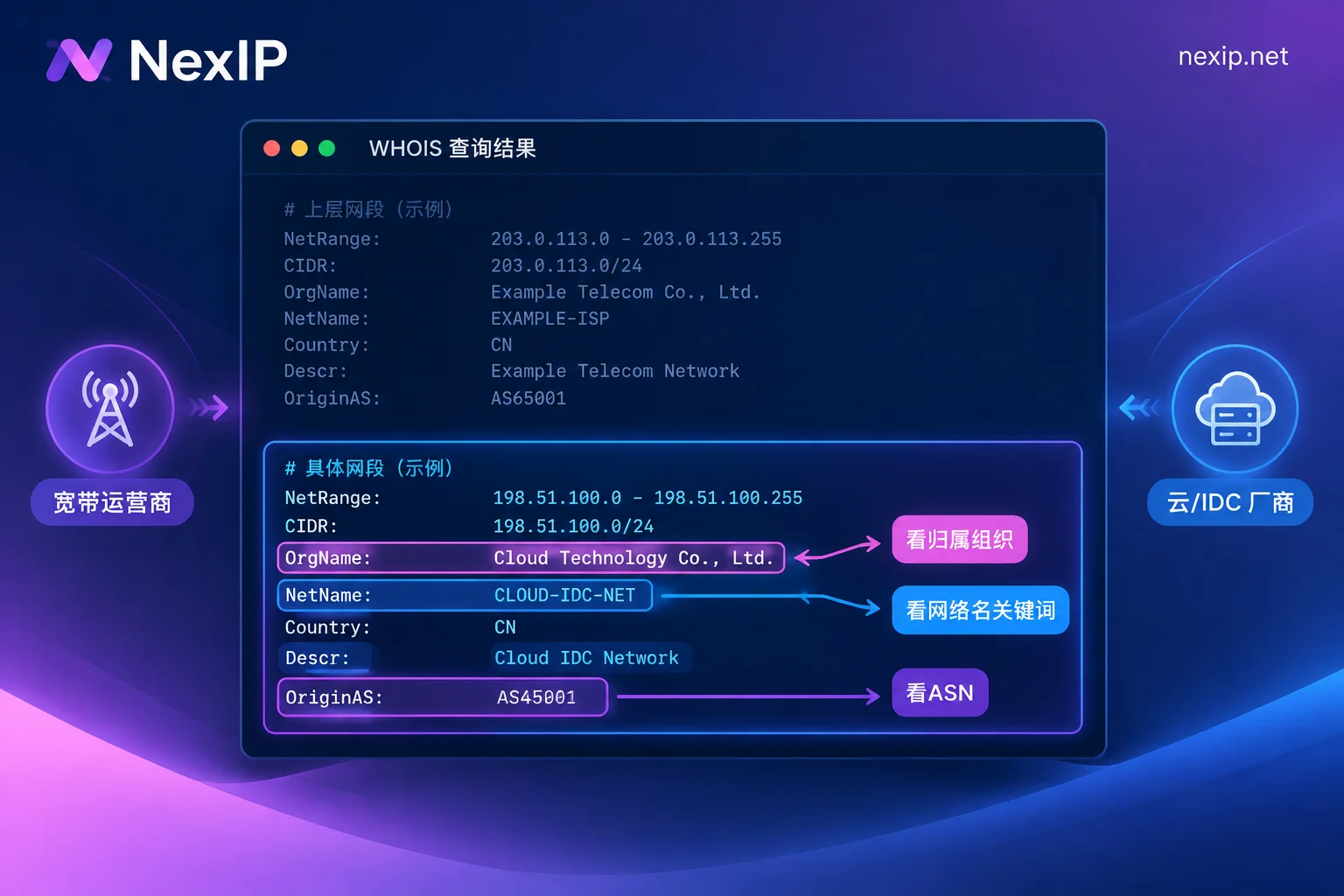
- Look at who the IP block is registered to: OrgName / Organization / descr / netname.
- Look at which ASN the IP belongs to, and how IP databases classify that ASN's type.
- Look at the naming style of the reverse DNS (PTR).
If all three clues point to a residential broadband provider, you can basically treat it as home broadband. If even one clearly points to a cloud provider, IDC, or server hosting company, treat it as a data center. Also remember that registration information only tells you who the block is assigned to, not where it is physically connected. So you should cross-check with several IP databases in the end.
Step 1: Find the Correct WHOIS Record
IP WHOIS is maintained by five Regional Internet Registries: ARIN (North America), RIPE (Europe, Middle East), APNIC (Asia-Pacific), LACNIC (Latin America), and AFRINIC (Africa). On Linux and macOS, you can run:
whois 203.0.113.10Windows doesn't have this command by default. You can go to the corresponding registry's website or use an online WHOIS tool.
A single query often returns several records. There's a large block at the top, followed by a smaller sub-block. When making a judgment, use the smallest, most specific range. The large block is usually the upstream allocation to an ISP or company, while the smaller block is closer to the actual user of this IP. If you only look at the first record, it's easy to mistake an address that a hosting provider obtained from an ISP for the ISP's home broadband.
Step 2: Which Fields to Look At
Field names vary slightly between registries, but focus on these:
- ARIN format:
OrgName,NetName - RIPE / APNIC etc. format:
netname,descr,org - ASN-related:
originorOriginAS. Some records don't include it, so you'll need to look it up separately (see next step).
How to interpret ownership:
- Leaning home broadband: The organization is a broadband or telecom provider serving residential users, such as Comcast, AT&T, Verizon, Charter, Deutsche Telekom, China Telecom, etc. Network names often contain access network terms like broadband, cable, dsl, fttx.
- Leaning data center: The organization is a cloud provider, IDC, or server hosting company, such as AWS, DigitalOcean, OVHcloud, Hetzner, Choopa/Vultr, Linode. Network names often contain terms like cloud, hosting, datacenter, server, vps, idc.
Step 3: Check the ASN and Its Type
Websites and risk control systems usually don't read raw WHOIS records one by one when determining IP type. They more often directly query ASN attributes and commercial IP databases. So the ASN step is closer to what the other party actually sees than the organization name.
Some IP databases provide a type field for the ASN or connection. For example, in IPinfo, as.type being hosting indicates hosting, cloud provider, or data center, while isp indicates a broadband access network. MaxMind, IP2Location, and others also have similar Usage Type / Connection Type classifications, though field names differ.
For how to find the ASN announcing an IP and how to verify IP block ownership, see How to Check If an IP's ASN Belongs to an ISP.
Step 4: Look at Reverse DNS (PTR)
dig -x 203.0.113.10 +short
# 或
nslookup 203.0.113.10- Common for home broadband: Contains the ISP's domain, with access-side naming like res, cpe, pool, dynamic, cable, dsl, and often embeds the IP number itself.
- Common for data centers: Shows server characteristics like ec2, compute, hosted-by, vps, server, or simply lacks any residential-style PTR.
PTR is only a supplementary clue. The absence of a PTR is not enough to prove it's a data center, and a PTR with an ISP domain is not enough to prove it's home broadband. You need to compare it with the previous two steps.
Step 5: Cross-Validate with Several IP Databases
Put the same IP into IPinfo, MaxMind, IP2Location, Scamalytics, etc., and check whether the usage types match. If there are fraud scores or risk scores, look at those too. If several sources agree, the judgment is fairly reliable. If they conflict, it means the IP is in a gray area; the next section lists common reasons.
The target platform's specific database and thresholds are generally not public. What you can do externally is compare multiple databases; you can't precisely reproduce any platform's decision.
Several Cases Where It's Easy to Misjudge
| Situation | Phenomenon | How to Handle |
|---|---|---|
| Static ISP / home broadband broadcast IP | WHOIS and ASN are registered under a broadband ISP, so the first layer is classified as broadband, but physically it may be connected to data center facilities | Don't conclude based only on registration info; combine type from multiple databases and risk scores. If you need a real residential exit, make sure to buy "native residential" when purchasing |
| The ISP also runs IDC / cloud business | The organization name is a telecom ISP, but this block is actually a data center | Don't just look at the organization name; look at the netname / descr of the specific block, and then the type given by IP databases |
| Only looked at the parent large block | The large block is registered to the ISP, but the small block is actually assigned to a hosting provider | Use the most specific record |
| IP database mislabeling | A normal broadband IP is labeled as hosting, or vice versa | Compare multiple databases; a single source's label is for reference only |
After Checking: Choose the Exit Type Based on the Task
The ultimate goal of determining IP type is to confirm the exit matches the task:
- Public web scraping, high throughput, risk-insensitive collection: Data center exits have large bandwidth and low unit cost, usually sufficient.
- Scraping with strict anti-bot, ad verification, SERP monitoring: Rotating dynamic residential exits are more suitable. Whether billing is by traffic or bandwidth depends on your traffic volume and concurrency. See How to Choose Between Traffic-Based and Bandwidth-Based Billing.
- Long-term logged-in own accounts like store backends, social media profiles, TK operations: Platforms look at ASN ownership and IP quality; data center ASNs are more likely to trigger risk control. For these scenarios, dedicated, fixed static residential exits are suitable; prioritize native residential type.
NexIP's static long-lasting IPs are rented monthly or yearly, dedicated and fixed, with three subcategories: native residential, residential broadcast, and data center. If they fail, replacements are free. The official recommendation for TK operations is static native residential IPs. For rotating scraping, see dynamic traffic packages, which support rotation or sticky sessions.
Once you have the IP, go through the steps above: WHOIS ownership, ASN type, PTR, and multi-database results should all match the type you purchased. If they don't, verify with the provider first, and only proceed after confirmation. Even if the type matches perfectly, the platform will also look at the IP's history and your usage patterns. See Will Static IPs Be Flagged by Platforms for details.


Comments(0)