NexIP官方博客
Let me start with a judgment that can save you a lot of troubleshooting time: most tasks only need country-level targeting. Narrowing down to a city, and then further to a specific ISP, doesn't buy you more accuracy—it gives you a smaller pool of available IPs, a higher connection failure rate, and problems that are harder to reproduce. Only in these three scenarios does narrowing down to city or ASN granularity bring real benefits:
- Localized ad verification—ad placements in a certain city, local search results, store delivery range prompts—the content of these pages changes with the city.
- Regional price comparison and inventory monitoring—prices, delivery times, and stock status of the same product in different city stores.
- Specific ISP link testing—when you need to confirm how a page performs on a particular broadband ISP or mobile network, or when the target platform has differentiated policies for certain types of networks.
If you're just scraping a full site's product list, monitoring SERP rankings for a country, or assigning a stable exit for an account, country-level targeting plus the correct network type (residential or datacenter) is enough. Don't proactively stuff city parameters in.
Dynamic Proxies: Should Parameters Go in the Credentials or in the API?
There are two ways to pass targeting for dynamic residential pools, depending on your access method.
Credential-based access is the most common approach: append parameters to the base username with hyphens, leaving the password unchanged. The industry-standard format looks like this:
用户名-country-us-city-newyork:密码@网关域名:端口
用户名-country-us-asn-7922:密码@网关域名:端口
用户名-country-us-state-ca-city-losangeles-sessid-a1b2c3:密码@网关域名:端口
A few formatting rules are basically consistent across providers:
- Use two-letter ISO codes for countries, mostly lowercase (us, gb, de, jp).
- City names usually need to be lowercased and spaces removed, so
New Yorkbecomesnewyork. Some providers require underscores (new_york) or plus signs. This varies by provider, so before writing, confirm once on your own dashboard's extraction page or documentation. A misspelling often doesn't result in an error message—instead, it's treated as an invalid username and returns a 407 authentication failure, which is easily mistaken for a wrong password. - ASN should be pure digits, e.g., Comcast is 7922, T-Mobile is 21928. Some providers accept a prefix like
AS7922, while others only accept digits. Again, follow your dashboard's specifications. - ASN usually needs to be given together with a country. Providing an ASN alone without limiting the country can lead to unwanted locations on multinational carriers.
- Targeting parameters and session parameters can be combined. The session identifier for sticky sessions and city parameters can be written in the same string without conflict. For how to set up sessions and how often they drop, see How to Set Up Sticky Sessions So They Don't Drop Login State Midway.
API extraction access involves filling these conditions into the query parameters of the extraction link. The dashboard usually provides dropdowns for country, state/province, and city; after selecting, it generates the link directly. The advantage is that the options are pre-set by the provider and won't be misspelled; the limitation is that the generated link has fixed conditions—to dynamically switch cities, you need to generate multiple links. For a more detailed comparison of the two access methods, see What's the Difference Between API Extraction and Port Forwarding.
The Finer the Targeting, the More You Need a Fallback Path
Dynamic pools are alive—a certain city may have zero active nodes at any given moment. In this case, the gateway typically returns a 502 Bad Gateway or simply fails to route, rather than "quietly switching you to a nearby city"—the latter is actually more dangerous because you don't know where the data was scraped from.
So any task with city or ASN targeting should have a fallback sequence written into the script:
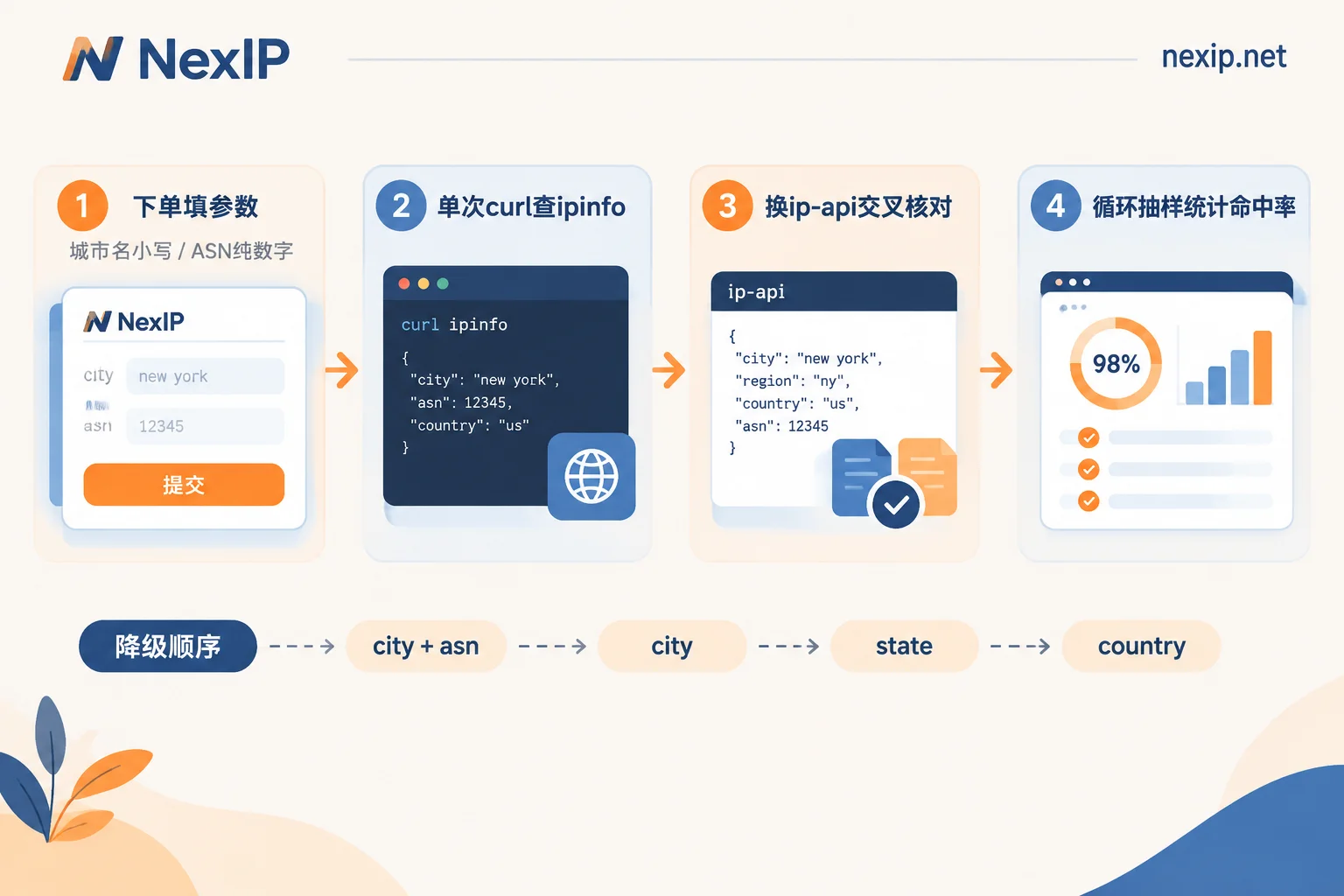
city + asn → city → state/region → countryLog each fallback level, indicating the actual targeting level of that batch of data. When you analyze later, you'll know which conclusions are truly city-level data. Also, limiting to obscure cities and specifying ASNs is the easiest combination to fail. Unless it's a clear ISP comparison test, it's not recommended to configure this from the start.
Static IPs: Targeting Is Chosen at Order Time, Not Assembled at Use Time
The logic for static residential IPs is completely different. They are exclusive, fixed exits; the region and network attributes are determined at the moment of ordering. After that, you connect directly with credentials or ports—you do not need to, and should not, append city parameters to the username. If you add rotation or targeting suffixes to a static IP, it will most likely result in authentication failure.
Three things to confirm when ordering:
- Country and available cities—the city list for static resources is much narrower than dynamic pools. Popular cities usually have stock, but obscure cities depend on inventory.
- Network attributes—residential native, residential broadcast, datacenter ISP. These three are completely different in the eyes of target platforms. For differences and use cases, see What's the Difference Between Residential Native and Residential Broadcast for Static Long-Lasting Residential IPs.
- Lease term—short-term by hour/day or long-term by month/year, depending on the business cycle, not price. For guidance, see How to Choose Between Static Short-Term and Static Long-Term Residential IPs.
Note that ASNs for static resources are usually "categorized by network attribute" rather than "named by ISP." You can choose residential native, but you may not be able to specify a particular ASN from a certain ISP—ask clearly about the available range before ordering. Don't expect it to work like dynamic pools.
How to Verify Upon Receipt: Three Steps, Don't Just Check One Endpoint
After getting the channel, do these three steps before running your business.
Step 1: Single curl, Check Four Fields
curl -x http://用户名-country-us-city-newyork:密码@网关域名:端口 \
     https://ipinfo.io/json
Focus on four fields in the response:
| Field | What to Check |
|---|---|
ip | Exit address; for static IPs, it should match what the dashboard gave you. |
city / region | Whether city and state/province match the parameters you filled in. |
country | Country; usually correct. If wrong, the parameters didn't take effect at all. |
org | Format like AS7922 Comcast Cable, giving both ASN and ISP name. |
For SOCKS5 channels, change -x to --socks5-hostname. Make sure to use the hostname form so DNS also goes through the proxy; otherwise, you may end up with IP in the US but DNS local—a split state.
Step 2: Cross-Check with Another Library
curl -x http://用户名:密码@网关域名:端口 \
     http://ip-api.com/json/?fields=status,country,regionName,city,isp,org,as,asname
Why two libraries? Because the credibility of ASN and city are on completely different levels.
ASN comes from the global BGP routing table—it's deterministic information. Different query tools almost never disagree. If ipinfo says AS7922 and ip-api says another number, it's most likely that your exit rotated during the query, not a database discrepancy.
City, however, is inferred by commercial IP databases based on ISP allocation records, latency measurements, etc. MaxMind, IPinfo, and IP2Location commonly give adjacent cities or even different cities for the same IP—especially for address blocks at ISP core data centers. So the acceptance criterion for the city field shouldn't be "all three agree," but:
- Two or more place it in the target city or its metro area → usable;
- Results scattered across different cities hundreds of kilometers away → this one is unusable;
- Results agree but none is your target city → targeting parameters didn't take effect; go back and check spelling.
The real judge is actually the database used by the target business system itself. If the e-commerce platform you're monitoring geolocates this IP to Chicago, then it gives you Chicago prices and inventory, no matter what ipinfo says. If possible, directly check the target site's own "current location" or "deliver to" prompts—more accurate than any third-party library. For a more systematic layered approach, see How to Judge the Geolocation Accuracy of Overseas Residential IPs.
Step 3: Dynamic Pools Need Hit Rate Testing, Not Just One Check
Acceptance for dynamic targeting can't rely on a single successful curl. Write a loop to sample, run it dozens of times, and track three numbers:
for i in $(seq 1 50); do
  curl -s -x http://用户名-country-us-city-newyork-sessid-$RANDOM:密码@网关域名:端口 \
       https://ipinfo.io/json | jq -r '[.ip, .city, .org] | @tsv'
  sleep 1
done | tee city_check.tsv
Look at three things: request failure rate (502/timeout percentage), city hit rate (proportion where the city field equals the target city), and unique IP count (how many different IPs appear in 50 tries, reflecting the pool size for this combination). If the hit rate is low or the unique count is only single digits, the inventory for that city can't support your concurrency—either broaden to state/province or check with the provider about that city's resources.
Same for ASN targeting: replace the statistical field with the AS number from org. ASN hit rate should usually be near 100%. If it often lands on other ISPs, the parameter format is likely wrong.
Two Extra Checks for Static IPs
For static exits, besides field verification, before binding to store backends or social media, also check whether the timezone and IP geolocation are consistent, and whether the IP has obvious historical risk flags. This only makes sense in conjunction with browser environment—if the exit is in New York but the browser reports a different timezone and language, it still won't match. The environment side is handled by NexBrowser; for the exit side checklist, see What to Verify Before Binding a Static Residential IP to a Store Backend.
Common Troubleshooting Reference
- 407 Authentication Failure: Suspect targeting parameter spelling first (city name format, ASN prefix, separator), not the password. Try removing all parameters and using just the base username. If it connects, the issue is in the parameter string.
- 502 / Cannot Route: No available nodes for that targeting combination currently. Fall back one level according to your sequence.
- Connects but wrong city: Parameters ignored by the gateway (city not supported, silently falling back to country level). This is the most insidious—only detectable through the sampling statistics above.
- Targeting fails under whitelist mode: Some providers only pass targeting parameters via credential suffix; there's no place to write parameters under whitelist authentication. For the trade-offs between the two authentication methods, see How to Choose Between Proxy IP Credential Authentication and Whitelist Authentication.
Choosing an Exit by Task
To sum up the above into one sentence: if you need to switch between multiple cities and can change IP per request, use a dynamic pool with targeting parameters; if you need to stay fixed in one city and one ISP long-term, use a static IP and lock it down at order time.
- For tasks that frequently change locations—city-level price comparison, local SERP monitoring, ad verification—NexIP's dynamic residential traffic plans charged by traffic are better for cost control. If it's long-running high-concurrency scraping where usage is hard to estimate, consider dynamic residential bandwidth plans charged by bandwidth with unlimited traffic.
- For store backends, social media accounts, and operational tasks requiring fixed exits, use static residential long-lasting IPs, choosing among residential native, residential broadcast, and datacenter based on platform requirements. For short-term projects or temporary verification, use static short-term IPs. For TikTok operations, the official site explicitly recommends static residential native; the tier breakdown is discussed in Which Type of Residential IP Should Be Used for TikTok Operations.
If you're unsure whether a certain city or ISP has resources, before ordering, directly check the coverage list by country, or look at industry solutions by business type—faster than guessing parameters yourself.