NexIP官方博客
Let's first clarify the most common misconception: Sticky Sessions guarantee that within a certain period, consecutive requests with the same session identifier go through the same exit IP. It does not guarantee that this IP remains yours forever. In dynamic residential pools, exits come from real home network devices; if the device is turned off, disconnected, or switches Wi-Fi, the gateway can only assign you a new one. Most platforms with risk control bind the login token to the exit IP at issuance. If the IP changes, at best you get a CAPTCHA, at worst you're kicked offline.
So before configuring sticky sessions, make a selection decision.
A decision line: Is your task closed-loop or persistent?
If the task can be completed in one continuous flow—login, fetch data, submit, logout, without long pauses in between, such as stateful data scraping, form submission, order automation, end-to-end testing—sticky sessions suffice and are more cost-effective than static IPs because you can batch-create sessions per task.
If you need to maintain the same login state across hours, days, or even months—persistent store backends, daily social media account operations, ad campaign dashboards, long-online admin panels—don't force it with dynamic pool sticky sessions. It's not a matter of configuration skill; the mechanism can't support it: you cannot predict or prevent upstream node downtime, and the cost of one abnormal disconnection for such accounts usually far exceeds the cost of switching to a fixed exit.
Once you're clear on this line, the following configuration makes sense.
How sticky sessions pin requests to the same exit
The implementation is basically at the proxy gateway layer: you include a unique session identifier in the authentication info or request parameters (a common practice is to put it in the proxy username field, like 用户名-session-任务ID, or some use an API to get a connection string with session parameters). The gateway then establishes a mapping from "identifier → exit IP". As long as subsequent requests carry the same identifier, the same exit is reused within the validity window.
Specific parameter names, delimiters, and case sensitivity vary by gateway. Always refer to your provider's panel documentation, and don't copy example strings from other blogs.
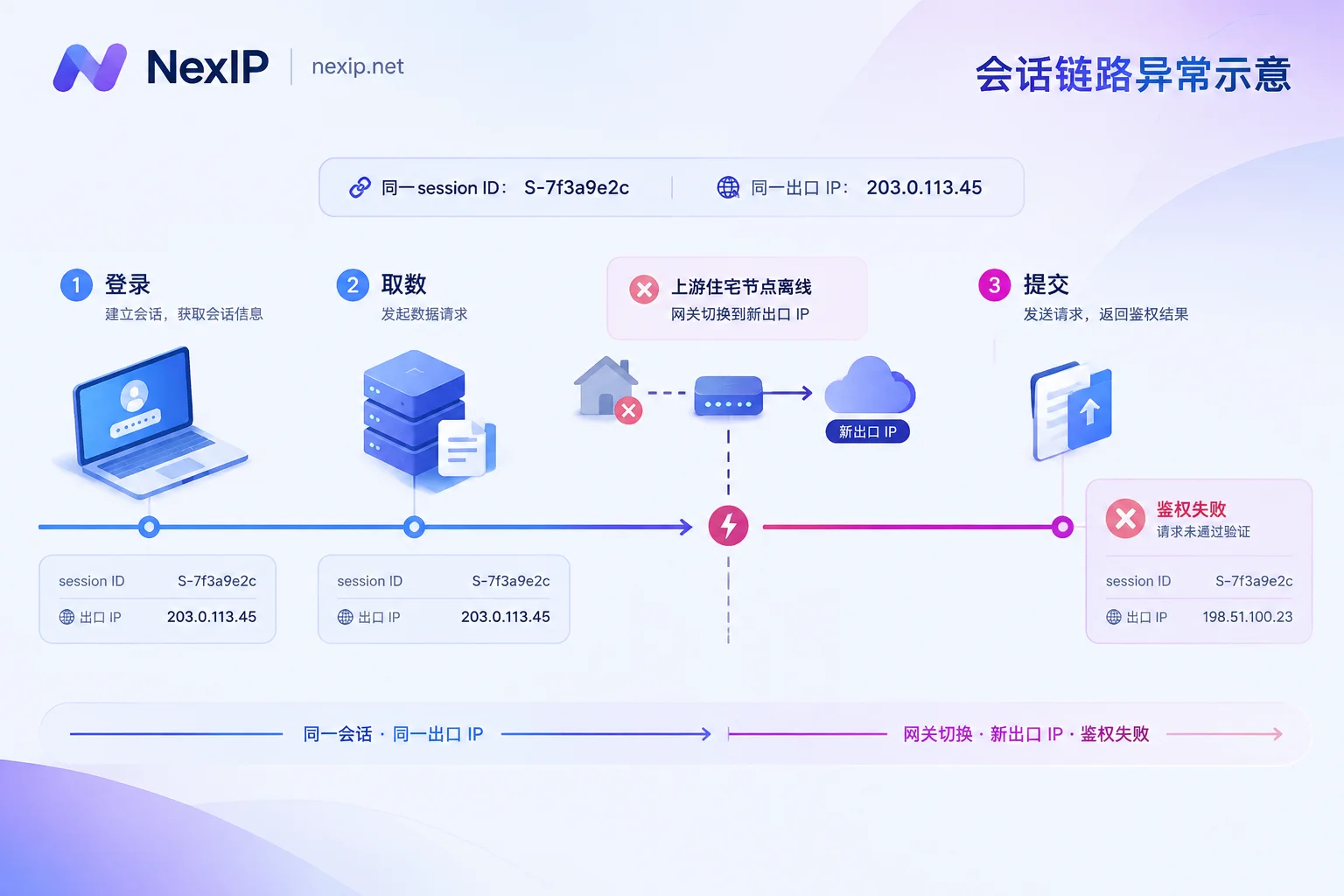
Four pitfalls that cause login state loss
1. Upstream node goes offline, gateway performs failover
This is the most frustrating type because it happens outside your code. After a residential device goes offline, the gateway automatically switches to an available exit. The connection isn't broken and requests still go through, but the target site sees "the same session suddenly sending requests from another IP," triggering risk control. Symptoms are usually mid-task 401s, redirects to login page, or re-verification requests.
There are only two ways to handle this: shorten the time a single task stays in a session; and if you detect an IP change, abort instead of continuing with old cookies.
2. Session window expires
Every sticky session has a maximum lifetime, after which the gateway releases or rotates the exit. Treating a sticky session as a permanent static IP is the most common root cause of disconnections. Window lengths vary greatly between providers, even within the same provider's different plans. Check your panel's specifications before configuring; don't estimate based on experience.
3. Multiple threads sharing the same session ID
Concurrent tasks sharing one identifier for convenience cause requests to compete and may trigger abnormal judgments on the gateway side. A more subtle case is multiple browser tabs or script coroutines sharing the same proxy connection string, making behavior look like multiple identities active on the same IP to the target site.
4. The client itself doesn't retain identity
Even if the exit is stable, login state can still be lost. Common causes: no independent Cookie Jar per task; tokens not persisted in memory and lost on restart; rebuilding connections per request with inconsistent User-Agent and headers; or session data from different accounts getting mixed up.
Remember this alignment rule: one account/task = one independent environment profile = one independent session ID = one independent CookieJar. All four correspond one-to-one, no sharing, no reuse.
A copy-paste configuration standard
Generating session identifiers: Use a stable task-level value, such as "task ID + account hash", ensuring it stays constant throughout the entire flow. Don't use timestamps or random numbers regenerated mid-request—this is a direct cause of many scripts mysteriously dropping connections. Actively discard the identifier after the task ends; don't reuse it across tasks.
Pin regional parameters as well: Fixing only the session but not the country or city can lead to region changes when the IP changes, triggering risk control faster. Choose regions consistent with the account's historical login location.
Authentication method: Username/password authentication allows you to embed session parameters directly in the username, making dynamic per-task string assembly easy and multi-thread distribution simple. IP whitelist authentication suits server environments with fixed exit IPs but is less flexible for passing session parameters. For trade-offs, see How to Choose Between Username/Password and Whitelist Authentication.
Protocol: Both HTTP/HTTPS and SOCKS5 support stickiness. SOCKS5 is friendlier for long connections and non-HTTP traffic, often more stable for browser automation.
Task structure: Design "login → fetch → submit" as an atomic closed loop, complete in one run then exit, without long waits, manual confirmation, or cross-day scheduling. If you truly need steps that persist for a long time, that's a signal to switch to static IPs.
Failure handling: When detecting an exit IP change, the correct action is to abort the current flow, discard the session state, and re-login according to the retry policy. The wrong action is to continue requesting with old cookies on a new IP—that's actively exposing an anomaly to the platform.
Keep-alive: Some gateways release sessions early if idle for too long. If there are natural gaps in your flow, insert low-frequency lightweight requests to maintain activity. But keep frequency restrained; overly regular empty requests are themselves a pattern.
For how to integrate these parameters into Requests, HTTPX, AIOHTTP, or Playwright scripts, adapt from Integrating Residential Proxies into Python Scraping Scripts.
Three-step verification: confirm stickiness actually works before going live
Step 1: Consistency. Send several IP query requests consecutively with the same session identifier, confirm the returned exit IPs are identical. Then send one with a different identifier, confirm you get a different IP. Both conditions must be met to confirm the session parameter is correctly written and effective.
Step 2: No drift under concurrency. Launch tasks with your actual production concurrency, each using its own independent identifier. After running for a while, check whether the exit IP within each task remains unique throughout. If a task switches IP mid-way, either identifiers collided or a node is unstable—check the former first.
Step 3: Business state verification. The first two steps only prove the network layer is fine. What truly matters is: after logging in, wait a while and then call an endpoint that requires authentication, and see whether you get normal data, a 401, a 302 redirect to login, or a CAPTCHA page. If this step fails but the first two pass, the issue is likely in the client's Cookie/Token management.
When running production tasks, log both the "current exit IP" and "whether authentication is valid" together, so you can immediately distinguish network drift from session expiration when issues arise.
When to switch to static dedicated IPs
If any of the following apply, stop tweaking parameters on sticky sessions:
- Task duration clearly exceeds the session window, or you need to maintain the same login state across days or weeks;
- The account is high-value, and a single abnormal login could trigger manual review or restrictions;
- The target platform records the exit IP in the account's login environment profile, requiring verification on IP change;
- You need to add a fixed exit to the platform's whitelist or bind it to the backend.
Choose the tier based on business cycle: For short-term projects, temporary verification, or operations ending within days, use Static Short-Term IPs billed hourly or daily, exclusively fixed, released after use. For long-term online store backends, social media accounts, or ad dashboards, use Static Long-Term IPs billed monthly or yearly. NexIP offers three sub-types: residential native, residential broadcast, and data center, with free replacement if they fail. For scenarios sensitive to exit authenticity like TikTok operations, the official site explicitly recommends static residential native; details are broken down in Which Type of Residential IP for TK Operations. To draw the line between the two static tiers, see How to Choose Between Static Short-Term and Static Long-Term.
Conversely, if your task is truly closed-loop—scraping, price comparison, SERP monitoring, ad landing page verification—then sticky sessions are the better choice. The Dynamic Residential Traffic Plan billed by traffic supports both rotation and sticky modes; the same account can switch per task. For estimating usage, see How to Estimate Usage for Dynamic Residential Traffic Plans.
Finally, a boundary note: Exit IP is just one link in the identity chain. Browser fingerprints and account environment isolation are separate problem domains, handled by tools like NexBrowser and NexSHOPX respectively. If the IP is stable but the fingerprint drifts, login state won't hold either—don't just stare at the proxy when troubleshooting.