 NexIP官方博客
First, the conclusion: The difference between API extraction and port forwarding isn't about which is faster or more stable, but about where the proxy address resides.
API extraction gives you a list of remote addresses (like 1.2.3.4:8080), which your program uses to connect directly to the provider's proxy nodes on the public internet. Port forwarding gives you a local address (like 127.0.0.1:40000), where a local client listens on that port and relays traffic to the exit IP you bound.
All subsequent differences—whether you need to install a client, where authentication credentials are written, who changes the IP when it expires, and what to check first when something goes wrong—are derived from this single point.
30-Second Decision: Which One to Use
- Traffic is sent by code you write (crawlers, SERP monitoring, batch API requests): use API extraction.
- Traffic is sent by tools with a GUI (anti-detect browsers, Android emulators, desktop software, e-commerce or social media backends): use port forwarding.
- Tasks require frequent IP changes and dozens or hundreds of concurrent connections: API extraction, where changing IP is just changing an address.
- An environment needs a long-term fixed exit (one store, one account, one emulator): port forwarding, with one local port per environment, and network settings in the terminal configured once and rarely changed.
- Running on a headless Linux server, container, or cloud function: only API extraction (or username/password direct connection) is possible; port forwarding requires a persistent client.
Projects that use both are common. For example, manually checking ad landing pages with an anti-detect browser during the day and running batch scraping with scripts at night—then use both access methods simultaneously, they don't conflict.
What's the Actual Difference in Mechanism
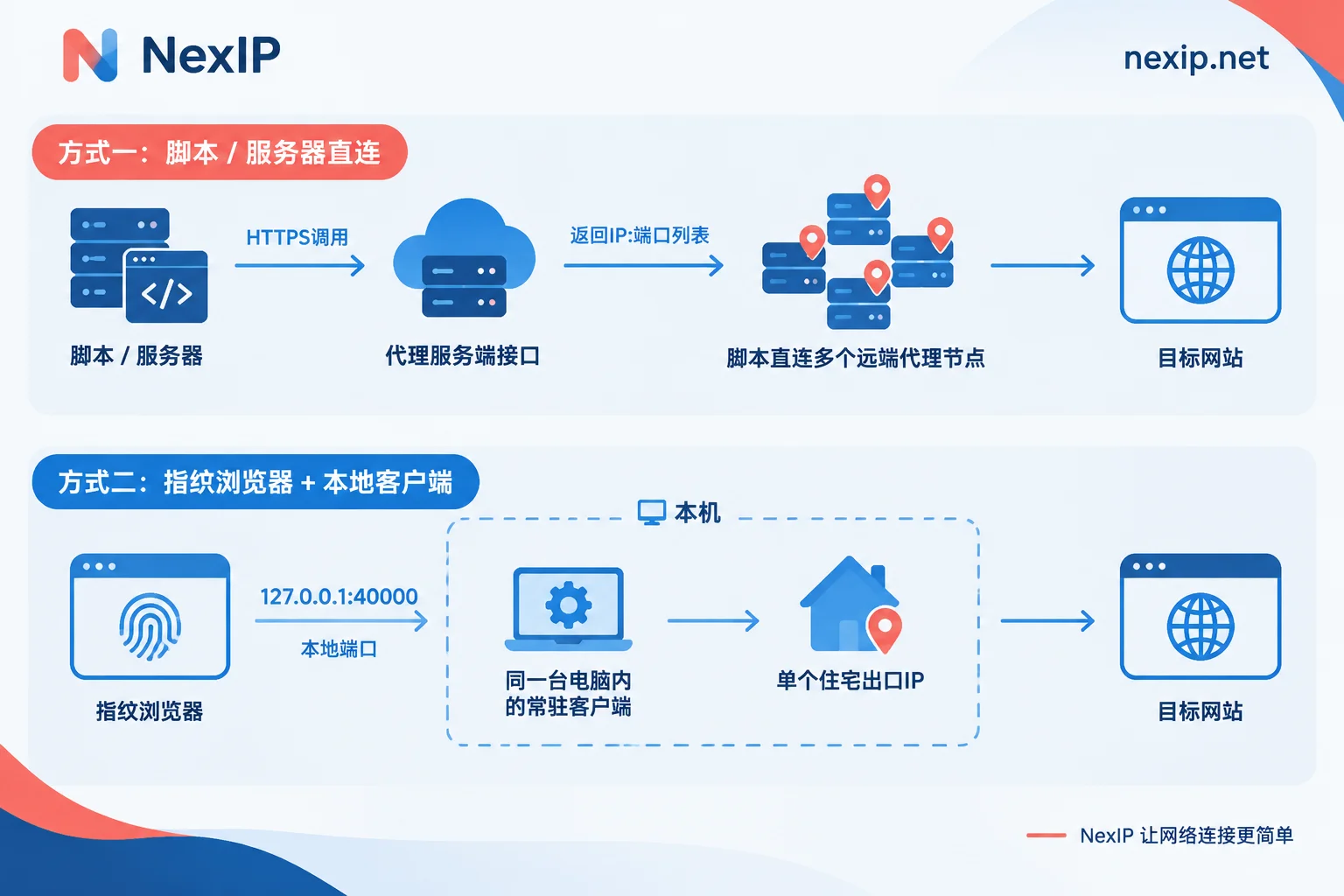
Different network paths. With API extraction, you send a request to the provider's HTTP/HTTPS interface, which returns a batch of public proxy node IPs and ports based on your specified region, protocol, and quantity. Your program then establishes TCP connections to these remote nodes. There's no local relay in the entire chain, so your machine only needs outbound internet access. With port forwarding, the client opens a listening port on your local machine (some solutions support a gateway machine within the LAN), mapping it to your chosen exit. The terminal application only communicates with 127.0.0.1, and the relay work is done by a local daemon.
Different environment dependencies. This determines whether many deployment plans can be implemented. API extraction doesn't require a desktop client; a few lines of HTTP requests in code can integrate into any runtime environment. Port forwarding heavily depends on that persistent local process: if the client exits, doesn't auto-start after a system reboot, or the port is occupied by another program, the forwarding link breaks immediately—and when it breaks, the terminal application often only reports a connection refused error without telling you the cause is on the client side. So for unattended machines using port forwarding, you must first solve client auto-start on boot and reconnection after disconnection.
Different places for authentication. API extraction generally has two forms: either add the public egress IP of the calling machine to a whitelist, and the extracted addresses are directly usable; or the extraction result includes username/password parameters that the program carries. Port forwarding, on the other hand, has the client handle authentication uniformly. In terminal tools, you just fill in 127.0.0.1 plus the port number, and it works. Many legacy software that don't support username/password authentication rely on this to connect. For the trade-offs between these two authentication methods, refer to How to Choose Between Proxy IP Username/Password Authentication and Whitelist Authentication.
Who's responsible when an IP fails. API extraction delegates IP pool maintenance to your program: liveness detection, timeout circuit breaking, failure retries, rotation per task—you must implement all of these yourself, but the benefit is full control over scheduling logic. Port forwarding leaves this to the client interface: when an exit is unavailable, you rebind a new IP to that port in the client, and you don't need to change a single character in the terminal software's configuration—for someone running a dozen browser environments simultaneously, this saves real operational effort.
Two Configuration Sequences
For API extraction:
- First, define the exit conditions clearly: country or city, protocol (HTTP/HTTPS or SOCKS5), whether to rotate or maintain the same exit for a session.
- Handle authentication. If using a whitelist, add the current machine's public egress IP—note it's the IP this machine shows when accessing the internet, not the internal address. If using username/password, put credentials in environment variables, don't hardcode them into the repository.
- Call the API to get a batch of addresses, and build a pool in your program: allocation, marking failures, timeout removal, re-extraction as needed.
- Pay attention to the API's own rate limits; don't call the extraction API for every request. Usually, fetch in batches and use them yourself.
- For specific implementations with Requests, HTTPX, AIOHTTP, Playwright, you can copy configurations from How to Integrate Residential Proxies into Python Scraping Scripts.
For port forwarding:
- Install the client and log in, confirm it can run persistently.
- Select an exit IP or region, bind it to a local port.
- In the terminal tool, set the proxy to
127.0.0.1plus this port, and choose the protocol as prompted by the client. - One port serves only one environment; don't let two browser windows share the same port—otherwise environment isolation is pointless.
- Default port range, maximum number of simultaneous ports, and whether terminal software needs restart after binding vary by client; refer to your actual client's interface prompts.
What to Check First When Problems Arise: Two Checklists Are Not Interchangeable
Before starting, both sides should do the same thing: send a request from this exit and confirm that the IP ownership, country, and city seen by the other party match what you need. After that, the troubleshooting paths diverge.
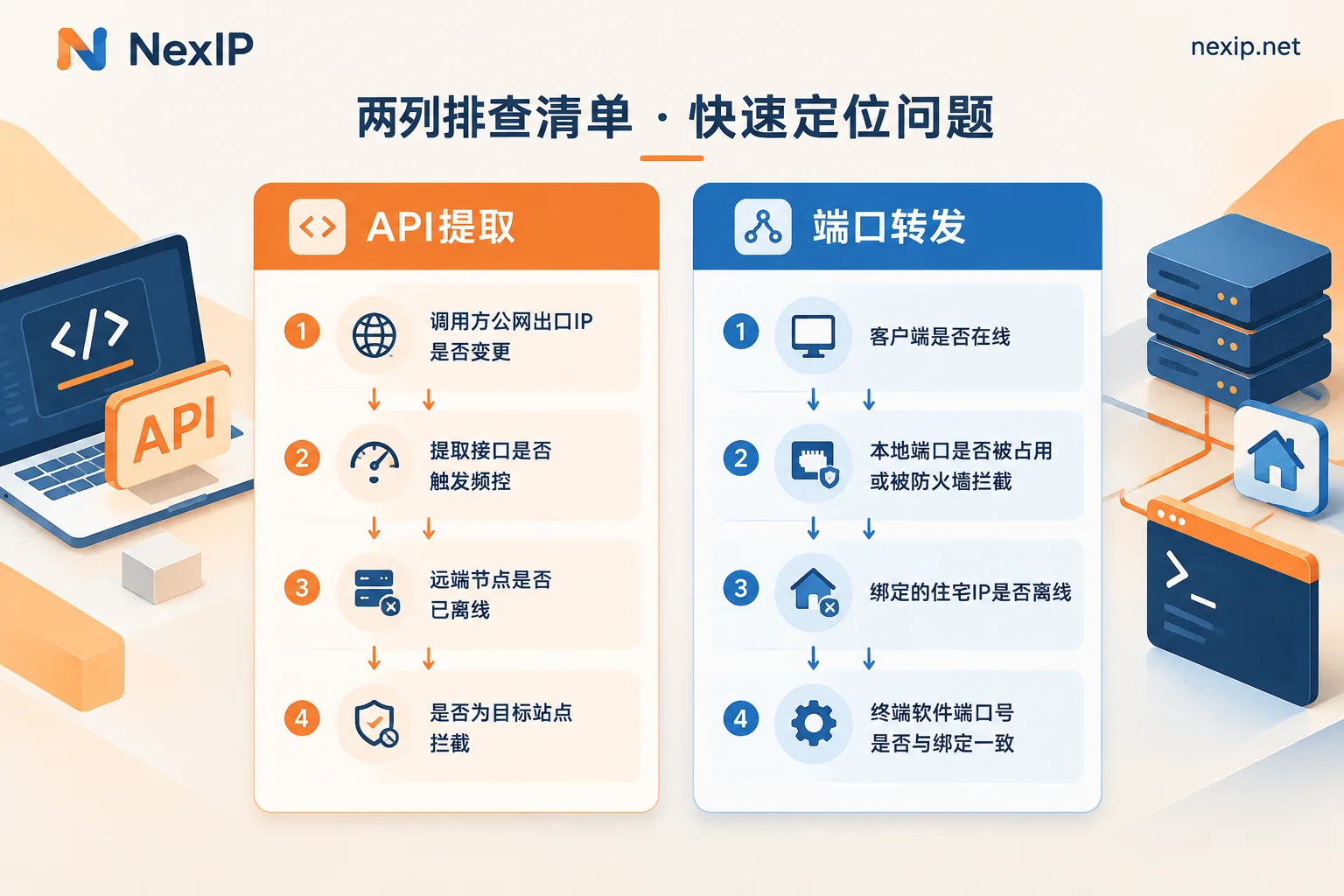
For API extraction failures, check in this order:
- Has the calling machine's public egress IP changed? Home broadband re-dial, office network egress switch, cloud host elastic IP change—all can instantly invalidate the whitelist, causing all requests to return 407 or be rejected.
- Has the extraction API triggered rate limiting? The returned error code usually indicates this.
- Are the obtained remote addresses no longer available? Dynamic exits have a lifespan; discard addresses that have been sitting in the pool too long.
- Is the target site blocking, rather than a proxy link issue—the errors for these two cases are completely different, don't mix them up.
For port forwarding failures, check in this order:
- Is the local client still running? Has it disconnected or been logged out?
- Is the local port occupied by another process, or blocked by the local firewall or security software for loopback connections?
- Is the bound residential IP in the client offline? Static exits can also go offline naturally; reputable providers usually offer free replacement for failed exclusive IPs.
- Does the port number filled in the terminal software match the client's current binding—changing the binding but forgetting to update the browser configuration is the most common low-level fault.
When configuring exits for store backends or social media backends, mere connectivity isn't enough; you also need to check if region, timezone, and language signals are consistent. For which items to verify, see What to Verify Before Binding a Static Residential IP to a Store Backend.
Four Easily Confused Points
Access method is not the same as exit type. This is the most common misunderstanding: assuming port forwarding means fixed IP and API extraction means rotating IP. In fact, these are two independent things—dynamic packages can also maintain session stickiness through parameters, and static exclusive IPs can also be integrated into code via username/password or API. First decide whether the task needs rotation or fixed IP, then decide how to connect.
Port forwarding is not inherently more stable. It just moves the unstable parts from code to the local client. Machine reboots, client disconnections, port conflicts—these are new failure points that API extraction solutions won't encounter.
Multi-person collaboration needs forethought. Port forwarding listens on one machine, so colleagues' computers can't use it by default unless the client supports LAN listening or you set up a gateway. For teams sharing exits, username/password authentication is usually easier to distribute than port forwarding.
Proxy only handles the network exit layer. Browser fingerprints, cookies, and account status are separate matters—even with the right exit, if the environment doesn't match, you'll still be flagged as abnormal. For fingerprint environment needs, use specialized tools (like NexBrowser); accounts and phone numbers belong to NexSHOPX and NexSMS. Don't expect changing an IP to solve everything.
How to Choose When It Comes to Products
After determining the access method, next decide the exit type; the two must match:
- For programmatic batch operations like crawlers, SERP monitoring, price comparison, ad verification, pair with dynamic residential exits, using API extraction or username/password to integrate into code. Whether to bill by traffic or bandwidth depends on whether your tasks are mostly short, quick requests or long-running full connections—for the former, see Dynamic Residential Traffic Plans; for the latter, dynamic bandwidth plans with unlimited traffic and bandwidth billing are more suitable.
- For one-environment-one-exit scenarios like store backends, social media operations, and emulator multi-boxing, pair with Static Residential Long-Lasting IPs, exclusive and fixed, and use port forwarding to integrate into anti-detect browsers or emulators with minimal effort; long-lasting IPs come in three subtypes: native residential, broadcast residential, and data center. For TikTok operations, official recommendations suggest native residential. For short project cycles, consider static short-term IPs.
NexIP's four product categories all support API, username/password, port forwarding, and process proxy access methods, with protocol coverage for HTTP/HTTPS and SOCKS5, and authentication via username/password or whitelist. That is, exit type and access method can be decided separately: first determine rotation or fixed, traffic or bandwidth based on the task, then decide the access method based on the runtime environment. For how to draw the line between short-term and long-lasting, refer to How to Choose Between Static Short-Term and Static Long-Lasting Residential IPs.
After deciding, go through the two configuration sequences above, run a location verification once more, and you're ready to start.



Comments(0)