 NexIP官方博客
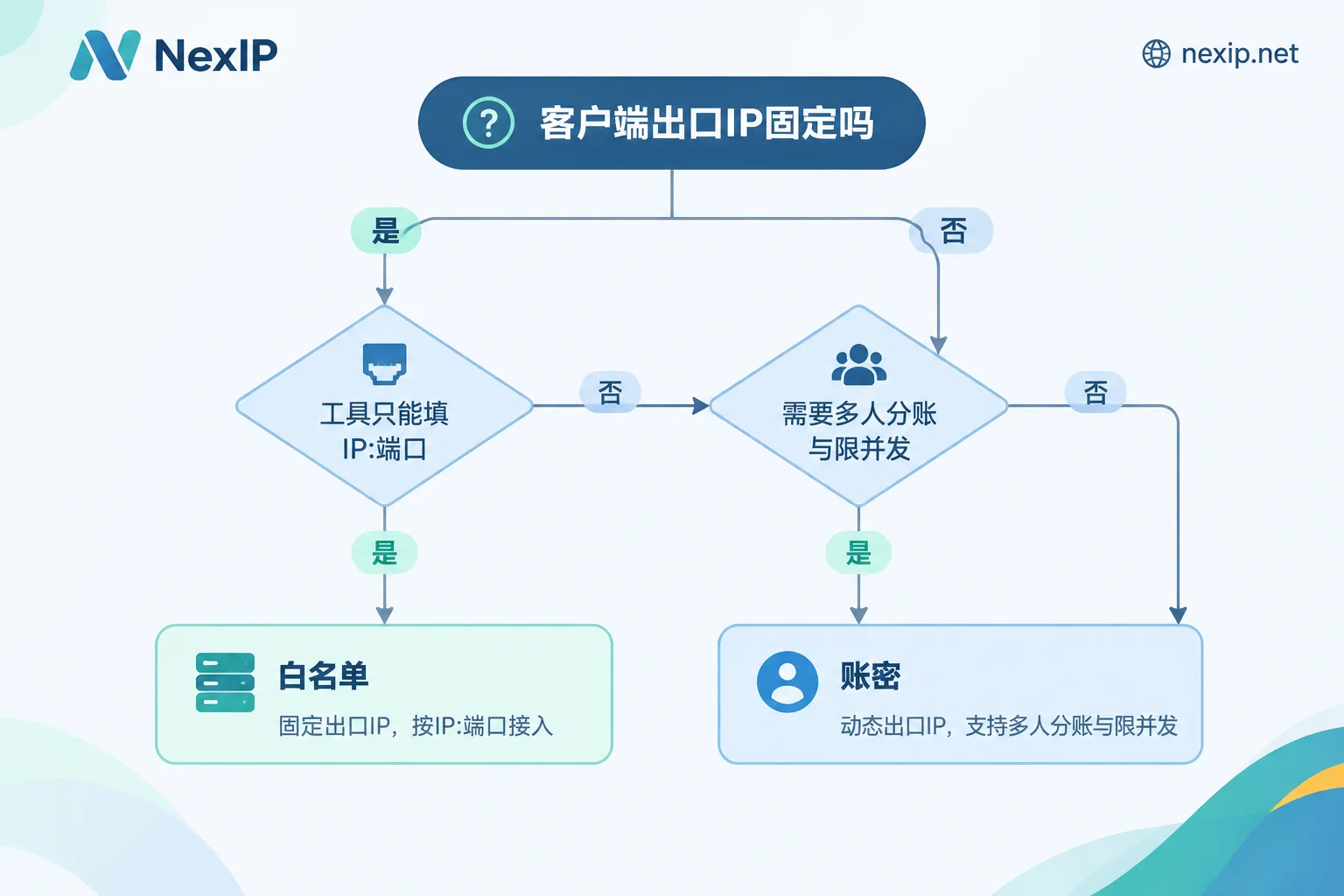
Let's get straight to the conclusion so you don't have to scroll: Check whether the machine making the request has a fixed public egress IP.
- Yes (cloud servers with fixed public IPs, IDC machines, NAT gateways with fixed EIPs, enterprise dedicated lines) → Prefer whitelist. No credentials in the config, simplest and least error-prone.
- No (home broadband, 4G/5G hotspots, containers or serverless that are rebuilt anytime and have non-fixed egress IPs) → Use username/password, otherwise you'll be stuck in a loop of "modify the whitelist in the backend every time the IP drifts".
- The client only accepts "IP:port" input (old scraping components, some router firmware, embedded devices) → Whitelist is the only option.
- Multiple people, multiple projects, separate concurrency limits or separate billing → Use username/password.
The rest of this article explains the reasoning behind this criterion, edge cases, and how to verify after configuration.
First, clarify the most commonly confused point
Whitelist authentication allows the end that connects to the proxy, i.e., the public egress IP of your local machine or server, not the egress IP that the proxy rotates for you. Many people configure a whitelist for the first time by entering the proxy IP they see on the dashboard into the whitelist, and then can't connect.
So the prerequisite for whitelist is: your machine's public egress IP itself is stable and known. This has nothing to do with whether you bought dynamic or static proxies—you can still use whitelist authentication with dynamic rotating proxies, as long as your client is on a machine with a public IP.
What each authentication method verifies
Username/password authentication puts credentials into the protocol. HTTP requests send Base64-encoded "username:password" via the Proxy-Authorization header; HTTPS verifies during the CONNECT handshake; SOCKS5 uses the username/password sub-negotiation defined in RFC 1929. Credentials travel with the request, so it doesn't matter if the machine changes network, data center, or egress.
Whitelist authentication passes no credentials. The proxy server directly reads the source IP of the TCP connection and compares it with the allowlist you registered in the console. If it matches, it allows access. The client config only contains IP and port.
In one sentence: username/password is decoupled from the client's network, while whitelist is strongly bound to the client's network. All trade-offs follow from this.
Four judgment dimensions
1. Stability of the egress IP
This is the main criterion, but test it rather than relying on impressions. Home broadband often changes IP on redial in many regions, and ISPs may also force periodic disconnections; office dedicated lines may not have fixed IPs—some just "haven't changed for a long time." The method is simple: check your public egress IP at different times, including once across midnight, and see if it's consistent. If it changes, whitelist becomes an ongoing maintenance burden.
2. Deployment architecture
Cloud scenarios are more nuanced than "fixed / not fixed":
- Instances are auto-scaling, but egress uniformly goes through a NAT gateway with a fixed EIP → Whitelist works; just register the gateway IP.
- Multiple availability zones, multiple NAT gateways, or dual-line load-balanced egress → The actual egress IP may jump between several; either register all of them or switch to username/password.
- Container clusters without a unified egress, scheduling to different nodes each time → Username/password.
- Scraping nodes scattered across multiple machines and scaling up/down anytime → Username/password; the whitelist will become a list that can never keep up.
How many whitelist IPs a single account can register and whether CIDR blocks are supported vary by provider. Check the console before configuring; don't assume based on other providers' habits.
3. Tool and protocol compatibility
Modern development libraries and tools generally support both: cURL, Python requests / httpx, Node.js agents, mainstream fingerprint browsers, and automated testing frameworks all handle username/password fine.
Watch out for another category: some lightweight network tools, old scraping components, router and soft-router proxy forwarding settings, and certain hardware devices only provide two input boxes for "address + port", with no place for username/password and no handling of SOCKS5 username/password handshake. In such cases, whitelist is the only viable path.
Another common pitfall: some clients support username/password with HTTP proxy but don't do sub-negotiation when switched to SOCKS5, resulting in connection failure. Re-verify after changing protocols; don't assume it still works.
4. Team collaboration and permission isolation
If you're the only user, skip this. For multiple people or business lines, the difference is clear:
Username/password allows generating different sub-accounts per team or project, each with separate concurrency limits, country/region restrictions, and traffic quotas. If something goes wrong, you can trace it to the specific business line via the sub-account. Whitelist only recognizes the physical source IP—everyone and all scripts under the same office egress are one identity on the proxy side; you can't separate billing or attribute behavior.
So even if your server egress IP is completely fixed, username/password is still more suitable when multiple people collaborate and costs need to be shared. These two authentication methods are not mutually exclusive; many teams actually use: fixed production scraping machines with whitelist, and developer laptops and temporary tasks with username/password.
Four-step verification after configuration
Don't run business traffic immediately after configuration. Verify these four steps in order to pinpoint issues quickly.
Step 1: Confirm your egress IP. Without a proxy, request an IP echo service and compare the result digit by digit with the value registered in the whitelist. Check again a few hours later to confirm it doesn't drift. Those using username/password can skip this, but knowing your egress IP helps with troubleshooting later.
Step 2: Run a minimal request. Send a simple request with curl, without business logic:
# 账密认证
curl -x http://user:pass@proxy_host:port https://ipinfo.io/json

# 密码含特殊字符时,改用 --proxy-user 避免 URL 解析出错
curl -x http://proxy_host:port --proxy-user 'user:p@ss/word' https://ipinfo.io/json

# 白名单认证,不带任何凭据
curl -x http://proxy_host:port https://ipinfo.io/json
If characters like @ : / # ? in the password are written in URL form, they must be URL-encoded; otherwise they'll be parsed as hostname separators—this is one of the most common causes of 407 errors.
Step 3: Verify with different protocols. Test HTTP, HTTPS (via CONNECT), and SOCKS5 separately. For SOCKS5, remember to use socks5h:// to let the proxy handle DNS resolution; otherwise local DNS will leak your real location, which is especially important for scraping and region verification tasks.
Step 4: Validate with the target site. Make a request to the real target domain and confirm that the returned egress IP, region determination, and response status meet expectations. This step reveals issues where "the proxy connects but the target site doesn't accept it."
Error comparison: 407 vs 403
These two codes basically distinguish the direction of the problem.
HTTP 407 (Proxy Authentication Required) — The problem is on the credential side:
- Special characters in the password not URL-encoded, or Base64 concatenation error;
- Credentials expired, or sub-account disabled, quota exhausted;
- Wrong protocol, e.g., connecting to a SOCKS5 port as an HTTP proxy port;
- The tool itself doesn't support credential handshake for that protocol (see point 3 above).
HTTP 403, or TCP connection reset/timeout — The problem is likely on the whitelist side:
- Router redial or ISP changed address; actual egress IP is no longer the registered one;
- Dual-line/multi-gateway load balancing; this request happened to go out through another egress;
- Registered an internal IP (starting with 10./172./192.168.) instead of public IP;
- Client prefers IPv6 egress, but only IPv4 addresses are registered in the whitelist.
Also, distinguish this: 403 can also be returned by the target site, not the proxy. Check response headers and body—proxy-side rejections usually lack target site characteristics. If needed, try a domain that will never block you to distinguish.
How to match authentication method with egress type
Authentication only solves the "does the proxy recognize you" layer. The type, region, and whether the egress IP is dedicated or shared is another decision; browser fingerprint environments and account issues belong to NexBrowser, NexSHOPX, and NexSMS respectively—don't expect changing authentication to solve those.
Common combinations by task type:
Rotating scraping, SERP monitoring, ad verification. These tasks usually run on scraping servers or containers, with changing node counts. Dynamic residential proxies with username/password are more suitable—sub-accounts per project allow separate management of concurrency, region, and usage, and no need to update whitelists when scaling. Whether billing is by traffic or bandwidth depends on your request volume and concurrency patterns; you can start with dynamic traffic plans; for estimating usage, see how to estimate dynamic residential traffic plan usage. If the cluster egress does go through a fixed NAT gateway, whitelist is also feasible—it's a choice, not a matter of superiority.
Store backends, social media accounts, TikTok operations. These require dedicated fixed egress, corresponding to static long-term residential IPs (subdivided into native home broadband, broadcast home broadband, and data center; TikTok operations officially recommends native home broadband). Authentication depends on where the operations team works: if concentrated under a fixed network egress, whitelist is simpler; if staff are scattered on home broadband or travel frequently, use username/password, otherwise you'll need to add whitelist entries every time they move. For what to verify before binding, see what to verify before binding static residential IPs to store backends.
NexIP offers four access methods: API, username/password, port forwarding, and process proxy. Protocols supported: HTTP/HTTPS/SOCKS5. Both username/password and whitelist authentication are available. Note that different access methods have different authentication configuration processes—for example, with port forwarding and process proxy, the local connection is to a local port, and the actual authentication happens upstream. Refer to the console instructions; don't apply experience from one access method to another.
Final thoughts
If you're still unsure, default to username/password. It's not picky about network environments; you can change machines, data centers, or run scripts temporarily at home without changing config. The cost is just two extra fields in the config. When your client is truly long-term fixed on a machine with a fixed public IP and the tools on that machine can't fill in credentials, then switch to whitelist.
What really takes time is not choosing between the two, but verifying with those four steps after configuration—most "proxy doesn't work" issues ultimately come down to one of three things: egress IP drift, password not encoded, or wrong protocol.


Comments(0)