 NexIP官方博客
When a provider vanishes overnight—instances deleted, website redirected, support tickets unanswered—the community's buzz in late August 2026 centers on VIRCS. Users with unfinished billing cycles are left with no machines and no refunds. For teams that have already bound their US store dashboards, social media accounts, or scraping tasks to such a provider, the immediate priority isn't venting frustration but handling three things in order.
Before you evaluate new providers, do these three steps:
- Keep any still-accessible exits alive for critical traffic, migrating essential tasks (e.g., time-sensitive scraping, ad verification) to temporary backup exits. Better to slow down than to lose connectivity entirely.
- Inventory your setup: Which operations rely on static IPs, which accounts or allowlists are bound to them, and which tasks are just rotating scrapes? These two categories require different migration approaches, and mixing them up invites trouble.
- Stop any further long-term prepayments to the unreachable provider. Meanwhile, check if any API keys, whitelisted company IPs, or other credentials remain on their dashboard—change those you can.
After handling the immediate crisis, return to the fundamental question: How do you choose the next provider so this doesn't happen again?
Why Shoestring Residential IP Operations Suddenly Disappear
Community feedback reveals that such providers typically rent residential properties (especially in California), sign up for home broadband under personal names, and then resell these connections as segmented VPS or proxy services. The IPs they offer are genuine residential ASNs, which look good in risk control checks—that's why they sold well initially.
However, the fragility of this model is structural and can collapse without any dramatic event:
- Contractual Misalignment: Consumer broadband terms of service usually prohibit commercial resale. If ISPs detect unusual traffic patterns or receive complaints, they can terminate lines at will, leaving the reseller with no recourse.
- Single Point of Failure: One house, one line, one local contact. If the landlord doesn't renew, power goes out, or the maintainer leaves, a batch of IPs goes dark simultaneously.
- Upfront Fixed Costs: Rent, broadband fees, and equipment are rigid expenses, while revenue depends on user renewals. When cash flow dries up, deleting instances and skipping town is more economical than a slow wind-down.
It's important to note that what's publicly visible so far is community-side evidence of machine deletions, service outages, and unresponsiveness, plus speculation about ISP terminations—there's no official enforcement document. So a safer conclusion is that this model was never compliant in the first place; failure was just a matter of time and triggers, rather than claiming a specific legal cause for a particular shutdown.
This also means that when evaluating the next provider, the focus shouldn't be on "does it work now?" but on "where do its resources come from, and what happens if they're cut off?"
Six Hard Criteria for Choosing a Provider
These don't require insider knowledge—you can evaluate most from the website and control panel:
1. Clear IP Type Classification: Legitimate providers subdivide static residential IPs into categories like native household, residential broadcast, and datacenter, and explain the differences. Those that vaguely say “residential IP” or “real household broadband” typically won't take responsibility for resource attributes.
2. Replacement Mechanism for Dead IPs: Static IPs will inevitably fail; the difference lies in what happens afterward. Providers that promise free replacement for inactive IPs at least demonstrate they have a pool of spare capacity, rather than selling a single line until it dies.
3. Multiple Access Methods: A provider that offers only a single username/password string will leave you stuck during migration. Support for API extraction, username/password authentication, port forwarding, and process-based proxies allows you to use different methods for different tasks: scraping scripts via API or credentials, desktop tools via process proxy, and server batch jobs via port forwarding. Both HTTP/HTTPS and SOCKS5 protocols should be available, and authentication should ideally support both username/password and IP allowlisting, since not all environments can handle auth headers.
4. Self-Service Operations: Having a panel where you can generate channels, change IPs, and monitor usage without contacting support is a magnitude more reliable than one requiring manual intervention each time.
5. Flexible Payment Terms: Providers offering hourly, daily, or monthly options have lower trial-and-error costs than those selling only annual plans. Given your recent experience, committing to a year upfront is unwise—first run a short cycle to validate the process, then extend once reliability is confirmed.
6. Don't Put All Eggs in One Basket: For critical account-based tasks and scraping tasks, try to use two different sources. Even if your primary provider is reliable, maintain a backup channel that can be activated at any time—it's only a small fixed cost.
Choosing the Right Exit Based on Your Use Case
After screening providers, it's time to select the product. There are only three levels of decision—don't skip any.
Level 1: Does the Task Require a Fixed Identity or a Dispersed Identity?
Tasks needing a fixed identity: US store dashboards, overseas social media accounts, TikTok operations—any scenario where a change in IP triggers re-verification. These require exclusive, static residential IPs, ideally with a long-term one-to-one binding between account and IP.
Tasks needing dispersed identity: Data scraping, SERP rank tracking, ad verification, price comparison. Using a fixed IP here is counterproductive—a single IP will quickly hit rate limits on target sites. Instead, use dynamic residential proxies that spread requests across many exits, improving success rates and throughput.
There's a middle ground: tasks needing short-term fixed IPs, such as platform verification requiring a constant IP for a few hours, or one-time registration/review processes. For these, static short-duration IPs are more suitable, rented by the hour or day and released when done, without needing to buy long-term resources for transient needs. More detailed guidance can be found in What IP Should I Use to Register ChatGPT? Choosing Exit Types and Session Stickiness.
Level 2: Which Subtype of Fixed Exit to Choose
Static long-term IPs can be categorized into three types, with descending risk-control performance and cost:
- Native Household (Native): ASN and ISP attributed to a local telecommunications provider, appearing as a regular home broadband connection. This is cleanest for platform risk control, but resources are scarce and costs high. Official recommendations for account-sensitive tasks like store dashboards, social media, and TikTok operations point to this class.
- Residential Broadcast: IP ranges belong to residential ISPs but are hosted in data centers. ASN typically still shows the ISP, with lower costs than native. Suitable for scenarios with medium risk-control needs but requiring fixed exits.
- Datacenter: Clearly identified as datacenter, offering good speed and stability at the lowest cost. Ideal for internal system access, API integrations, or fixed exits not involving platform account risk control.
If you're unclear on the native vs. non-native distinction, check the four fields described in The Fundamental Difference Between Native and Non-Native IPs to verify for yourself.
Level 3: Metered Traffic vs. Metered Bandwidth for Dynamic Exits
This level depends on throughput patterns:
- Traffic-based metering: Suitable for low-to-medium throughput tasks requiring wide IP distribution. Typical use cases include SERP monitoring, multi-region ad verification, and intermittent scraping. These plans should support both rotating and sticky sessions—sticky for maintaining the same exit across multiple requests (e.g., pagination, post-login data extraction), rotating for pure concurrent scraping.
- Bandwidth-based metering with unmetered traffic: Designed for high-concurrency continuous scraping, especially when capturing large content like images and videos. Metered traffic would be expensive, while a bandwidth package offers predictable costs that amortize with concurrency.
A rough guideline: if your monthly traffic is large enough that you're calculating per-unit costs, it's time to compare bandwidth plans. For trade-offs between task type and dedicated/shared resources, see Is Dedicated IP or Shared IP More Cost-Effective for Data Scraping?
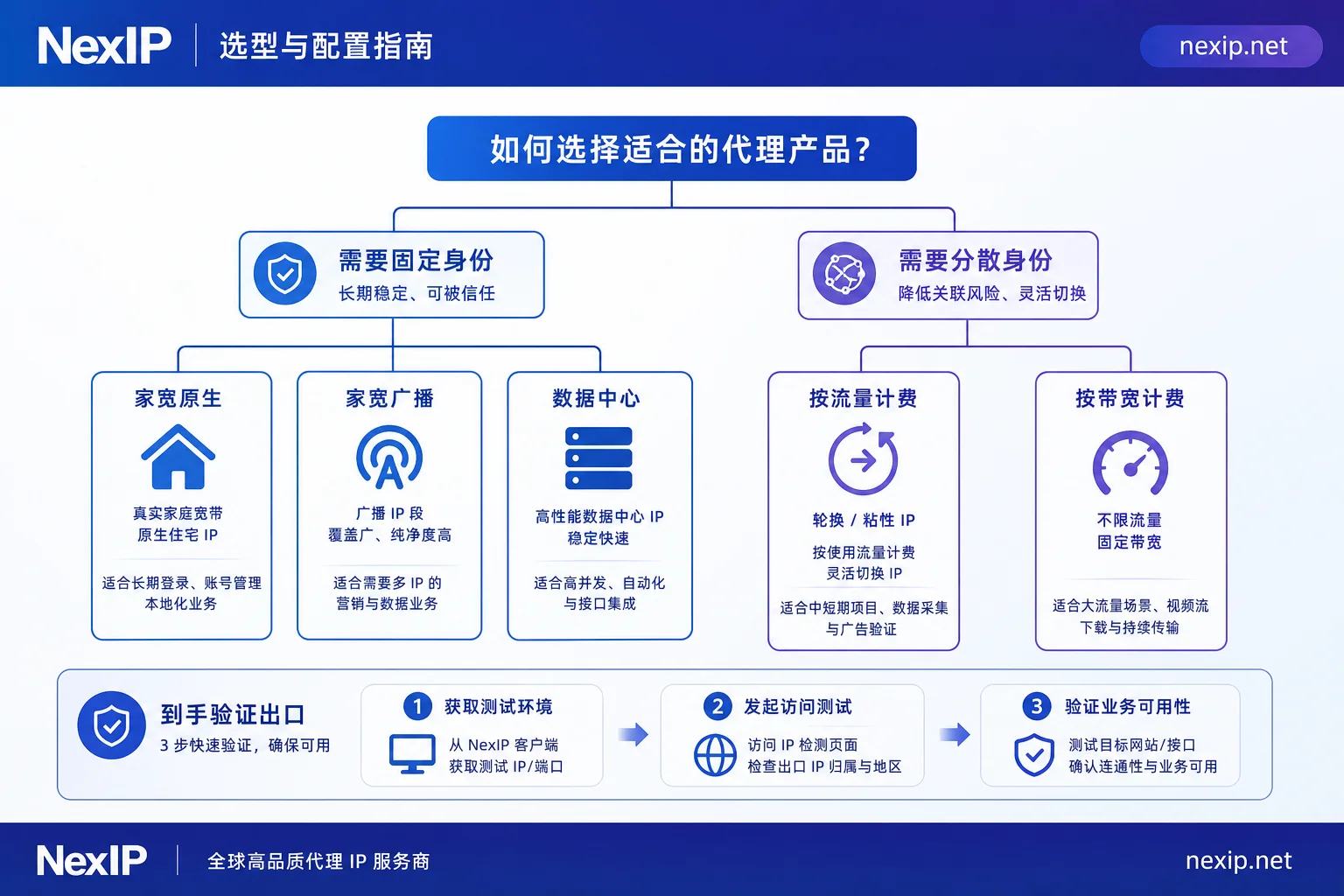
Corresponding to NexIP's product line, these three levels map to: fixed exits for account-based tasks via Static Long-term IP (with subcategories of native household, residential broadcast, and datacenter, free replacement for inactive ones), rotating exits for scraping tasks via Dynamic Residential Traffic Plans, and high-concurrency persistent tasks via Dynamic Residential Bandwidth Plans. Country coverage and pricing may vary; see the official website for details.
How to Safely Migrate Account-Bound IPs
Migrating scraping tasks is trivial—update configuration and rerun. The challenge lies with fixed IPs bound to accounts; here's an actionable sequence:
- Configure the new exit first, don't hurriedly stop the old one. If the old IP still works, keep it alive for a day to use as a control.
- Align the region. The city and state of the new IP should match the account's historical location as closely as possible; crossing states is more likely to trigger verification than simply changing IP. For how to assess geolocation accuracy, see This Five-Step Guide.
- Update the environment accordingly. Browser timezone, language, WebRTC, and DNS should all follow the new IP's geolocation. The network exit is only half the story; inconsistent fingerprint environments negate the IP change—this is where fingerprint browsers like NexBrowser handle it; exit and environment must be configured together. WebRTC is the most commonly overlooked aspect; for detection and remediation, see The Impact of WebRTC Leaks on Proxy IP Security and Protection.
- Switch accounts one by one, not in batches. Move one account, observe for a day or two without anomalies, then proceed to the next batch. Batch switching amplifies common configuration errors into large-scale incidents.
- Prioritize the most valuable accounts. If IP resources are limited, secure revenue-generating main accounts first, and handle peripheral ones later.
For more on static vs. dynamic choices for TikTok operations, see This Post Categorized by Three Scenarios; for a full TikTok setup, refer directly to the TikTok Solutions Page.
Run These Verification Checks Before Going Live with the New IP
Don't wait until production to discover issues. After obtaining the channel, run through these checks within five minutes:
Check ASN and ISP: Use third-party databases like ipinfo or WHOIS to look up the exit IP's ASN, verifying it belongs to a major local broadband provider and that the IP type flag is ISP rather than Hosting. If you purchased native household but discover it's from a cloud provider, ask for a replacement immediately.
Check Geographic Consistency: Compare city and state across at least two data sources. Some discrepancies are normal, but if one database says California and another Texas, the geolocation data is dirty and will cause problems for region-sensitive tasks. For handling inconsistencies among multiple databases, see How to Verify the Authenticity of Dual-ISP Residential IPs.
Check Blacklists and Fraud Scores: Run through public blacklists and fraud-score tools. Scores are a reference, not the sole basis, but if a fresh IP is already flagged on multiple spam blacklists, it's likely been misused before—you don't want to inherit that history.
Check for Leaks: Use DNS leak detection pages via the proxy to confirm DNS requests aren't bypassing the proxy and going direct. Skipping this step can render all other configurations meaningless.
Test the Link: Measure latency, jitter, and packet loss over several minutes to confirm stability. For live streaming or real-time interactions, stricter requirements apply; see Four Metrics for Diagnosing Overseas Live Stream Lag and Stutter.
Run a Real Business Request: Perform a small-scale test against the actual target site to ensure responses are normal and no extra verification is triggered. This step is more accurate than any detection tool.
Only after passing all five checks should you connect to production.
Common Pitfalls to Avoid
No exit can guarantee immunity from platform restrictions. Risk control is multi-dimensional; IP is just one factor, alongside account history, device fingerprint, and operational rhythm. Choosing the right IP type optimizes controllable factors, not a silver bullet.
Be wary of unrealistically cheap resources. The acquisition cost of real native household IPs is known; if prices are significantly below market averages, it's likely residential broadcast masquerading as native, or just another shoestring reseller—this recent incident is a lesson.
Fixed IPs are not "set and forget." Regularly recheck ASN attribution and blacklist status; IP blocks can be reclassified. Providers with replacement mechanisms allow you to resolve issues in minutes; without them, you'll need to purchase anew.
Don't expect proxies to solve everything beyond the exit. Browser environments, accounts, and CAPTCHAs are separate concerns. Even with the right network exit, environmental inconsistencies will still trigger problems. Plan these together, not in isolation.
While provider disappearances can't be entirely avoided, you can contain the damage to "reconfigure a new channel" rather than "business downtime and lost accounts." The difference lies in asking the right questions during selection and maintaining a fallback path.


Comments(0)