 NexIP官方博客
Let's start with the conclusion: the only metric is — does this egress need to consistently represent the same "person" over several months? If yes, choose static long-term; if it only needs to stay constant during a period with a clear end, choose static short-term.
What they share, and the one key difference
Both static short-term and static long-term IPs are exclusive fixed IPs: during the rental period, your requests always exit from the same address, unlike rotating residential proxies. This commonality lets them solve the same type of problem — CAPTCHAs, secondary identity checks, and login blocks triggered by frequent IP changes.
The difference is not about which is "cleaner," but their lifecycle. Long-term plans are billed monthly or yearly; short-term plans are billed hourly or daily. So the question is not which is better, but how long does this IP need to live?
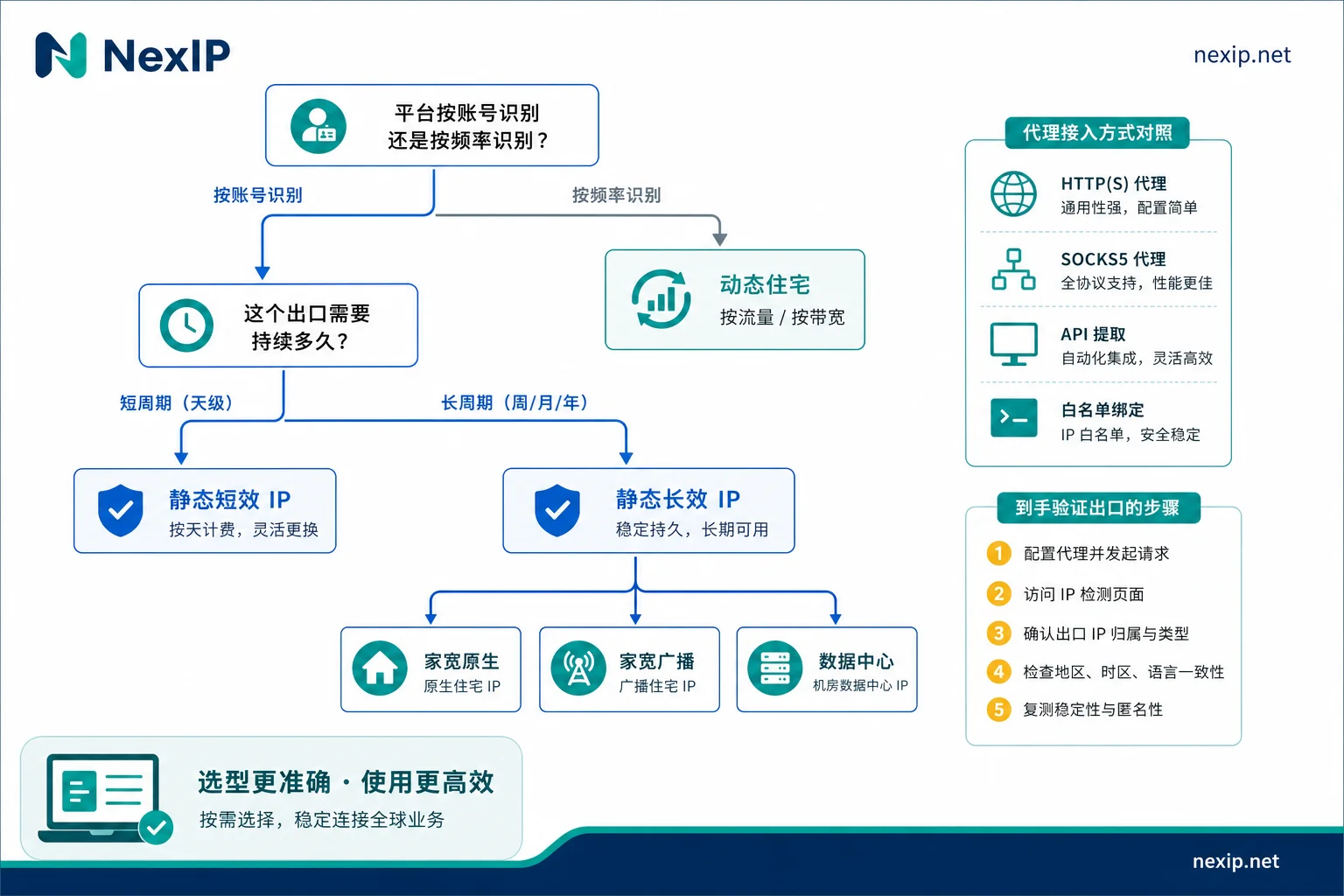
Three cases where long-term is the right choice
1. Platforms treat IP as part of identity. The backends of cross-border e-commerce stores and primary social media accounts are typical. If the IP changes, the platform sees "the same account logging in from a new location." Maintaining a single egress over time gives login history continuity, which may reduce the number of additional verification prompts — it reduces trigger points, not the possibility of being audited.
2. The operation cycle has no finite endpoint. Stores, main accounts, and self-managed services running indefinitely — as long as the business doesn't stop, the egress cannot stop. In such cases, hourly or daily rentals end up costing more and are more prone to downtime during renewal gaps.
3. You need a fixed binding record between one IP and one account. For example, when the platform side, internal ledgers, or firewall whitelists must register this egress address, and any change requires synchronization across multiple places.
TikTok operations are a clear example: the NexIP website recommends static residential native IPs for this use case, rather than broadcast residential or datacenter lines. For specific tiers, refer to TikTok residential IP: choose static or dynamic.
Three cases where short-term is the right choice
- Phased tasks: price monitoring during a launch period, a one-time automated regression test, or availability checks during an event. Tasks have both a start and an end.
- Needs fixed but does not need to accumulate: multi-step forms, checkout flows, or operations that require maintaining a logged-in state; changing IP midway forces a restart. But once the task ends, this IP holds no value for you. Paying monthly means paying for idle resources.
- Testing lines: validating connectivity and platform acceptance for a region or ISP on a small scale before committing to a monthly plan. This is the most underrated use of short-term IPs.
A common misselection: scraping and SERP monitoring often should not use static IPs
If your task involves large-scale crawling, search result rank monitoring, or ad verification, you typically need diverse egresses, not a fixed one. In this case, dynamic residential IPs are more suitable: pay-per-traffic plans fit scenarios with fluctuating request volumes where you need to switch between rotation and sticky sessions; bandwidth-based, unlimited-traffic plans suit long-running, stable-concurrency tasks where traffic estimates are uncertain. For usage estimation, see How to estimate usage for dynamic residential traffic plans, and for cost differences between exclusive and shared IPs, see Is it more cost-effective to use exclusive IP or shared IP for data scraping.
A quick rule of thumb: tasks identified by the platform via account should use static; tasks identified by frequency should use dynamic. Some jobs involve both — for instance, logging into an account and then scraping multiple pages. In that case, use static for the login session and dynamic for bulk page fetching, configuring them separately.
Long-term IPs require another layer of selection: native residential, broadcast residential, and datacenter
Static long-term IPs come in three subcategories, with varying trust levels in risk control:
- Native residential: allocated by a local physical ISP and registered directly in the residential broadband range; both ASN and ISP tags point to the local operator, closest to a real person's network. Platforms with strict environment detection (like TikTok) clearly prefer this type.
- Broadcast residential: ASN may appear residential, but registration or routing may not fully match the actual location. It’s a compromise between usability and cost.
- Datacenter: better connectivity and bandwidth stability, but the ASN clearly indicates a datacenter or hosting provider. Suitable for scenarios where residential attributes are not critical — fixed egress for internal systems, API integrations, or accessing your own services.
Selection principle: the more the platform treats "is this a real home network" as a criterion, the more you should lean toward native; if you only need fixed and stable without identity verification, datacenter IPs are more cost-effective. For differences in fields, compare What is the fundamental difference between native IP and non-native IP, and for e-commerce scenarios see Why cross-border e-commerce prefers static dual-ISP residential IPs.
Short-term IPs are sufficient when used purely for the "exclusive fixed" feature; they don’t need to carry a long-term identity role — their value lies in cycle matching, not reputation building.
How to configure access
Access method depends on your tooling: API extraction suits scripts that pull IPs on demand and automation flows; username/password works for direct entry in browsers and third-party tools; port forwarding suits software not easily adjusted for proxy configuration, mapping a fixed local port to the remote egress; process-based proxy sends only designated processes through the proxy while other traffic stays unaffected — ideal when you have both proxied and non-proxied tasks on the same machine.
Protocol: HTTP/HTTPS for browsers and most scraping libraries; SOCKS5 for non-HTTP traffic, UDP, or long-lived connections.
Authentication: username/password suits situations where your local egress IP is not fixed or when used by multiple people/devices; whitelisting suits servers with fixed outbound IPs, avoiding plaintext credentials in config files. Whitelisting has a pitfall — if your home broadband egress IP changes, authentication breaks. So if you work from home or an office, don’t rely solely on whitelisting; keep a username/password set as backup.
Region: choose based on where the target platform sees you, not where you are. If the store's registration country, account's usual location, and the country where you monitor search results differ, defer to the platform's criteria. For coverage and available countries, see the country coverage page.
Four checks upon delivery, in order
- Connectivity: Use a minimal request to confirm protocol and port work; test both HTTP and SOCKS5, and test each authentication method.
- Is it the claimed type: Check ASN, ISP tags, and registration location. If you purchased native residential, it should fall into the local ISP's residential range; if the ASN shows a datacenter or hosting provider, the type doesn't match. For detailed verification, see How to verify the authenticity of dual-ISP residential IPs.
- Location accuracy: Database attribution is only the first level; cross-check with latency to nodes in the target region. Only pass when both are plausible. For methodology, see How to judge the geographic accuracy of overseas residential IPs.
- Stability: After some time, restart the client, switch access methods, and check the egress IP again to ensure no drift. For long-term IPs, verify this especially before formal binding to an account.
These four steps must be completed before binding the IP to an account — do not log in first and then check later. If a long-term IP fails during the rental period, NexIP provides free replacement. But replacing the IP means the platform must adapt to a new egress, so filter out unqualified nodes before going live, rather than waiting for issues and then swapping.
Where to choose after evaluation
- If you need to maintain a fixed identity monthly or yearly and choose among native residential / broadcast residential / datacenter, see Static Long-Term IP.
- If you only need the same egress during a finite period and release it after the task ends, see Static Short-Term IP.
- If you are unsure which identification method your business falls under, check the Solutions Page by industry and platform before deciding.
Finally, a boundary note: the egress is only one layer. Browser fingerprint environments belong to NexBrowser; accounts and SMS reception belong to NexSHOPX and NexSMS. If the IP is correct but the browser environment or account details don't match, platforms will still be suspicious — treat these three layers together and don't put all your expectations on the IP alone.


Comments(0)