 NexIP官方博客
There is no universal rotation interval for dynamic IPs that works for all tasks. A more reliable approach is to rotate by "work unit" and supplement with rotation based on risk control signals, not by fixed time intervals:
- Public data collection (SERP monitoring, public product pages, price comparison): rotate the exit for each request or each small batch of requests.
- Flows with login state or multi-step operations (login, form submission, shopping cart, checkout): use the same exit for the entire flow—i.e., a sticky session—and rotate after the flow ends.
- Long-term store backends and social media accounts: these tasks don't have a "how often to rotate" question; they shouldn't use dynamic rotation at all. Use dedicated static IPs instead.
On top of the above, add one more rule: when you receive signals like 429, 403, or CAPTCHAs, proactively switch exits.
Below, we explain how to determine which category you fall into and how to configure each type.
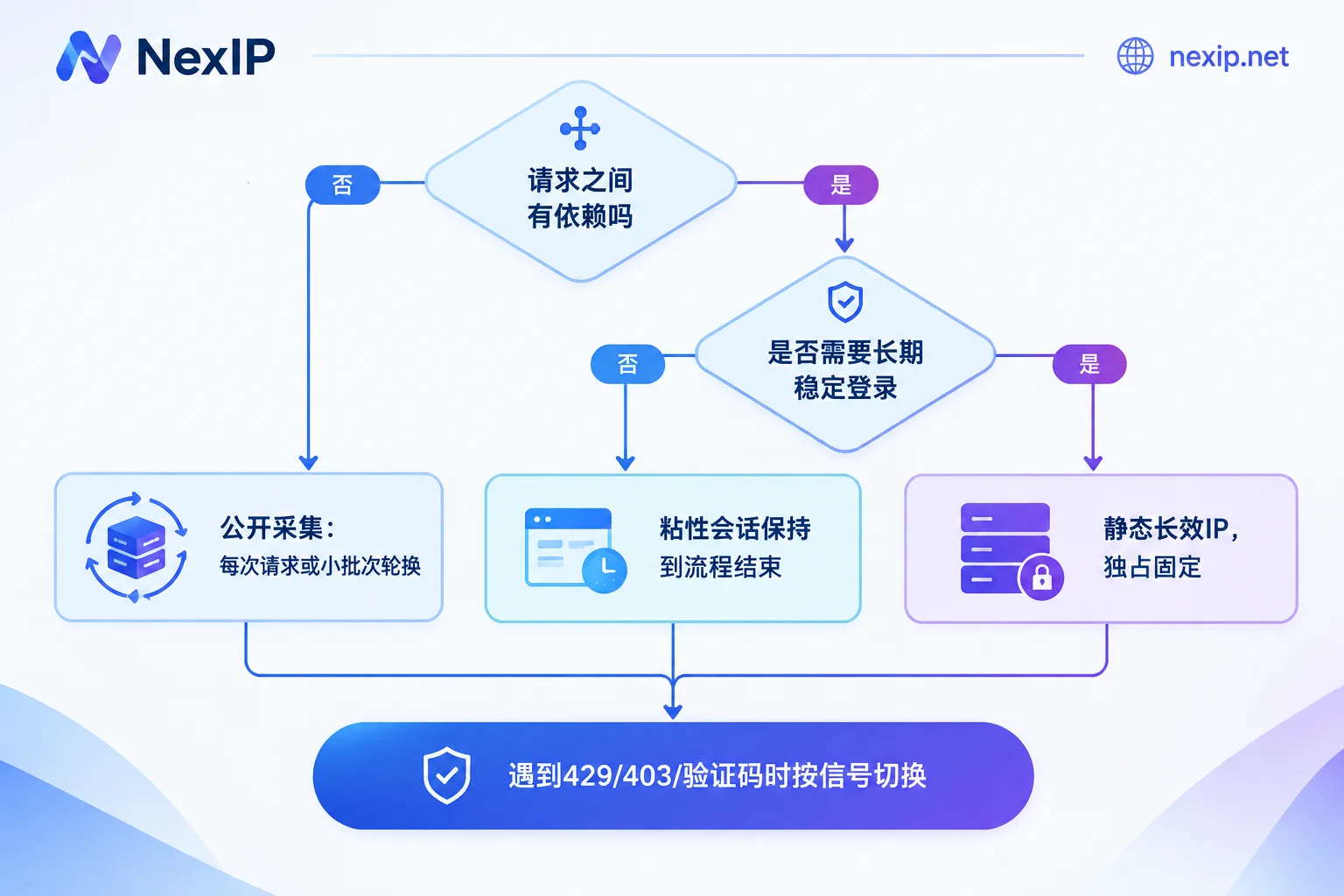
Step 1: Determine Whether the Task Has "State"
The test is simple: does the next request depend on something left by the previous request, such as a cookie, login state, CSRF token, shopping cart ID, or pagination parameter returned by the previous page?
- If it doesn't depend, it's a stateless task. Each request can be sent independently and still get a result; changing IPs doesn't affect the outcome.
- If it depends, it's a stateful task. Changing IPs midway may cause the server to think the session is hijacked or the environment is abnormal, invalidating tokens, requiring re-verification, or blocking outright.
Many scraping tasks are mixed. For example, first scraping a list page, then scraping detail pages one by one—these two steps are usually stateless. But on some sites, pagination parameters are bound to the session, so continuous pagination becomes a small stateful unit. Splitting by "whether requests depend on each other" is more accurate than splitting by "task type."
Stateless Scraping: Rotate per Request or Small Batch
The most common limit for public page scraping is rate limiting per IP. If the same address makes too many requests in a short time, it gets throttled or hit with a CAPTCHA. Distributing requests across different exits reduces the request density per IP, so these tasks typically use automatic rotation per request or rotation every small batch.
To choose between per-request and small-batch rotation, consider:
- If requests are completely independent, such as querying a SERP once per keyword or scraping a detail page per product, per-request rotation is simplest.
- If there's mild dependency within a group of requests, such as needing to paginate through several pages for the same keyword, or pagination parameters bound to the session, treat that group as a unit: run it with the same exit, then rotate.
When scraping e-commerce frontends like Amazon, for guidance on choosing rotation methods for lists, details, and prices, see Which Proxy IP to Use for Scraping Amazon Competitor Prices.
Rotating more frequently isn't necessarily safer. If the IP keeps changing but cookies, request headers, and TLS fingerprints remain the same, or if exits jump across countries and cities within a batch of tasks, that combination itself doesn't look like normal access and may actually be more easily identified as a bot. A few practical constraints:
- Pair one exit with one independent session. When changing IPs, discard old cookies at the same time; don't let a session carrying traces of the previous IP continue on the new IP.
- Keep regions consistent. For the same batch of tasks, fix the country or region to the target market; don't rotate randomly worldwide.
- Make request characteristics reasonable. Keep request headers and client characteristics consistent with a real browser; changing IPs alone won't solve request characteristic issues.
Stateful Flows: Keep Sticky Sessions Until the Flow Ends
For flows like login, submitting forms with CSRF tokens, adding to cart, and checkout, do not change IPs midway. Configure sticky sessions so the same exit serves from the first step to the last.
Pay attention to three points when configuring:
- Session duration should cover the longest flow. First estimate the worst-case duration of your flow, including page loads, waits, and retries, then confirm whether the sticky session duration is sufficient. Rules vary by provider; refer to the documentation in your product panel.
- Proactively end the session when the flow ends. Regardless of success or failure, start the next round with a new session and a fresh set of cookies. Don't let a sticky exit be reused indefinitely.
- If the flow is too long, switch product types. If a flow lasts several hours or needs to resume the next day, dynamic sticky sessions aren't suitable. Consider static short-lived IPs rented by the hour or day.
Sticky sessions are meant to support temporary, short-term interaction steps; they are not a substitute for fixed exits.
Rotation Based on Signals: Handling 429, 403, and CAPTCHAs
Beyond rotating by work unit, add signal-based switching logic to your program. Common signals and responses:
| Signal | Common meaning | Recommended action |
|---|---|---|
| 429 Too Many Requests | Request rate exceeds site limit | Back off and wait, then switch exit and retry, while lowering concurrency for that site |
| 403 Forbidden | Exit rejected, or request characteristics identified | Switch exit and retry once; if multiple exits still get 403, first check headers, fingerprints, and whether the page needs rendering |
| CAPTCHA or challenge page | Soft block; status code may still be 200 | Detect by page content, not just status code; switch exit and record it |
| Timeout, connection interrupted | Unstable exit or network issue | Switch exit and retry |
Two things are easily overlooked:
- Set a retry limit. After a request fails several times in a row, put it in a pending queue; don't retry infinitely. Infinite retries only burn bandwidth faster and show the site more abnormal requests.
- The exit isn't necessarily the cause. If all exits are blocked, the problem is likely with the request itself, not the IP.
How Fast Is Appropriate: Measure It with Your Own Data
Sites don't publish their blocking thresholds, and they adjust risk control policies over time. Widely circulated "requests per minute" figures can't be applied directly. A more reliable approach is to test separately per target domain:
- Start with low concurrency and longer request intervals, running a small sample.
- Gradually increase the number of requests and concurrency per exit, changing only one variable at a time.
- Record the success rate, proportion of 429 and 403, CAPTCHA occurrence rate, and bandwidth consumed per valid data point at each setting.
- When the block rate rises noticeably, step back to the previous setting and use that as the operating parameter for this site.
Site rules change, so these parameters should be retested periodically. Results vary greatly between sites; save them per domain rather than sharing one set globally.
Long-Term Accounts: Use Fixed Exits Directly
Cross-border store backends, long-term social media accounts, and TikTok accounts need a long-term stable login environment. Any form of dynamic rotation—including natural changes when sticky sessions expire—will cause the login exit to drift constantly.
These tasks should use dedicated, fixed, long-lived static IPs, with one account or store mapped to one exit, while keeping the browser environment consistent. For the browser environment layer, tools like NexBrowser can manage it. For Amazon backends specifically, see Dynamic IP or Static IP for Amazon Seller Central; if you're unsure whether scraping tasks should use dynamic or static, see Static Residential IP vs Dynamic Residential IP for Scraping.
After Deciding: How to Choose and Verify
If your task is public scraping or short flows, dynamic residential IPs are sufficient. NexIP's dynamic residential traffic plans are billed by traffic, and within the same plan you can choose rotation or sticky sessions: use rotation for stateless scraping, and sticky for login and multi-step flows. Integration supports API, username/password, port forwarding, and process proxy; protocols support HTTP/HTTPS/SOCKS5; authentication supports username/password or whitelist. If you have very large scraping volumes and traffic is hard to estimate, you can also look at dynamic bandwidth plans billed by bandwidth with unlimited traffic.
If your task is long-term store or account operation, choose static residential long-lived IPs. They are dedicated and fixed, rented monthly or yearly, and come in three types: residential native, residential broadcast, and data center. The official site recommends residential native IPs for TikTok operations.
After getting proxies, do three checks before running tasks officially:
- Does rotation work? In rotation mode, repeatedly request an IP-check endpoint to confirm the exit actually changes each time or batch.
- Is stickiness stable? In sticky mode, repeatedly request within your estimated maximum flow duration to confirm the exit never changes.
- Is the region correct? Verify that the exit's country and region match your settings. After confirming, run a small batch of requests against the real target site and record the success rate as a baseline for later parameter adjustments.



Comments(0)