 NexIP官方博客
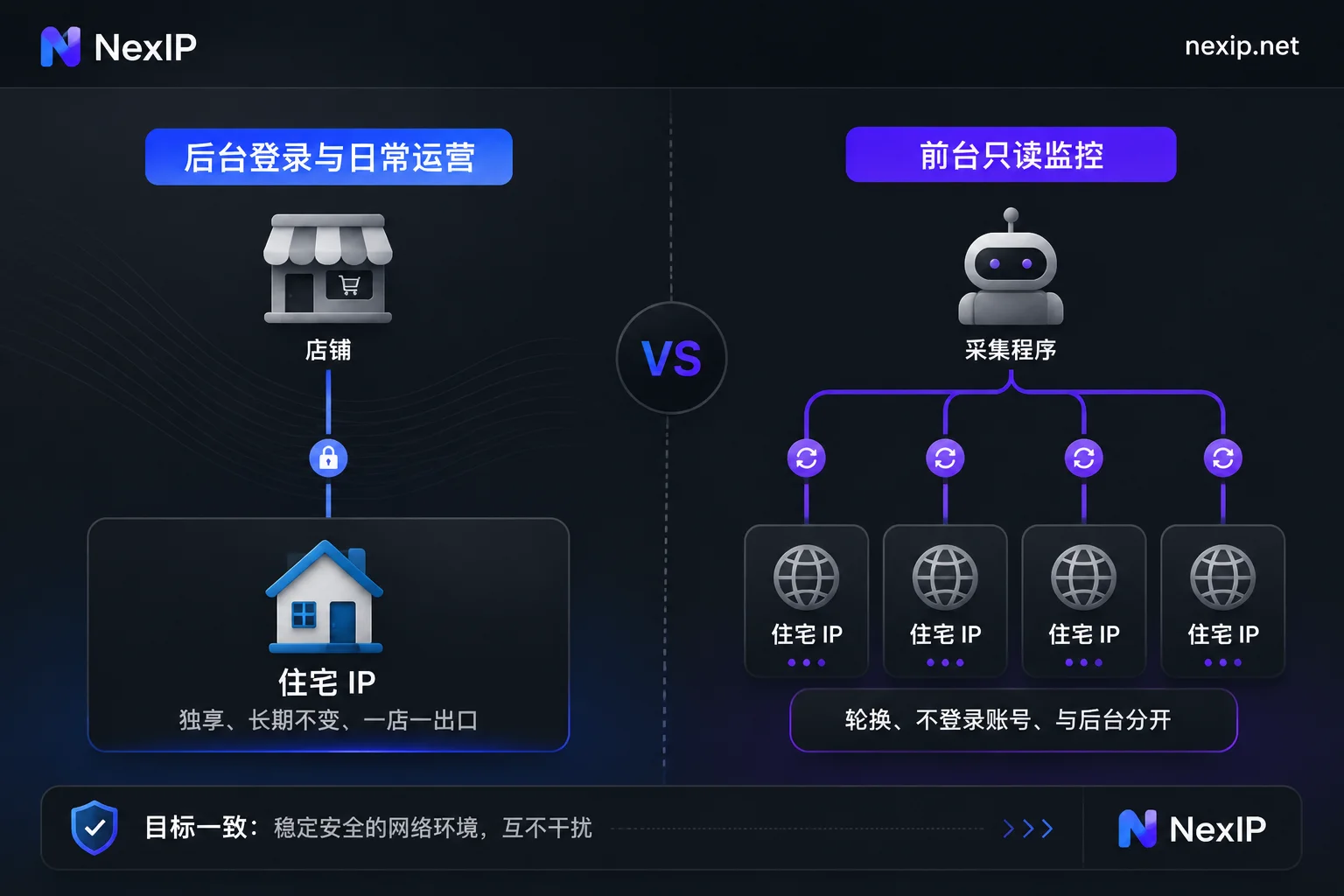
For logging into and running the Amazon Seller Central backend, it is recommended to use a dedicated, long-term static IP, preferably a static long-lasting residential IP. Rotating dynamic IPs are not suitable for backend login; they are better for frontend tasks that don't require login, such as monitoring competitor prices, listings, and keyword rankings.
The following sections explain: why dynamic IPs are unsuitable for the backend, when you don't need to buy an extra IP, how to choose among the three sub-types of long-lasting IPs, and how to verify the IP after you get it.
Why dynamic IPs are unsuitable for backend login
Seller Central requires strong identity verification, and accounts are used long-term. Logging into the same account every day to process orders, adjust ads, and check payouts means the platform remembers the account's usual login environment. The exit IP, along with its region and ISP, is a very obvious signal among these.
Dynamic residential IPs are designed with the opposite goal. Rotation mode changes the exit on a per-request or per-time basis. Sticky sessions only remain unchanged for a period; after the session expires or reconnects, it switches to a new node, and the region and ISP may change. Common problems when using them to log into the backend include:
- Login location changes repeatedly: easily triggers frequent two-factor authentication (OTP/2FA), and sometimes requires re-verification or password changes.
- Disconnection mid-operation: when the exit changes, the current session may become invalid and require re-login.
- Uncontrollable history of shared pools: dynamic pools are shared by many users; the node you get may have been used by others for violations. Multiple stores may also happen to get the same exit when rotating.
Amazon has not publicly disclosed thresholds like "how many IP changes count as abnormal"; the above conclusions come from practical experience in the cross-border industry. Occasionally changing networks usually only adds one verification. The bigger problem is a long-term unstable exit combined with other abnormal operations. You can refer to Will an Amazon store be audited when logging in from a different IP.
Static IPs solve consistency, not "invisibility"
The role of a static dedicated IP is to keep the exit fixed and used only by you. Each time the account logs in, the network environment is basically consistent, making it easier for the platform to view these accesses as normal operations of the same operator.
It also has limitations:
- A fixed IP does not mean you won't be risk-controlled. Account information, business behavior, and browser environment also affect the platform's judgment.
- IP is only one signal for association. Even if each store is assigned a different IP, if you switch back and forth in the same browser, cookies and browser fingerprints may still link these stores. Use specialized browser tools (such as NexBrowser) to isolate browser environments; this site only handles the network exit.
- Check policies first for multiple stores. Amazon has clear policy requirements for opening multiple seller accounts. First confirm that your stores comply with the policy, then consider how to configure the exit. See Can multiple Amazon stores log in with the same IP.
When you don't necessarily need to buy an extra IP
If you always log into your store from the same location using the same broadband connection, that broadband itself is a relatively stable exit, and you don't need to add a proxy layer just to "use a proxy."
The following situations are more likely to require a separate fixed exit:
- Team members are in different locations but want the same store to always log in from the same exit;
- The office network's public IP changes frequently (many home broadband connections change IP after re-dialing), or multiple people and businesses share one exit;
- You operate multiple compliant stores simultaneously, and each store needs an independent exit.
When multiple people share one store's exit, you also need to manage proxy credentials and usage permissions. See How to configure proxy IP permissions for team collaboration.
Static short-acting vs. long-lasting: choose long-lasting for the backend
Static short-acting and static long-lasting are both exclusive, fixed IPs. The main difference is the lease term: short-acting is billed by hour or day, long-lasting by month or year.
Seller Central usually requires continuous operation for months or years. Once the exit changes, it is equivalent to another login from a new location for the platform, so long-lasting IPs are more suitable for the backend. Short-acting IPs are suitable for temporary tasks with a clear end time and are not recommended as a store's long-term login exit.
How to choose among the three sub-types of long-lasting IPs
Taking NexIP as an example, static long-lasting IPs are divided into three types: residential native, residential broadcast, and data center.
- Residential native: usually shows as a local home broadband ISP in IP attribution databases, closest to a real broadband user. Prioritize this type for backend login.
- Residential broadcast: also provided as a residential type, but may differ from native IPs in origin and recognition results across detection databases. Suitable for tighter budgets and those willing to verify after receiving; refer to the official website for specific differences.
- Data center: usually lower cost, but the ASN generally shows as a data center or hosting provider. Not recommended as a priority for backend login; more suitable for auxiliary tasks that are not sensitive to exit type.
Whichever you choose, it is recommended to check it after receiving according to the methods below. To learn how residential IPs are faked, see How fake residential IPs are packaged.
Where dynamic IPs are used in Amazon business
Dynamic IPs are suitable for frontend read-only tasks in Amazon business, such as:
- Competitor price and inventory monitoring
- Competitor listing change tracking
- Keyword search result ranking monitoring
- Ad placement verification
These tasks do not require logging into an account and involve large request volumes, exactly needing rotating exits to distribute requests. Use rotation mode for batch scraping a single page; use sticky sessions when you need to turn pages continuously and keep the exit unchanged within the same flow.
Note two points: collection tasks should not log into seller accounts, nor share the same set of exits with the backend. Whether billing is by traffic or bandwidth depends on your request volume and concurrency. See Proxy IP billing: by traffic or by bandwidth.
How to verify after setup
The proxy supports HTTP, HTTPS, and SOCKS5 protocols, with authentication via username/password or IP whitelist. If using a whitelist, update it promptly when your office network's public IP changes; if using username/password, do not casually share credentials.
After configuration, check in the actual browser used to log into the backend:
- Exit IP and region: open an IP lookup page, confirm the exit is the IP you purchased, and the country and city match your selection.
- IP type: check the ASN or ISP information. Residential IPs should show as a residential broadband ISP, not a cloud provider or hosting provider.
- History: query common blacklists or risk databases. If there are obvious bad records, contact the provider to replace it promptly.
- Leak detection: check whether WebRTC and DNS expose your local real IP or DNS from other regions.
- Stability: check again after a few days to confirm the IP has not changed. To determine if it is truly exclusive, see How to tell if the IP you bought is truly exclusive.
When logging in with a new exit for the first time, triggering a two-factor verification is normal; just complete it as required. After that, keep one store corresponding to one exit and do not change it for a long time.
NexIP's static long-lasting IPs can be replaced for free if they become invalid. However, for the platform, the replaced IP is a new exit, and you can expect another verification, so do not actively and frequently replace it.
Choose by task
- Backend login, daily operations: choose static long-lasting IP, preferably residential native, select the region according to the store's marketplace, and assign one separately for each store.
- Frontend competitor and ranking monitoring: separately configure dynamic traffic packages, purchased and used separately from the backend exit.


Comments(0)