 NexIP官方博客
Conclusion first: Do not directly use a Facebook proxy IP that has just been banned or triggered severe restrictions to register a new account, nor bind it to a high-value main account or core BM. Meta generally does not permanently globally ban residential addresses, but entering 2026, platform risk control has shifted to pre-risk scoring based on "IP historical credit + device fingerprint + recent account anomaly records"—an exit that recently had dead accounts, BM associated restrictions, or frequent verification triggers will easily inherit risk weight when a new account connects, causing immediate review or even instant ban upon login.
At the same time, there is another half-truth: many people's accounts die in a chain not because they didn't change IP, but because "they changed to a new proxy IP but didn't isolate device fingerprints, residual cookies, BM, or payment cards." Before changing lines, first distinguish which layer is the problem, so you won't get more chaotic by changing.
I. After a ban, first determine responsibility: Is the IP contaminated, or are devices and assets implicated?
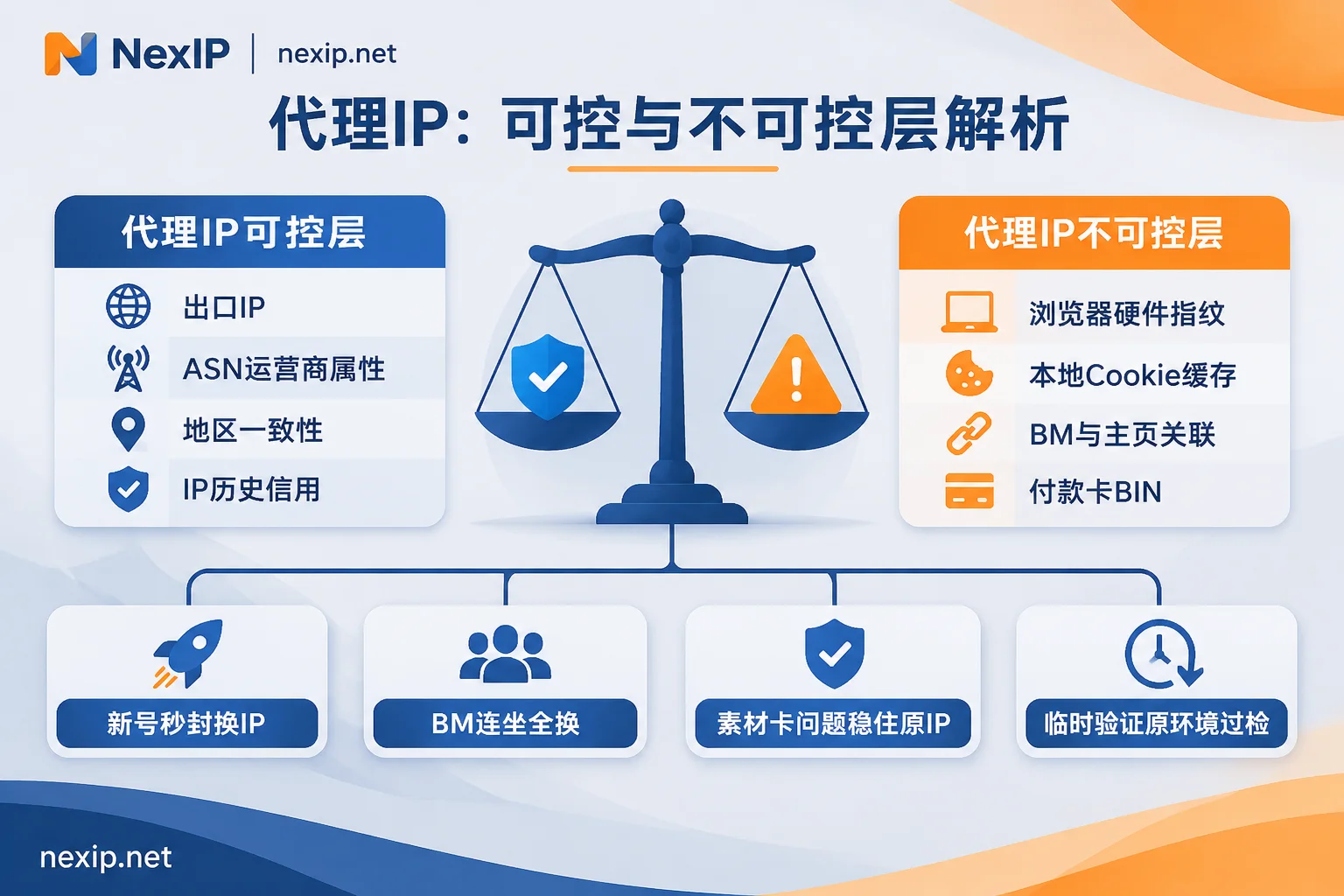
In Meta login and advertising, a proxy connection can only determine "from which address the request goes out" and "what usage records this address has accumulated." The survival of an account often involves four signals:
- Exit IP and its network (ASN/ISP): Is it a real home broadband, hosted broadcast segment, or a data center segment already on a high-risk list; whether the same IP or adjacent subnet recently had bulk registrations or violation bans.
- Device and browser fingerprint: GPU rendering characteristics, fonts, screen resolution, timezone language, local cache, and cookies. In many cases, the platform actually blacklists this hardware/browser fingerprint, not just a dynamic IP.
- Business and payment associations: Same Business Manager (BM), public page, Pixel, bound phone number, or credit card BIN with chargebacks.
- Account operation rhythm: A new account that immediately adds friends frequently, creates ads, changes profile, or logs in from different locations.
You can directly refer to the decision table below to judge whether the old proxy IP should be kept, isolated for observation, or immediately discarded:
| Situation | Can the original proxy IP still be used? | Correct stop-loss action |
|---|---|---|
| New account permanently disabled shortly after registration or warming | No, discard immediately | Indicates the IP likely has residual abuse from previous users, or the subnet is flagged by Meta as high-risk for bulk account creation; also destroy the corresponding browser environment |
| Entire BM banned, multiple associated ad accounts restricted | Not recommended to reuse | BM-level association often accompanies dual contamination of environment and IP records; new BM must be paired with a brand new exclusive static exit, independent environment, and clean payment method |
| Old account rejected due to a single creative/payment card issue, or single ad account restricted, personal account normal | Don't change randomly, keep original exit | If the account itself is not blacklisted, rashly switching IP across regions may add cross-location login risk; first appeal under the original fixed environment or remove the problematic ad account |
| Only temporary verification like 282/959 selfie, email, or SMS | Keep it for now, verify in original environment | Complete verification on the original stable exit first, then check for DNS/WebRTC leaks or short-term region switching |
If it's just a temporary identity verification or security prompt after cross-device switching, you can refer to Facebook Still Requires Verification After Setting Up Proxy IP and Do You Need to Re-verify Identity After Changing Facebook IP? for targeted troubleshooting. Don't blindly change nodes just because of a popup.
II. How to confirm if a newly purchased or used Facebook proxy IP is clean? 4-step purity check
Whether it's a newly acquired line or you want to confirm if an old IP is worth keeping, don't just look at the "fraud score" displayed on a single third-party website—different risk control databases have very different update cycles and weight algorithms (for specific reasons, see The purity scores of the same IP on different websites are different, which one to trust?). Running through the following 4 steps is more valuable than a single score:
1. Check ASN ownership and "native / broadcast" attributes
First check if the ASN of the IP belongs to a real local broadband operator (ISP). If the result shows obvious data center, cloud host, or hosting/cloud/datacenter characteristics, don't use it to directly log into personal accounts and BM—data center segments are almost equivalent to automation or bulk environments in Meta's eyes.
Also, pay attention to the differences in "residential labels": although both show residential attributes, home broadband native IP is an address directly assigned by a local broadband operator to a home user, while home broadband broadcast IP is a segment registered as residential but announced via BGP in a data center. For high-risk main advertising accounts or cold-start new accounts, it's safer to prioritize native attributes; for the underlying differences, refer to NexIP Native Residential vs. Broadcast Residential Comparison and Why Does It Still Get Throttled When Checked as Residential?.
2. Confirm "truly exclusive" or shared pool
Many friends buy cheap proxies but get banned upon login; the core issue is that the provider sells the same residential port to multiple social media users—the previous person just ran a batch of dead accounts on it, and the next day this IP is assigned to you. For long-term account warming and asset operations, be sure to confirm it's an exclusive static exit with a fixed address during the rental period.
3. Test WebRTC, DNS, and timezone closure before formal login
Even if the proxy IP itself is clean, wrong configuration can still expose you. Before formally opening Facebook, complete three checks in the target browser profile:
- WebRTC: Disable or spoof to the current proxy exit IP to prevent the browser from leaking local real intranet or public IP.
- DNS: Ensure domain resolution requests also go through the proxy tunnel, not local ISP DNS causing inconsistent geolocation.
- Timezone and system language: Manually align to the standard timezone and corresponding language of the proxy IP's city.
If you encounter SOCKS5 parameters filled in but cannot connect, or suspect DNS leaks, you can first calibrate according to the full-end troubleshooting steps in Why SOCKS5 Proxy Configuration Fails to Connect Even with Parameters Filled In.
4. Use low-value test actions for gray-box probing
After getting a new IP, don't immediately bind to the main BM or top up and run ads. First, in an independent environment, normally visit public pages in the target region, observe if there are frequent abnormal blocks or human verification; after connecting a new account, maintain a natural browsing and light interaction rhythm for the first 3–7 days, and gradually take on business actions only after confirming the environment is stable.
III. Why does a new account still get banned after changing to a new proxy IP?
A common frustration in practice is: "I've already bought a new static residential IP, why does the new account still not survive a week?" Most of the time, the problem lies in the following 4 aspects that the proxy layer cannot manage:
- Only changed IP, but still logging in from the old browser or same device fingerprint: Local browser cache, IndexedDB, residual cookies, and unisolated hardware fingerprints directly link the new account with the previously banned account as the same operating entity.
- Desktop and mobile using different networks to log into the same account simultaneously: The desktop is in an anti-detect browser with a fixed US residential exit, while the operator casually opens the Facebook App on their phone using local data or another shared VPN to receive messages; short-term cross-country/cross-subnet jumps immediately raise the risk score.
- Multiple team members sharing the same personal account and password: Meta rules clearly state one personal account per person. Correct team collaboration is not sending the same proxy and account to three media buyers to log in alternately, but one person, one fixed account, one fixed exit, and then assigning page and ad account permissions through the BM backend (see How Many Accounts Can Log In with One IP on Facebook?).
- Mixing "account warming exit" with "scraping/ad testing exit": Using the same static residential IP to both run the main advertising account and run scripts to scrape competitor ads or frequently refresh public pages at high concurrency, triggering rate limits that directly affect the reputation of the exit where the main account is located.
IV. Configure Facebook proxy IPs by task pools to avoid one failure dragging down everything
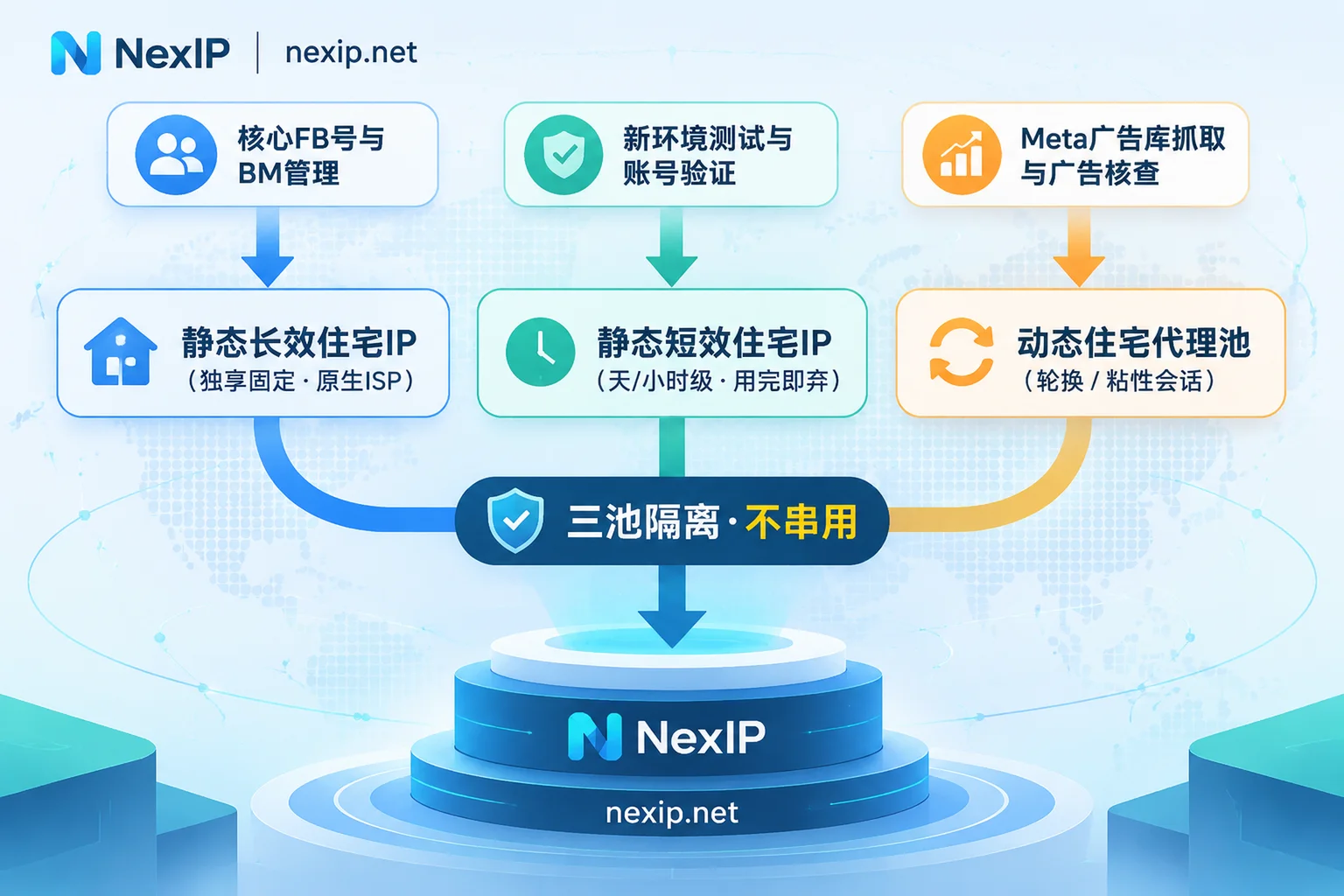
To minimize associated losses after a ban, the safest approach is to split Facebook business into three lines: core account operations, temporary verification testing, and public data collection, each matched with exits of different lifecycles, without mixing pools. Take NexIP, which focuses on overseas network exits, as an example. It only manages the network exit layer to be stable and clean (browser environment multi-opening, SMS receiving, or account bodies require independent fingerprint environments and compliant account asset management). You can directly match three types of packages by scenario:
- Core personal accounts, BM management, and long-term ad delivery → Static Residential Proxy · Long-lasting IP
When configuring long-term Facebook proxy IPs, the core requirement is "exclusive, fixed, long-term without jumps." NexIP's static long-lasting IPs provide exclusive fixed exits, billed monthly or annually with unlimited traffic, subdivided into home broadband native, home broadband broadcast, and data center, and support native dual ISP; for main accounts and high-spend ad accounts, it's recommended to prioritize home broadband native level. If a node fails, free replacement is supported, so you won't be forced to switch lines across regions due to temporary downtime. - New account verification, appeal troubleshooting, and short-term integration → Static Residential Proxy · Short-term IP
If you need to temporarily verify a high-risk operation, do payment and registration environment integration, or are unsure if a process will trigger risk control, never use the main account's long-lasting IP to trial and error. You can use NexIP's Static Residential Proxy · Short-term IP, rent exclusive fixed ISP exits by hour or day with unlimited traffic; after testing or encountering anomalies, destroy and discard directly, locking the risk within a single task. - Meta Ad Library monitoring, public page scraping, and multi-country ad verification → Dynamic Residential Proxy
Scraping competitor ad creatives, monitoring public page interactions, or switching multiple countries to check ad landing pages are essentially high-concurrency, multi-region switching tasks, not suitable for binding to a single static IP. Such workflows are better suited for NexIP's Dynamic Residential Proxy · Traffic Package (billed by GB, supports per-request rotation or sticky sessions); if you need long-term unattended polling with stable throughput for continuous monitoring streams, you can switch to the Dynamic Residential Proxy · Bandwidth Package billed by port bandwidth with unlimited traffic under fair use.
For integration and team collaboration, NexIP supports HTTP/HTTPS/SOCKS5 protocols, targeting by country, city, ASN, and ISP (subject to inventory), provides username/password or IP whitelist authentication, and four access methods: API extraction, username/password direct connection, port forwarding, and process proxy, and supports panel, API management, and team sub-account allocation. If your business spans multiple regions and platform workflows, you can first check the operator distribution in target markets on NexIP Industry and Platform Solutions and Country and Region Coverage Page, or visit the User Dashboard for specific documentation and available inventory. For more complete ad delivery and Marketplace scenario selection, you can also refer to 2026 Facebook Proxy IP Full Workflow Selection.
V. 5-step stop-loss checklist for reopening and changing IP after a ban
If you have just experienced an account disable or ad account restriction and are about to go online with a new account or new BM, check off these 5 items in order before starting:
- First decide the fate of the old IP: Old IPs that caused instant ban of new accounts or BM associated bans should be directly discarded; for old accounts only restricted due to creatives/payment cards with the main account healthy, prioritize stabilizing the original exit and appealing.
- Thoroughly reconstruct an isolated environment: Create a new independent anti-detect browser profile for the new account, clear all old cookies and local cache, and do not log in bare on a device that was previously banned.
- Lock one-to-one correspondence: One exclusive static residential IP binds only one core personal account, with timezone, language, registered phone number's location consistent with the IP's target city.
- Separate team and cross-device paths: Team members each use their own personal account and fixed exit, collaborating through BM permissions; do not cross-login on mobile with another unstable network to the account being warmed on desktop.
- Kick testing and scraping out of the main account pool: For daily Meta Ad Library scraping or multi-country ad landing page verification, use separate dynamic residential or short-term static test channels, and don't let high-frequency requests consume the reputation of the main static IP.