 NexIP官方博客
Here's the conclusion upfront:
- Not every TikTok action requires a static residential IP — if you're only collecting public leaderboard/video data or doing temporary integration testing, an exit configured by traffic or short-term lease is enough; but as soon as you're involved in official account creation and nurturing, relying on organic traffic for promotion, live commerce, or managing the TikTok Shop backend, an independent and fixed TikTok residential IP (preferably native home broadband) is basically a must-have. Regular data center nodes and shared networks can hardly withstand risk control.
- How many accounts one residential IP can hold depends on the account's value: High-weight monetization main accounts, live streaming accounts, and TikTok Shop backends must strictly follow one IP per account (one store per exit); only low-cost batch product testing accounts, under the premise of fully isolated device fingerprints and no interaction correlation, should be limited to no more than 2 per IP.
- Switching an old account from a data center IP to a residential IP itself will not reduce weight. What actually triggers abnormal verification or throttling is cross-region jumps, repeated node switching for testing, and unsynchronized time zone/device environment. Follow the four steps: "pause posting for cooldown — align region and parameters — single switch — low-frequency transition" to smoothly migrate old accounts.
1. Do You Really Need a TikTok Residential IP? First, Understand the Boundaries of 4 Alternatives
Many newcomers wonder: I can browse TikTok videos using regular nodes or mobile roaming cards, so why buy a separate residential IP? The reason is that TikTok's network judgment is not about "whether you can open the app", but about which type of user your exit IP is classified as.
The actual performance of common solutions varies greatly in practice:
| Common Network Solutions | Identity Characteristics in Platform's Eyes | Applicable Boundaries | Main Shortcomings and Risks |
|---|---|---|---|
| Regular VPS / Public Nodes | Data center (Hosting) ASN, shared by multiple users | Only suitable for temporary information lookup, non-account login access | Historically used for mass registration and crawlers, new accounts easily get stuck at basic playback, frequent verification pop-ups |
| Overseas Mobile Data Cards (Roaming) | Mobile carrier IP, high authenticity | Very few single-device account creation, short-term testing | High long-term traffic costs, base station switching causes IP drift, inconvenient for desktop or team collaboration |
| Overseas Relatives' Real Home Broadband | Local real home broadband ISP | Relatives in target country and managing very few accounts | Cannot scale multi-region matrix as needed, high cross-border maintenance threshold, inconvenient team permission sharing |
| Professional Proxy Residential IPs | Residential exit assigned by local ISP, can target country/city | Account matrix, TikTok Shop, data monitoring pool configuration | Need to distinguish dynamic/short-term/static long-term and native home broadband vs. broadcast; choosing wrong subclass leads to pitfalls |
When is it unnecessary to buy static long-term residential IPs?
If your needs are not long-term account nurturing or guarding store backends, there's no need to spend high prices on long-term exclusive exits; splitting by task saves budget:
- Public data collection, video/product leaderboard monitoring, ad landing page verification: These tasks do not require fixed login states and need massive rotation or on-demand sticky sessions. Choose Dynamic Residential Proxy - Traffic Plan billed by traffic, or Dynamic Residential Proxy - Bandwidth Plan with unlimited traffic for high-concurrency continuous pulling.
- Temporary account verification, payment process integration testing: Scenarios requiring a fixed exit for only a few hours to days, then removed. Choose hourly or daily billed Static Residential Proxy - Short-term IP.
For specific division between static and dynamic in different TikTok tasks, you can also refer to this article TikTok Residential IP: Static or Dynamic? Categorized by 3 Scenarios for double-checking.
2. How Many Accounts Can One TikTok Residential IP Actually Hold? Don't Use "Can Log In" as a Substitute for "Safe Boundary"
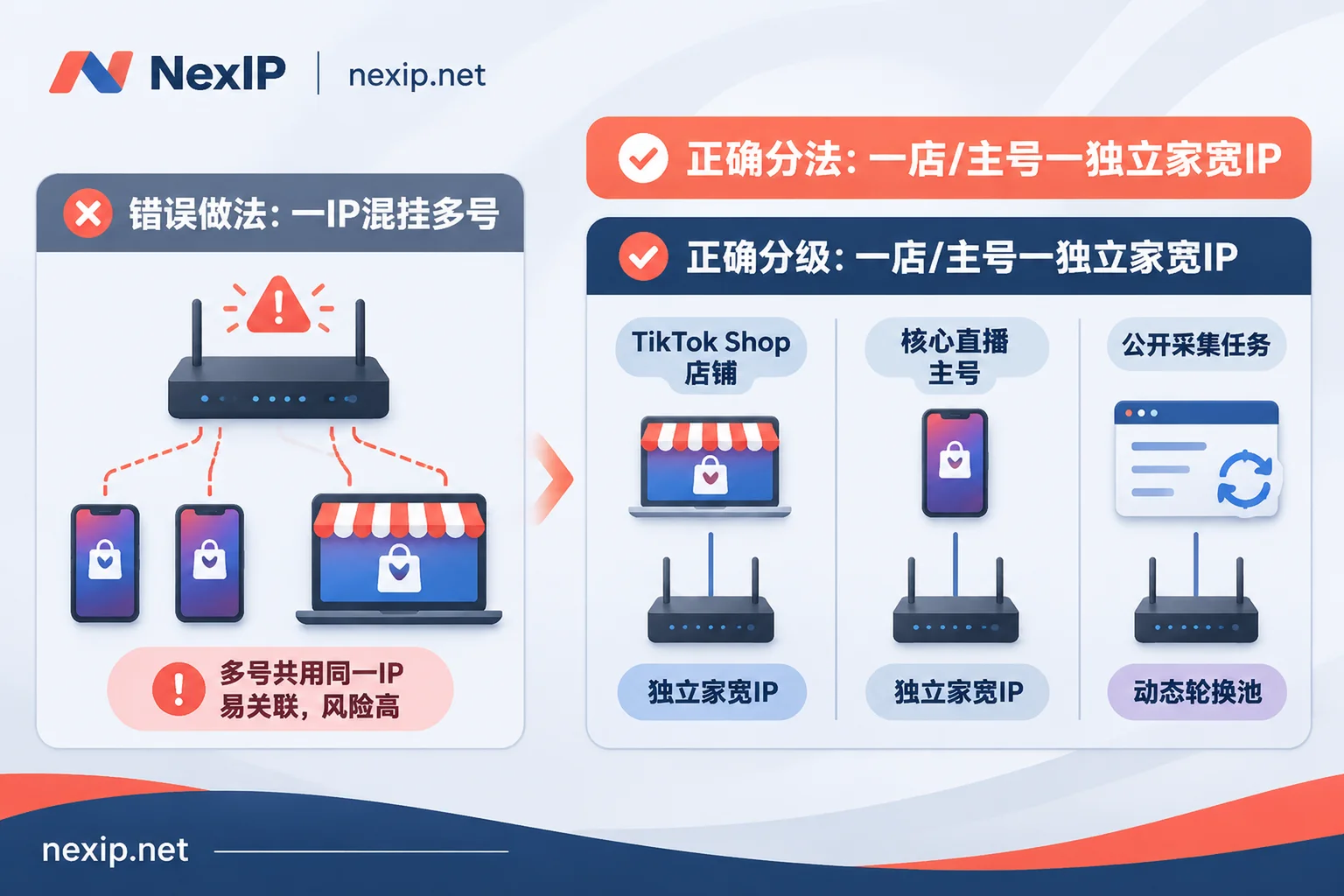
TikTok determines whether multiple accounts are associated based on the IP exit + device fingerprint + operational behavior three-layer overlay. Even if you prepare ten independent phones or fingerprint environments, as long as they frequently log in and batch operate from the same exit IP, the platform will still classify them as the same operating entity; once one account violates rules, other accounts under the same exit may suffer collateral throttling or even banning.
In actual operations, it is recommended to strictly grade by asset attributes of accounts and stores:
| Business Type | Recommended Max Accounts per IP | Recommended IP Type | Minimum Environment Isolation |
|---|---|---|---|
| TikTok Shop Backend (Local/Cross-border Stores) | 1 IP = 1 Store | Static Long-term · Native Home Broadband IP | Independent fingerprint browser environment + fixed time zone/language, strictly no mixed login with content accounts |
| Core Influencer Accounts / Brand Official Accounts / Live Commerce Accounts | 1 IP = 1 Account | Static Long-term · Native Home Broadband IP (supports dual ISP) | One device per exit, no sharing network with test accounts |
| Early Product Testing / Material Scaling Small Accounts | Max 2 per IP | Static Long-term Residential IP | Must completely isolate device environment, and accounts under same IP must never like, comment, or follow each other |
| Competitor Collection / Anonymous Inspection | Not bound to fixed accounts | Dynamic Residential IP | Rotate by task or set short sticky sessions, no sensitive assets accumulated |
Why do we need to distinguish native home broadband from broadcast home broadband even for "static residential IPs" used for TK?
Many operators find after buying static residential IPs: although tested as ISP attributes, posting videos or opening local stores still easily triggers secondary review or silent weight reduction. This is often because they didn't distinguish native home broadband from broadcast home broadband:
- Native Home Broadband IP: Directly from local ISP's home broadband in the target country; registration attribution, routing announcements, and local residential broadband are highly consistent.
- Broadcast Home Broadband IP: Although registered as residential in databases, it's actually a network segment broadcast via BGP hosted in data centers.
For sites like US, UK, and Japan where risk control increasingly values environmental continuity, NexIP in its TK Operation Plan Page explicitly recommends prioritizing native home broadband IPs from Static Residential Proxy - Long-term IP for long-term account operations (supports native dual ISP, and free replacement if long-term plan fails), and insists on one fixed exit per account. If you want a more systematic comparison of technical differences between the two types of static network segments, see NexIP Native vs. Broadcast IP Comparison and What's the Difference Between Native Home Broadband and Broadcast Home Broadband for Static Long-term Residential IPs.
3. Will Switching an Old Account from a Data Center IP to a TikTok Residential IP Reduce Weight or Get Banned?
Conclusion: It won't reduce weight because of switching to a clean home broadband IP; problems mostly arise from "wrong switching method".
In practice, many accounts that could barely post videos suddenly get verification pop-ups or even 0 views after switching to a residential IP. They usually fall into the following three pitfalls:
- High-risk operations combined with IP switching: Right after switching IP, changing password, binding email, modifying payment info, or frequently unbinding showcase, the system will directly judge as account theft or abnormal takeover.
- Large exit region jumps: The old account originally used a data center node in Singapore or US East, but the newly purchased residential IP casually chose US West or even cross-country nodes, causing login trajectory to show unreasonable geographical span in a short time.
- Repeated node switching to "test the feel": After connecting, if views don't immediately skyrocket, switching two or three IPs back and forth within a day turns a normal account into a high-frequency abnormal account.
4-Step Practical Checklist for Smooth Migration of Old Accounts
- Step 1: Pause posting for 24-hour cooldown. Before migration, stop posting videos, and do not follow, comment, or modify account information, letting old network sessions expire naturally.
- Step 2: Lock region and carrier according to target market. Based on account audience and store registration location, select target country, city, and local carrier in advance on the NexIP Region Coverage Page (supports targeting by country, city, ASN, and carrier, subject to real-time inventory), and synchronize device system time zone and language settings.
- Step 3: Single switch, quality check before entering app. After configuring the new static residential exit, don't rush to open TikTok and post videos. First use an IP detection page to verify exit country/city, ASN attribution, DNS, and WebRTC consistency without leaks.
- Step 4: Low-frequency natural transition for 2-3 days. In the first two days after switching, spend ten-plus minutes daily browsing the For You feed like a normal local user, maintaining natural dwell time, and after confirming no abnormal verification pop-ups, resume original update frequency.
For the platform's comprehensive verification mechanism of "account behavior + IP continuity" in 2026, we recommend further reading 2026 TikTok Risk Control Upgrade: Not Only Native, You Also Need This "Account + IP" Long-term Operational Logic.
4. How to Configure Mobile App and Desktop TikTok Shop Backend Without Conflicts?
Among teams searching for "TikTok residential IP", a large portion are already running both mobile content/live streaming and desktop TikTok Shop merchant backend. The most common practical issues are two.
1. Why can't I connect or keep disconnecting after buying a residential IP and filling SOCKS5 on my phone?
This is one of the most frequent misconceptions among beginners: Residential proxies provide an overseas exit identity, not a cross-border encrypted transmission channel. Whether HTTP/HTTPS or SOCKS5 protocol, in cross-border direct connection scenarios, bare SOCKS5 without appropriate transmission link forwarding is highly susceptible to interference or timeout packet loss; meanwhile, if the local phone hasn't disabled location permissions or DNS still uses local resolution, there will be a torn state where "exit shows overseas but DNS or system signal leaks domestically".
If you encounter connection failures, disconnections, or DNS mismatches, follow this troubleshooting process step by step: Why SOCKS5 Proxy Configuration Still Fails to Connect with Correct Parameters? Correct Setup on All Platforms and DNS Leak Troubleshooting. Also, objectively distinguish: NexIP only provides a clean and stable network exit. If you encounter video lag or stream jitter during overseas live streaming, besides the exit IP itself, you also need to check local uplink bandwidth and cross-border basic link transmission quality (Note: NexIP does not provide separate cross-border dedicated line product specifications; ensure your own basic transmission network is stable).
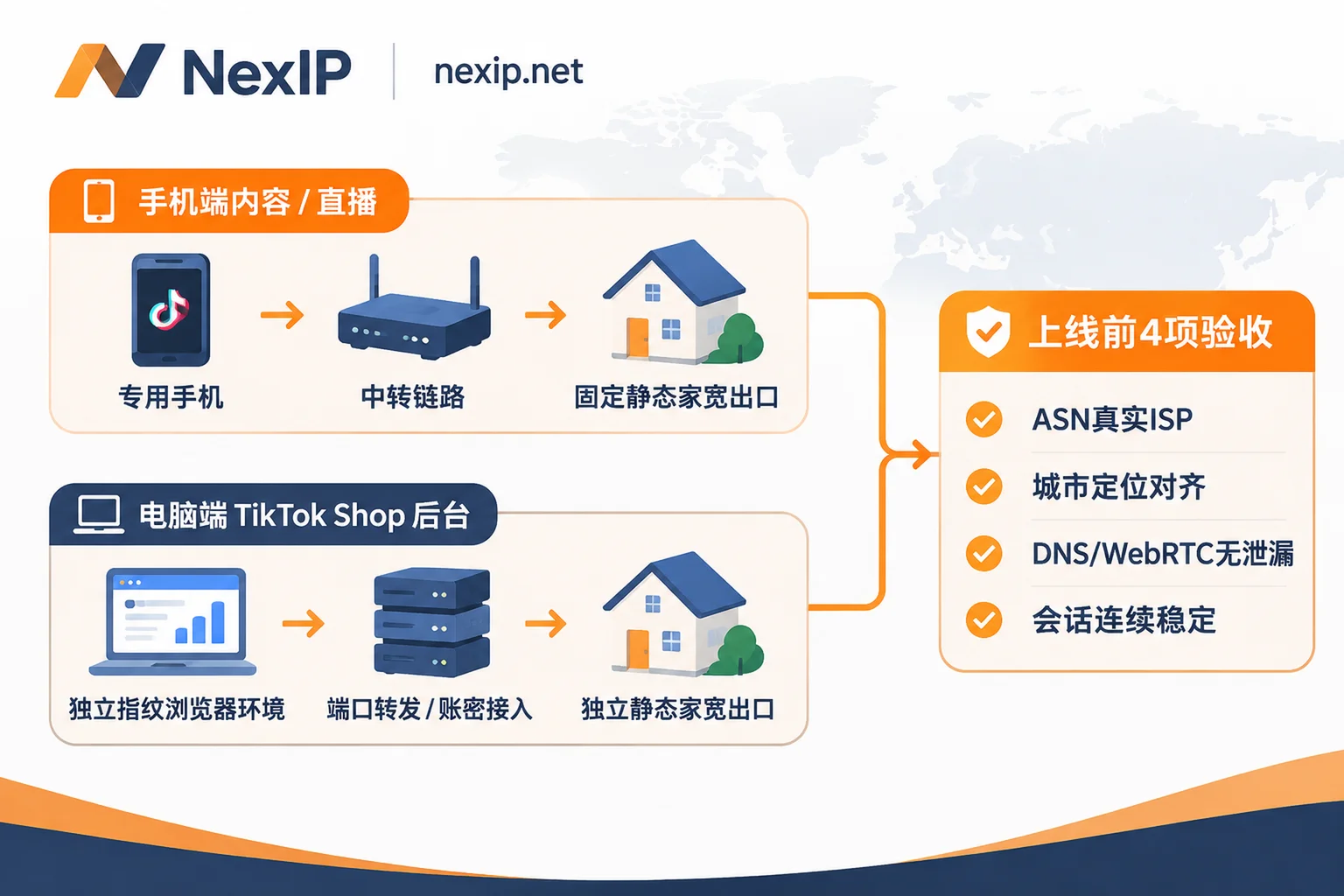
2. How to separately connect desktop TikTok Shop backend and mobile content accounts?
Many sellers easily mix store backend and sales phones under one proxy, or let multiple operators take turns logging in with the same set of credentials. A more stable architecture is to completely separate the two ends:
Desktop (TikTok Shop Backend / Ad Management / Influencer Outreach):
- At proxy level, through NexIP User Backend (supports username/password authentication, IP whitelist authentication, and four access methods: API extraction, port forwarding, process proxy, supports sub-account permission sharing), assign an independent static long-term residential IP for each store.
- At environment level, NexIP only handles network exit, not browser multi-instance isolation; each store's backend login still needs to be paired with an independent fingerprint browser environment, binding Cookie, Canvas, fonts, time zone with corresponding static IP one-to-one, achieving "one store, one environment, one fixed exit".
Mobile (Short Video Shooting and Posting / Daily Account Nurturing / Mobile Live Streaming):
- Each dedicated phone is fixed to one static residential exit, does not mix login to backend, and does not scan QR codes or switch accounts back and forth between multiple devices.
- Even if the store backend is bound to a mobile sales account, let the store backend use the desktop's independent fixed exit, and the mobile content account use the mobile's independent fixed exit, each adapting to the target market's local schedule and operating stably without interference.
5. 4 Quick Acceptance Checks Before Officially Logging In After Purchasing IP
No matter where you purchase TikTok residential IPs, spending 5 minutes on these 4 checks before logging into important accounts or opening store registration pages can avoid over 80% of basic risk control pitfalls:
- Check ASN and Usage Type: Confirm that detection tools identify it as a local real telecom carrier (ISP / Residential), not Hosting or Data Center.
- Verify attributed city and business positioning: Confirm that the IP's displayed country, state/province, city match the site you plan to operate (e.g., after selecting Los Angeles or New York for US region, stick to it long-term; don't switch East Coast today and West Coast tomorrow).
- Check DNS and WebRTC leaks: Confirm that DNS server region queried by browser or device matches proxy IP region, and WebRTC does not expose real internal or local public addresses.
- Perform continuous connectivity observation: Before connecting new or heavy-asset stores, observe response stability and session retention capability for continuous access to target pages in a test environment, and bind official accounts only after confirming stability.
Summary and Selection Recommendations
When searching for "TikTok residential IP", what truly determines whether accounts survive and stores remain stable is never "buying the cheapest node", but scenario match and long-term consistency:
- For long-term operation of main content accounts, live streaming accounts, and TikTok Shop backend: directly configure NexIP Static Residential Proxy - Long-term IP (Native Home Broadband), strictly adhering to the one IP per account bottom line;
- For short-cycle tasks like account verification and payment testing: use Static Residential Proxy - Short-term IP to control costs;
- For public competitor and leaderboard data collection: use Dynamic Residential Proxy (Traffic or Bandwidth Plan) to completely separate high-frequency requests from account environments.
For specific real-time available countries, cities, local carrier inventory, plan specifications, and prices, you can directly visit NexIP User Backend and Documentation Center to view and create test exits as needed.