 NexIP官方博客
Let's start with the conclusion: Not every Amazon seller has to spend money on a proxy IP right from the start.
If you have only one Amazon store, use your own exclusive and clean home broadband (or a dedicated office broadband), and pair it with a dedicated computer that has never logged into any other Amazon seller or buyer account, you can register and operate daily using your local broadband directly. It's not mandatory to buy an extra IP.
However, if you fall into any of the following situations, it's not advisable to keep using ordinary broadband or a mobile hotspot bare. Instead, you should configure an exclusive fixed exit for the store—commonly known as an Amazon store IP:
- Multiple people in the company share the same broadband or Wi-Fi (even if you only operate one or two stores, as long as an employee has logged into a personal buyer account or touched other stores on the same network);
- You plan to open a 2nd or more store, or multiple site teams operate in the same office simultaneously;
- You operate an overseas local entity store (e.g., US or European local store), and need to maintain long-term consistency with a local residential exit;
- Broadband, router, or computer from a previously "banned store" (linked ban or failed secondary review) — even if you restart the optical modem and get a new IP, it's not recommended to use it directly to open a new store.
Below, we break down the four most common dilemmas sellers face.
1. Can Home Broadband Serve as an Amazon Store IP? Is Dynamic Home Broadband IP Change After Restart a Concern?
Most home broadband in China is not a true "fixed public IP" but a dynamic residential IP assigned by the local ISP—after the router is powered off and restarted or the lease expires and redials, the public IP may change.
Many single-store sellers have used home broadband for years without issues because the platform's risk control looks at whether the IP source resembles a normal individual user and whether the environment is cross-contaminated, rather than banning all normal ISP redials indiscriminately. As long as changes occur within the same city and browser fingerprints, devices, and login habits remain stable, usually at most a two-step verification (2SV) is triggered.
The real pitfalls with home broadband often lie in these three easily overlooked details:
- "Invisible mixed logins" under the same router: Family members using phones or tablets connected to the same Wi-Fi have browsed Amazon buyer accounts, or a friend visiting your home used your Wi-Fi to log into their store backend—leaving cross records on the exit IP.
- Second-hand risks of shared broadband: Some urban villages, shared apartments, or small shared office buildings use multi-layer NAT shared exits (multiple households sharing one public IP). You cannot confirm whether previous tenants or neighbors have used the same exit to register Amazon accounts.
- Scraping competitor data on the store network: Some sellers habitually open the seller backend while using the same browser or broadband to run plugins that frequently scrape front-end competitor prices, BSR rankings, and reviews. Once the front end triggers captchas or anti-scraping rate limits, the reputation of the same exit IP is also dragged down.
Therefore, the only prerequisite for using home broadband is: this computer, this cable, and this router physically serve only this one store.
2. Can a Mobile Hotspot Be Used to Register and Log In to an Amazon Store?
The conclusion is clear: A mobile hotspot is only for temporary emergencies for a single store; it is not suitable as a long-term primary network, and you should never rely on "swapping SIM cards and tethering" to isolate multiple stores.
There are three practical problems with logging into Seller Central via mobile hotspot:
- Extremely high base station IP reuse: Mobile carriers' 4G/5G exit IP pools are shared in real-time by a large number of mobile users across the city. Each time you enable the hotspot or move and switch base stations, the assigned IP may come from different regional pools, and you cannot verify whether this IP has recently been used by other e-commerce sellers.
- Frequent cross-region jumps easily trigger verification: Especially when on business trips, high-speed rail, airports, or moving across provinces, the IP's city attribution jumps within a short time, easily causing the system to pop up secondary verification or even freeze sensitive operations.
- Changing only the hotspot without changing the device still causes association: Many novices think "one data card per store means one computer can switch hotspots to manage two or three stores." But the same computer's browser fingerprint, system fonts, local cache, and hardware environment are identical; the platform does not rely solely on IP to determine association.
If you really need emergency access to check orders during a business trip or home network outage: Prefer using your usual dedicated store laptop connected to your own phone's personal hotspot, and absolutely do not connect to public Wi-Fi in hotels, airports, or cafes. At the same time, on a remote network, try to only handle daily actions like shipping and replying to messages. Do not immediately change the receiving bank card, primary login email, or company entity information just because you switched hotspots. For details on which operations are most likely to trigger review after changing networks, refer to the detailed breakdown in Will Changing IP for Amazon Store Login Trigger a Review.
3. Why Must Companies, Multi-Store Operations, and Local Stores Switch to Independent Fixed Exits?
Many sellers start with one store and find local broadband stable, but once the team expands to two or more collaborators, a second store is opened, or they begin laying out European/American local accounts, the limits of local broadband immediately surface.
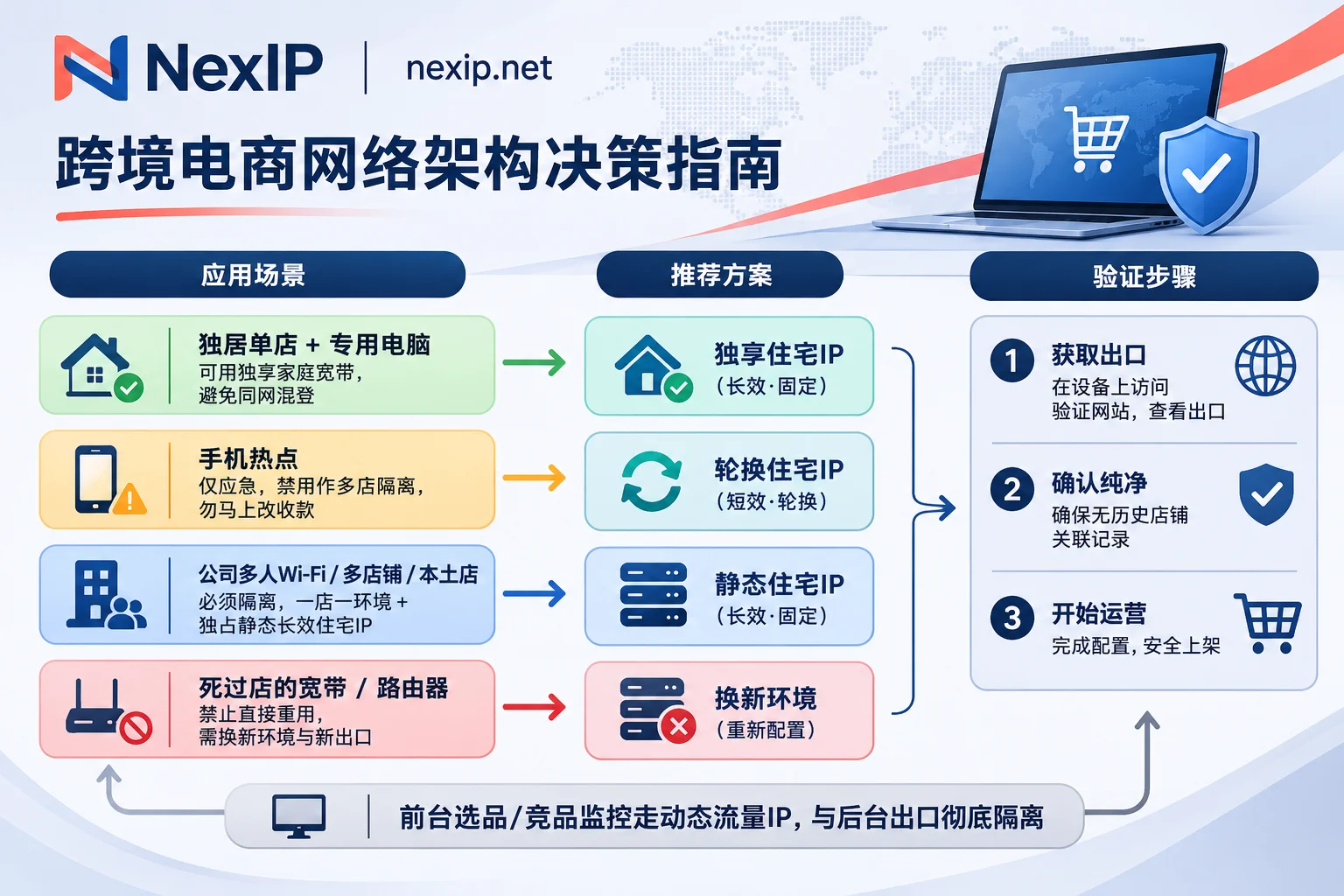
In team scenarios, the safest approach is to completely separate the "network exit" and "browser environment" into one-to-one independent units—i.e., one store, one exit, one environment (for specific verification steps, see How to Configure Amazon Store IP? 5-Step Verification for One Store One Exit).
1. Use an Exclusive Static Long-Lived Residential IP for the Store Backend
For the Seller Central and advertising backend, the core requirements are long-term fixed, residential nature, and not shared with others. Do not use rotating dynamic proxies that change every few minutes, and avoid obvious cloud server/data center ranges.
In such long-term account maintenance backend management scenarios, you can use NexIP Static Residential Proxy · Long-Lived IP (View NexIP Static Long-Lived Residential IP Product Page):
- Exclusive fixed exit: Billed monthly or annually, unlimited traffic, the exit address remains fixed long-term after purchase, avoiding location jumps when team members log in from different locations or workstations;
- Selectable subtypes: Offers residential native, residential broadcast, and data center subcategories, supports native dual ISP (specific countries, cities, carriers, and prices are subject to the official website's real-time page), and provides free replacement within the validity period if it fails;
- Selection coordination for local and cross-border stores: If you operate an overseas local company entity store, or need to handle strict Protocol 3 video verification and entity consistency reviews, it's advisable to prioritize verifying the registration location and local carrier attributes, and distinguish between residential native and residential broadcast (refer to NexIP's Native IP vs. Broadcast IP Comparison and 2026 Amazon Store IP Configuration Guide);
- Team permissions and access: Supports HTTP/HTTPS/SOCKS5 protocols and username/password or IP whitelist authentication. You can centrally manage exits and assign sub-accounts in the NexIP User Backend, preventing employees from directly obtaining original credentials and logging in randomly on personal devices.
It must be clear: NexIP only handles the network exit layer. To achieve true anti-association, you also need to pair each store with an independent physical computer or fingerprint browser isolation container to separate cookies, Canvas/WebGL fingerprints, and cache together (for the difference between built-in IPs and self-configured proxies, see For Cross-Border E-Commerce, Is a Fingerprint Browser's Built-in IP Better or Should You Buy Your Own Proxy IP?).
2. Use Dynamic Traffic IPs for Frontend Product Selection, Price, and Review Monitoring
Even with only one store, as long as your team needs to frequently check competitor prices, hijacker situations, or keyword rankings on the frontend, you should completely separate frontend scraping traffic from the backend store IP.
This part of public web access tasks is suitable for NexIP Dynamic Residential Proxy · Traffic Package (View Dynamic Traffic Package), billed by actual traffic consumption (GB), supporting per-request rotation or sticky sessions, keeping high-frequency requests in the dynamic pool without polluting the clean static exit for the seller backend (for selection details, see Which Proxy IP to Use for Scraping Amazon Competitor Prices).
4. Can Broadband from a Banned Store Be Used for a New Store After Restarting the Router and Changing IP?
When a store is banned, many sellers' first reaction is: "I'll power off the optical modem for ten minutes and restart, check that the public IP has indeed changed—can I just register a new store directly?"
In practice, it's highly not recommended to gamble like this. There are three reasons:
- Restarting often still gets an IP in the same nearby subnet: Home broadband redials mostly jump within the same gateway address pool of the local ISP, with high C-segment proximity.
- A banned store often doesn't just "die on IP": The previously banned store likely left hardware and environmental features on the same computer, same router intranet, or even the same browser configuration. Changing only the public IP without changing the terminal environment or cleaning registration and payment association factors means the new store will still be traced.
- Don't expect to find a "complete IP login table" in the backend after a ban to prove innocence: Many articles mislead sellers into exporting a complete historical login IP detail table from Seller Central. In reality, the seller backend's
设置(Settings) > 登录设置(Login Settings)mainly shows the registration email, password, phone number, and two-step verification security settings. There is no independent panel where you can directly view the full historical login IPs with one click (only local operation logs like the "Account Transparency Log" in the advertising backend record the IP at the time of corresponding operations). Therefore, once the old environment has had an incident, rebuilding with a new environment, new entity information, new terminals, and a brand-new independent exit is far more cost-effective than "trial-and-error restarts" on the old broadband.
5. Pre-Login 4-Step Self-Checklist: Follow This Whether Using Broadband or Buying an IP
Regardless of whether you decide to run a single store on exclusive broadband or configure an independent static residential proxy for your team, before officially registering or binding a store, it's recommended to go through all four items:
- Verify exit attributes and purity: Confirm the exit is not a data center range or a high-risk shared pool. If it's a self-purchased proxy exit, before binding, check ASN, attribution, and blacklist records according to Which Items to Verify Before Binding a Static Residential IP to the Store Backend.
- Check for real IP and DNS leaks: After opening an independent browser environment, check whether WebRTC, IPv6, and DNS resolution expose the local real network, and whether the system time zone and language match the target environment.
- Implement "one person one permission, one store one exit" in detail: Prohibit logging into personal Amazon buyer accounts in the store environment, do not mix multiple stores on a shared team computer, and never run plugins to scrape the frontend in the store environment.
- Set up two-step verification (2SV) based on an authenticator app in advance: It's more stable than pure SMS codes, avoiding being stuck on the login page due to failure to receive SMS during cross-region network fluctuations or device verification.