 NexIP官方博客
Most people follow tutorials to fill in IP, port, and credentials, complete the SOCKS5 proxy configuration, but still encounter connection failures, timeout errors, or web pages that open but the IP hasn't changed. 90% of the time, it's not the proxy node that's broken, but rather three hidden limitations of protocols and clients:
- Entry points don't support native SOCKS5: Windows' built-in "Settings → Proxy" is mainly for HTTP/HTTPS, and iOS and Android Wi-Fi system proxies also don't natively support SOCKS5.
- Chromium-based browsers reject SOCKS5 with authentication: Chrome, Edge, Playwright, and various Chromium-based automation tools do not support SOCKS5 username/password authentication. Passing credentials directly throws
Browser does not support socks5 proxy authentication, and some tools may silently ignore credentials and fall back to direct connection. - DNS still resolves locally: In
curl, Python, or Firefox, missing the remote resolution flag (socks5h://or corresponding checkbox) causes requests to go through the proxy while domain resolution still uses the local network, leading to inaccessible domains or DNS leaks.
If you already have working proxy parameters but are stuck at connectivity or verification, you can directly refer to the table below to identify the cause and then adjust to the correct configuration for your scenario.
Identify Your Client: SOCKS5 Support Boundaries Across Different Clients
| Entry Point | Native SOCKS5 Support | SOCKS5 Username/Password Authentication | Default DNS Resolution Location | Recommended Workaround or Correct Setup |
|---|---|---|---|---|
| Windows System Proxy | Only partial compatibility with old Control Panel, modern settings only HTTP/HTTPS | Very likely to fail | Local | Use client port forwarding or process proxy |
| iOS / Android Wi-Fi Settings | Not supported | Not supported | Local | Use third-party proxy clients that support SOCKS5 |
| Chrome / Edge (Chromium) | Only supports no authentication | Not supported | Depends on extensions or system | Switch to HTTP endpoint, IP whitelist, or ZeroOmega with HTTP |
| Playwright / Puppeteer | Only supports no authentication | Not supported (throws error) | Depends on parameters | Change to http:// endpoint + separate credential fields, or use IP whitelist |
| Firefox Browser | Native support | Supported (popup input) | Default local, need to manually check remote | Check "Proxy DNS when using SOCKS v5" |
| curl / Python Requests | Native support | Supported | socks5:// local, socks5h:// remote | Uniformly rewrite to socks5h:// |
Issue 1: SOCKS5 Filled in Windows and Mobile System Settings But Not Working
Many people, upon receiving proxy information, first open Windows "Settings → Network & Internet → Proxy → Manual proxy setup" and fill in the SOCKS5 address and port. The result is either all web pages fail to open after saving, or the browser still shows the local IP.
The reason is that the manual proxy entry in modern Windows settings only parses HTTP/HTTPS proxies; directly filling in a SOCKS5 port cannot complete the protocol handshake. Similarly, in iOS and Android system Wi-Fi proxy options, only HTTP manual/automatic configuration is provided, with no native SOCKS5 protocol entry.
Correct Approach
- Avoid blindly enabling system-wide proxy: Even if you force SOCKS settings through the old "Internet Options", a global proxy will route local online banking, chat apps, and system updates through the proxy exit, easily causing disconnections or account anomalies.
- Isolate traffic by client or process: If you need a specific desktop software or scraping tool to use a fixed exit, it's recommended to use a local proxy client that supports SOCKS5 authentication for port forwarding, or directly use process-level proxy rules to only capture the target program. For details, refer to our previous article "How to Make Only One Software Use a Proxy with Process Proxy".
- Switch to a compatible protocol on the access side: If you are using a service like NexIP that provides HTTP / HTTPS / SOCKS5 multi-protocol exits, there's no need to struggle with system entry points that don't support SOCKS5—simply switch to HTTP authentication format in the NexIP dashboard, or use the client's port forwarding / process proxy mode. This maintains the same residential exit IP while bypassing system compatibility issues.
Issue 2: Chrome, Edge, and Playwright Throw Errors with SOCKS5 Credentials
When doing automated testing, data collection, or AI Agent web operations, the most common error is:
Error: Browser does not support socks5 proxy authenticationOr after passing --proxy-server=socks5://user:pass@host:port in Chrome launch parameters, you encounter net::ERR_SOCKS_CONNECTION_FAILED, hangs and timeouts, or even silent fallback to direct connection in some third-party headless browsers, exposing your real IP.
This is not a bug in a particular scripting framework, but rather Chromium's underlying network stack does not support SOCKS5 authentication with username and password. When you embed user:pass@ in the URL, Chromium ignores the user info and attempts an unauthenticated handshake, which is rejected by the proxy gateway. If you explicitly pass socks5:// with username / password in Playwright's proxy object, Playwright will intercept and throw the above exception before launching the browser.
Three Engineering Alternatives
- Switch to HTTP endpoint + separate credential fields (most recommended)
For Playwright, Playwright MCP, or various Chromium-driven scripts, as long as the target site uses HTTPS, the browser can still complete end-to-end TLS encrypted forwarding through the HTTP proxy'sCONNECTtunnel. Security is not lower than SOCKS5, and Chromium natively supports HTTP basic authentication. Note: do not embed credentials in the URL; instead, split them into separate fields:
const { chromium } = require('playwright');

const browser = await chromium.launch({
  proxy: {
    server: 'http://proxy-host:port',
    username: 'YOUR_USERNAME',
    password: 'YOUR_PASSWORD',
    bypass: 'localhost,127.0.0.1'
  }
});- Continue using
socks5://, but switch authentication to IP whitelist
If your business must use SOCKS5 (e.g., for general underlying forwarding), simply removeusernameandpasswordand let the proxy server allow access based on the source public IP. Then both Chromium and Playwright can connect tosocks5://host:portnormally. For example, in NexIP, the user dashboard supports both username/password authentication and IP whitelist authentication. When running automation on fixed servers or cloud hosts, adding a whitelist is easier than passing credentials. For how to choose between the two, see "How to Choose Between Proxy IP Username/Password Authentication and Whitelist Authentication". - Set up a local unauthenticated relay, or switch to Firefox
If the server can only provide SOCKS5 nodes with credentials, you can run a lightweight forwarding tool locally listening on127.0.0.1without password, which then forwards with credentials to the upstream; or directly use Firefox, which natively supports SOCKS5 popup authentication.
Chrome/Edge Extension Tip: As browsers advance the Manifest V3 specification, the old SwitchyOmega has been gradually deprecated. For manual proxy switching, we recommend ZeroOmega, which is compatible with new specifications. However, if you configure authenticated SOCKS5 within the extension, it is still subject to Chromium's core mechanism. It's better to prioritize HTTP endpoints provided by the service provider or use with a whitelist.
Issue 3: Exit IP Changed but Target Site Still Unreachable? Beware of DNS Leaks Caused by socks5://
Many developers and operators encounter a strange phenomenon: when using curl or scripts to test IP websites, it shows an overseas IP, but accessing specific overseas login pages or localized APIs still times out, or backend risk control still identifies an abnormal region.
The problem often lies in DNS resolution location. Taking curl and Python requests as examples, in client conventions, socks5:// and socks5h:// are not two versions; the only difference is who translates the domain name to an IP:
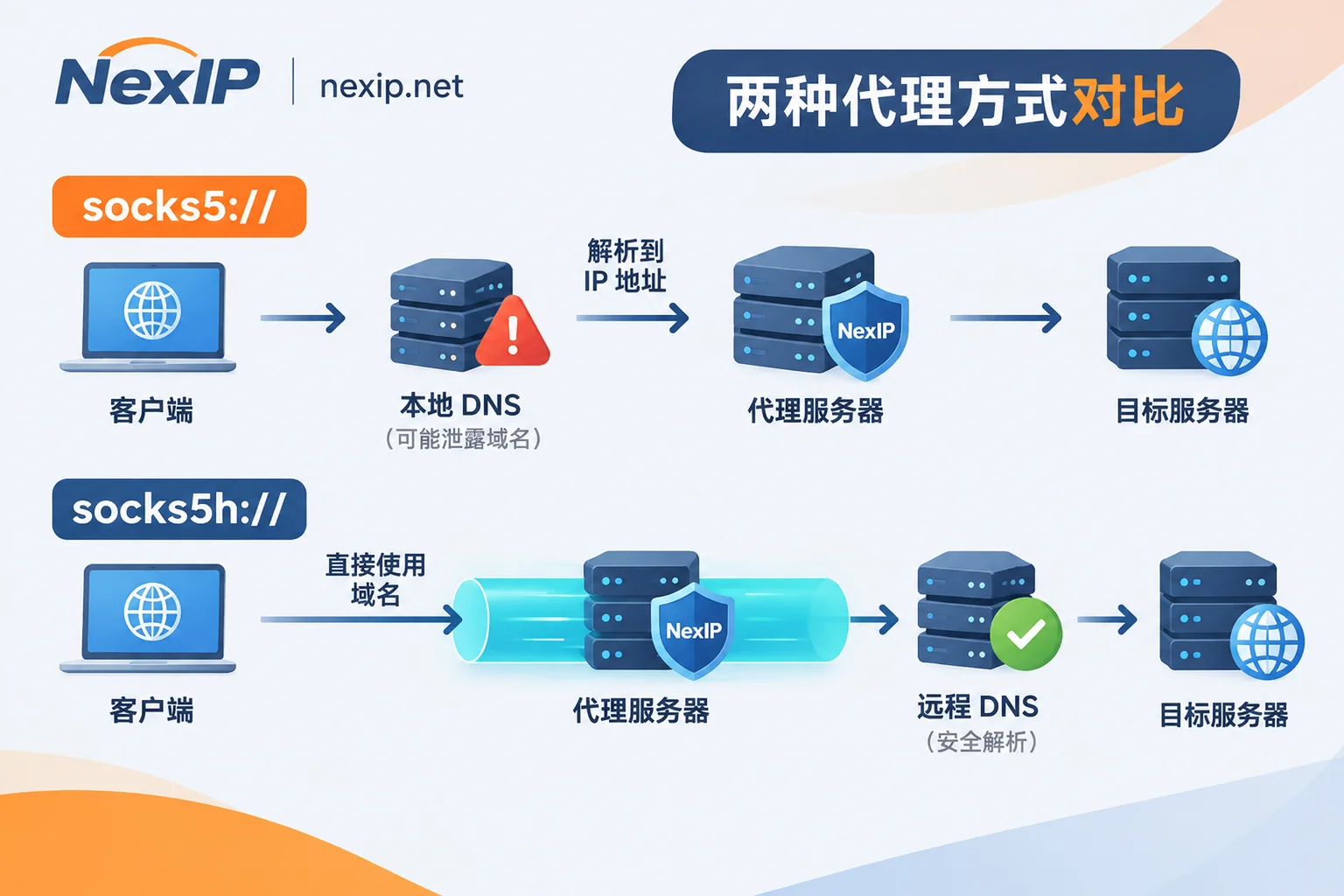
socks5://(orcurl --socks5): The client first resolves the domain to an IP using the local network's default DNS, then sends that IP to the SOCKS5 proxy. If the local DNS cannot resolve the domain, is polluted, or the target site returns different node IPs based on resolution source, requests will fail or be misrouted, and the local ISP can also see your domain query records.socks5h://(orcurl --socks5-hostname): The client directly hands the original domain name to the proxy server, and DNS resolution is completed by the proxy exit's network, making the request path and exit perspective completely consistent.
Correct Ways to Prevent DNS Leaks on Various Platforms
- Command-line
curlverification: Changesocks5://in the command tosocks5h://, and it's recommended to pass parameters via--proxy-useror write to a private config file to avoid leaving passwords in command-line history:
curl --proxy "socks5h://proxy-host:port" \
  --proxy-user "YOUR_USERNAME:YOUR_PASSWORD" \
  --connect-timeout 10 --max-time 20 \
https://api.ipify.org- Python
requests/ scraping scripts: First ensure SOCKS dependencies are installed (pip install "requests[socks]"), and uniformly writesocks5h://in theproxiesdictionary:
import requests

proxies = {
    "http": "socks5h://USER:PASS@proxy-host:port",
    "https": "socks5h://USER:PASS@proxy-host:port",
}
resp = requests.get("https://api.ipify.org", proxies=proxies, timeout=15)
print(resp.text)
For more complete asynchronous frameworks (HTTPX, AIOHTTP) and Playwright integration, see "How to Integrate Residential Proxies into Python Scraping Scripts".
- Firefox browser: In "Settings → General → Network Settings → Manual proxy configuration", fill in the SOCKS host and port, select SOCKS v5, and be sure to check "Proxy DNS when using SOCKS v5". Without this, Firefox will still use local DNS.
Issue 4: Configuration Completely Correct but Still Timing Out or 407? Check These 4 Details
If after ruling out system entry points, Chromium authentication limitations, and DNS issues, it still doesn't work, check the following four items one by one:
- Special characters not escaped: Many dynamic residential proxy usernames carry country, city, or sticky session parameters, and passwords may contain symbols like
@,:,#. If directly concatenated into thesocks5h://user:pass@host:portstring, the parser will truncate at the first@, causing authentication failure. For special characters, URL-encode them (e.g., write@as%40), or use separate fields. - Confusing platform login credentials with proxy authentication credentials: What you fill in the proxy client is not the email and password for the proxy website login, but the proxy channel credentials or sub-account credentials generated in the console.
- Local/corporate firewall blocking non-standard ports or protocol signatures: Some corporate intranets, campus networks, or antivirus software block common proxy ports like
1080, or intercept unencapsulated SOCKS5 handshake traffic. During testing, first check port connectivity via command line, or switch to a common port provided by the service provider (e.g., HTTPS tunnel port). - Sticky session expiration causing long connection interruption: If you configure a sticky session for dynamic residential proxies, once the session duration limit is reached or the upstream residential node goes offline, the original link will disconnect. For long-term login state, don't rely on dynamic parameters; instead, plan session cycles in advance by referring to "How to Set Sticky Sessions to Avoid Login State Loss".
After Configuration Works, Which Exit Type Should Different Businesses Choose to Avoid Wasted Effort?
Getting the protocol channel working is only the first step. What really determines task stability is whether the mounted IP type matches the business.
- Large-scale web scraping, SEO/SERP monitoring, ad verification, and AI data crawling: These tasks are not afraid of exit rotation; they fear anti-scraping blocks or uncontrolled traffic costs. After accessing via
socks5h://or HTTP endpoint, it's suitable to pair with NexIP's dynamic residential proxy · traffic plan, setting per-request rotation or sticky sessions as needed; for continuous, stable-throughput sentiment monitoring or inventory tracking, consider the dynamic residential proxy · bandwidth plan billed by port bandwidth. - Short-term account verification, payment testing, and API integration: During testing, the biggest fear is sudden IP changes causing integration interruption. For such hourly or daily tasks, you can directly choose the static residential proxy · short-lived IP billed by IP with unlimited traffic.
- Cross-border store backends, social media accounts, and long-term TikTok operations: If you need fixed exits for long-term business accounts, SOCKS5 proxy configuration, do not use dynamic rotation pools; instead, bind each account to an exclusive static long-lived residential IP (choose native residential or broadcast residential based on risk control strictness, with free replacement upon failure), and use fingerprint browsers or independent process rules to achieve one-to-one isolation of environment, account, and network exit.
All products support quick access via API extraction, username/password, port forwarding, and process proxy in the NexIP user dashboard, and support sub-account quota allocation and targeting by country, city, ASN, and ISP (subject to real-time inventory).
Two-Step Pre-Launch Checklist
Every time you change proxy configuration, don't just check if the browser can open web pages. Spend 30 seconds on these two verification steps before running tasks:
- First test the minimal loop with command line: Use
curlwithsocks5h://to run an exit IP check, confirming it returns the target proxy IP and no timeout. If this step fails, prioritize checking whitelist IP, credential escaping, and local firewall; don't rush to change business code. - Then check for leaks in the real runtime environment: In the browser actually running the business (e.g., Firefox or fingerprint browser) or Playwright context, open IP and DNS detection pages and verify three things—exit IP location matches the order region, DNS resolution server belongs to the proxy side rather than local ISP, and WebRTC does not expose real internal or public IP (for WebRTC protection methods, see "Impact of WebRTC Leaks on Proxy IP Security and Protection").
As long as you straighten out "whether the client supports SOCKS5 credentials" and "whether DNS uses socks5h remote resolution", over 90% of SOCKS5 proxy configuration failures can be identified and resolved within minutes.