 NexIP官方博客
When Amazon displays an "abnormal activity" warning during login, do not switch nodes and retry repeatedly. There are three common network-side causes:
- The exit IP changes during the same login session, usually caused by routing rules or rotating proxies;
- Location signals mismatch, such as DNS or WebRTC revealing a location in a different country from the exit IP;
- The exit IP source has high risk, such as data center ranges, shared proxies, or public Wi-Fi.
The recommended troubleshooting order is: first determine which situation you are in, then stop retrying, and sequentially check the exit, routing, leaks, IP source, and login behavior. For long-term operation of a seller backend, the more reliable approach is to assign each account an exclusive, fixed exit.
One thing to note: Amazon does not publicly disclose the specific rules and thresholds for determining "abnormal activity." The following content is based on eliminating common causes and cannot guarantee that verification will not be triggered again after troubleshooting.
First, identify which type you are encountering
Different prompts require different handling, so match your situation first.
1. After changing networks, you are asked to enter a verification code once
This is a normal security mechanism. When Amazon detects a change in the network environment, it invalidates the previously checked "remember on this device" and requires two-step verification again. Network changes include switching between Wi-Fi and mobile data, changing access points, or a change in the public exit IP.
- If the network remains unchanged after completing verification, it usually will not occur frequently afterward.
- If every login requires verification, it often means your exit is changing each time. You can directly refer to steps 1 to 3 below.
2. Verification code after verification code, entering a verification loop
This situation is often related to the risk of the exit IP or proxy characteristics. IP ranges flagged as data center (IDC), shared proxies, public Wi-Fi, or IPs with a history of abuse are more likely to be continuously required to pass human verification. Focus on steps 4 and 5.
3. Account temporarily locked, or required to submit identity documents
Common causes include high-frequency login attempts from multiple different public IPs in a short period, or frequent jumps in login location between different regions. This looks like account theft or credential stuffing to risk control systems.
When the account is already locked, stop first
After the account is locked, trying a few more IPs is equivalent to continuing to create a signal of "high-frequency attempts from multiple IPs," which may make things worse.
The more reliable approach is:
- Stop all login attempts, including those from colleagues;
- Submit materials according to Amazon's page prompts or official recovery process;
- Complete network troubleshooting while waiting;
- After recovery, log in only from the one fixed exit that has been verified.
The problem with public Wi-Fi has been repeatedly mentioned in seller forums. Networks in hotels, cafes, and shared offices are shared by many people, and the exit history is uncontrollable, so they are not recommended for logging into the backend.
Six-step network troubleshooting
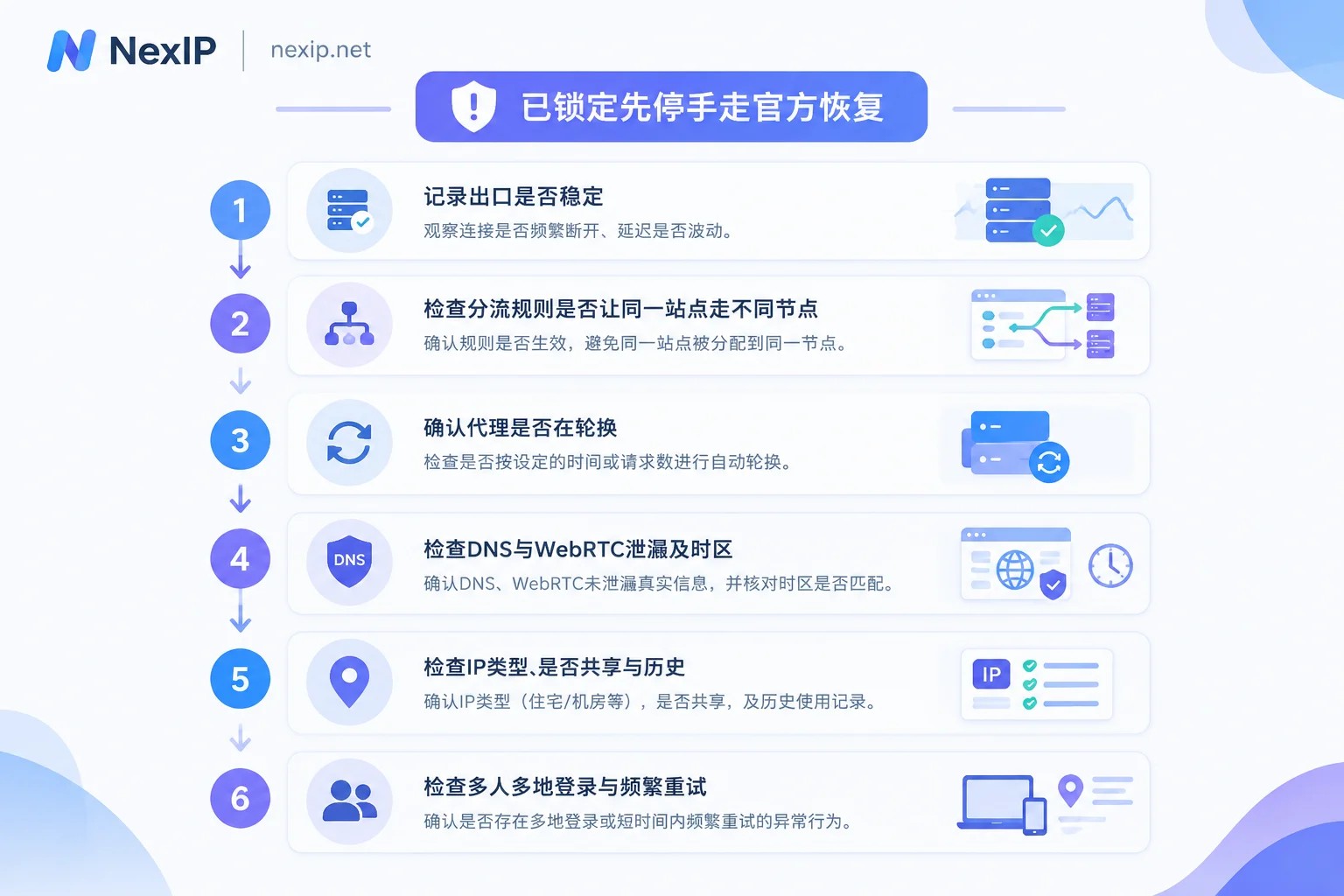
Step 1: Record the actual exit and see if it is stable
Use the same browser (or the same browser profile) that you use to log into Amazon to open an IP lookup page, and note the following:
- Exit IP;
- Country and city;
- ISP or ASN;
- IP type (residential or data center).
Then refresh several times over a few minutes, and also navigate around the Amazon pages a few times before checking again. If the IP changes, it means the exit is drifting within the same session. This is the most common cause of "verification every time."
Step 2: Check routing rules to avoid Amazon requests going through different nodes
Many proxy tools route by domain. If the rules are fragmented, this can happen: sellercentral.amazon.com goes through node A, while interface and static resource domains loaded by the page go through node B, and some requests even go direct. As a result, Amazon sees the same session as coming from multiple exits.
Troubleshooting method:
- Open the Network panel in the browser developer tools, refresh the backend page, and see which domains the page actually requests;
- Compare with the proxy tool's rules to confirm these domains all point to the same exit;
- If you do not want to maintain rules one by one, you can route this entire browser profile through the same proxy, without splitting by domain.
Step 3: Confirm whether the proxy itself is rotating
The rotation mode of dynamic residential proxies changes IPs per request or per time interval. Sticky sessions can last for a while, but they also switch after expiration. Such exits are suitable for tasks like data collection and price monitoring, but not for backend logins that require session continuity.
If you are using a rotating proxy to log into the backend, the drift seen in step 1 basically explains the "repeated verification."
Step 4: Check DNS, WebRTC leaks, and time zone
The exit IP is in the United States, but DNS resolution goes through domestic servers; or WebRTC exposes the local real IP. These cause conflicting location signals.
- DNS: Use a DNS leak detection page to check the actual DNS servers in use. Their location should match the country of the exit IP. If not, enable remote DNS resolution in the proxy tool, or route DNS requests through the proxy.
- WebRTC: Use a WebRTC detection page to check the displayed public IP. If your local IP appears, you need to restrict or disable WebRTC exposure in the browser.
- Time zone and language: System time zone and browser language being too far from the exit region can also become additional inconsistency signals.
This step is more related to the browser environment. Teams using fingerprint browsers like NexBrowser can set this uniformly in each profile.
Step 5: Check the source of the exit IP
If the first 4 steps are normal but you are still stuck in a verification loop, the problem is likely with the IP itself. Check three things:
- Type: Check the ASN and IP type. If it shows as a data center or hosting provider, the probability of being blocked is usually higher. You can refer to How to distinguish real residential IPs from fake residential IPs.
- Whether shared: For a shared exit, you cannot control its history. See How to tell if the IP you bought is truly exclusive for verification methods.
- History: If the same IP has been used for high-frequency access before, its reputation may already be damaged. If the provider supports replacement, you can simply change to a new one, which is more convenient than repeatedly trying verification codes.
Step 6: Check login behavior
Even with a clean network, the behavior itself can trigger it. Common situations include:
- Team members logging into the same account from different cities and different networks;
- Multiple devices online at the same time;
- Rapid consecutive retries after entering the wrong password.
It is recommended to agree to log in only through the same fixed exit, and use backend user permissions for division of labor, rather than sharing one set of credentials among multiple people. For how to allocate team credentials and exits, see How to configure proxy IP permissions for team collaboration.
After troubleshooting, what exit should the backend use
Conclusion: Scenarios like seller backends that require long-term session continuity are suitable for exclusive, fixed static residential IPs, with one account corresponding to one exit. Automatic rotating dynamic proxies are not recommended. Trade-offs for the following situations:
- Long-acting or short-acting: The backend needs long-term use, so choose static long-acting IPs with monthly or yearly terms. Short-acting IPs are suitable for temporary tasks; using them on the backend means changing IPs when the rental period ends, triggering another round of verification.
- Which subclass of long-acting IP to choose: Backend logins are sensitive to IP type, so prioritize home broadband types (home broadband native or home broadband broadcast). Data center subclasses are more suitable for tasks with lower IP type requirements.
- Use of dynamic proxies: Front-end price, ranking, and search result monitoring are still suitable for dynamic proxies, just separate them from the backend exit. For detailed distinctions, see Dynamic IP or static IP for Amazon seller backend.
- Region: The exit country usually matches the store site and the daily operating location. For the relationship between IP location and registered address, see this breakdown.
- Access and authentication: Fill in the proxy in the browser or fingerprint browser profile; the protocol can be HTTP/HTTPS or SOCKS5. For authentication, whitelisting is easier for fixed office networks; for multiple devices or mobile work, username/password is more flexible.
After getting the IP, it is recommended to verify before logging in:
- Check type, ASN, and country as in step 1, and refresh multiple times to confirm the IP does not change;
- Confirm no DNS or WebRTC leaks as in step 4;
- When logging in with a new exit for the first time, a two-step verification is normal; after completing it, keep this exit unchanged;
- Log in only from this exit afterward. If verification still pops up frequently, go back to steps 5 and 6.
If you determine that you need an exclusive fixed exit for the backend, you can choose home broadband native or home broadband broadcast on the Static Residential Long-Acting IP page of NexIP, and select the country according to the store site. These IPs can be replaced for free if they become invalid. Available countries can be confirmed first in Coverage by country. A fixed exit can reduce verification caused by network changes, but whether the account can be used normally ultimately depends on compliant operations and platform review.




Comments(0)