 NexIP官方博客
First, the conclusion: A true US residential IP is an address assigned by a US consumer broadband ISP (such as Comcast, AT&T, Charter, Verizon) to a home broadband line. In terms of ASN ownership, such IPs belong to the ISP, and in network intelligence databases like IPinfo, the connection type shows as isp, not hosting. If the ASN points to a cloud provider or hosting company, such as AWS, OVH, DigitalOcean, Hetzner, then no matter how the seller labels it, it is not a residential IP.
The tricky cases are those in between: some IPs “look like they belong to an ISP” but actually send traffic from a data center. Below, we first clarify the various forms, then provide a verification sequence after acquisition.
Conditions a True Residential IP Must Meet
To determine if a US IP is truly residential broadband, you need to check all three of the following:
- The ASN belongs to a US consumer ISP. For example, Comcast's AS7922. Note that “ISP” does not equal “residential broadband”; some ISPs allocate certain IP ranges for enterprise dedicated lines or hosting services.
- The address block is used for home broadband access. Risk control databases tag IPs with a Usage Type or connection type, and residential blocks are marked differently from data center blocks.
- The traffic actually originates from a home line. This cannot be determined from registration information alone; it can only be inferred from network characteristics, such as reverse DNS hostnames in ISP format, typical asymmetric upload/download speeds of home broadband, and latency consistent with the claimed city.
Meeting only condition 1 does not guarantee a true residential line.
Three Common Forms of “Fake Residential” IPs
1. Data center IPs falsely labeled as residential. This is the crudest form. Vendors sell cloud or data center IPs as residential proxies, but the ASN directly points to a hosting provider. A single lookup reveals it: if the ASN Organization or Usage Type shows Hosting / Data Center, it is not a residential IP.
2. Broadcast IPs from data centers (BGP broadcast, non-native). For these IP blocks, the registration information (Whois/ARIN records) is in one place, while the actual data center or access network is elsewhere. They use BGP announcements to pull IP blocks from other locations or third parties into a data center and then forward traffic. In some simple geolocation databases, they may temporarily show the target city, but there are three common flaws: unreasonable route hop counts; inconsistency between ASN ownership and the actual egress network; and database update delays that cause the location to “drift” across databases and over time.
3. Registered under an ISP but servers located in data centers (often called ISP proxies or static residential proxies). The registration and ASN of such IPs belong to telecom ISPs, and lookups return ISP, but the underlying servers are usually deployed in data centers to ensure sufficient bandwidth and 24/7 availability. This is not necessarily fraud by the seller; many vendors clearly state this form. What you need to know is that strict risk control systems do not just look at ASN; they also comprehensively detect traces of data center infrastructure, abuse history of neighbors in the same /24 subnet, and egress routing characteristics, thereby identifying it as a commercial proxy.
Therefore, terms like “native,” “broadcast,” and “data center” must be verified against specific fields, not just product names. For details on how fake residential IPs are packaged, refer to How Fake Residential IPs Are Packaged.
Verify in This Order After Acquisition
First, obtain the real egress IP through the proxy, not the IP you saw when ordering. For an HTTP proxy, for example:
curl -x http://用户名:密码@代理地址:端口 https://ipinfo.io/jsonThe returned ip, org (including ASN and organization name), city, and region form the basis for subsequent checks. Then follow the order below; if a step fails, no need to continue:
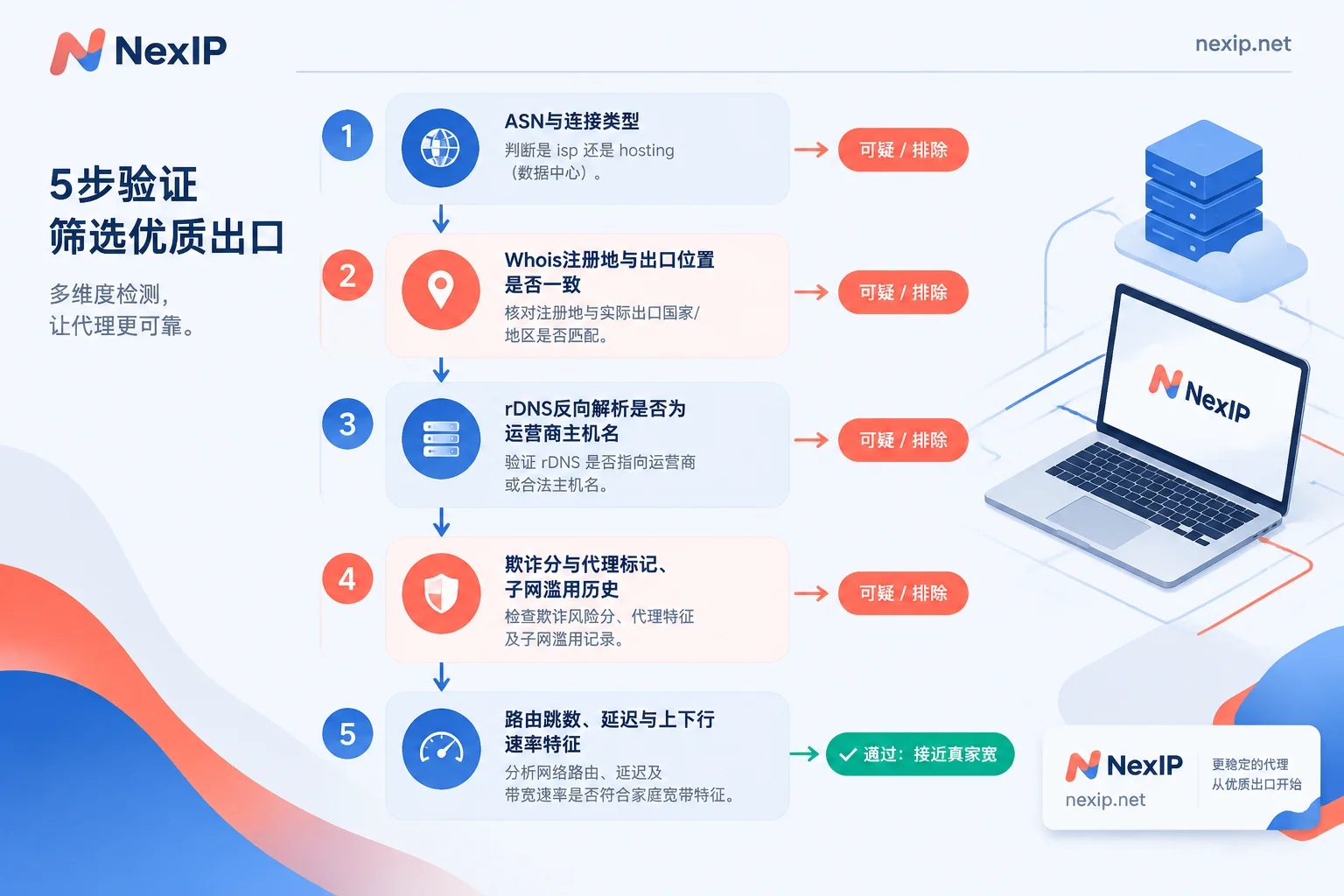
Step 1: ASN and usage type. org should be a US consumer ISP, not a cloud provider or hosting company. Query the IP on IPinfo's website and check whether the connection type is isp or hosting. Some fields may not be returned in the free API, so rely on the web query results. If the result is hosting, you can rule it out immediately.
Step 2: Registration location vs. egress. Use Whois to check the registration ownership of the IP block and compare it with the city shown by multiple geolocation databases. If an ISP registered in location A has an egress in a data center in location B, or if different databases give vastly different locations, these are typical signs of a broadcast IP. You can check again after a few days to see if the location drifts.
Step 3: Reverse DNS (rDNS/PTR).
nslookup 出口IP
# 或
dig -x 出口IP +short
True residential broadband usually returns a hostname in ISP format, such as names ending with comcast.net, att.net. Data center disguised IPs often have no PTR, or point to domains containing “hosting” or “vps”. Note that not all real residential broadband has PTR records; lack of PTR is only a demerit, not conclusive on its own.
Step 4: Risk and fraud scores. Use risk databases like Scamalytics or IPQS to check Fraud Score, Proxy/VPN flags, and abuse history of the subnet. The third form (data center-hosted ISP proxies) often reveals itself here: the ASN is fine, but it is flagged as a proxy, or the neighbor segment has a dirty history.
Step 5: Network characteristics. Use traceroute to check hop counts and the network ownership of the last few hops, and test latency from a US location to see if it matches the claimed city. If possible, run a speed test to see if upload/download shows the typical asymmetry of home broadband. Fully symmetric upload/download, high bandwidth, and no fluctuation throughout the day are more indicative of a data center.
Refer to the table below for interpretation:
| Check Item | Typical True Residential Broadband | Suspicious Signs |
|---|---|---|
| ASN / Connection Type | Consumer ISP, isp | Cloud provider, hosting, hosting |
| Registration vs. Egress | Consistent, similar across databases | Inconsistent, location drifts |
| rDNS | ISP-format hostname | No PTR, or contains vps/hosting |
| Risk Databases | No proxy flags, clean subnet | Proxy flags, neighbor abuse history |
| Network Characteristics | Latency matches city, asymmetric speeds | Abnormal hops, symmetric high bandwidth |
One more caveat: the internal risk thresholds and proprietary IP reputation databases of platforms are not public, and there is no standard that guarantees passing a specific platform's checks just by completing these five steps. These checks help you confirm what type of IP you bought and avoid being misled by product names, but they cannot replace the target platform's own judgment.
Which Tier Your Task Requires
Not every task needs the “most genuine” residential broadband; choosing based on use case is more cost-effective:
- Data scraping, SERP monitoring, ad verification: The core requirements are request dispersion and accurate geolocation. Generally, dynamic residential proxies are used, with rotation or sticky sessions chosen based on the request pattern. For such tasks, sampling checks with steps 1 and 2 above are sufficient; no need to verify rDNS for every IP.
- Scenarios requiring fixed egress, such as store backends, social media accounts, and TikTok operations: You need exclusive, fixed, long-term unchanging IPs, and platforms are more sensitive to IP attributes. It is recommended to go through all five steps and then bind the account. For more items to verify before binding, see What to Verify Before Binding a Static Residential IP to a Store Backend.
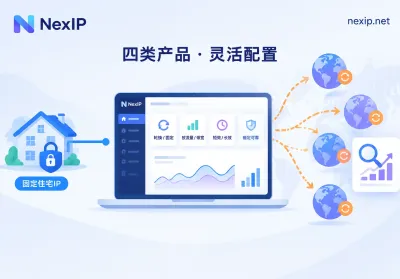
If you are sure you need a fixed US egress, NexIP's Static Residential Long-Lasting IPs offer exclusive use on a monthly or yearly basis, divided into three subcategories: native residential broadband, broadcast residential broadband, and data center. You can know exactly which type you are buying before ordering. For scenarios with high requirements for registration consistency, such as TikTok operations as recommended on the official website, prioritize native residential broadband; broadcast residential broadband and data center are suitable for uses that are less sensitive to attributes and more focused on cost or stability. IPs can be replaced for free if they fail, but after acquisition, it is still recommended to verify them yourself using the steps above. If you are doing scraping or monitoring, just go to Dynamic Residential Traffic Plans.
Additionally, IP only determines the network egress. Browser fingerprints and the account's own status also affect platform judgments, and these need to be handled separately.


Comments(0)