 NexIP官方博客
The dividing line between the two models is actually quite simple: how many bytes each request transfers, whether it's predictable, and how stable the workload is.
- Small per-request size (a few KB to tens of KB), intermittent tasks, large peak-to-valley differences → Traffic-based (GB) billing is more cost-effective; you don't pay when you're not running.
- Large per-request size (full-page rendering, media resources), continuous 24/7 throughput, stable concurrency → Bandwidth-based billing is more cost-effective; costs are capped, no surprise bills.
The tricky part is that many people underestimate their per-request transfer volume by one to two orders of magnitude. So what you really need to do is not compare price lists, but first measure your own load.
What the two billing methods actually measure
Traffic-based billing measures the total inbound and outbound bytes transferred between the client and the target server through the proxy. Here are some easily overlooked details:
- Both uplink and downlink are usually counted. Large POST bodies and file uploads also consume quota.
- Failed requests are still counted. Bytes transferred before a timeout, 403 pages, and CAPTCHA pages all go through the proxy.
- Retries are a multiplier. A 30% retry rate means your bill directly increases by 30%.
Bandwidth-based billing measures the peak transfer rate allocated to you (in Mbps, or given as a fixed number of channels/concurrent connections), with no limit on total transfer volume within the agreed period. You're buying the thickness of a pipe, not the volume of a bucket. The pipe's thickness determines your ceiling; how much you put in the bucket no longer costs extra.
Expressed in cost terms: traffic-based billing costs grow linearly with business volume, with constant marginal cost; bandwidth-based billing is a fixed cost, where the larger the business volume, the lower the unit cost, but there's a hard cap at the rate limit.
First measure three numbers: per-request size, total requests, retry rate
The formula for estimating monthly traffic consumption is simple:
Monthly traffic ≈ average per-request transfer size × estimated monthly requests × (1 + failure retry rate)
Among these three, the first is the easiest to misestimate.
Using requests/httpx to fetch HTML directly, a product page might be just tens of KB; switching to Playwright or Puppeteer for full rendering loads images, fonts, JS bundles, tracking scripts, and ad slots—easily reaching several MB per page. The traffic difference between the two data-fetching methods for the same target site can be over 50 times. Multiply that by concurrency and retries, and a GB-based bill can grow exponentially.
How to measure accurately:
- Browser DevTools: Open the Network panel, run the target page once, and check the total Transferred at the bottom (not the decompressed size under Resources). This is the quickest rough estimate.
- In-script counting: Accumulate the actual bytes of each response (including headers) on the proxy session, run 200–500 real requests, and take the average—far more reliable than a single sample.
- Reconcile with the provider's dashboard: Start with a small quota, run only this type of task for half a day, then divide the usage shown on the dashboard by the number of requests in your logs. This gives you the "real-world" figure, including overhead you can't measure in code.
The retry rate should also come from real logs; don't just guess 5%. If the success rate is declining recently, the retry rate will quietly inflate your traffic bill—in that case, don't rush to switch plans; first determine whether it's an exit issue or a target site issue. Otherwise, switching to a bandwidth plan just turns overspending into queuing timeouts.
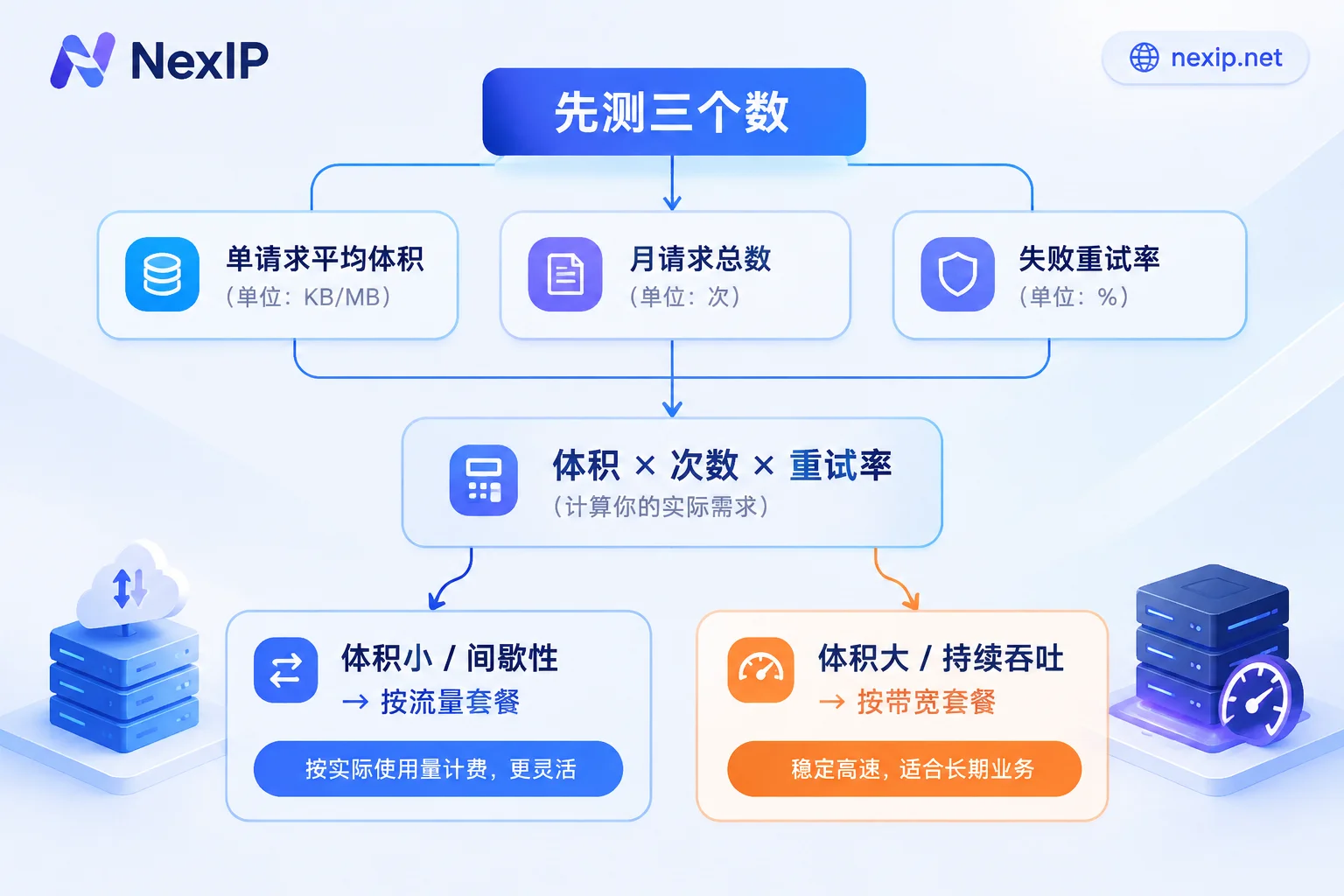
Once you have the three numbers, compare the converted monthly traffic cost with the cost of a bandwidth plan with equivalent capacity. The conclusion is usually clear-cut: If the converted traffic cost is significantly higher than a fixed bandwidth plan, or if the business itself requires continuous throughput around the clock, a bandwidth plan is more suitable; if the task runs for two hours a day, once a week, or has obvious peak-valley activity periods, the flexibility of a traffic plan is more valuable.
If you choose traffic billing, engineering efforts should focus on traffic reduction
In pay-per-GB scenarios, saving money can be coded:
- Block unnecessary resources: When using a headless browser, abort requests for image, media, font, and stylesheet types at the routing layer. For scraping tasks that only need text and structured data, this step often cuts most of the traffic.
- Avoid rendering when possible: First check if the target data is hidden in an XHR/JSON endpoint; if you can hit the API directly, don't load the whole page.
- Enable compression: Make sure requests include
Accept-Encoding: gzip, br; text responses compress significantly. - Control retries: Add exponential backoff and a retry limit; don't retry deterministic failures (404, clear block pages).
- Use different exits for different task types: Lightweight text scraping and tasks requiring full-page rendering don't need to share the same billing method.
For details on how to configure proxies in clients for various languages and how to intercept resources in Playwright, refer to Residential Proxy Integration in Python Scraping Scripts.
If you choose bandwidth billing, handle concurrency and bursts in advance
Unlimited traffic doesn't mean unlimited speed. The risks of a bandwidth plan lie elsewhere:
- Peak rate is a hard constraint: If instantaneous concurrent connections are too high, or a single connection saturates the pipe for a long time, you'll see queuing, packet loss, soaring latency, and many timeouts. Timeouts trigger retries, which further consume bandwidth, creating a vicious cycle.
- Implement active rate limiting on the engineering side: Use queues to control in-flight requests, connection pools to reuse connections, and smooth out the load curve instead of a spike at the top of every hour. Better to keep concurrency at 70–80% of the bandwidth limit than to max it out.
- Clarify burst handling: When exceeding allocated bandwidth, whether the provider queues, throttles, rejects connections, or charges extra on a tiered basis varies. Confirm this before ordering—it's worth far more than troubleshooting afterwards.
There's a category of needs that doesn't fit this either/or
If you need a long-term fixed exit for a store backend, social media account, or ad account, then what matters is not GB or Mbps, but whether the IP is exclusive, whether it changes mid-way, and how to replace it if it fails. Such needs correspond to static resources billed by IP and duration: short-term by hour or day for temporary verification and short tasks; long-term by month or year for accounts and backends requiring stable binding.
Static residential IPs further split into native home broadband, hosted home broadband, and data center—risk control systems see different information, and uses differ. For sensitive operations like TikTok, the official recommendation is native static residential IPs. Before binding, check which fields to verify against What to verify before binding a static residential IP to a store backend.
In other words, first decide "rotating or fixed," then "traffic or bandwidth." Doing it in reverse wastes time—the complete selection process for tasks like SERP monitoring is detailed in this article.
Where to make the choice
To sum up, on NexIP there are two entry points:
- Discrete requests, controllable size, pay-per-use, need rotation or sticky sessions → Dynamic Traffic Plan, billed by traffic, sessions can rotate or remain sticky.
- Continuous high concurrency, high proportion of full-page rendering or media resources, want to fix costs → Dynamic Bandwidth Plan, billed by bandwidth, unlimited traffic.
Both support API extraction, username/password, port forwarding, and process proxy integration; protocols cover HTTP/HTTPS and SOCKS5; authentication can be via username/password or whitelist. How to choose authentication method, see How to choose between username/password and whitelist authentication.
How to verify after you get it
Don't switch all production tasks over immediately. Follow this order:
- Run samples with a small quota: Use real scripts and real target sites to run hundreds to thousands of requests, recording request counts and success rates from your logs.
- Reconcile with the dashboard: Divide the dashboard usage by your request count to get the real "average traffic per request." The difference from your earlier estimate determines whether you need to reselect a plan.
- Set quota alerts: Traffic plans must have alert thresholds; an infinite loop or retry storm in code can burn a month's quota in hours.
- Stress-test peak for bandwidth plans: Gradually increase concurrency, record the concurrency at which latency and timeout rates start to deteriorate, and set production concurrency below that with headroom.
- Continuously monitor traffic per thousand requests: If this metric spikes abnormally, it usually means the target site added more resources or your blocking rules have failed.
A final reminder: proxies only handle the network exit layer. Browser fingerprints and account environments are separate matters—don't assume the whole chain is stable just because you chose the right billing model.



Comments(0)