NexIP官方博客
When the scraping success rate drops from 90% to 20-30%, the first instinct is often to switch proxy pools or max out retry attempts. Both make troubleshooting harder: swapping pools erases the scene, while brute-force retries can push a task that was merely rate-limited into a real blacklist.
The correct first step isn't choosing between "exit" and "target site," but first checking which layer the error falls on. This cut automatically sends the two problem types to opposite sides, usually within minutes.
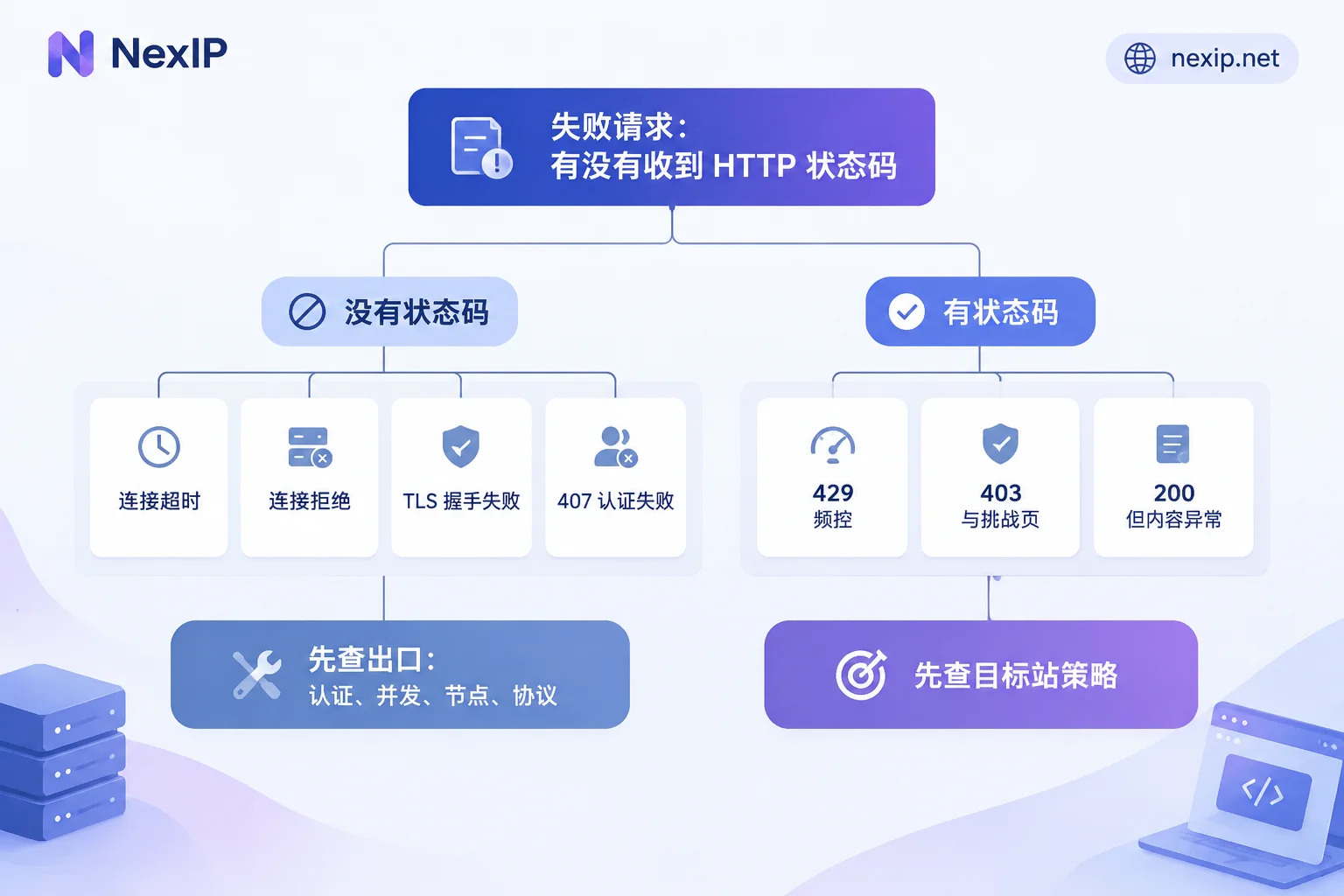
First cut: Did the request even reach the target site?
Scan the logs of the most recent batch of failed requests and answer only one question: did you get an HTTP status code returned by the target site?
No status code — check the exit first. Typical signs are Connect Timeout, Connection Refused, TLS handshake failure, or 407 Proxy Authentication Required. These errors mean the request is stuck on the link from you to the proxy, or from the proxy to the target site, and never reached the target's server—the target's risk control at that moment is irrelevant.
Got a status code (403, 429, 503, even 200) — the exit link is working. The physical path is fine; you're blocked at the application layer: the target saw your request and decided how to handle it. Swapping proxy pools is likely useless here, and may even make things worse by triggering stricter verification on the new IP.
One case can fool this rule: error pages returned by the proxy gateway itself also carry status codes. If you receive a 502/503 with a short response body and no page characteristics of the target site, first confirm whether it came from the gateway or the target—replay the same URL through a different exit, or if allowed, compare with a direct connection.
Along the exit path: check four items in order
1. Authentication. 407 almost always falls here. For username/password auth, check for typos in region or session parameters concatenated into the username; for whitelist auth, the more common failure is that your own public egress IP changed—restarting the router, switching office network lines, or a cloud host swapping elastic IPs can invalidate the old whitelist. For the applicable scenarios and pitfalls of each auth type, see How to Choose Between Proxy IP Username/Password Auth and Whitelist Auth.
2. Concurrency and connection count. Did you just increase the thread count before the success rate dropped? Most plans limit concurrent connections; exceeding it often manifests as timeouts or connection refused rather than an explicit "over quota" error. Set concurrency back to the original value and run a small batch; if it recovers, the problem is pinned here.
3. Node and gateway reachability. Do a minimal reproduction: use curl through the same proxy to request an IP echo endpoint and see if it connects and how long it takes. If it works, the exit is alive; if not, it's on the node or gateway side.
4. Protocol and port. Wrong HTTP/HTTPS/SOCKS5 port, or configuring a proxy only for http and not for https, can manifest as "some requests work, some fail entirely"—easily misread as the target site selectively blocking.
If all four are normal, shift focus back to the target site.
Along the target site path: triage by response characteristics
429: Adjust pacing first, don't rush to add IPs
429 Too Many Requests is unambiguous—the link is fine, you've hit the rate limit. Adding proxies or shortening retry intervals only pushes concurrency higher, prompting the other side to tighten thresholds further.
First read the Retry-After in the response headers; if present, wait according to it; if not, use exponential backoff (1s, 2s, 4s… with random jitter) while smoothing out instantaneous bursts—many tasks' problem isn't total volume but a burst of requests in the same second. Once pacing is stable, if throughput is still insufficient, consider spreading requests across a larger rotating pool to bring per-exit frequency below the threshold.
The order can't be reversed: control speed first, then distribute exits. Doing it the other way just uses more IPs to hit the same wall.
403, JS challenge pages, CAPTCHAs: do a baseline replay
These responses mean the other side flagged you as an anomalous source, but "anomalous" could mean the IP or the client fingerprint. A single A/B replay separates the two:
Take a failed URL and replay the same request using your local real browser on a native home broadband network, with as consistent headers as possible.
- Native environment opens fine, proxy exit fails → problem leans toward exit identity: the IP or ASN reputation has been tightened by the target, and datacenter ranges and broadcast address ranges are more likely to be flagged. The direction is to switch to an exit type closer to real home broadband, not to keep tweaking code parameters.
- Native environment also rejected → not much to do with the exit. It could be the target site upgraded its risk control overall, your session/cookie expired, or client characteristics like header order or TLS (JA3) fingerprint are exposed. Keep looking on the client side.
During replay, change only one variable at a time (only swap exit, or only swap client), otherwise the conclusion is unusable.
200 but wrong content: soft block or redesign
Counting only the proportion of HTTP 200s misses the most painful failure type: status code normal but returning a blank page, security verification placeholder, or login redirect—i.e., soft block; another possibility is the target's frontend redesigned and API fields were renamed, so the parser gets no data.
To distinguish these, log at least three things: status, content-length, and the first few hundred bytes of the response body. If content-length collectively shrinks to a fixed value, it's likely a soft block; if length is normal but structure changed, that's a redesign—your own parsing code's job, unrelated to proxies.
An often overlooked pitfall: fake rotation
You configured a rotating proxy, and the IP parameter in logs differs each time, but the actual exit is always the same—this is more common than you'd think. The cause is in the HTTP client's long connections and connection pool: when reusing the same Session object, the underlying layer by default reuses the established TCP connection for the same domain, and the proxy is determined at connection time, so subsequent requests continue through the old exit until that IP is banned.
There's only one reliable verification method: in the real task's code path, hit an IP echo endpoint every few requests and log the returned exit IP. If it's the same multiple times in a row, rotation isn't working. The fix is to create a new session/connection pool per batch, or explicitly disable keep-alive reuse. For specific implementations in various Python clients, see How to Integrate Residential Proxies into Python Scraping Scripts.
The reverse also holds: for tasks that need to maintain login state, if the connection pool is frequently rebuilt and the exit changes on every request, the session will mysteriously drop—that's a configuration issue in the other direction. Refer to How to Set Up Sticky Sessions So Login State Doesn't Drop Midway.
After diagnosis, then decide how to adjust the exit
By this point, the conclusion usually falls into one of three categories, each with different actions:
Rate limit hit (mainly 429). Fix pacing and concurrency first; when you truly need more throughput, use rotating dynamic residential exits to spread frequency. These tasks have low IP reuse and usage fluctuates with the task—Dynamic Traffic Plans bill by traffic and support rotation or sticky sessions, a good fit; for long-running tasks with hard-to-estimate traffic, Dynamic Bandwidth Plans bill by bandwidth with unlimited traffic, making accounting easier.
Exit identity recognized (baseline replay confirms the issue is on the IP side). The direction is to switch to exits closer to real home broadband, not to keep adding volume to the pool. Residential IPs vary greatly in actual origin—verify them yourself upon receipt, don't just trust the label. How Fake Residential IPs Are Packaged lists several things you can self-check.
The task itself requires a fixed identity. Scenarios requiring login, multi-step sessions, and sensitivity to IP drift (store backends, social media accounts, TikTok operations) — frequent IP changes are actually the trigger for verification. These need exclusive fixed static residential exits, choosing between Static Short-Lived IPs and Static Long-Lived IPs based on business cycle; the latter comes in three types: native home broadband, broadcast home broadband, and datacenter. For TikTok operations, the official site recommends static native home broadband. For how to tier the two by cycle, refer to How to Choose Between Static Short-Lived and Static Long-Lived Residential IPs.
The exit only solves the "where you come out from" part. If the baseline replay points to browser fingerprint or the account itself, no IP swap can fix it—that falls under browser environments (NexBrowser) and account side (NexSHOPX, NexSMS).
Ten-minute troubleshooting checklist
Follow in order, don't skip:
- Stop expanding retries and swapping pools, preserve the scene logs.
- Sample 50 failed requests, split into "has status code" and "no status code" piles.
- No status code pile → check authentication, concurrency, node reachability, protocol/port in order.
- Has status code pile → triage into 429 / 403 & challenge pages / 200 with abnormal body.
- 429: read
Retry-After, back off and reduce bursts, then evaluate if a larger rotating pool is needed. - 403 & challenge pages: do baseline replay in native environment, change only one variable at a time.
- 200: check content-length and first few hundred bytes of body, distinguish soft block from page redesign.
- Throughout, use IP echo to confirm whether rotation is actually working.
- Only after the conclusion is clear, adjust exit type and rotation strategy—this step comes last.
Two premises that can change the conclusion
This sequence works for most cases, but two things need adjustment based on your actual situation.
Which protection the other side uses. Cloudflare, Akamai, DataDome, and various in-house rate-limiting modules have different sensitivity weights for TLS fingerprints and IP types: some are nearly zero-tolerance for datacenter ranges but don't care much about request pacing, others the opposite. When first encountering a site, the actual baseline replay result is more reliable than any general experience.
Which type of scraping client you use. Pure protocol scraping (Requests, cURL, HTTPX) getting 403—suspect header order and TLS fingerprint first; headless browsers (Playwright, Puppeteer) getting 403—more likely browser driver characteristics and automation traces. The troubleshooting points differ; don't apply experience from one to the other.