NexIP官方博客
When purchasing residential proxies, the most common pitfall isn't buying an IP that isn't residential, but buying an IP that's been packaged as residential—a query tool shows the name of a telecom operator, but the actual routing origin is still a data center. Such exits are often called fake residential IPs (or fake home broadband).
Here's the conclusion upfront: To judge whether an exit is usable, don't stop at whether the IP database shows it as an ISP. What really determines whether you pass is the target platform's composite audit—the ASN's network type, reverse DNS, physical routing path, protocol stack fingerprint, and historical reputation are all examined together. So when purchasing, the question isn't "is it a residential IP?", but rather "which type of residential IP is it, where is the ASN attribution written, and can I verify it myself?"
How Fake Residential IPs Are Created
There are three common paths, with varying costs and stealth levels.
First, IDC IPs with spoofing + BGP announcement. Address blocks held by IDCs are announced via BGP to networks that appear residential, while modifying Whois Org and Type fields, or submitting attribution corrections to third-party IP databases. The result: when you check with a regular query interface, it shows a broadband operator; but the actual routing origin and upstream carrier network are still data centers. Low-level detection passes, but platforms doing cross-audits see the contradiction.
Second, falsely labeling "dual ISP" or virtualizing to simulate home terminals. Behavior characteristics of home terminals are simulated on data center servers, claiming to be dual ISP or home broadband lines, but the ASN still points to Hosting-type networks, not consumer ISPs serving individual users. Such IPs often have better latency and stability than real home broadband, which ironically becomes a vulnerability.
Third, mixing IP pools. What's sold as a "residential pool" actually mixes in data center IPs at a certain ratio to cut costs. This is hardest to spot during procurement: the first few IPs you test are fine, but after thousands of requests, the success rate starts dropping, and you spend hours troubleshooting thinking it's a script issue.
One thing to clarify: Home broadband broadcast IPs are not a scam in themselves—they're a clearly existing resource type that's sufficient and cost-effective in many scenarios. The problem is selling broadcast IPs, or even data center IPs, uniformly labeled as "native residential." The same resource, clearly labeled, is normal business; mixed labeling is fake residential. For the actual difference between the two, see What's the difference between native home broadband and broadcast home broadband for static long-lasting residential IPs.
What Platforms Are Checking
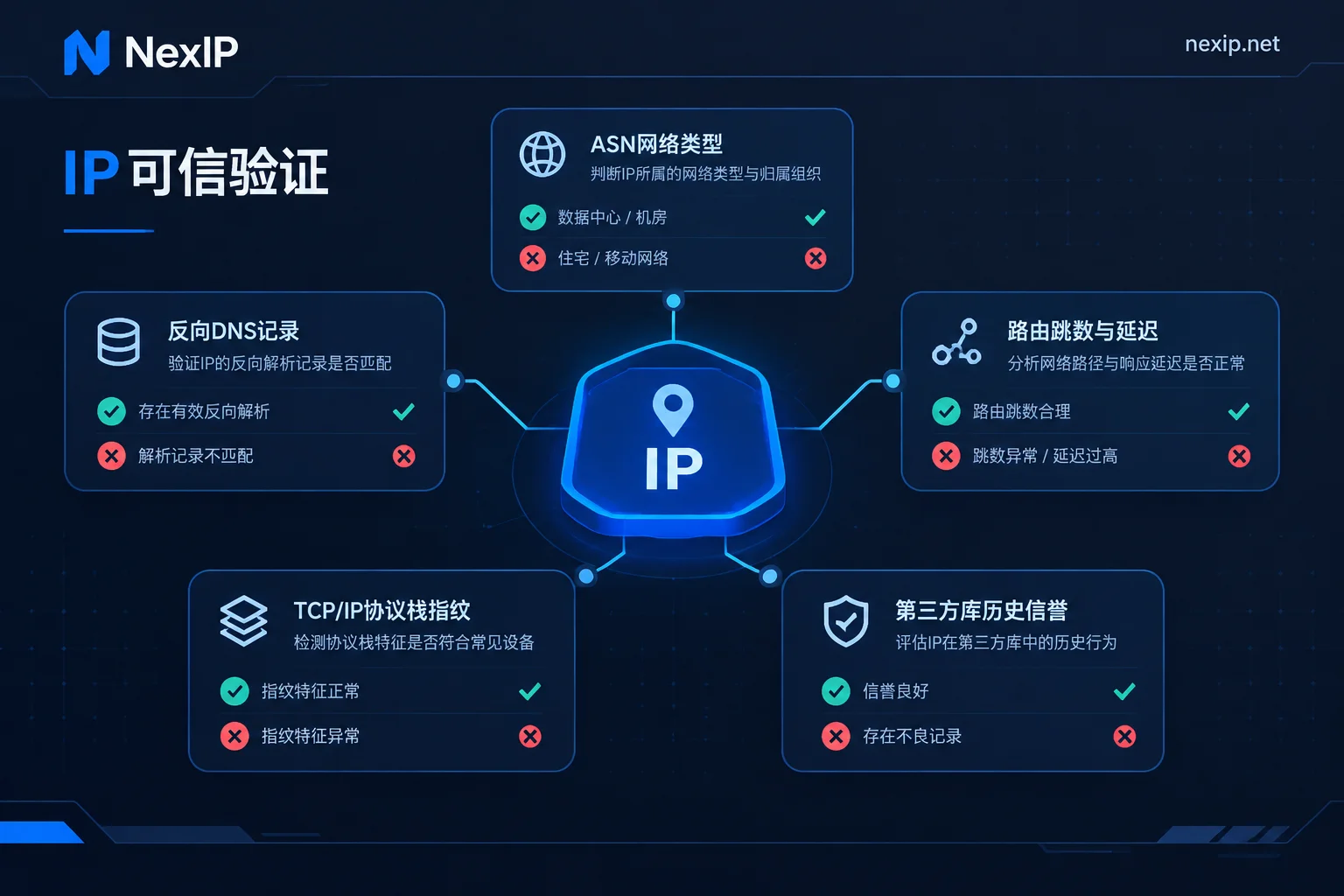
Laying out the detection logic helps you know what to verify. Mainstream risk control systems typically cross-reference these signals:
ASN and network type classification. This has the highest weight. Whether the autonomous system the IP belongs to falls under Hosting/Data Center categories or under broadband operators serving residential users (e.g., mainstream home broadband ISPs in various countries) is a hard dividing line. The organization name in Whois can be changed, but the ASN's network property classification in the global routing table is much harder to alter.
Reverse DNS (rDNS/PTR). Data center IPs often have PTR records with obvious server naming conventions, while home broadband operators' dynamic address pools have their own naming habits. A mismatch between naming style and claimed attribution is an easy catch.
Physical routing and latency consistency. Which network the last few hops of a traceroute land on, whether the hop count matches real home access patterns, and whether latency distribution is too "clean"—all these are compared against the claimed geographic location.
TCP/IP stack and OS fingerprint. Claiming to be a home terminal but showing server OS stack fingerprints at the底层 creates inconsistency. This is increasingly used in high-risk scenarios.
Historical reputation from third-party databases. Historical abuse records and connection type annotations from sources like IPinfo, MaxMind, and Scamalytics are included as supplementary evidence in scoring.
A reminder: these signals are jointly judged, not a single veto. Seeing a bad score from one tool doesn't mean the IP will necessarily be rejected; conversely, passing one check doesn't mean it's safe. Treating any single metric as the sole cause usually leads to dead ends.
How to Verify Yourself After Receiving
The following can be run the same day you get the IP, and the order matters—first verify network attribution, then behavior.
Step 1: Check ASN and organization name. Use an IP information query API to see AS number, organization, and usage type. The key isn't whether there's an operator name, but whether the AS is classified as consumer broadband. If the organization is a broadband company but usage type is hosting, that's a typical contradictory signal.
Step 2: Reverse-check rDNS. Look at the PTR record's naming pattern and whether it matches the claimed operator. No PTR record isn't a problem per se, but an obviously data center-style name raises questions.
Step 3: Run traceroute. See which network the last few hops land on and whether they're within the city range you specified when ordering. If you did city or ASN targeting, this step also verifies whether targeting parameters actually took effect—see City targeting and ASN targeting: how to fill parameters when ordering and how to verify upon receipt.
Step 4: Cross-reference multiple sources. Use at least two independent IP databases plus a risk scoring site, and don't conclude based on a single result. Different databases have different update cycles and judgment criteria.
Step 5: Check DNS leaks and WebRTC. Even if the exit IP is correct, DNS resolution may still go through your local machine or local ISP—a common leak in scenarios requiring geographic consistency.
Step 6: Sample proportionally, don't just test the first one. Especially for dynamic pools, test across different time periods and rotation batches to see if the pool is mixed.
If these IPs are for fixed scenarios like binding to store backends, add more acceptance items—What to verify before binding static residential IPs to store backends lists more details.
One more point: Don't take "not blocked yet" as verification passed. Many platforms process with delays and layers; current passage doesn't mean the exit has no issues at the network level. Base judgments on objective network-layer metrics, with behavior as supplementary reference only.
Not All Tasks Need True Native
Spending money on the right tier is more practical than always buying the most expensive. By task:
Large-scale scraping, SERP monitoring, ad landing page verification. The core needs are many IPs, accurate regions, and controllable rotation; the "native-ness" of a single IP isn't decisive. Dynamic residential pools with rotation or sticky sessions suffice—the key is not miscalculating billing and usage estimates. See Which type of residential proxy for overseas SERP rank monitoring and How to configure exit IPs for multi-country ad landing page verification.
Multi-step processes requiring maintained login state. What matters is that the exit doesn't change during the session; focus on sticky session parameter configuration to avoid IP drops mid-process—How to set sticky sessions so login state doesn't drop covers this.
Store backends, social media accounts, long-term TikTok operations. These scenarios require exclusive, fixed, long-term IPs, and have the highest platform risk control—this is where you must use native home broadband. NexIP's official recommendation for TikTok operations is static native home broadband IPs; for tier details, see Which type of residential IP for TikTok operations.
Short-term projects, temporary verification, phased campaigns. Static short-duration is more suitable for cycles; see How to choose between static short-duration and static long-duration residential IPs for judgment methods.
Clear Classification Is Prerequisite for Verifiability
Back to the supplier level. The most direct indicator of a provider's trustworthiness isn't how many adjectives they use in marketing, but whether they name and price resources of different qualities separately.
NexIP's static long-lasting IPs are cut along this logic: native home broadband, broadcast home broadband, and data center are three independent subcategories—which to buy, at what price, and for what scenarios are separated on the order page, leaving no room to mix broadcast or data center IPs into "native." Static resources are exclusive and fixed, with free replacement on failure. The significance: when you verify using the above methods, the results should match the tier you purchased—transparent classification provides a reference frame for verification.
For access methods, API extraction, username/password, port forwarding, and process proxy are all supported; protocols cover HTTP/HTTPS/SOCKS5; authentication can be username/password or whitelist. This determines whether you can automate the verification process: fetch IP, check attribution, run routing, log results—the entire chain can be scripted and then allocated to business. For authentication trade-offs, see How to choose between username/password and whitelist authentication.
After going through a round based on the above, there are two entry points: for fixed exclusive exits, especially native home broadband, see Static long-lasting residential IPs; for rotation tasks like scraping, monitoring, and multi-region verification, see Dynamic residential traffic plans. To match specific platforms or industries, you can also work backward from the solutions page.
Final boundary note: exit IPs only address the network layer. Browser fingerprinting and environment isolation are handled by NexBrowser; accounts and SMS verification by NexSHOPX and NexSMS. No matter how clean the IP verification, if the browser environment doesn't match the IP's claimed region, language, and timezone, inconsistencies will still expose you. These three layers must be managed separately and verified independently—don't expect a better IP to cover all issues.