NexIP官方博客
Let's put the conclusion up front: when it comes to models being swapped out, a residential IP can only solve one category of the problem.
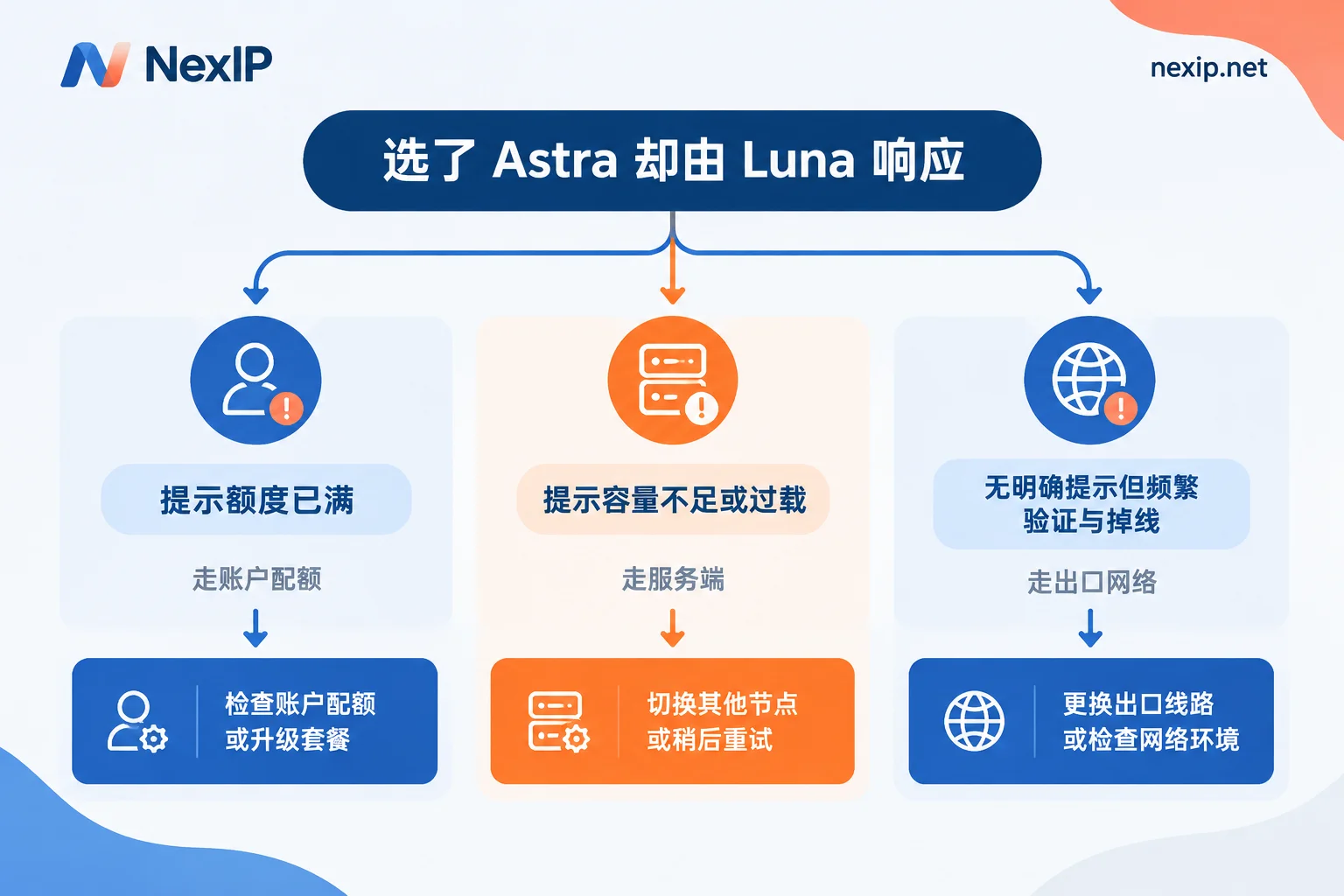
If the interface or logs explicitly say insufficient capacity, server overload, or that you've used up your current window's quota, that's a server-side and account-level issue—no matter what egress you switch to, it won't change. Only when degradation, repeated CAPTCHAs, and connection interruptions are concentrated on a specific network path does switching egress become the right move.
Below, we'll triage by symptom, then discuss how to configure and verify your egress.
Three categories of causes: you can rule out most just by reading the prompt text
Category 1: Account usage quota. OpenAI's usage management documentation for GPT-6 Astra is straightforward—Astra has high compute overhead and is subject to both a 5-hour window and weekly total quota based on subscription tier (Plus, Pro, Business, etc.). Exceeding the quota or being in a peak window may result in throttling. In such cases, the client usually gives a clear prompt and routes subsequent requests to a lightweight model. This is billing and quota logic, completely unrelated to where your IP is or how clean it is.
Category 2: Server capacity. Typical messages are our servers are currently overloaded or Selected model is at capacity. This has appeared in developer communities and third-party gateway issue logs: the request is configured with gpt-6-astra, but the upstream response is actually marked gpt-5.6-luna—the two don't match. This is a fallback made by upstream scheduling when it can't keep up. Switching egress won't solve it either; you can only stagger usage, retry, or proactively assign non-deep-reasoning tasks to a lightweight model.
Category 3: Egress network. This category lacks clear model degradation prompts and manifests more diversely: frequent CAPTCHAs, session login state dropping mid-way, page loading getting stuck then reconnecting, region detection not matching your expectations, long tasks like Codex breaking halfway. It doesn't directly change model selection, but it creates a lot of failures and reconnections, making the whole experience look like "it's constantly degrading."
One caveat not to miss: If you're using a third-party relay, aggregation gateway, or resold API, suspect the gateway first. Many gateways silently fallback to cheaper models when upstream errors occur—this has nothing to do with your network or account. Checking the gateway's routing configuration is faster than checking IPs.
A controlled test to characterize the issue in 30 minutes
Verbal judgment is unreliable; do a minimal controlled experiment:
- Same account, within the same time window (no more than a dozen minutes apart), prepare two egress paths—for example, the one currently in use and a US residential egress to be tested.
- Send the same set of requests on each path, explicitly specifying Astra, running each at least 10 times. Use the same prompt to avoid length differences.
- Record three things each time: the actual model identifier in the response, the original error text, whether CAPTCHA or reconnection was triggered. For API, check the model field in the response body; for web, check the model annotation in the session history.
Reading the results is simple:
- Both paths have similar degradation rates and both show capacity/quota messages → server-side or account quota. Switching IP is useless; adjust your window and usage rhythm.
- Only one path frequently fails, shows noticeably more CAPTCHAs, and responds slower → egress network issue; see below for selection.
- Both are normal, but you often encounter issues → likely a timing issue; move heavy tasks out of peak windows.
Incidentally: this controlled method is almost universally applicable for determining "is it my network?"—the same approach works for SERP monitoring and ad verification.
The parts of the egress network that truly need fixing
If it really falls into Category 3, the problem usually lies in these areas:
Egress is a datacenter range. Datacenter IPs carry a different weight in edge risk control compared to residential ranges; they are more likely to face strict rate limiting and more frequent verification challenges. For interactive sessions, this means you spend a lot of time clicking CAPTCHAs instead of using the model.
IP changes mid-session. This is underestimated. Using a rotating egress for long conversations or Codex tasks, a single change can make the server think the environment changed, triggering re-verification or even dropping login state; a task breaking halfway means starting over and consuming quota again. Long sessions must use an egress that does not change IP mid-session—this affects the experience more than "how clean the IP is." To understand exactly where changes occur, see How to set up sticky sessions to avoid losing login state mid-session.
Region detection inconsistent with account expectations. When the egress country, account registration region, and payment method conflict, you may be asked for additional verification. This isn't solved by a "better IP" but by consistency.
Shared egress dragged down by others. If the same egress also carries high-frequency automated traffic, the risk control cost is shared. For scenarios requiring stable interaction, dedicated is worth more than shared.
Which type of egress to choose
Choose by what you need to do—don't use one configuration for everything:
Daily interaction, long conversations, Codex long tasks, scenarios requiring persistent login state — choose a dedicated static US residential egress, preferably native residential. Two reasons: the IP doesn't change, so login state and environment characteristics remain continuous; and it belongs to a local residential ISP, so edge risk control issues fewer challenges. This corresponds to NexIP's static residential long-term IP, dedicated and fixed, monthly or yearly, with three subcategories: native residential, broadcast residential, and datacenter. For long sessions, go directly for native residential; for the difference between the two residential subcategories, see What's the difference between native residential and broadcast residential.
Short-term projects, temporary verification environments lasting only a few days — static short-term is more suitable; also dedicated and fixed, just with a shorter lease. For selection criteria, see How to choose between static short-term and static long-term residential IPs.
Multi-region comparison testing, bulk scraping of public pages, etc., without login state — use dynamic residential traffic plans, billed by traffic, rotatable or sticky, more cost-effective than occupying a fixed IP long-term. But don't use it for sessions requiring persistent login.
One boundary to clarify: the network egress only handles "where you come from." Browser environment fingerprint consistency is handled by NexBrowser, account and verification numbers by NexSHOPX, NexSMS. These three layers are separate; mixing attributions will only make troubleshooting messier.
Four common pitfalls when configuring
Protocol: Choose HTTP/HTTPS/SOCKS5 based on client support. Desktop clients and command-line tools usually find SOCKS5 easier.
Authentication method: If your local public IP is static, you can use whitelist; if it follows broadband changes, use username/password. Otherwise, when dial-up changes your IP, authentication will fail. For comparison criteria, see How to choose between username/password authentication and whitelist authentication.
Don't enable global proxy: Only route the ChatGPT client, Codex CLI, or specified browser through the proxy; keep other traffic on the local egress. Global proxy wastes bandwidth and mixes unrelated service traffic characteristics into the same egress. For specifics, see How to make only one software use a proxy with process-based proxying.
Access method: For a single machine using one egress long-term, port forwarding is simplest; for programmatic retrieval of multiple egresses, use API extraction. The difference is broken down in What's the difference between API extraction and port forwarding.
Four things to verify upon receipt
Don't rush to use it after configuration; verify first:
- Attribution check: Check the egress IP's ASN and ISP name—it should belong to a US local residential ISP, not a cloud provider. If the country is correct but the ASN is a datacenter range, it's as good as not configured.
- Consistency check: Egress region, system timezone, browser language, account region—all four should not conflict.
- Continuity test: Run a continuous session for 30 to 60 minutes, observing whether the IP changes, login state drops, or extra verification pops up. This step specifically exposes change issues.
- Controlled re-test: Go back to the A/B method above and run another round, comparing degradation rate, CAPTCHA count, and average response time between old and new paths. Numbers tell you if the switch was worth it.
There's one more verification method you can borrow: the layered criteria in How to judge the geolocation accuracy of overseas residential IPs also apply to steps 1 and 2 here.
If it's still degrading after switching egress
Then go back to Categories 1 and 2. These actions are more effective than switching IP:
- Read the prompt text carefully to distinguish between account quota exhaustion and global capacity shortage. For the former, either wait for the window to reset or adjust your subscription level.
- Grade your tasks: Give truly deep-reasoning tasks to Astra; formats, bulk rewrites, etc., to lightweight models. Save limited quota for what matters.
- Stagger usage: Move long tasks to low-load periods, especially Codex tasks that run for tens of minutes.
- Break down tasks: Split long tasks into resumable segments so a single interruption doesn't require starting over.
- Gateway self-check: If going through a third-party relay, check its fallback strategy. Don't attribute its degradation to the platform.
Finally, an unpopular but important note: currently, there is no public material proving that "switching to a residential IP will prevent further degradation." The platform's overload circuit breaker and cross-model fallback logic lack public details, and quota and compute peaks are hard constraints on the server side. What a residential egress can improve is the reputation and stability of the access path—fewer verification challenges, fewer mid-session disconnects, less wasted re-runs; it cannot change whether the server has compute for you. Keeping these two things separate will greatly improve troubleshooting efficiency.