 NexIP官方博客
In cross-border e-commerce multi-store management, TikTok account matrix operations, and maintenance of high-authority social media and AI accounts, "dual-ISP residential IP" has almost become a standard term when many teams purchase network egress. Many operators have a very direct selection criterion: get an IP, check it with a detection tool, and if both fields show isp, they think they have a "get-out-of-jail-free card."
But after actually putting it into business use, strange things often happen: despite the detection result showing dual ISP, why does TikTok still trap videos in low view pools, or why do Amazon and Facebook logins frequently trigger secondary verification?
The problem often lies in the term "dual ISP" itself being severely misused in the market. Different service providers and detection tools may refer to completely different underlying network structures when talking about dual ISP. If you don't first figure out which kind of "dual ISP" you're buying, it's easy to pay a high price and step into hidden risk control pitfalls.
1. The "dual-ISP residential IP" on the market actually mixes three meanings
When you consult service providers or search online for "dual-ISP residential IP," you will usually hear three distinct explanations. Only by separating these three layers can you see the real judgment logic of risk control systems:
1. "Dual-field ISP authentication" in detection databases (the most mainstream criterion)
In mainstream IP databases such as ipinfo.io, querying an IP's background usually returns two core dimensions:
- ASN (Autonomous System Number) level Type: represents the attribute of the autonomous system currently responsible for announcing the IP route to the Internet.
- Company (registrant) level Type: represents the attribute of the holder registered for the IP block in the registration authority (WHOIS).
When an IP's ASN Type and Company Type both show isp (Internet Service Provider, such as AT&T, Comcast, NTT, etc.) instead of hosting (data center hosting) or business (enterprise dedicated line), the community habitually calls it a "dual-ISP residential IP." For how to specifically verify these two dimensions, you can refer to our previous articles How to check if an IP's ASN belongs to an ISP and How to tell from WHOIS whether it's a data center or home broadband.
2. "Dual-carrier access" at the network link layer
In traditional network engineering, dual ISP refers to having redundant links or commercial cooperation authorization from two local broadband carriers at the access layer (for example, peering with multiple local ISPs upstream) to ensure connection stability when a single route fluctuates.
3. "Cross-region forwarding / fake dual ISP" to be wary of
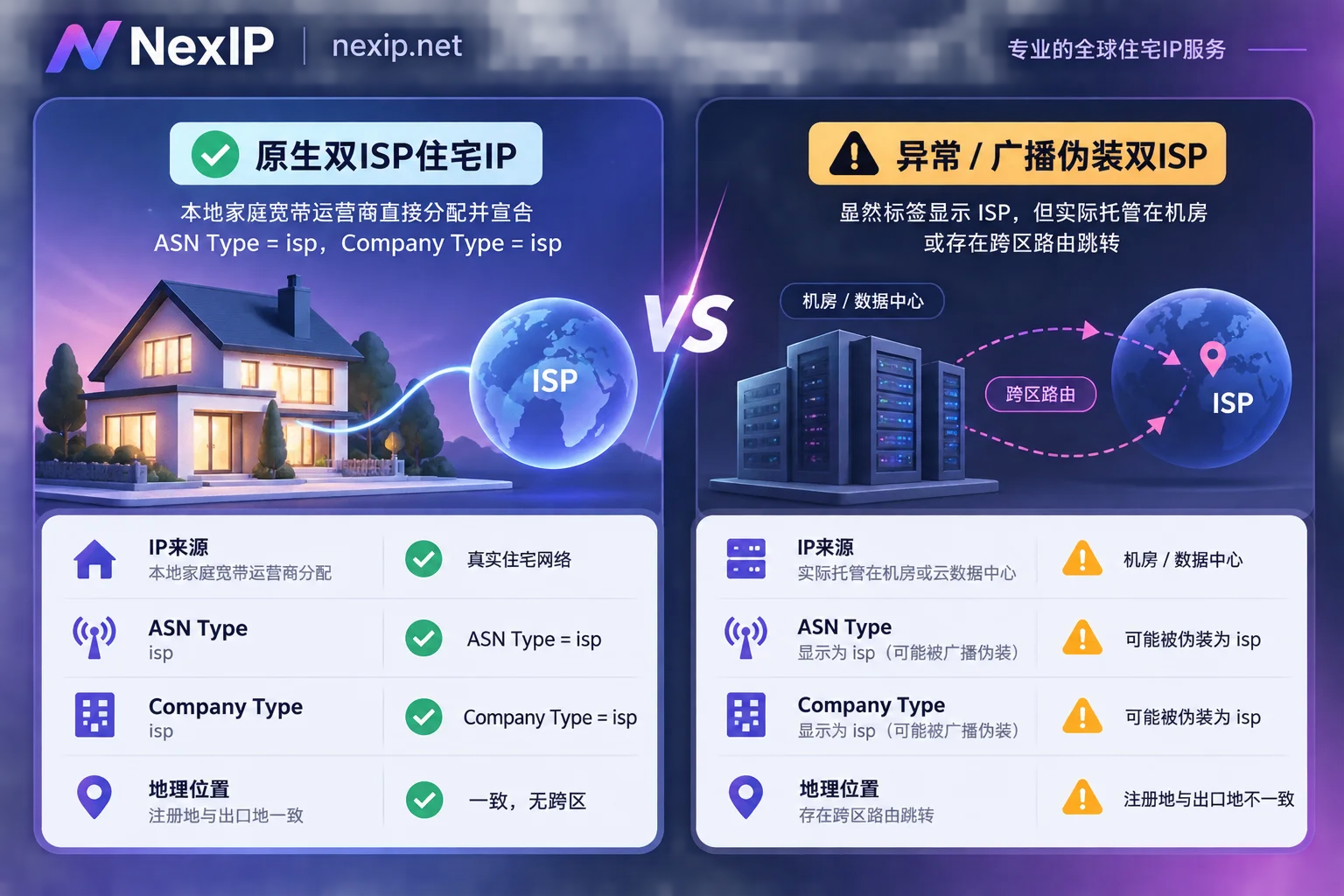
This is also the disaster area that causes account abnormalities. Some unscrupulous service providers lease residential IP blocks registered under carrier A to a data center or cloud provider in location B for announcement, or use an entry point in A to forward to an exit in B in the proxy chain. Although some IP lookup websites still show "dual ISP" due to delayed database updates or only looking at surface labels, under deep route detection by large platforms, this structure of "separation between registered location and egress link" is actually more likely to be flagged as high-risk proxy traffic than ordinary single-ISP.
2. Why do "dual-field ISP" IPs still have real and fake home broadband?
After understanding the meaning of dual-field isp, the second core question arises: Just because both ASN and Company show isp, does that mean it's a real home broadband connection dialed from a local resident's optical modem?
The answer is not necessarily. Even if they all satisfy the "dual ISP" label, there is still an essential difference between native home broadband and broadcast home broadband:
- Native dual ISP (native home broadband): The IP block is directly held by a major local broadband carrier in the target country, and BGP announcement is completed by that carrier in the local native network environment. Physical location, registered ownership, and network egress are completely consistent. In the eyes of risk control systems, this is a standard, clean local residential home broadband environment.
- Broadcast dual ISP (broadcast home broadband): The block is indeed registered as residential ISP in the registry, and even the autonomous system announcing it bears a telecom carrier's name, but the block is actually hosted in a data center via BGP broadcast.
In our article Why residential attributes still get rate-limited? Discussing risk control differences between native residential IPs and broadcast blocks, we detailed how top platforms like TikTok and Amazon not only check static IP databases but also combine reverse DNS (rDNS), activity characteristics of neighboring IPs in the same C segment, and route hop counts for comprehensive profiling. If it's a broadcast block hosted in a data center, even with the "dual ISP" title, once it encounters strict local environment verification, it is still easy to expose its data center hosting nature.
3. Which businesses must use "native dual ISP"? Which don't need to chase the top tier blindly?
At this point, many teams might think: "Then why not just replace all business proxies with top-tier native dual-ISP static IPs?"
Technically, of course, you can, but from the perspective of cost and business fit, it's completely unnecessary. The core of network egress configuration is "matching the solution to the need"—as we mentioned in How to choose static residential IPs: Analyzing fixed network egress configurations from native home broadband, dual ISP, and lease term dimensions, you should purchase in tiers according to the platform's risk control sensitivity to "fixed identity" and "local authenticity":
1. Scenarios where "native dual ISP · static long-term IP" is strongly recommended
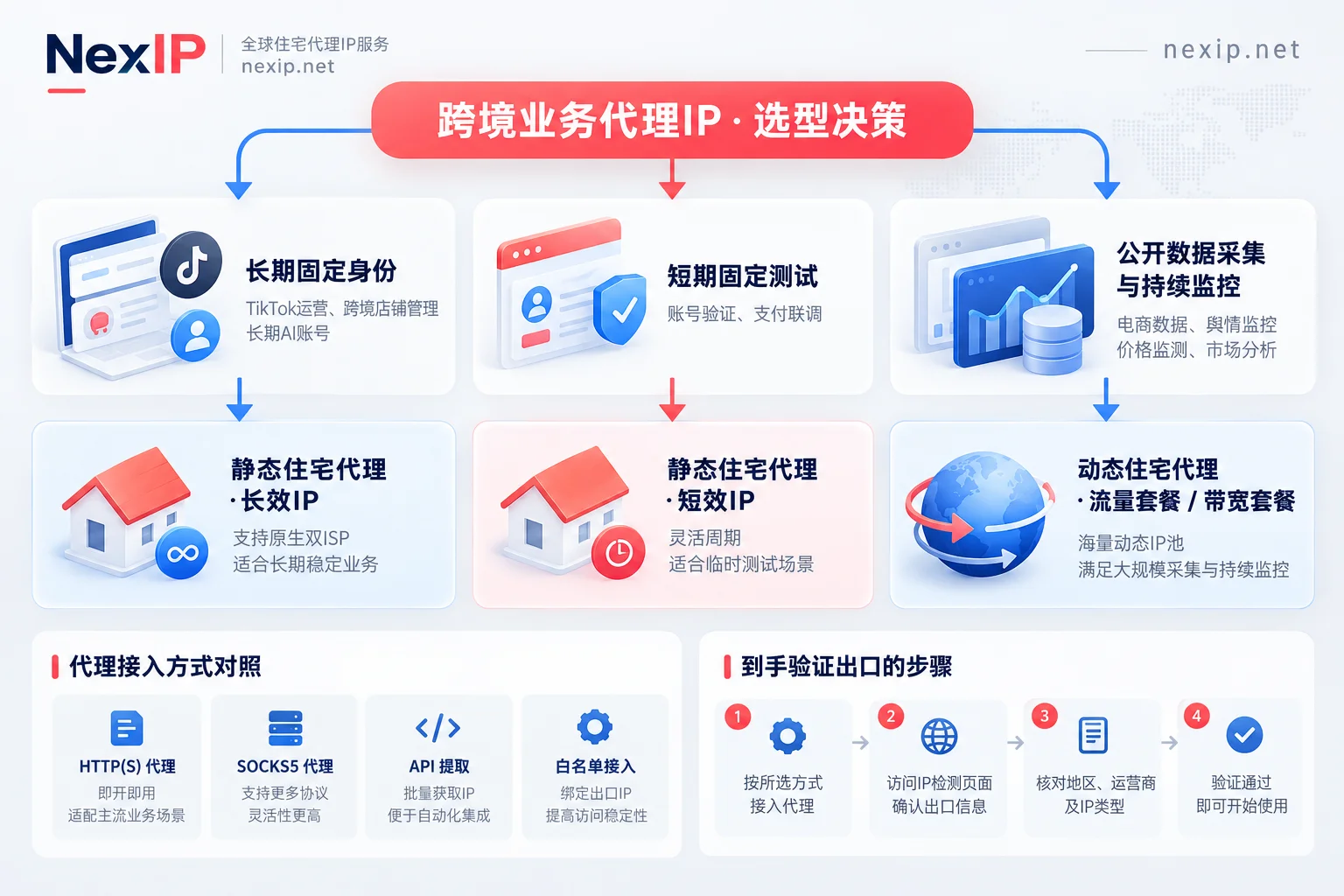
If your business's core assets are high-value, long-term accounts or stores, and the platform extremely rejects data center and cross-region traffic, then choosing static residential proxy · long-term IP (native home broadband subcategory) that supports native dual ISP is the most reliable solution:
- TikTok operations and core social media matrices: TikTok is extremely sensitive to the native local attributes of network egress. The official recommendation is to use native home broadband IPs within static long-term, strictly implementing "one account, one dedicated IP" to avoid zero views and rate limiting caused by broadcast blocks or shared egress.
- Local store management for cross-border e-commerce: Daily management of seller backends on platforms like Amazon and Shopee. A dedicated monthly or yearly fixed home broadband egress can avoid store secondary reviews caused by frequent egress changes or abnormal hosting attributes.
- AI applications that maintain long-term login states: For teams that need to maintain long-term high-privilege account login states on overseas AI platforms, using a fixed, clean native dual-ISP egress can significantly reduce mid-session disconnections or account risk control probability.
Selection note: If your business also needs a static fixed egress but is less strict about "native physical home broadband" and values data center-level connection throughput more, you can also choose the broadcast home broadband or data center subcategories as needed within static residential proxy · long-term IP, spending your budget where it matters most.
2. Scenarios where you don't need to lock into long-term dual ISP and other packages are more cost-effective
- Temporary account verification, payment testing, and API integration: These tasks also require dedicated fixed static residential (ISP) IPs, but the duration is often only a few hours or days. You can directly use static residential proxy · short-term IP billed by hour or day with unlimited traffic, without bearing the long-term cost of monthly or yearly subscriptions.
- Public web scraping, price comparison, and SEO/SERP monitoring: These businesses don't need to maintain an account with a fixed IP; instead, they need to constantly change real residential egress to spread request frequency. Using dynamic residential proxy · traffic package billed by GB and supporting per-request rotation or sticky sessions, or for AI training corpora and RAG real-time web retrieval, is far more cost-effective than static IPs.
- 7×24 high-throughput continuous monitoring: For continuously running public opinion monitoring, real-time inventory tracking, or high-frequency API polling, traffic consumption is huge and throughput is stable. Directly configuring dynamic residential proxy · bandwidth package billed by port bandwidth with unlimited traffic (fair use) is the reasonable architectural choice.
4. After getting a dual-ISP residential IP, how to do a four-step self-check before going live?
To ensure the proxy egress assigned to core stores or TikTok accounts is foolproof, it is recommended to spend two minutes completing the following four-step verification before formally binding the account:
- Verify dual-field attributes: Query the IP in a third-party IP database, confirm that
ASN TypeandCompany Typeare both marked asisp, and that the organization is a well-known local broadband carrier in the target country. - Check consistency between native and broadcast: Verify whether the IP's registered country and its current actual located city completely match, to avoid buying cross-region broadcast blocks that are "registered in country A, announced in country B."
- Confirm exclusivity and fixity: For long-term operations, avoid unexplained IP changes mid-way. In NexIP's static long-term residential proxies, each IP is a dedicated fixed egress with unlimited traffic; if there is a very small probability of carrier line failure, the system supports free replacement upon failure, avoiding long business downtime.
- Check local proxy chain and protocol matching: NexIP fully supports
HTTP/HTTPS/SOCKS5protocol, providing username/password or IP whitelist authentication, and supports four access methods: API extraction, username/password, port forwarding, or process proxy. Before going live, please confirm that the local tool's proxy port forwarding is correct to prevent DNS leaks from your real local network.
Conclusion
"Dual-ISP residential IP" is not a mystical concept; its core value lies in "authentic carrier ownership + clean route announcement." When selecting a network architecture, first distinguish whether your business needs the static long-term fixed identity of native dual ISP or a high-concurrency dynamic rotation pool, and then use the global country and region coverage page to select matching local carriers and city nodes. This way, you can both maintain the bottom line of account security and avoid wasting money.
If you are planning network egress for cross-border stores, TikTok teams, or data pipelines, welcome to visit the NexIP user dashboard to check access documentation, or use the panel and sub-account features to flexibly allocate and manage your proxy IP resources by business line.


Comments(0)