 NexIP官方博客
The answer is yes. A static IP doesn't automatically mean platforms trust it more. A fixed exit solves issues like frequent IP changes causing异地登录 and session interruptions. But platform risk engines also evaluate: what network the IP belongs to, whether it has a bad history, how clean its neighboring IPs are, how you use it, and whether your device environment matches.
Another often overlooked trait of static IPs: the network identifier stays constant. When used properly, this stability gradually builds trusted consistency. But if you generate high-frequency requests, engage in violations, or the IP itself carries a bad record, platforms can precisely lock onto it and block it persistently—even if you switch accounts, the record follows.
So instead of asking "Will a static IP be flagged?", ask: What type of IP do I have, is it clean, and how do I plan to use it?
What Signals Platforms Mainly Look At
Commercial platforms like Amazon, TikTok, and Meta don't publicly disclose their algorithms and thresholds. The following content is based on public practices from general risk control and IP data systems like Cloudflare, MaxMind, and IPinfo. Different platforms weigh these signals differently; no single one is the sole cause.
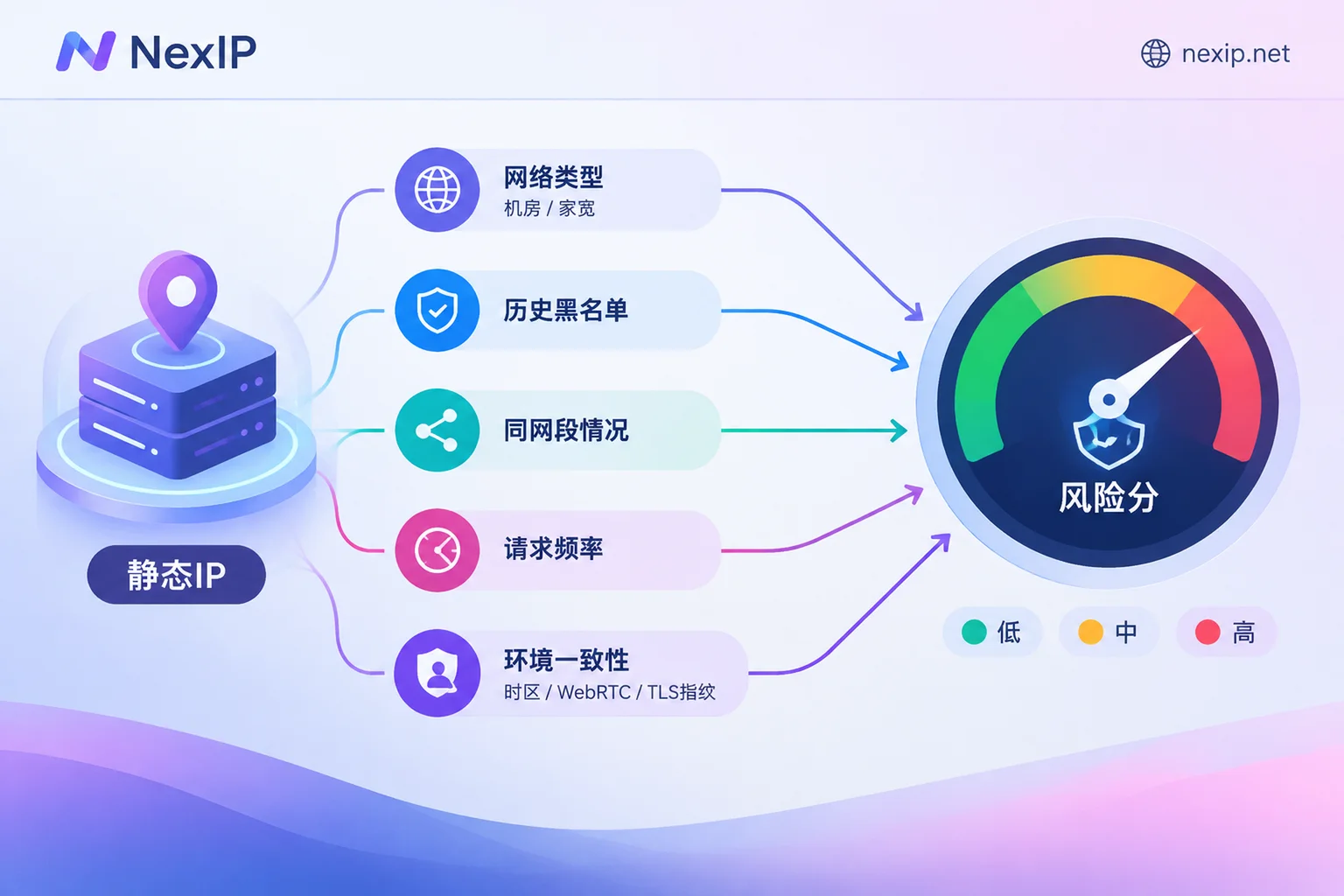
1. ASN and Network Type: Data Center vs. Residential
Risk engines typically first check IP databases to determine the ASN and network type. Data center (Hosting/Datacenter) IPs are mostly used for cloud servers. In social media and e-commerce login scenarios, these IPs often carry a higher risk weight from the start. Residential (ISP/Residential) IPs look like ordinary user networks and have significantly higher initial reputation.
This is one of the most common reasons static IPs get flagged: the IP itself is fine, but it's a data center IP being used to log into backends that are sensitive to IP type.
2. History: You Might Inherit a Flag Immediately
If the previous user of this IP sent spam, performed credential stuffing, ran scrapers, or hit honeypots, the record may already be in blacklists like Spamhaus, AbuseIPDB, or commercial anti-fraud databases. New users inherit these records. You did nothing, yet you get a captcha on your first login—this could be why.
3. Subnet Contamination
If a /24 subnet has many flagged malicious requests or bans, platforms often downgrade the entire range or enforce stricter verification. Your IP may be clean but dragged down by its neighbors.
4. Request Frequency and Behavior Patterns
Systems like MaxMind minFraud and Cloudflare WAF continuously track request frequency, burst concurrency, and login counts per IP. If a fixed IP's request rate far exceeds human operation, or the intervals are as regular as a timer, it's quickly judged as automated traffic, triggering captchas or outright blocks. Once an IP is fixed, such behavior is easier to track persistently.
5. Environment Consistency
Risk engines also cross-check. The IP's location and timezone must match the client's system timezone, language, WebRTC-exposed local address, TCP/IP stack fingerprint, TLS (JA3) fingerprint, and browser environment. For example, if the exit is in the US but the system timezone is UTC+8, or WebRTC leaks the real address, the fraud score spikes.
This also means: an IP showing "fraud score 0" on a detection site doesn't mean platforms can't tell you're using a proxy. IP is just one layer; environment conflicts also trigger alerts.
Choose the Right Exit Type for the Task First
Many flagged cases stem from choosing the wrong exit type from the start.
- Long-term fixed logins for store backends, social media accounts, TikTok operations: Prioritize dedicated long-lasting static residential IPs, not data center IPs. Dedicated avoids others' behavior being attributed to you; long-lasting keeps the account logging in from the same exit over time.
- Short-term projects or temporary identity testing: Hourly or daily static short-lived IPs suffice; no need to buy a long-term exit for a few days' task.
- Data scraping, SERP monitoring, ad verification: These tasks typically should use rotating or sticky-session dynamic residential IPs, not the fixed IP reserved for your store. High-frequency scraping requests pollute the fixed exit and eventually harm backend accounts. For how to separate these tasks, see Static Residential IP vs. Dynamic Residential IP: Which Is Better for Scraping.
Take Amazon as an example: use static long-lasting IPs for the seller backend, and dynamic IPs for front-end price monitoring. Don't mix the two. For details, see Dynamic or Static IP for Amazon Seller Backend.
Validate a Static IP Before Logging Into Accounts
Don't log into important accounts with a new IP right away. First, run these checks in an unimportant browser environment:
- Verify network type and ASN: Use an IP lookup tool like IPinfo to confirm the ASN shows a local ISP (residential), not Hosting/Datacenter. If you bought residential but it shows data center, verify with your provider.
- Verify geolocation: Country and city must match your operating location. Different IP databases may vary slightly; country-level consistency is the minimum.
- Check risk score: On platforms like Scamalytics and IPQS, check the Fraud Score and risk tags. IPs with notably high scores are unsuitable for backend logins.
- Check blacklists: Confirm on Spamhaus, AbuseIPDB, etc., whether the IP and its subnet have abuse records.
- Check leaks and environment consistency: Ensure WebRTC doesn't expose your real address, DNS goes through the proxy exit, and browser timezone/language match the IP location.
- Confirm exit stability: Repeatedly query the exit IP over time to ensure it's always the same address, with no occasional fallback to your local network.
Once all checks pass, assign the IP to specific accounts. Thereafter, try to maintain "one account, one fixed exit, one fixed environment" and avoid temporary swaps.
If Already Flagged: Distinguish IP Problems from Usage Problems
When frequently getting captchas or abnormal activity warnings, first go through the checklist above, then determine:
- The IP itself is problematic: e.g., high fraud score, on blacklists, ASN shows data center, entire subnet has a bad reputation. In this case, changing IPs is more effective than repeated appeals.
- IP is clean but usage is the issue: e.g., the exit is also running scripts, request frequency is abnormal, or multiple unrelated accounts crowd the same IP. Changing IPs has limited effect; first split tasks and reduce frequency to normal business levels.
- IP is clean and usage is normal, but verification still triggers: Focus on the environment—timezone, WebRTC, and whether the exit drifts. Refer to Network-side troubleshooting for Amazon's 'abnormal activity' login prompt and What to do when Facebook still asks for verification despite a proxy IP.
If the platform has already taken action on the account, follow its appeal and verification process. Changing network exits won't solve account-level issues.
Choosing a Fixed Exit on NexIP
If you've decided to configure a long-term fixed exit for store backends, social media accounts, or TikTok operations, check NexIP's Static Residential Long-lasting IPs. They are dedicated fixed IPs, rented monthly or yearly, with three subtypes: residential native, residential broadcast, and data center; invalid IPs can be replaced for free. Based on the logic above, logins to IP-type-sensitive platforms should use residential types, leaving data center subtypes for less sensitive uses. For TikTok operations, the official site explicitly recommends static residential native IPs; see the TikTok operations page for details.
Access supports API, username/password, port forwarding, and process proxy; protocols include HTTP/HTTPS/SOCKS5, with username/password or whitelist authentication. After receiving the IP, validate it with the checklist above before assigning it to accounts.
Note: even the cleanest IP only manages the network exit layer. Browser fingerprinting and environment isolation require specialized tools—handled by NexBrowser within the NexIP ecosystem. Good IP quality, combined with compliant and stable usage, reduces the probability of being flagged. No provider can promise you'll never be banned.



Comments(0)