 NexIP官方博客
It does matter, but it depends on how the IP changes.
Meta continuously monitors login attempts and post-login behavior. The IP address used for login is one of the factors it uses to determine whether there is suspicious activity. When the system detects a new network location or an unfamiliar IP attempting to log in, it will require identity verification to prevent unauthorized access. So the issue is not whether the IP changes, but whether the magnitude and frequency of changes resemble normal usage.
The general judgment is: For admin accounts associated with BM, it is best to log in from the same, regionally reasonable residential exit over the long term. Rotating IPs are suitable for scraping and ad verification, but not for logging into the BM backend.
Which changes are not a big deal, and which require caution
Meta has not disclosed specific thresholds, such as how many changes within a few hours or how far the geographic jump must be to trigger a lockout. These are dynamically evaluated by its automated risk control models. The following tiers can only help you gauge the level of risk; they cannot be used as precise safety lines.
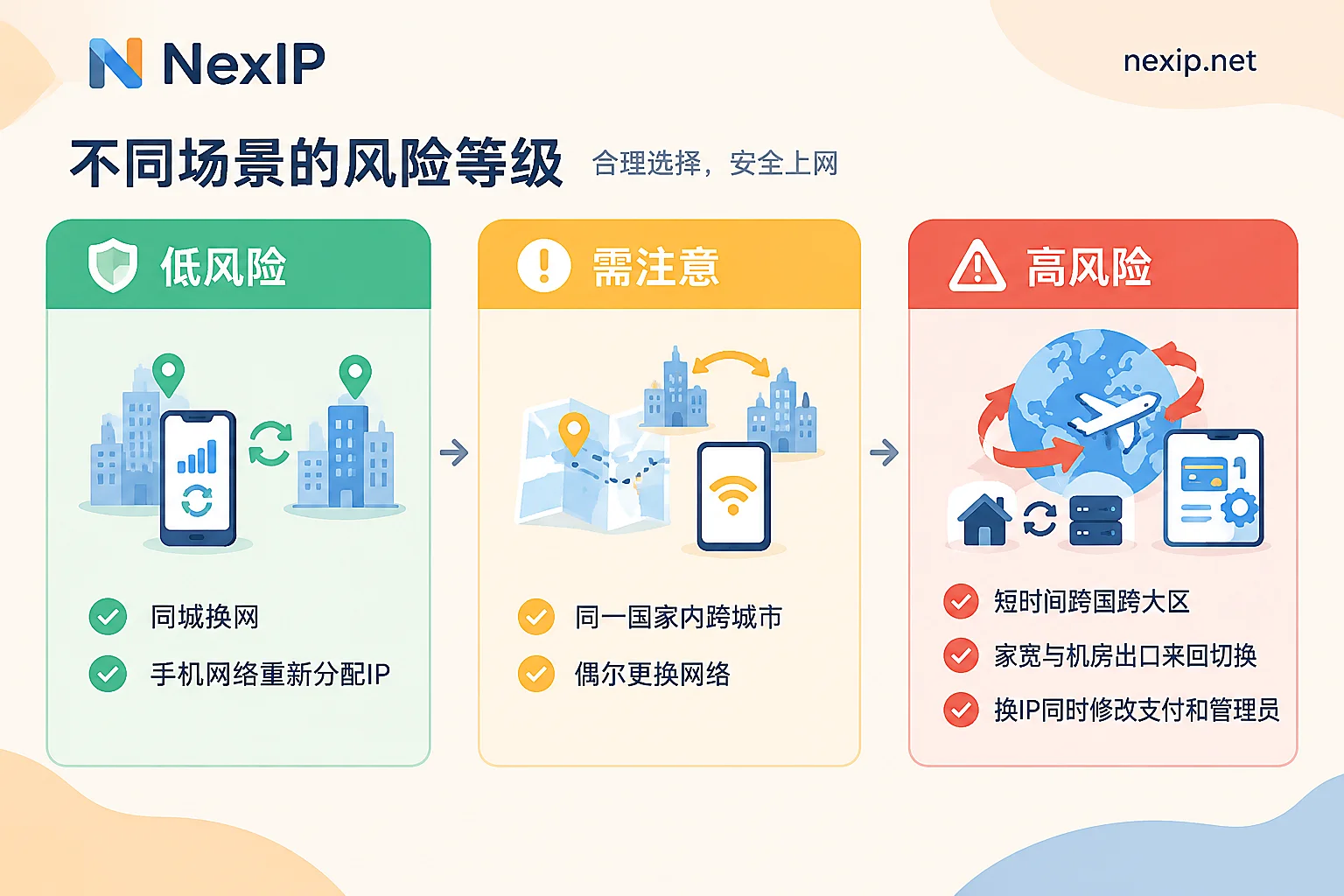
Generally normal range:
- The IP is reassigned by the carrier under mobile networks;
- Home broadband reconnects after a disconnection and changes IP, but it is still the same carrier and same city;
- Switching between company and home, with both locations in the same region.
In these cases, the IP does change, but the network type and geographic location remain basically consistent, which falls within the platform's tolerated daily dynamics. An occasional verification pop-up is normal.
Noticeably higher risk:
- Cross-country or cross-region jumps within a short time. For example, logging in from the US in the morning, Southeast Asia in the afternoon, and back to Europe in the evening.
- Back-and-forth switching of network attributes. For example, normally using home broadband, suddenly switching to a data center proxy, or repeatedly switching between proxies from different sources.
- Multiple admins each logging into the same BM from different regional exits, and these exits also change frequently.
- IP changes combined with other sensitive operations. For example, changing the exit while also modifying payment methods, adding admins, or bulk-editing ad settings.
The fourth item alone may not cause trouble, but when combined, it looks more like "someone is operating after credential leakage," making interception more likely.
What happens after triggering
The consequences roughly increase in severity:
- Frequent security check pop-ups. You are asked to enter a two-factor verification code, confirm the login device, or identity. This is the most common situation, and you can usually continue after handling it. For specific situations that trigger verification, refer to Does Facebook require re-verification after changing IP.
- Admin personal account gets locked. Abnormal IP changes may directly cause the account to be locked by the system, requiring unlocking through the Help Center process.
- BM is judged as possibly compromised. When the login environment and IP show frequent unknown changes, Meta may believe that the business assets are at risk of intrusion or credential leakage, and temporarily block access to Business Manager or Meta Business Suite and restrict operations.
- Ad accounts and assets are restricted. After being flagged for "abnormal activity," ad delivery may be immediately paused, card binding and payment functions may be blocked, and even the entire business asset portfolio may be restricted.
The impact of levels 3 and 4 goes beyond the personal account itself and directly interrupts ad delivery, so BM admin login exits deserve more serious attention than ordinary social media accounts.
What exit should be used for the BM backend
First distinguish the tasks, then choose the exit type.
Admin accounts for daily BM management and ad delivery: use an exclusive static residential IP. The goal is to make every login appear to come from the same place and the same type of network. Specifically, you can choose as follows:
- Long-term operated BM: choose a static long-lasting IP, used monthly or yearly. For subtype, prioritize native residential broadband. If you normally use home broadband, switching the backend to a data center exit is itself a change in network attributes.
- Temporary tasks: for example, short-term assistance on a project or temporary management during a business trip, you can use a static short-term IP. Stop using it when done, and do not treat a short-term IP as a long-term exit by renewing it back and forth.
- Do not use dynamic rotating IPs to log into the backend. Dynamic residential IPs switch exits per request or session, suitable for tasks like data scraping and ad landing page verification. Using them for BM login is actively creating IP jumps.
How to determine the region: Choose a country or region consistent with the business entity and the admin's usual residence, and do not change it arbitrarily once decided. If the team has admins in multiple countries, each person using an exit fixed in their own location is more reasonable than everyone sharing an exit that matches no one.
One admin corresponds to one exit. For different entities and unrelated businesses, it is not recommended to share the same exit, otherwise it is easy to be considered related. For the boundaries of multiple accounts sharing an IP, refer to How many Facebook accounts can log in from one IP.
In addition, the exit is only part of the login environment. If the browser fingerprint, time zone, and language do not match the IP, it will also appear inconsistent. The browser environment can be managed uniformly by tools like NexBrowser.
After obtaining it, verify first, then use it to log in
Do not directly use a new exit to log into BM. First perform several checks:
- Geographic location: use several different IP lookup services to check. The country and city should match your selection, and the results from each service should not differ too much.
- Network type: check the ASN and carrier information to confirm it shows residential broadband or a telecom carrier, not hosting or data center.
- Stability: check again the next day or after a few days to confirm that the exit IP has not changed.
- Leak check: access detection pages through the proxy to confirm that DNS and WebRTC do not expose your local real IP.
- Whether it is exclusive: if you bought an exclusive IP, you can check it using the methods in How to tell if the IP you bought is truly exclusive.
Regarding protocols, both HTTP/HTTPS and SOCKS5 can be used, depending on your browser or tool support. For authentication, if the office network IP is fixed, whitelisting is more convenient; if the network changes frequently, username/password authentication is more flexible.
After confirming there are no issues, when switching exits for the first time, it is recommended to only perform regular login and browsing, and not simultaneously modify payment methods or adjust admin permissions. Wait until the login stabilizes for a period before handling these sensitive operations.
If already locked or restricted, handle in this order
- First fix the exit and do not change it again. Switching IPs back and forth during an appeal will only make the login records more chaotic. Use the exit you intend to use long-term for all subsequent operations.
- First restore access to the admin personal account. Complete identity verification as prompted, and enable or confirm two-factor authentication.
- If prompted that the BM may have been compromised, follow the recovery process in the Business Help Center to check the admin list, remove unrecognized people and apps, and change the passwords of related accounts.
- Handle ad accounts and assets. Go to Account Quality, check the specific reason for the restriction, and submit identity verification or business proof to appeal as required.
Note that fixing the exit can reduce misjudgments caused by IP jumps, but it cannot guarantee that the account will not be restricted. Whether the account remains stable also depends on factors such as entity qualifications, whether ad content is compliant, and whether payment information is genuine.
Go choose an exit
If you have determined that the BM backend needs a fixed exit, you can choose according to the usage cycle: for long-term management, see static long-lasting IP, prioritizing native residential broadband; for temporary tasks, see static short-term IP. Both types are exclusive fixed IPs, supporting API, username/password, port forwarding, and process proxy access, and can be used in the official website panel or client. For specific countries covered and prices, refer to the official website page.



Comments(0)