 NexIP官方博客
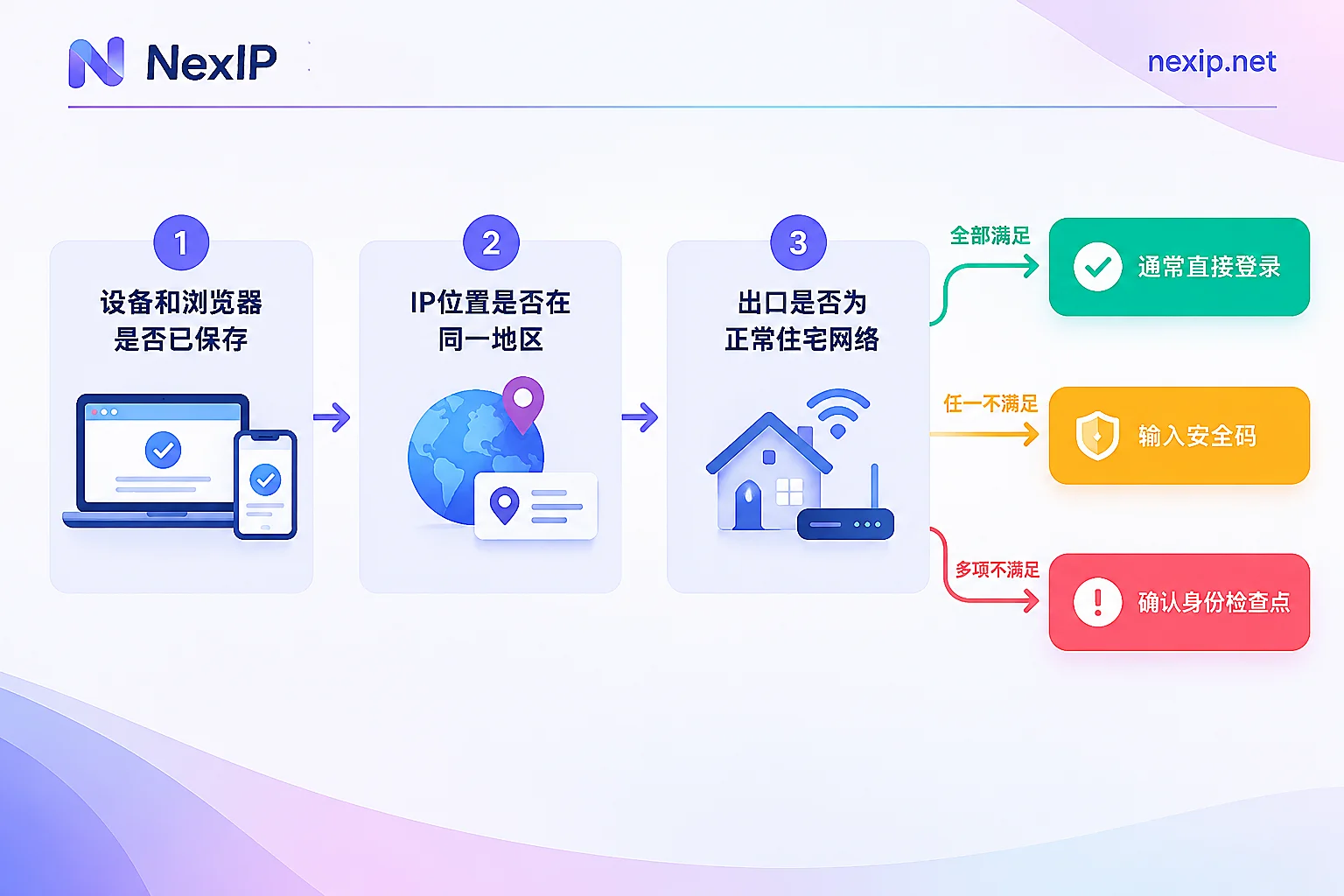
In most cases, no. Facebook decides whether to ask you to re-verify not just based on whether your IP has changed, but on whether it recognizes the overall environment of this login: whether the device and browser have been saved before, how far the location resolved from the IP is from your usual one, and whether the exit itself looks like a normal user.
On saved devices and browsers, IP changes within the same region usually log in directly, such as re-dialing your home broadband or switching from Wi-Fi to mobile data. Conversely, logging in from a new device, incognito window, or a browser with cleared cookies, or an IP suddenly jumping to another country, can easily trigger a request for a security code or, in severe cases, a "Confirm Your Identity" security check. Meta has not disclosed specific thresholds, such as how far apart locations must be or how long between logins to trigger verification, so the following describes conditions that increase risk, not definitive rules.
First, distinguish which type of verification you are facing
Verifications after an IP change fall into two main categories, with very different difficulty levels.
Login security code or device approval. For accounts with two-factor authentication (2FA) enabled, logging in from a device or browser Facebook does not recognize will require a code from an authenticator app or SMS, or confirmation from a logged-in device that "this is me." This is normal secondary confirmation. After completing it, check to save the browser, and future logins from that browser usually won't ask again.
Security checkpoint (Confirm Your Identity). If the system believes this login might be account theft or automated activity, it will lock the account first, requiring you to prove your identity via email or phone verification code, confirmation from a logged-in device, or checking recent activity, and in some cases uploading ID. This type of verification is usually the result of an IP change combined with other risk signals.
Occasionally being asked for a security code means the security mechanism is working normally; you don't need to overhaul your network configuration. If you repeatedly hit checkpoints, then it's worth investigating the login environment further.
Situations where changing IP usually won't interrupt you
- The device or browser has been saved to the account, such as ticking "Save Browser" when logging in, or having saved this device in settings.
- The browser's cookies and login state are still intact, and you always use the same browser profile.
- The IP only changes within the same city or region, such as broadband reassigning an address, or switching between local carrier networks.
When all three are met, an IP change alone rarely triggers verification.
Situations that easily trigger verification
Unrecognizable environment. In incognito or private mode, browsers that clear cookies on close, new system installations, or new phones, Facebook cannot remember the device, and regardless of IP changes, you might need a security code every time you log in. Many people think the IP change caused verification, but the real reason is that the browser did not retain the login state.
Location jumping in a short time. Logging in from one country in the morning, appearing in the US an hour later, then Europe a while after, such geographic jumps are typical signs of account theft. Using rotating proxies or frequently switching nodes to log into an account is most likely to cause this.
Problematic exit itself. IPs from public data center ranges, with a history of abuse, or shared by many unrelated accounts simultaneously, make the system more wary of this login. For the issue of multiple accounts sharing an IP, see How Many Facebook Accounts Can Log In from One IP.
Multiple signals combined. When a new browser, new country, and data center IP appear together, it's more likely to directly enter a security checkpoint than any single change.
If you are already asked to verify, handle in this order
- Follow the on-page prompts to complete verification. Do not repeatedly refresh or try again with a different IP. Consecutive failed login attempts are themselves a risk signal.
- Prioritize approval from a logged-in device, or a code from an authenticator app. If you can't receive SMS, use previously saved backup recovery codes.
- After logging in, check "Where You're Logged In." This is under "Password and Security" in Account Center; menu names may vary slightly by version. If you see unfamiliar devices or locations, log out of those sessions first, then change your password. If the displayed location is just the proxy exit location, that's normal.
- If the account is locked or restricted, follow official procedures. For personal accounts, follow the "Unlock Account" process in Facebook Help Center. For restricted assets in ad accounts or Business Manager, appeal via Meta Business Help Center's restricted account process.
To reduce interruptions, prepare the account side first
Besides the network, the following items are often more directly effective in reducing repeated verification:
- Use an authenticator app for 2FA, not just SMS. When the exit is overseas and your phone number is domestic, SMS may be delayed or not received.
- Generate backup recovery codes and save them offline. Facebook generates a set of recovery codes at once, each usable only once; you can generate a new set when used up.
- Save devices in your usual browser, don't log into work accounts via incognito windows.
- Use a fixed browser profile for each account, don't casually clear cookies. If you need to isolate multiple account browser environments on the same computer, this is browser-level work and can be handled by tools like NexBrowser.
How to configure network exit: use a fixed exit for long-term logged-in accounts
The criterion is: does this account need long-term, repeated logins?
For personal profiles, Page management, ad accounts, and Business Manager, such scenarios involve long-term logins, and Facebook remembers their usual environment. A more reliable approach is:
- Use a fixed, exclusive exit, not a rotating proxy that changes IP on each connection.
- The exit location should match the account's usual location and business location; don't use the US today and the UK tomorrow.
- Prefer residential exits and avoid public data center ranges.
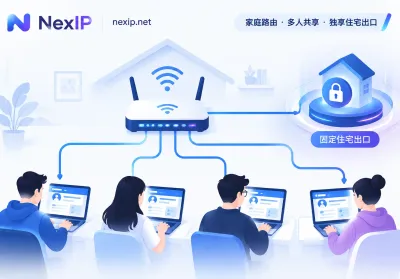
- For team collaboration, one account should correspond to one fixed exit; all members log in from that exit, not each using their own network. For how teams allocate exits and credentials, see How to Configure Proxy IP Permissions for Team Collaboration.
Rotating dynamic residential IPs are suitable for tasks that don't log into accounts or bind to long-term accounts, such as public data collection and ad placement checks, but not for logging into accounts requiring long-term operation.
After getting an exit, verify before logging in:
- After connecting to the proxy, use an IP lookup website to confirm the exit IP and resolved country/city match expectations.
- Check again after a few hours and a day to confirm the IP hasn't changed.
- Confirm the IP is exclusive; for specific methods, see How to Determine If the IP You Bought Is Truly Exclusive.
- The first login through this exit will likely require verification once. Have your authenticator and recovery codes ready, and save the browser after completion.
If you determine you need a fixed exit, see NexIP's Static Long-Acting Residential IP. It is an exclusive fixed exit, rented monthly or yearly, available in three types: native home broadband, broadcast home broadband, and data center. For logging into long-term Facebook accounts, native home broadband is closer to a typical home user's network; data center types are more suitable for tasks insensitive to exit type. When an IP fails, you can replace it for free, but a new IP is an environment change for Facebook; it's recommended to replace when you have your authenticator and recovery codes at hand, and switch to an IP in the same region.
Finally, note that a fixed exit only ensures the "stable environment" factor. Whether an account gets restricted also depends on whether the account itself is compliant and daily operation behavior; these cannot be replaced by network configuration.


Comments(0)