 NexIP官方博客
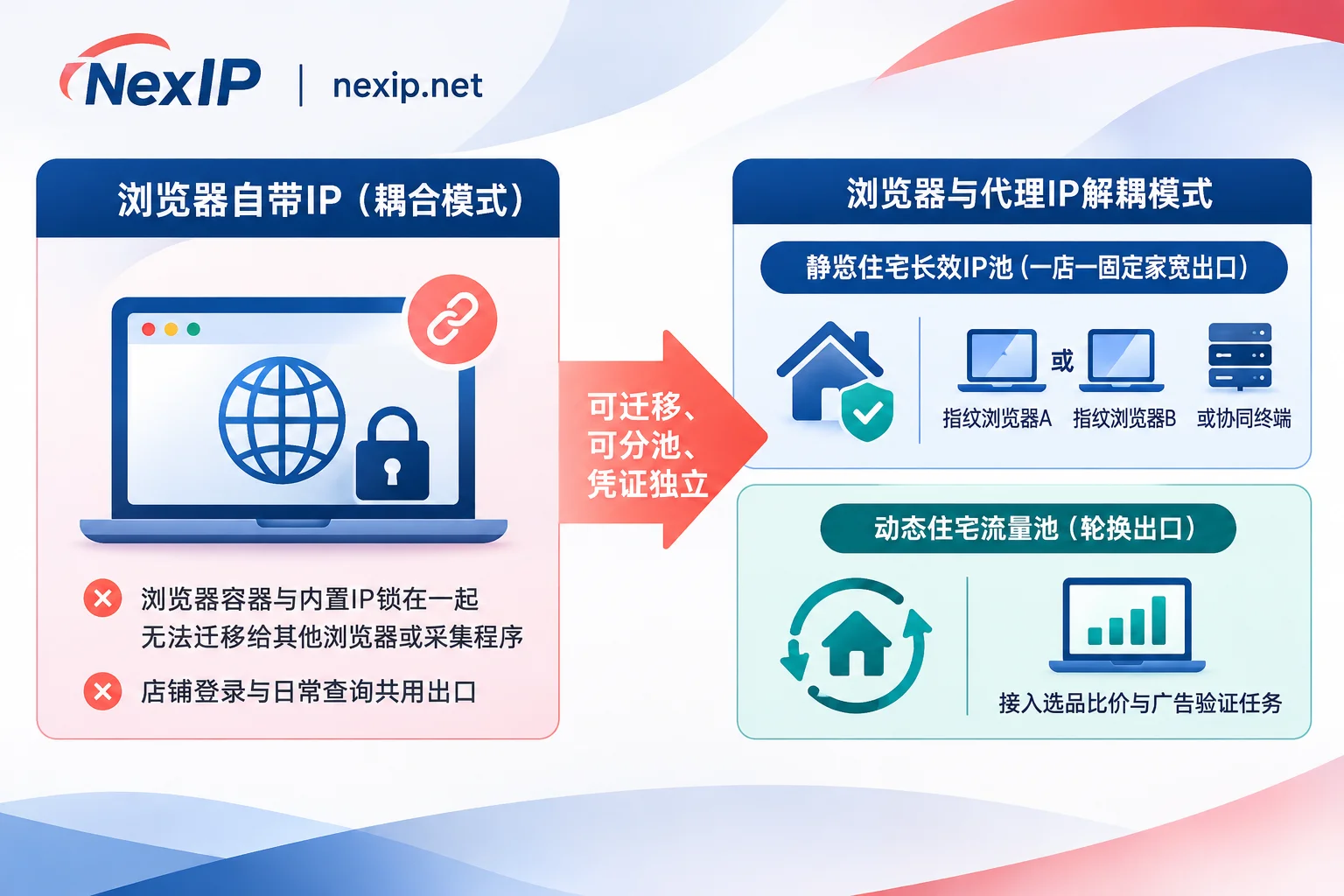
Straight to the conclusion: If you only have 1-3 regular old stores on standard cross-border platforms, check the backend in a single browser daily, and don't plan to switch tools in the short term, then choosing an "independent and non-shared" built-in IP from a cross-border-specific browser is indeed more convenient. However, as soon as you're involved with high-risk new stores or local stores (e.g., US/European local stores, TikTok Shop, independent sites bound to Stripe/PayPal), social media and ad account coordination, needing to simultaneously run competitor data collection and store login in separate pools, or if you don't want the egress IP to be "locked in" by a single browser vendor, buying static residential proxy IPs separately and integrating them into the anti-detect browser is more reliable in terms of controllability, migration freedom, and long-term cost.
Many sellers struggle with "why bother buying proxies yourself when the browser already comes with an IP," often because they conflate "fingerprint isolation" with "network egress." Below, we break down the underlying mechanisms and real differences between the two approaches.
1. First, Clarify: What Is Called "Built-in IP" Is Actually Three Completely Different Things
Many sellers think that "built-in IP" means the vendor provides a free clean residential broadband line, but in reality, different anti-detect browsers have very different implementation logic:
- Hosted cloud platform IPs from vertical cross-border browsers: These tools focus on e-commerce multi-store operations, and you buy a fixed egress along with the environment. However, in entry-level or mainstream low-cost packages, many underlying IPs come from cloud servers or cloud platform data center ranges. While daily operations on regular old store backends are fine, when registering new stores, verifying local stores, or coordinating social media traffic, they are more likely to be identified as data center network attributes.
- Built-in third-party proxy entrances in general anti-detect browsers: Some browsers integrate proxy marketplaces or built-in residential/ISP proxies in the software interface, but this is essentially built-in resale. Common limitations include coarse regional granularity (some only allow country selection, not city or ASN), and proxy credentials may not be exportable for use outside the browser.
- Pure fingerprint isolation browsers (no IP included at all): Many general anti-detect browsers only isolate device parameters like Canvas, WebGL, Cookies, timezone, fonts, etc., and do not come with proxy IPs. Sellers must purchase third-party proxies and fill in the host, port, and credentials.
In other words, anti-detect browsers solve the problem of "making the device look like it's not the same computer," but whether the network egress is a real, clean, long-term fixed overseas address is still determined by the proxy IP.
2. Built-in IP vs. Buying Your Own Cross-Border E-commerce Proxy IP: 5 Differences That Determine Security and Cost
| Comparison Dimension | Browser Built-in IP | Buying Your Own Independent Proxy IP (Browser and Egress Decoupled) |
|---|---|---|
| Controllability of IP underlying attributes | Mostly roughly categorized as "cloud platform/residential," with underlying data center vs. broadcast vs. native details not transparent | Can explicitly choose residential native, residential broadcast, or data center types, and support targeting by country, city, ASN, and ISP |
| Migration when switching browsers | IP is strongly bound to the current browser account; switching software usually means having to change IP | Standard HTTP/HTTPS/SOCKS5 credentials are yours, and when switching anti-detect browsers, the original IP can be taken directly |
| Reuse across tools and multiple scenarios | Usually locked inside the browser, difficult to use simultaneously for specific clients or external scripts | Can be flexibly allocated via credentials, IP whitelisting, port forwarding, or sub-accounts to different business terminals |
| Separate pools for stores and data collection tasks | Often uniformly billed per "fixed device," making price comparison or data collection expensive and prone to dirtying the egress | Store backend uses static long-acting IPs, product selection/price comparison/ad verification uses dynamic traffic packages, completely physically separated pools |
| Handling after IP contamination or failure | Relies on browser customer service ticket flow; some tools charge extra per change for IP replacement | Professional proxy providers (like NexIP static long-acting) support free replacement upon failure, with a shorter troubleshooting chain |
In actual operations, the most common pitfalls are the following three:
1. Assets Locked to a Single Tool: Changing Tools Means "Forced IP Change"
When you had 2 stores, the one-stop packaging of the browser felt convenient. But when you reach 20 stores, the team starts to specialize, or the original browser raises renewal prices or becomes inconvenient and you want to migrate, the biggest obstacle is often not exporting cookies, but the built-in IP cannot be taken away. Once forced to collectively change login IPs, originally stable stores can easily trigger secondary identity verification during intensive operations. Adopting a decoupled architecture of "anti-detect browser manages environment + self-purchased proxy IP manages egress" means that regardless of migrating from browser A to browser B later, the store egress IP can remain unchanged.
2. Treating "Data Center/Broadcast Ranges" as "Real Residential Native"
Regular Amazon old stores or routine backend operations have relatively high tolerance for data center IPs. But if you're running US/European local stores, TikTok Shop matrices, Facebook ad campaigns, or independent sites that have just opened high-risk payment accounts like Shopify Payments/PayPal/Stripe, the underlying ASN and IP type directly affect trust scores. For the actual risk control differences between residential native and data center broadcast ranges, you can refer to our previous practical breakdown: Why does it still get rate-limited even when it shows residential? Starting from the risk control differences between native residential IPs and broadcast network ranges.
3. Using an Expensive Static IP for Both Store Login and Data Scraping
Many teams, after buying a browser's built-in fixed IP, habitually use that window to check front-end rankings, scrape competitor reviews, or click ad landing pages for verification. Once high-frequency concurrent requests trigger the target site's anti-scraping risk control, the store's dedicated IP gets pulled into a watchlist. When purchasing proxies yourself, you can completely separate fixed identity login from high-frequency collection and verification.
3. Selection Decision Checklist: When to Use Built-in, When You Must Buy Yourself?
It's not black and white; just compare the following two checklists to decide directly:
3 Situations Where You Can Continue Using the Browser's Built-in IP
- Beginner trial phase with 1-2 regular stores: You don't want to study proxy protocols, credentials, and port configurations; just get the product selection and order process working first.
- Pure standard cross-border store backend operations: No involvement with highly sensitive local entity verification, and no need to coordinate TikTok account nurturing, Facebook ads, or high-risk independent site payment collection.
- Certain that you won't migrate browser environments long-term: The team already deeply relies on a specific cross-border browser's permission system and plugin ecosystem, and the independent broadband/residential devices it provides meet current platform requirements.
5 Situations Where You Should Buy Your Own Independent Proxy IP and Integrate
- Local stores, high-ticket boutique stores, or strict risk-control new stores: Need explicit control that the egress is a local real ISP residential native or dual-ISP egress, avoiding being dragged down by data center ranges.
- E-commerce + social media/ads/independent site payment coordination: For example, Shopify independent sites paired with Stripe/PayPal withdrawals, or TikTok Shop combined with video matrix sales, requiring network egress to be highly realistic and long-term fixed.
- Both managing stores and doing product selection/price comparison, ad verification: Need a dual-line approach of "static fixed pool + dynamic rotating pool" to prevent front-end collection activities from contaminating backend login IPs.
- Multi-team collaboration or potential browser switch in the future: Want account credentials, sub-account permissions, and egress assets in your own hands, supporting migration at any time.
- Multi-terminal or non-browser scenario needs: Besides anti-detect browsers, some businesses require separate independent egress for API polling, process proxies, or test integration.
4. How to Configure Self-Purchased Proxy IPs into Anti-Detect Browsers? (Using NexIP as an Example)
If you decide to decouple "browser environment" and "network egress," it's recommended to implement in three steps: "business tiering—protocol integration—four-item acceptance." Taking NexIP, which focuses on residential proxy network egress, as an example (NexIP only handles network egress, does not bundle a browser client, and can be integrated into any mainstream anti-detect browser):
Step 1: Configure Egress in Three Tiers Based on Task Nature, Don't Use a One-Size-Fits-All Approach
- Store backend, local stores, and long-term account nurturing: Choose NexIP's cross-border e-commerce proxy IPs (static residential proxy · long-acting IP). Each store has an exclusive fixed egress, supports monthly or annual rental with unlimited traffic, offers three sub-types: residential native, residential broadcast, data center, and native dual ISP options, with free replacement for line failures. For TK operations and high-risk local stores, it's recommended to prioritize the residential native sub-type (for differences, see How to choose between residential native and residential broadcast or What's the difference between residential native and residential broadcast for static long-acting residential IPs).
- Competitor price comparison, inventory and review monitoring, ad landing page verification: Never use store IPs for this. Open a separate NexIP dynamic residential proxy · traffic package, billed by actual traffic (GB), supporting automatic rotation per request or sticky sessions, suitable for anonymous scraping and verification from multi-country front-end perspectives.
- Temporary account testing, payment verification, and environment integration: When you only need a fixed egress for a few hours or one or two days, you can use static residential proxy · short-acting IP, billed by IP and hour/day with unlimited traffic, so you don't have to buy a full month package for temporary tasks.
Step 2: Choose Authentication Method and Fill into Anti-Detect Browser
After selecting the target country (and specifying city, ASN, or ISP based on inventory) in the NexIP user backend, NexIP supports HTTP / HTTPS / SOCKS5 protocols, provides username/password authentication and IP whitelist authentication, and supports sub-account collaborative management (for how teams can configure permissions without exposing credentials, refer to How to configure proxy IP permissions for team collaboration).
Open your anti-detect browser and follow the principle of "one store, one environment, one IP":
- Create a new independent browser profile, set timezone, language, and geolocation to match the target IP, and disable or replace WebRTC to prevent local real address leaks;
- Select proxy type
SOCKS5orHTTPS, fill in the host, port, and sub-account credentials generated in the NexIP backend (for detailed parameter filling and isolation checks, see After dual-ISP static residential IPs become standard for anti-association, how to achieve true one-environment-one-egress isolation in anti-detect browser proxy configuration); - Click the browser's proxy detection to confirm connectivity and that the egress address exactly matches the one assigned in the backend.
Step 3: Four Acceptance Checks Before Officially Logging into the Store
- Verify location and fingerprint consistency: Confirm that the egress country/city matches the store's registration location, and that the browser's timezone and system language do not conflict with the egress IP.
- Verify IP attributes and exclusivity evidence: Use public detection tools to check ASN type and ISP ownership, confirming they match the native or broadcast attributes selected at order time (for specific verification methods, see How to tell if the IP you bought is truly exclusive).
- Observe short-term stability: First open the target platform's public homepage and browse for a few minutes to test latency during evening peak hours and whether the IP jumps midway.
- Establish a renewal ledger: Record "store number—browser environment ID—NexIP egress IP and expiration date." Be sure to renew long-acting static IPs before expiration to avoid being forced to log in with a new IP after expiration and release, which could trigger additional platform verification.
5. Quick Answers to Common Questions
1. I've been using the browser's built-in IP for a stable old store for half a year. Is it necessary to switch everything to self-purchased static residential IPs?
No need to easily disrupt. For mature old stores, "long-term unchanged egress address" is often safer than switching to better parameters. Unnecessarily changing IPs will itself be recorded by the platform as an environment mutation. It's recommended to keep the existing stable old store's egress unchanged, and only adopt self-purchased independent static residential IPs for newly opened stores, preparing to migrate browsers, or accounts with frequent secondary reviews.
2. Will self-purchased proxy IPs configured in anti-detect browsers be laggier than built-in IPs?
Daily store backend operations (processing orders, changing prices, replying to customer service, uploading regular product images) don't stress bandwidth much. Lag usually stems from improper protocol selection or local cross-border link fluctuations. It's recommended to first test latency and packet loss during evening peak hours with short-acting or a small number of cycles, and confirm the proxy supports stable SOCKS5/HTTPS access.
3. As long as I use an anti-detect browser, can I just buy cheap shared IPs and still prevent association?
No. Anti-detect browsers only isolate "device fingerprints" and "local storage (Cookies)." If multiple stores share the same IP, or if you buy second-hand IP ranges that have been polluted by others' brushing or group control, the platform will still link accounts at the network layer or trigger risk control interception at login.