 NexIP官方博客
First, the Conclusion: There Is No Official Number
Meta does not publicly specify a maximum number of Facebook accounts that can log in from a single IP. The reason is simple: home Wi-Fi, corporate office networks, and school networks all allow many people to go online through the same public IP. Dozens or even hundreds of real users each using their own accounts and sharing one exit is a normal network phenomenon. Merely sharing an IP is not a violation in itself.
The often-cited "10" comes from Facebook Help Center's account switching instructions: on the desktop web version, the same browser can save login information for up to 10 accounts for easy switching. This is a browser storage limit, not an IP quota. It should not be interpreted as "logging in up to 10 accounts from one IP is safe."
What truly has hard constraints is the account itself. Facebook stipulates that each person may maintain only one personal account representing their real identity; creating multiple personal profiles is not allowed. If what you want to know is "how many accounts can I, one person, open from one IP," the answer has nothing to do with IP: no matter how many IPs you switch, this rule does not change. When one person needs multiple external identities, they should use the official methods provided, such as a Page or an additional personal profile. Additional personal profiles have a separate policy page; please check the official instructions before use.
The following discussion addresses another scenario: several real people, several real business entities, each with their own accounts or Page assets appearing under the same network exit. How should this be arranged?
Sharing One IP: Where Does the Risk Come From?
Meta determines whether accounts are associated by looking at a set of signals; IP is only one of them. Overall, problems under the same exit are usually related to a combination of the following:
- The source and reputation of the IP itself. The ASN characteristics of data center (server room) IPs are easy to identify. Network segments that have been flagged or abused are more likely to trigger verification at login.
- Repeatedly switching accounts on the same device and browser profile. The browser fingerprint, cookies, and device hardware information are all the same. Even if the IP differs, the platform can link these accounts. Conversely, if the IP is the same but each person uses their own device, the situation is different.
- Concentrated bulk behavior. For example, registering multiple accounts in a short time from the same exit, or performing batch automated operations.
- Collateral review caused by a single violation. If one account under the same exit is penalized for advertising or content violations, the reputation of that exit may decline, and other accounts may also be asked for identity verification or video verification, or in severe cases, be banned.
Meta has not disclosed the threshold for "how many accounts under the same IP are considered abnormal." This judgment is dynamically adjusted based on account weight, registration time, network reputation, and behavior. Therefore, any "safe number" is only an empirical statement and cannot be treated as a rule. The real cost of sharing an IP is that risks are tied together: if one account gets into trouble, it may implicate other accounts under the same exit. This is the same issue as whether a shared IP will cause your account to be banned along with others.
Judge by Your Situation: Can You Share, or Should You Separate?
Home or office, each person using their own account and device. Simply share the network; no special handling is needed. This is exactly the scenario the platform considers normal by default.
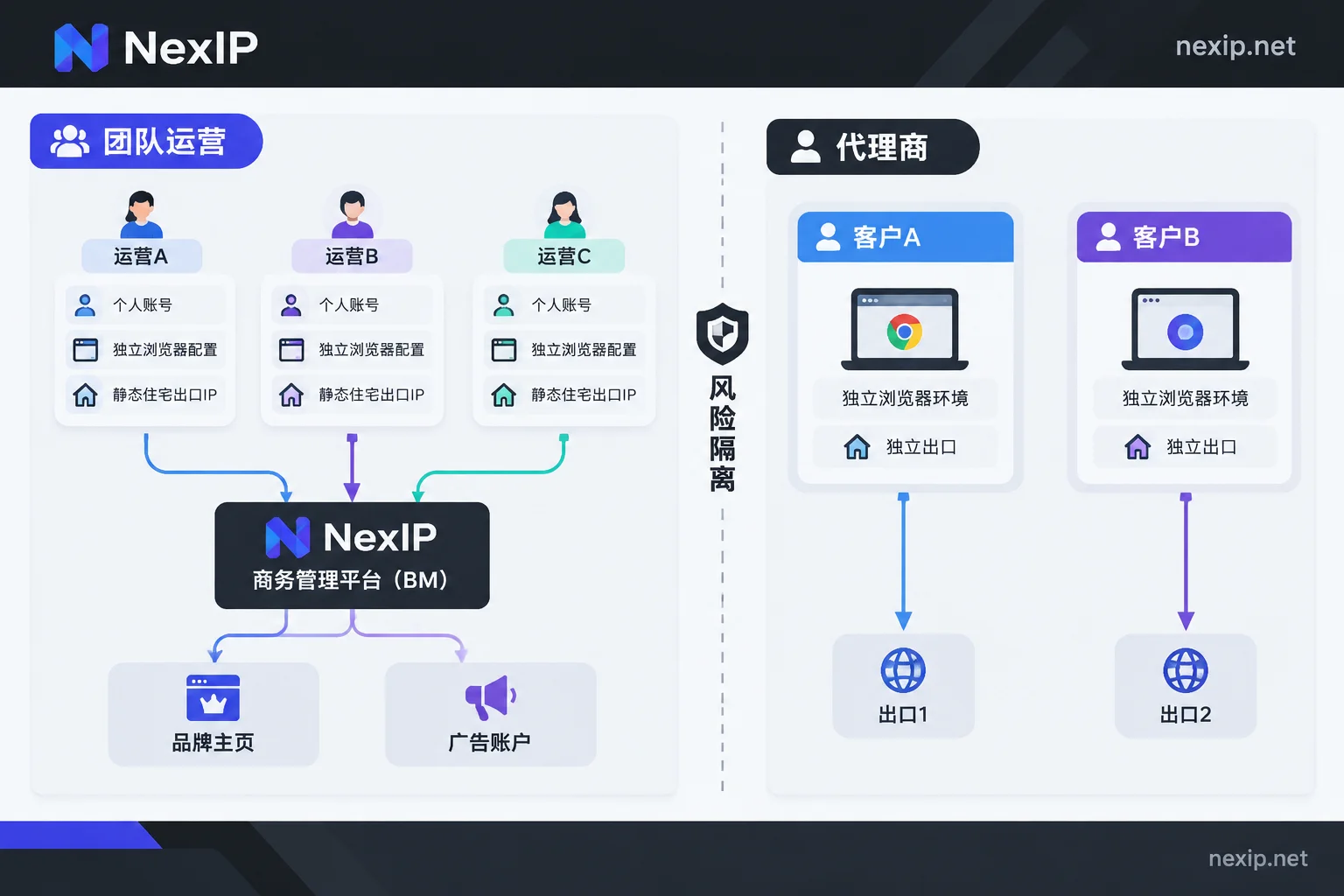
A company team operating a brand Page or ad account. Each operator should use their own personal account, put the Page and ad account into Business Manager (BM), and assign permissions by role. Do not hang all assets on a single "shared account" that everyone logs into in turn. Under this premise, the exit should focus on stability: if the team works in China but needs to log in long-term as a network identity from the business's region, each operator workstation should be assigned a fixed exit, rather than using one node today and another tomorrow. Frequently jumping IPs and geolocations are easily treated by the system as remote login or high-risk operations. For how to allocate exits and credentials during multi-person collaboration, see configuring proxy IP permissions for team collaboration.
An agency managing multiple clients' assets at the same time. It is recommended to split exits and browser environments by client. This is not to hide anything, but to control the scope of impact: if one client's ads are reviewed or penalized, other clients' assets will not all be asked for verification together.
One person wanting to hold multiple personal accounts in bulk. This violates platform account policies and cannot be solved by network configuration; this article does not provide methods for this.
When You Need a Fixed Exit, Which Type to Choose?
To assign an exit for Facebook accounts or BM, the core requirement is long-term stability and a source that looks like a real home broadband. Based on this requirement, the trade-offs among various exit types are as follows:
- Static long-acting residential IP: preferred. Exclusive use, IP remains unchanged for a long time, suitable for Pages, ads, and BM management that require continuous login monthly or yearly.
- Static short-acting IP: exclusive and fixed, but with a short lease. Suitable for temporary projects or short-term testing, not for accounts that need to stay logged in long-term.
- Dynamic residential IP (rotating): not suitable for logging into accounts, as the address may change with each connection. It is better for tasks that do not require login, such as ad verification and public page monitoring.
- Data center IP: low price and fast speed, but the ASN is easy to identify. Using it to log into social media accounts carries higher risk.
At NexIP, the corresponding option is static long-acting IP. It is divided into three subtypes: native home broadband, broadcast home broadband, and data center. For logging into Facebook accounts, native home broadband is recommended: the ownership information of broadcast home broadband IPs in various IP databases may not fully match the actual usage region, and you need to verify it yourself after receiving it; the data center subtype is not recommended for login. If a long-acting IP fails, it can be replaced for free, but the exit will change after replacement. It is recommended to switch during periods when no sensitive operations are performed, and after switching, first observe whether the account status is normal.
One more reminder: IP is only responsible for the network exit. The browser environment needs separate isolation for this part; tools like NexBrowser can be used to create an independent profile for each account. No solution can guarantee that an account will not be banned; the account itself being compliant is the prerequisite.
Align These Points During Configuration
- One account (or one client) corresponds to one browser profile and one fixed exit. Do not log out of A and log into B in the same browser profile.
- Protocol and authentication. Common access methods are HTTP/HTTPS or SOCKS5; authentication can use username/password or whitelist. For multi-person, multi-location work, username/password is more convenient; when the office network's public IP is fixed, a whitelist can be used to reduce credential leakage.
- Plug leaks. Check whether WebRTC and DNS bypass the proxy and expose your local real IP. If there is any leak, the previous exit configuration is wasted.
- Environment and exit region match. The browser's time zone and language should match the region of the exit IP as much as possible to avoid obvious contradictions.
- Slow down the first login. The first login from a new exit may trigger two-factor verification; just follow the prompts. Do not change the exit, change devices, and modify profile information in bulk on the same day.
How to Verify After Receiving It
- Visit an IP lookup page in the configured browser to confirm that the exit IP, country, and city meet expectations.
- Check the ASN and carrier name to confirm it is a residential broadband carrier, not a cloud service provider or data center.
- Use WebRTC and DNS leak detection pages to check and confirm that no local IP appears in the results.
- Recheck after a few days to confirm that the exit IP has not changed.
Whether exclusivity is genuine can be documented using the methods in determining whether an IP is truly exclusive.
Back to the initial question: Facebook does not limit how many accounts can log in from one IP; it focuses on whether these accounts are real, each belonging to its owner, and whether the network, device, and behavior are normal. First confirm that accounts are compliant, then split fixed exits by team or client.




Comments(0)