 NexIP官方博客
To start with the conclusion: IPWeb (ipweb.cc) issued a business adjustment announcement on October 3, 2026, stating that to comply with regulatory requirements, the dynamic IP business will cease operations immediately, and the static IP business will undergo regulatory rectification, with further arrangements pending. The announcement retained after-sales communication channels, but for most users, this provider's proxy exits can no longer be considered usable resources.
Strictly speaking, this situation is different from a "run away" where the company vanishes. The official statement provides an explanation and contact information. For business operations, however, the result is similar: collection tasks cannot run, fixed exits may fail at any time, and there is still no clear answer on how balances and unexpired IPs will be handled.
If your business relies on it, follow this order: first stop losses, then migrate, and finally use this opportunity to improve your criteria for choosing providers.
1. Three Things to Do First These Days
1. Stop renewals and top-ups, keep evidence. Archive order records, balance screenshots, lists of unexpired static IPs, and expiration dates. Then ask official after-sales channels how balances and unexpired IPs will be handled. As of the announcement, refund and settlement details are not fully public. For the latest updates, check the ipweb.cc official announcements and after-sales replies directly; do not trust third-party hearsay.
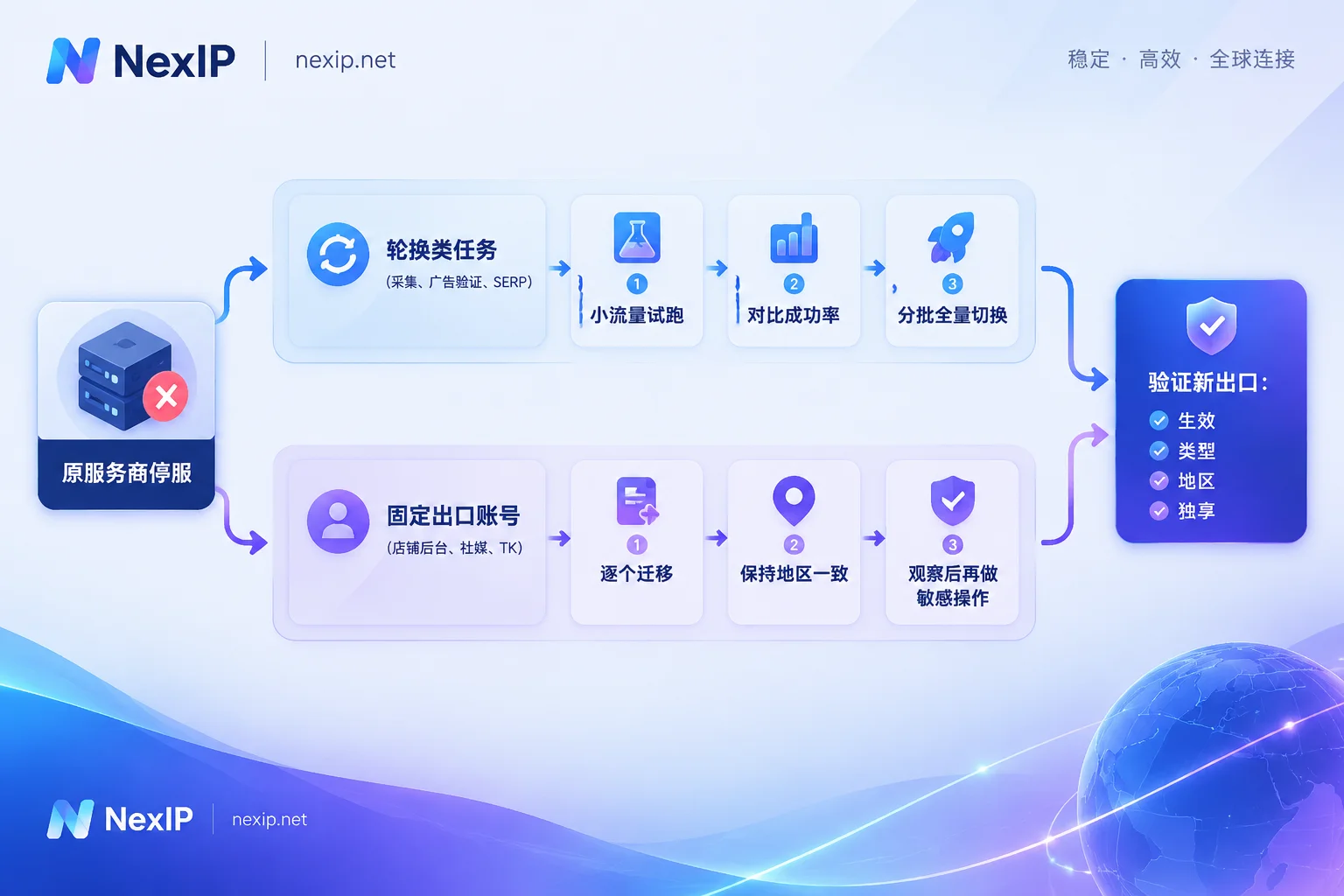
2. Group dependencies by "rotating exits" and "fixed exits". This step determines the migration order:
- Rotating exits: data collection, ad verification, SERP monitoring, price monitoring, etc. IPWeb's suspended dynamic service is exactly this type, so such tasks may already be failing or have lower success rates—the impact is most direct. Fortunately, these tasks have the lowest cost to switch exits, so they can be migrated first.
- Fixed exits: store backends, social media accounts, TikTok operations, and other accounts long bound to one IP. Static IPs are "under rectification"; they may still connect now, but no one knows when they will break. Do not wait for them to break—plan a proactive migration.
3. List access parameters for each link. This includes access method (API extraction, username/password, port forwarding, or process proxy), protocol (HTTP/HTTPS/SOCKS5), authentication method (username/password or whitelist), target country or city, and whether sticky sessions are used. As long as the new provider matches these items with your original configuration, in most cases you only need to change the host, port, and credentials—no need to rewrite business logic.
2. How to Migrate the Two Types of Exits
Rotating tasks: run small traffic first, then switch all
- Open a small package with the new provider and switch one non-core task's proxy address to it.
- Compare success rates, response code distribution, and latency before and after the switch. If the success rate is not ideal, first determine whether the problem is the exit or the target site. For how to judge, see Collection Success Rate Suddenly Drops: Check the Exit or the Target Site First?.
- Once stable, switch the remaining tasks in batches. In your code, put proxy addresses in config files or environment variables so that next time you can switch providers by changing configuration.
Billing methods can also be recalculated during this migration: tasks with scattered requests and small per-request traffic are suitable for traffic-based billing; long-term high-concurrency tasks with large traffic are often more cost-effective with bandwidth-based billing. For details, see Proxy IP Billing: By Traffic or By Bandwidth?.
Fixed-exit accounts: change one by one, and avoid sensitive operations immediately after
When store backends and social media accounts change IPs, platforms likely see it as a change in login environment. The common result is a second verification request, not a direct penalty. What you really need to avoid is several things happening at once:
- Do not change all accounts on the same day; migrate in batches by account importance.
- Do not change other environment factors at the same time as the IP, such as browser fingerprints, devices, or payment information.
- Keep the new exit's region as consistent as possible with the original, at least the same country.
- After the change, log in and use normally for a while before performing sensitive operations like changing profile or payment info.
For more details, see Will Changing IP to Log In to an Amazon Store Trigger a Review?. For why backends should use static exits and what dynamic exits are suitable for, see Dynamic IP or Static IP for Seller Backends?.
3. What to Improve This Time: How to Judge Whether a Provider Is Compliant
IPWeb is not the first residential proxy provider to get into trouble. According to industry reports, since 2026, several low-cost providers such as 922 S5 and Luna Proxy have also shut down services, with reports attributing this mostly to unauthorized IP resources or non-compliant operations. The exact characterization should be based on official notices; there are no public enforcement details yet. But the pattern is clear: providers with unclear IP sources and prices significantly below industry levels can shut down at any time.
When choosing a new provider, ask the following questions one by one:
| Question to Ask | Why It Matters |
|---|---|
| Where do IP resources come from? ISP authorization, or user-authorized shared devices? | Resource pools with unclear sources are most likely to be rectified and are more likely to enter platform blacklists. |
| Is there a verifiable company entity, user agreement, and prohibited-use clauses? | Providers with no restrictions on use at all also carry the greatest risk. |
| What happens if a static IP fails? Can it be replaced for free? | Determines the loss you bear when problems occur. |
| Which access methods, protocols, and authentication methods are supported? | Determines migration cost and whether you can move away at any time. |
| Can package periods be chosen on demand? | Avoid large one-time prepayments and reduce the risk of being locked in. |
| How to contact after-sales, and how quickly do they respond to failures? | This is your channel for rights protection when a shutdown occurs. |
Two other habits are worth maintaining: do not put all business on one provider; have at least one tested backup exit for core business. Limit prepayment amounts to enough for one or two billing cycles.
4. How to Verify a New IP After You Get It
No matter which provider you switch to, it is recommended to do these checks before going live:
- The exit is actually working. Access an IP lookup API through the proxy and confirm the returned IP is not your local IP:
curl -x http://用户名:密码@代理主机:端口 https://ipinfo.io
curl -x socks5h://用户名:密码@代理主机:端口 https://ipinfo.io- Type and region match. Check whether the ASN and carrier name are a residential ISP, and whether the geolocation matches the purchase. For how to identify fake residential IPs, see How Fake Residential IPs Are Packaged.
- Recheck static IPs every few days. Confirm the exit has not drifted and the geolocation has not changed.
- Confirm whether it is truly exclusive. For how to check, see How to Tell If the IP You Bought Is Really Exclusive.
5. Choose Alternatives by Task
After confirming the task type, you can match it with NexIP products:
- Tasks requiring rotation, such as collection, ad verification, and SERP monitoring: use dynamic residential IPs. For tasks with uncertain traffic, choose traffic-based billing with dynamic traffic packages, supporting rotation and sticky sessions; for long-term large-traffic tasks, consider dynamic bandwidth packages with bandwidth-based billing and unlimited traffic.
- Fixed exits such as store backends, social media, and TikTok operations: use static long-lasting IPs. They are exclusive fixed IPs, billed monthly or yearly, available in three types: residential native, residential broadcast, and data center, with free replacement after failure. For TikTok operations, the official recommendation is residential native. Short-term projects can use static short-term IPs billed by hour or day.
NexIP supports four access methods: API, username/password, port forwarding, and process proxy. Protocols cover HTTP/HTTPS/SOCKS5, and authentication can be username/password or whitelist. Most original access configurations can be mapped directly. For available countries and prices, please refer to the official website. Proxy IPs are only responsible for the network exit; browser environments, accounts, and phone numbers are separate aspects—do not change them all at the same time during migration.


Comments(0)