 NexIP官方博客
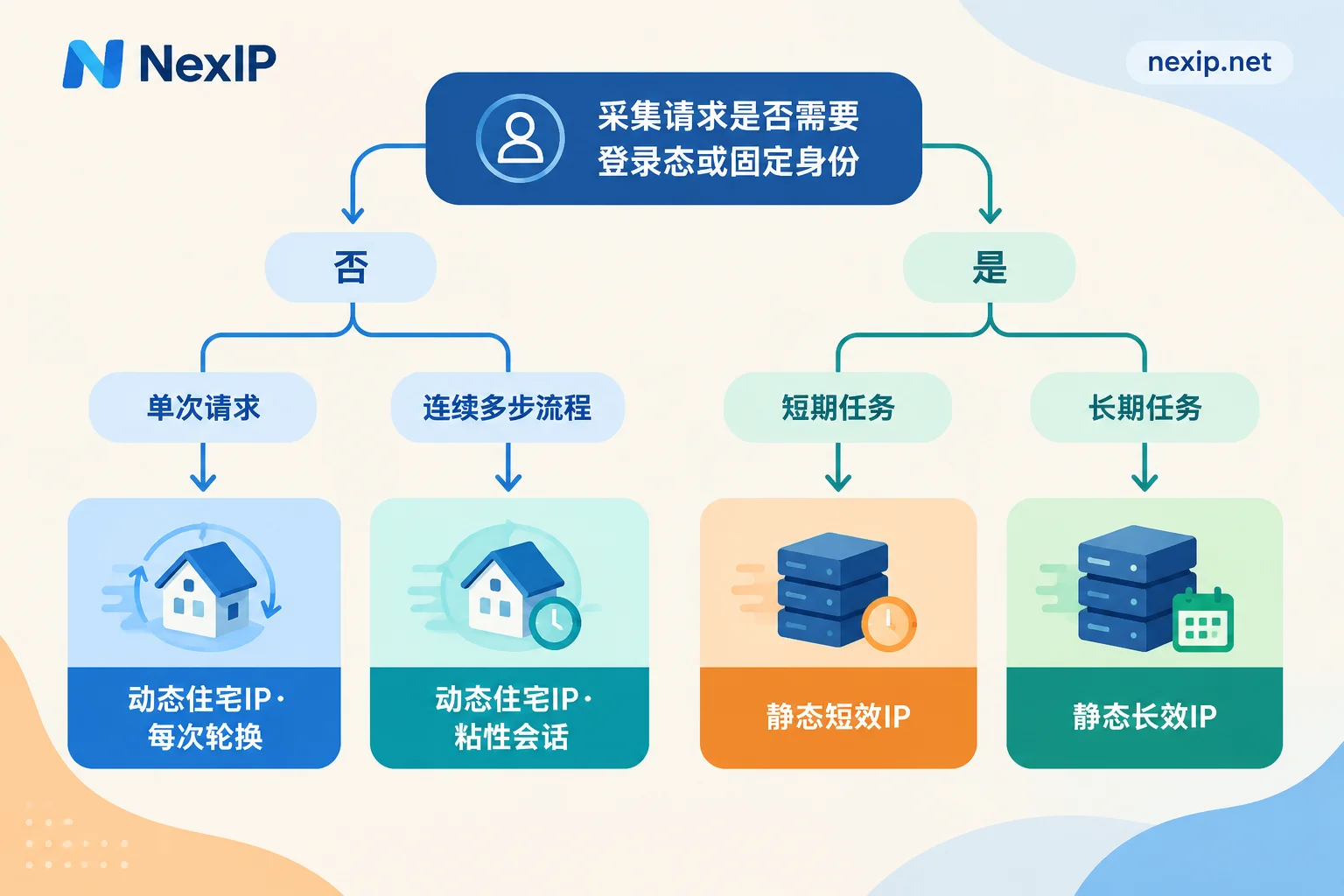
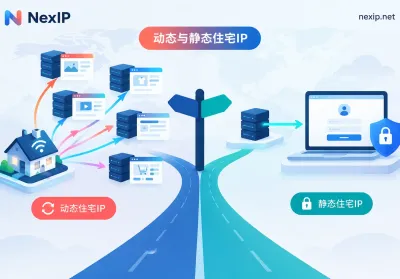
Most scraping tasks use dynamic residential IPs. Static residential IPs come into play only when scraping depends on a logged-in session and requires long-term access under the same identity. There is only one criterion: does your request need the target site to "remember who you are"?
By task type, it roughly breaks down like this:
- Bulk scraping of public pages where requests are independent (competitor prices, SERP rankings, public reviews, sentiment): use dynamic residential IPs, rotating per request or at short intervals.
- A multi-step flow within a single session (pagination, filtering then scraping the list, adding to cart to check shipping): still use dynamic residential IPs, but enable sticky sessions and rotate only after the whole flow finishes.
- Scraping that requires login and depends on sessions (pulling your own store backend reports, reading data pages of authorized accounts): use static residential IPs, with one fixed exit per account.
- Not recommended: using one or two static IPs to handle high-concurrency bulk scraping.
Below I'll explain the prerequisites and exceptions for each case, then cover how to configure and verify.
First, determine: does the request have state?
A simple test: take a single request, send it again from a different IP—does the result come back the same?
- Same result means it's a stateless request. For example, product detail pages and search result pages show roughly the same content to anyone (except regional versions).
- Different result, or you're asked to log in or verify again means it's a stateful request. It depends on cookies, login state, or context left by previous steps.
A project usually contains both types, so you don't have to pick one IP type for the entire project—just configure them separately by request type. I'll cover mixed usage later.
Stateless bulk scraping: rotating dynamic residential IPs
The main limitation in public data scraping is the target site's rate limit per IP. Too many requests from the same IP in a short time leads to 429s, CAPTCHAs, or 403s. Dynamic residential IPs assign real home broadband exits from a shared pool, automatically rotating per request or at time intervals, spreading requests across many exits and reducing the load on any single IP.
A few things to note:
- Rotation won't solve an excessive request rate. You still need to set the total request rate to the target site at a level it can handle, with random intervals and failure backoff. Hammering too hard will get you flagged no matter how many IPs you rotate, and it burdens the target's servers.
- Scrape only public data, and follow the target's terms of use and robots conventions. A proxy only handles the network exit; it doesn't change whether the scraping behavior itself is compliant.
- Pick the right region. Prices, inventory, and search results often differ by country or even city, so your exit region should match the version you want to see.
E-commerce price comparison is the classic scenario. For how to combine rotation and sticky sessions, see Which proxy IP to use for scraping Amazon competitor prices.
Multi-step flows: use dynamic residential IPs with sticky sessions
If a scrape involves several consecutive steps—like selecting filters, then paging through results, or adding an item to cart to check shipping—changing IP on every request will make the site notice the session's source keeps shifting, and the flow may break or get blocked.
In that case, enable sticky sessions: keep the same exit IP for a time window, and rotate after the flow completes. When configuring:
- The window should cover the entire flow with some margin, but not be too long, or it degrades back into high-frequency access from a single IP.
- If the IP changes or drops mid-flow, restart from step one. Don't continue the latter half from a new IP, as that can produce inconsistent data or trigger risk controls.
- Session duration rules vary by provider; follow the documentation for the product you're using.
Scraping that requires login state: static residential IPs
When scraping requires login—say, pulling your own seller backend reports daily, or reading analytics pages of authorized accounts—frequent IP changes are themselves a risk signal. If the source IP keeps jumping after login, common outcomes include two-factor verification, forced logout, and in severe cases account restrictions. Static residential IPs have a fixed address and stable location, so the account always logs in from the same place, which looks like normal usage.
How to choose:
- Short-term tasks (temporary projects, short tests, a few days of data backfill): static short-lived IPs, rented by the hour or day, exclusive and fixed.
- Long-term tasks (daily scheduled report pulls, long-maintained accounts): static long-lived IPs, rented monthly or yearly. Long-lived IPs are usually further subdivided. For platform accounts sensitive to exit origin, prioritize home broadband types; for technical APIs that aren't sensitive to IP type, data center types are an option.
- One account, one fixed exit—don't let multiple unrelated accounts share the same exit in rotation.
Understand that static IPs only solve the "stable origin" problem. The account itself still has rate limits, so keep the scraping pace moderate. If you're operating the backend in a browser, browser environment consistency matters too—that's the domain of fingerprint browsers, separate from IPs. For specific backend configuration for stores, see Dynamic or static IP for Amazon seller backend.
Why not use static IPs for bulk scraping
Some people think static residential IPs are "cleaner" and want to use them for all scraping. There are two problems:
- Fixed addresses can't escape rate limits. A single IP hitting frequently will quickly get throttled or banned by the target's anti-bot system, and the exclusive IP you paid for may become useless.
- The cost doesn't add up. To get enough exits from static IPs to spread bulk requests, you'd need to buy many IPs and manage rotation yourself—generally far more expensive than using a shared dynamic residential pool, and more maintenance hassle.
So static IPs suit "few but stable" identity-based access, not "many and fast" bulk scraping.
Billing models: per traffic, per bandwidth, or per IP
After choosing the type, check whether the billing model matches your traffic profile:
- Dynamic residential traffic plans (billed by traffic): suitable for scraping lightweight content like HTML or JSON. Estimation method: sample a small batch first, measure average traffic per page, multiply by expected page count, then add extra consumption from retries.
- Dynamic residential bandwidth plans (billed by bandwidth, unlimited traffic): suitable for tasks that fully render pages with headless browsers, download images or media, or sustain high throughput for long periods. If billed by traffic, these tasks get expensive fast. When choosing, mainly check whether the bandwidth supports your concurrency.
- Static residential IPs: usually billed by number of IPs and rental period. Whether traffic is billed separately depends on the specific product page.
If you're unsure which traffic profile you have, start with a traffic plan on a small scale, observe per-page traffic and daily totals, then decide whether to switch to a bandwidth plan.
Common practice: mix them in one project
Take cross-border e-commerce data as an example. A team might have all three needs at once:
- Competitor front-end price and ranking monitoring → dynamic residential IPs, rotating per request
- Add-to-cart shipping checks, multi-page filtering → dynamic residential IPs, sticky sessions enabled
- Your own store backend reports → static long-lived IPs, one exit per store
In code, routing different proxy configurations by task type is more stable and cheaper than using one IP type for the whole project.
Integration and configuration
- Protocol: most scraping frameworks and HTTP clients use HTTP/HTTPS proxies directly; use SOCKS5 when the client only supports SOCKS5 or you need to forward non-HTTP traffic.
- Authentication: if your scraping server's exit IP is fixed, whitelist authentication is easiest; for distributed nodes, cloud functions, and other non-fixed exit IPs, use username/password authentication.
- Integration method: if your program can configure proxies directly, use API IP extraction or username/password; if you need to assign a fixed exit to a fixed port, use port forwarding; if the software doesn't support proxy settings, use process proxying.
Verify after getting IPs, then scale up
- Verify rotation or fixed behavior: send consecutive requests to an IP echo endpoint. In rotation mode you should see different IPs; a sticky session should keep the same IP within the window; a static IP should still be the same the next day.
- Check region and type: look up the exit IP's geolocation and network type to confirm it matches your chosen country and residential type.
- Run a small batch against the target site: record the status code distribution (how many 200s, 403s, 429s), CAPTCHA rate, and average response time as a baseline. If these metrics degrade noticeably after scaling up, slow down first, then investigate.
- Recalculate usage: use the per-page traffic or bandwidth from the test run to check whether your plan is sufficient.
- Logged-in tasks: when using a browser, additionally check for DNS or WebRTC leaks revealing your real IP—otherwise your fixed exit is pointless.
Choose based on your determination
Once you've identified the task type, you can pick the corresponding NexIP product. For bulk public data scraping and multi-step flows, see dynamic residential traffic plans—the same plan supports rotating or sticky sessions. For heavy-traffic tasks like rendering or media, compare the bandwidth-billed, unlimited-traffic dynamic bandwidth plans under the same product line. For scraping that needs login state and a long-term fixed exit, see static residential long-lived IPs, available in home broadband native, home broadband broadcast, and data center types, with free replacement on failure. For short-term projects, choose the static short-lived IPs from the same series. Coverage countries, session rules, and pricing are subject to the current descriptions on the official website.


Comments(0)