 NexIP官方博客
After configuring the proxy, Facebook still requiring verification cannot simply be attributed to the proxy not working. More often, Facebook still considers this login to come from an unfamiliar device, browser, or location. Facebook Help Center clearly states: when an unrecognized device or browser, or an unfamiliar location is detected, additional verification is required. If the browser is in incognito mode, or clears cookies and history on close, Facebook cannot remember this device and will treat every login as a new device.
So the order of handling is: first, complete this verification via the official process and get the browser remembered; then check four things in sequence: whether the browser retains login records, whether the exit is changing, whether the real IP is leaking outside the proxy, and whether the exit location matches the account's usual login location. After checking all four, decide whether to change the exit type.
First, get past this verification
- Complete verification using a method already bound to the account, such as an authenticator app, SMS code, or confirming on another logged-in trusted device that it's you.
- After successful verification, if the page offers an option to save the browser or remember this device, be sure to check it. Whether Facebook can recognize this device later depends on this step.
- During verification, do not switch nodes, restart the proxy client, or change browsers to retry. If the exit changes mid-way, it creates another unfamiliar login.
- After logging in, open "Where you're logged in" in settings to see the location Facebook records. If the displayed country or city doesn't match the proxy exit, some traffic may not be going through the proxy; focus on this in step 3 below.
Step 1: Does the browser remember this device?
This is the most easily overlooked and least costly to check. There are three common scenarios:
- Logging in through incognito or private windows;
- Browser set to clear cookies on exit, or an auto-cleanup extension installed;
- The same account logs in from this browser profile today, another profile tomorrow, or several people take turns logging in from different computers.
In these cases, even if the exit IP never changes, Facebook will keep treating logins as new devices. The solution is to fix a regular window browser profile for this account, keep cookies, and try to always log in from the same device. If a team needs to maintain independent and long-term stable browser profiles for multiple accounts, environment management tools like NexBrowser can help. This site only handles the network exit layer.
Step 2: Is the exit constantly changing?
Facebook treats rapid geographic jumps and network operator (ASN) jumps as signals that an account may be compromised or a session hijacked. If the exit itself changes, having a proxy can actually make verification more frequent. Focus on these scenarios:
- Using rotating dynamic proxies. In a per-request IP rotation mode, every page refresh could switch the exit to another city or another operator.
- Sticky session expiration. Dynamic proxy sticky sessions have a time limit; after expiration, the exit changes. The duration depends on the provider's documentation.
- Client auto-switching nodes. Some clients automatically switch to another node when latency increases or a disconnect occurs.
- Fallback to direct connection when proxy drops. When the proxy disconnects, the browser goes directly through the local network, and the exit instantly reverts to the real IP.
The self-check is simple: in the same browser, open an IP lookup page at intervals, note the exit IP, country/city, and operator, and compare several times. If any one item changes, fix this issue first before moving to the next steps.
Step 3: Is the real IP leaking outside the proxy?
If the proxy only handles part of the traffic, you may see the proxy IP on webpages while the platform can still see another address. There are three common leaks.
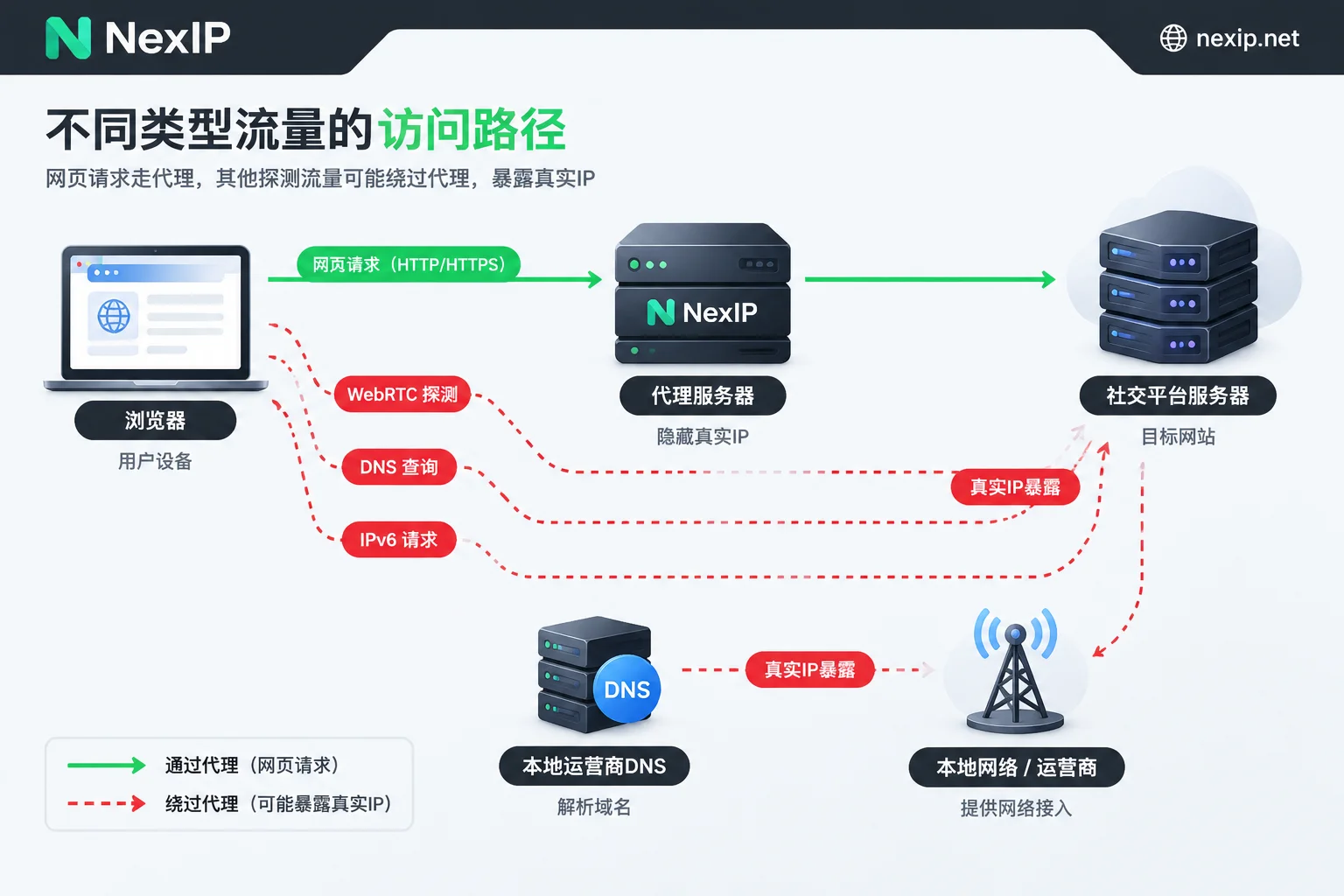
WebRTC leak. The browser's WebRTC uses STUN/TURN servers to probe local network interfaces and collect candidate addresses. If the proxy only handles regular HTTP/TCP traffic, this probing may bypass the proxy and expose your real public IP or IPv6 address.
DNS leak. Domain name resolution requests do not go through the proxy but are sent directly to the local operator's DNS servers. As a result, web requests come from the proxy's country, but DNS queries come from your local location—the two locations don't match.
IPv6 bypass. The local network has IPv6 enabled, but the proxy only handles IPv4, so some requests go out directly via IPv6.
How to check: After connecting to the proxy, test with a WebRTC leak detection page and a DNS leak detection page respectively. The IP and DNS server location you see should match the proxy exit; if your local IP or local operator's DNS appears, there is a leak.
How to fix:
- WebRTC: Limit WebRTC exposure of local addresses in browser settings or a trusted extension. If using an environment management browser, follow the tool's instructions to set WebRTC to not expose the local IP.
- DNS: When using SOCKS5, let the proxy resolve domain names remotely, e.g., use
socks5h://instead ofsocks5://in curl; or let the proxy client handle system DNS. - IPv6: If the proxy does not support IPv6, disable IPv6 in the local network settings, or enable the option to block IPv6 in the client.
- Fallback to direct: If the client has an option like "block traffic when proxy disconnects," it's recommended to enable it.
Step 4: Does the exit location match the account's usual location?
A stable exit with no leaks does not guarantee no verification. If an account has always been used in country A and one day logs in from a proxy in country B, that itself is an "unfamiliar location," and verification is a normal response. Usually, after verification and saving the device, it gradually stabilizes. When choosing an exit region, base it on the account's actual operating location and the team's location, and do not switch back and forth between several countries. For region selection during registration, see Which country's residential IP should be used for Facebook registration.
The source of the exit can also affect the platform's judgment. Data center IPs and IPs shared by many people are more likely to carry others' usage records, and some platforms are more cautious with such exits. However, Meta has not disclosed specific judgment rules, so this can only be a direction for troubleshooting. For the impact of shared exits, see Will a shared IP lead to account bans due to others' accounts.
After checking, how to configure the exit
For tasks like account login, ad backend, and BM management, the core requirement is to log in from the same exit every time. According to the usage period, you can choose as follows:
- Long-term accounts or backends: Choose an exclusive and fixed static residential IP, renewed monthly or yearly, so that one account (or a group of accounts under the same entity) corresponds to a fixed exit. NexIP's static residential long-term IP is divided into three subcategories: home broadband native, home broadband broadcast, and data center. The official website explicitly recommends home broadband native for TK operations; Facebook accounts also involve long-term fixed logins, so you can follow this approach: first look at home broadband native, then combine budget and required region. If the IP becomes invalid, it can be replaced for free; after replacement, remember to re-test using the above methods, and expect to encounter verification again.
- Short-term projects or temporary tasks of a few days: You can use static residential short-term IP. It is also exclusive and fixed, just with a shorter lease.
- Tasks that don't require login state: Dynamic rotating proxies are suitable for data collection, ad verification, etc., and should not be used to log into accounts.
For access, both username/password authentication and whitelist authentication can be used. If you have encountered DNS leaks, prefer SOCKS5 protocol and let the proxy resolve domain names. After obtaining the exit, run a round of checks:
curl -x socks5h://用户名:密码@代理地址:端口 https://ipinfo.ioRun it several times at intervals to confirm that the IP, country/city, and operator have not changed. Then, in the actual browser you will use, perform WebRTC and DNS checks again. After all pass, log into the account.
If the BM has many administrators and scattered login locations, you can then read Does frequent IP changes for BM account logins have an impact.
You've done all the troubleshooting, but still get verified
If the above steps are all fine, the cause may no longer be at the network layer, for example:
- The account recently changed password, email, or phone number, or had abnormal login records, which can also trigger additional checks;
- The same account is logged in by multiple people from different locations;
- The account itself is in a review or security check process.
For such cases, please follow the Facebook Help Center guidelines. Changing IPs won't solve these problems; frequently changing exits will only make things more complicated. As for when verification will or won't be triggered after changing IPs, you can refer to Do you need to re-verify identity after changing Facebook IP.



Comments(0)