 NexIP官方博客
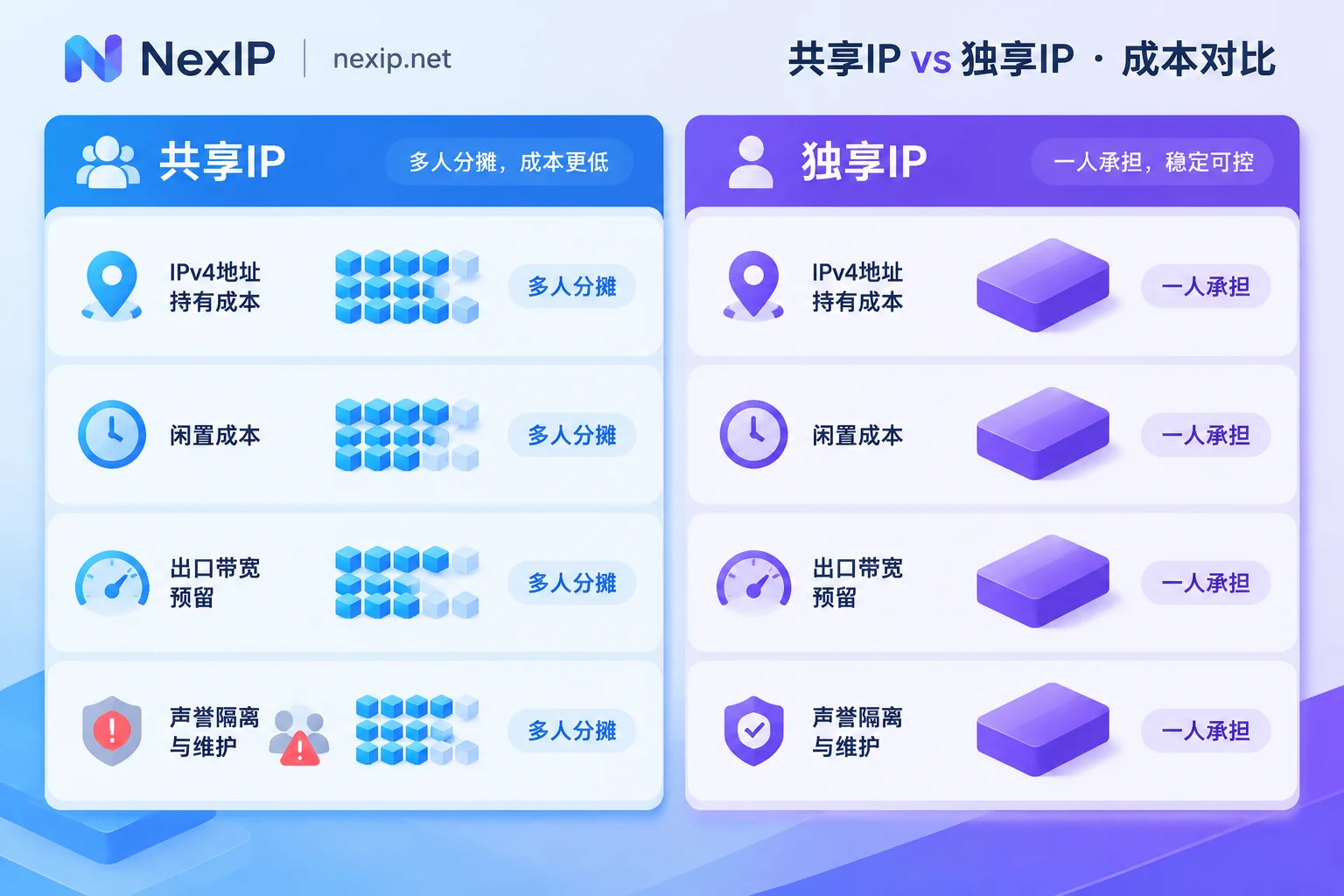
Let's start with the conclusion: A shared IP spreads the cost of one address across many people, while a dedicated IP gives that address to only you for the rental period. The cost of holding the address itself, the idle time when you're not using it, the egress capacity reserved for you, and the work to keep it "clean" all fall on you alone. The price difference mainly comes from how many people share the cost.
Whether this premium is worth it depends on whether your task needs the same egress to represent you over the long term. If it does, this cost is necessary. If not, you're paying for something you don't need.
Where the Price Difference Comes From
1. IPv4 Address Scarcity: The Number of Sharers Determines the Unit Price
Public IPv4 addresses have long been exhausted. Providers must pay rent or purchase costs to obtain and hold a fixed public IP for the long term. In shared mode, NAT or port multiplexing allows multiple tenants to use the same address simultaneously, spreading the cost across dozens or more users. A dedicated IP is shared by only you, so the unit price is naturally higher.
2. Idle Costs Can't Be Passed On
A shared IP can continue to be used by others when you're not using it, achieving high utilization. A dedicated IP cannot be allocated to others even if you don't use it at night. The cost of this idle time can only be included in your price.
3. Egress Capacity Must Be Reserved for You
Shared egress bandwidth is dynamically contested by currently online tenants. During peak hours, it may be squeezed by others' heavy traffic, causing slowdowns or congestion. To keep speed and latency controllable, dedicated services usually need to reserve connection channels and upstream capacity for you, which comes with higher infrastructure costs. However, "dedicated IP" and "dedicated bandwidth" are not necessarily the same thing; check the provider's explanation.
4. Reputation Isolation and Maintenance
This point is often underestimated. On a shared IP, if just one user engages in high-frequency scraping, spamming, or password brute-forcing, the IP may be blacklisted by Cloudflare, Akamai, or the target platform, or frequently subjected to CAPTCHAs, affecting other users on the same IP.
A dedicated IP's reputation is determined solely by your own usage. Accordingly, providers must screen for uncontaminated IPs and are responsible for replacing them if they fail. These maintenance tasks are also factored into the price.
Align Billing Units Before Comparing Prices
In the residential proxy space, "shared" usually refers to dynamic rotating pools, typically billed by traffic or bandwidth. Dedicated static IPs are usually billed per IP and per duration. The billing units differ, so directly comparing "how much per IP" leads to distorted conclusions.
The more accurate approach is to calculate per task: roughly how many requests or how much traffic you need per month, how many fixed egresses you need, and how long each egress will be used. For how to save on traffic vs. bandwidth billing, see Proxy IP Billing: Traffic vs. Bandwidth.
When This Premium Is Worth Paying
Start by asking one question: Does the target system need to see the same "you" coming from the same egress over the long term?
Tasks suitable for dedicated static IPs:
- Store backends, social media accounts, TK operations. Login status and platform trust in the account depend on a stable egress. Frequent egress changes or sharing an egress with strangers make additional verification more likely.
- Third-party API outbound whitelists. The other party only allows registered IPs, so the egress must be fixed and belong only to you.
- Internal systems or management tools that need to maintain the same session over the long term.
Tasks better suited for shared or rotating pools:
- Large-scale data scraping, SERP rank monitoring, public checks of ad landing pages. These tasks don't need session persistence, have high concurrency, and need to distribute requests across multiple egresses. If you force them onto a few dedicated IPs, the request rate per IP will be too high, making rate limiting more likely. Rotating pools are both cheaper and more suitable for such tasks.
In-between cases:
- If you only need the egress to stay unchanged during one complete operation flow, a sticky session in a dynamic pool may suffice. For parameter configuration, see How to Set Up Sticky Sessions Without Losing Login State Midway.
- If you need exclusivity but only for a few hours or days, choose static short-term IPs billed hourly or daily; no need to buy long-term at once.
Also note that "neighbor risk" on shared IPs mainly manifests as IP blocking. Account bans may have other causes and shouldn't all be attributed to the IP. To distinguish these two cases, see Will a Shared IP Get Your Account Banned Along with Others?.
After Paying for Dedicated, Verify These Four Things
- Egress consistency. Access an IP detection page through the proxy at different times and in different sessions to confirm the detected egress IP remains the same. If it's for an API whitelist, ask the other party to check the source IP of received requests in their logs.
- Speed test during peak hours. Test upload/download bandwidth, latency, and packet loss during your busiest hours and compare with off-peak. If the difference is significant, overselling may be occurring.
- Check reputation records. Query public blacklists and IP reputation databases for historical abuse records of this IP. IPs with records should be replaced. However, a clean check doesn't guarantee it won't be blocked by some platform.
- Read the terms. Confirm whether the console or contract explicitly states exclusive use and how to replace the IP if it fails or becomes contaminated.
If you bought a residential IP, also verify the IP type and ASN to rule out data center IPs disguised as residential. For details, see How Fake Residential IPs Are Packaged.
Choose Based on Your Assessment
If you determine you need a dedicated fixed egress, NexIP offers two types of static residential IPs:
- Long-term fixed egress (store backends, social media accounts, API whitelists): Choose Static Long-Term IP. It's exclusive and fixed, purchased monthly or yearly, available in three types: native home broadband, broadcast home broadband, and data center. Free replacement if it fails. For TK operations, the official website recommends native home broadband.
- Short-term exclusive: Choose Static Short-Term IP, purchased hourly or daily.
Both support four access methods: API, username/password, port forwarding, and process proxy, and support HTTP, HTTPS, SOCKS5 protocols, with username/password or whitelist authentication. Concurrency limits, covered countries, and prices are subject to the live descriptions on the official website and console.
If your tasks are mainly scraping and monitoring, you don't need to pay the premium for dedicated; dynamic traffic or dynamic bandwidth packages are more suitable.
One more thing: IP only handles the network egress layer. For account operations, the browser environment also affects platform judgments, which can be handled with NexBrowser.


Comments(0)