 NexIP官方博客
No single tool can directly tell you whether an IP is used only by you. Which customers an IP is assigned to is recorded in the provider's own backend—WHOIS, Ping, and online proxy detection can't read that. What you can do is two things: before ordering, clarify what "exclusive" means; after receiving it, gather circumstantial evidence with a few checks—whether the exit is fixed, whether the history is clean, whether there are signs of others using it simultaneously, and whether performance fluctuates without reason. The more consistent the evidence, the more reliable the conclusion; if clear counter-evidence appears, take your records and request a replacement.
First, clarify which kind of "exclusive" the seller means
"Exclusive" can mean different things at different providers:
- Dedicated exit IP: During the rental period, this IP is assigned only to your account. Store backends and social media accounts usually need this type.
- Dedicated bandwidth or line: Bandwidth isn't shared with others, but the exit IP isn't necessarily exclusive to you.
- Dedicated dynamic pool: A set of IPs is rotated only for you; the IPs change, but the pool isn't shared externally.
So whether the IP changes and whether it's exclusive are two different things. Before ordering, it's best to get a written statement (product page or ticket reply): Is this IP assigned only to me during the rental period? How long after expiration before it's reassigned? How do we handle replacements if issues arise?
Also separate two other questions: exclusive doesn't equal residential, and it doesn't equal clean. An exclusive data center IP is still a data center IP; an exclusive IP may also carry records left by the previous user. For how to verify IP type, see Methods for Checking Fake Residential IPs.
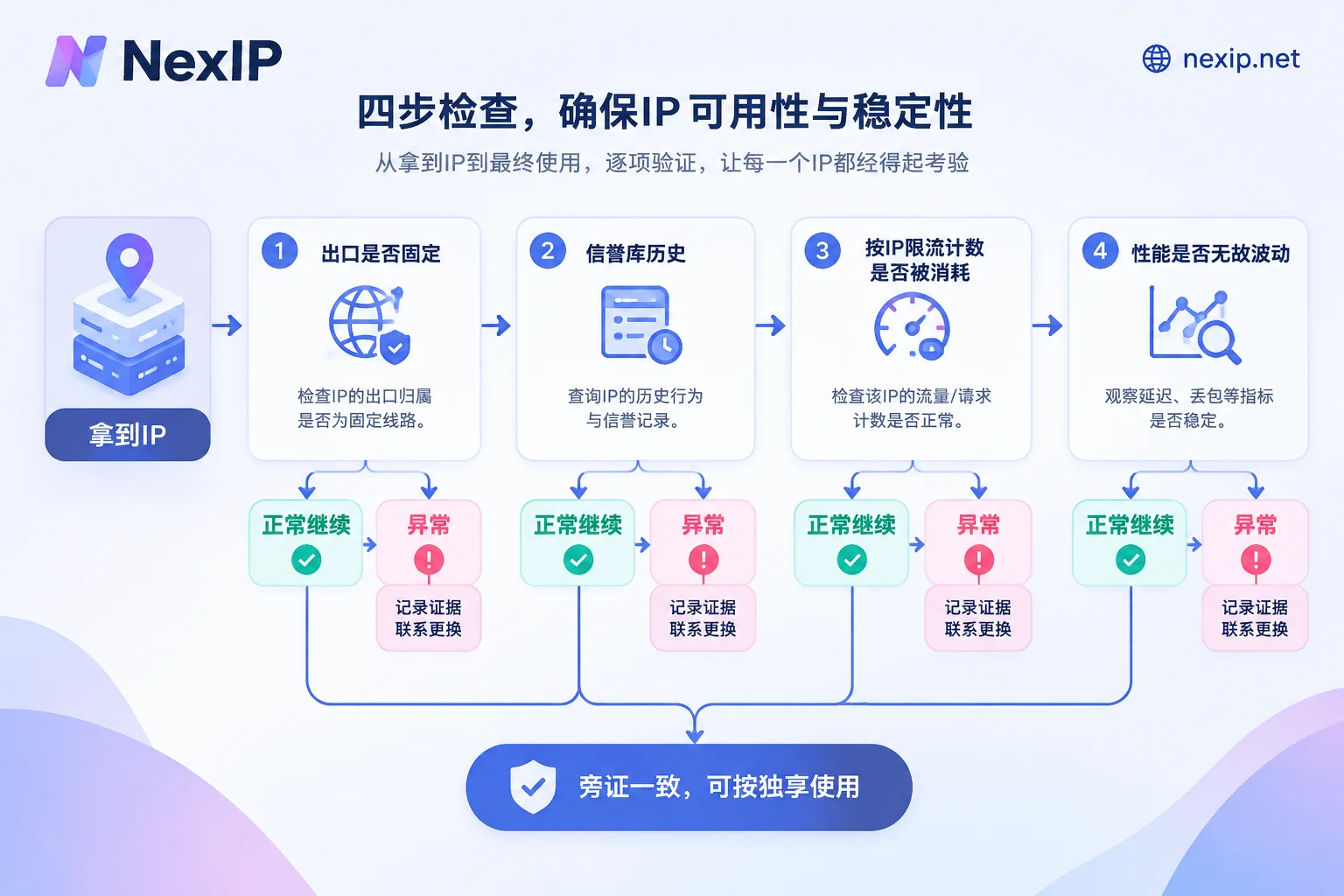
Four checks after receiving it
The following uses a static IP as an example. Keep request volume low during checks to avoid making the IP "dirty" yourself.
1. Is the exit fixed, and is it the IP in your order?
Access an IP echo service through the proxy multiple times at different times:
curl -s -x http://用户名:密码@代理地址:端口 https://api.ipify.orgThe returned value should always equal the IP listed in your order. If it changes, first check whether you're connected to a rotating gateway or if session parameters are wrong; if the configuration is correct and it still changes, it's not a fixed exclusive exit.
2. Historical reputation: are there problems left by the previous user?
Check this IP in databases like AbuseIPDB, Scamalytics, or IPQS. Recent scanning, spam reports, or a notably high fraud score often indicate it was just recycled from elsewhere and reassigned without cooling down.
This item only reflects history and cannot prove that someone is sharing it with you right now; a clean query result also doesn't mean it's exclusive.
3. Are there signs of others currently using it?
This is the check closest to "sharing" itself. The idea is to find a service that counts by source IP and see whether the count is consumed when you're not using it.
GitHub's unauthenticated API is rate-limited by source IP, and the endpoint for checking the limit itself doesn't count toward the limit:
curl -s -x http://用户名:密码@代理地址:端口 https://api.github.com/rate_limitLook at limit and remaining in the resources.core of the response. If you've never called the GitHub API through this IP, yet remaining is less than limit, it means other traffic from this exit accessed GitHub during the current counting window—for an IP claimed to be exclusive, this is strong counter-evidence (provided no other program on your machine also uses this proxy). Conversely, a full quota only means no one called GitHub during this period and cannot prove exclusivity. Checking once every few time slots provides more reference value.
Your business target site can also provide circumstantial evidence: if you only send sporadic requests but frequently get 429 Too Many Requests, captchas, or 403, someone may be using this IP for high-frequency requests. However, the target site may also tighten restrictions by subnet or ASN, especially for data center ranges. It's best to compare with another IP of the same type: only if this one IP is blocked does it more likely indicate a problem with itself.
4. Does performance fluctuate without reason?
When your own request volume is constant, record latency, TLS handshake time, and throughput. If throughput drops sharply, packet loss occurs, or 502/504 errors appear repeatedly at fixed times, it could be multiple users competing for the same node. This item can only be auxiliary: cross-border link congestion or target site failures can also cause similar phenomena. For whether to check the exit or the target site first when failures occur, see this troubleshooting approach.
These "detection methods" can't determine exclusivity
- WHOIS or ASN lookup: Only tells you which organization the IP is registered to, whether it belongs to a residential ISP or a data center; it can't see how many people the provider assigned it to internally.
- Ping and TTL: Reflect routing hops and firewall policies, unrelated to whether usage rights are exclusive.
- Online proxy detection: Answers "is this a proxy" or "can it connect", not "is it exclusive".
- Authentication method: Supporting IP whitelisting or having a dedicated port indicates a more fixed exit configuration but doesn't constitute proof of exclusivity; shared proxies can also use whitelist authentication.
What to do after finding issues
First distinguish which category it is:
- Historical contamination: Reputation databases have records, but no signs of concurrent use. Usually just request a replacement.
- Suspected active sharing: Rate limit counts are consumed, or you're blocked at low frequency while a control IP is fine. This is a problem with the exclusivity promise itself.
For both cases, organize evidence before contacting the provider: timestamps, IP, your request volume at the time, response codes, and relevant response headers. If sharing signs recur after several replacements, consider switching providers.
Match your tasks when choosing
Not all tasks require exclusivity. Large-scale scraping and SERP monitoring usually rely on rotation to distribute requests, making dynamic residential IPs more suitable; those needing a dedicated fixed exit are mainly long-term logged-in store backends, social media accounts, and verification tasks that need to maintain the same exit for a period. For why exclusive IPs cost more and when it's worth paying, see Why Exclusive IPs Are More Expensive Than Shared IPs.
At NexIP, dedicated fixed exits correspond to two product types:
- Rented by hour or day and released when the task ends: see Static Short-Term IPs;
- For long-term account binding by month or year: see Static Long-Term IPs. Long-term types are divided into residential native, residential broadcast, and data center—these are two dimensions separate from whether it's exclusive. Choose based on the target platform's IP type requirements; the official website recommends static residential native for TK operations. Long-term IPs can be replaced for free if they fail; after receiving, run the four checks above, and if there are issues, take your records to request a replacement.
Final reminder: IP exclusivity only solves the network exit layer; browser environment isolation needs separate handling (e.g., using NexBrowser). A clean exit also doesn't mean the account will definitely avoid platform penalties.


Comments(0)