 NexIP官方博客
Not recommended. Logging into multiple Amazon stores from the same IP does not directly trigger a violation. The problem is that the login IP is one of the signals Amazon uses to determine whether accounts are associated. If multiple stores share one exit over the long term, they can easily be grouped together by the system. Amazon has a linked-account suspension mechanism: if one store is suspended due to a violation or performance issues, other stores judged as associated may also be affected.
However, more important than whether to change IPs is whether your stores stand up from a policy perspective.
First, distinguish which type of multi-store situation you are in
The default rule in Amazon's Selling Policies and Seller Code of Conduct is: only one seller platform account is allowed per selling region. Multiple accounts are allowed only if there is a legitimate business need and all accounts remain in good standing. Examples of legitimate needs include: operating multiple completely independent brands, manufacturing products for two independent companies, being invited to participate in specific programs, etc.
Based on this, common situations can be divided into three types, each handled differently:
1. The same entity has opened multiple stores without a legitimate business need. In this case, the problem is at the policy level and cannot be solved at the network level. Changing IPs cannot turn a violation into compliance, and this article does not discuss such practices. You should first refer to the multi-account policy in Seller Central Help and address the accounts themselves.
2. The same entity has multiple accounts with legitimate needs. These accounts are inherently associated in Amazon's eyes; separating IPs is not about "hiding." However, it is still recommended to use a fixed, independent exit for each store for three reasons:
- The login network for each store remains stable over the long term;
- After team division, which person operates which store from which exit can be traced;
- Avoid historical reputation issues caused by public networks.
At the same time, be aware: associated accounts are still subject to the linked-suspension mechanism, and problems in one store will still affect other stores. What truly protects you is that each store complies with the rules and meets performance standards.
3. Different entities. For example, an agency managing multiple clients' stores simultaneously, or several companies sharing an office network. This is the situation where IP separation is most necessary. Sharing an exit will cause originally unrelated companies to be judged together by the system, and someone else's violation may affect you. Each client or company's store should have its own dedicated fixed exit.
For more detailed judgment on whether different platforms and different entities can share a dedicated IP, you can refer to Can Multiple Stores Share a Dedicated IP.
Why one IP "ties" stores together
When Amazon determines account association, it looks at a set of signals, commonly mentioned ones include:
- Network layer: login IP, network environment;
- Device layer: device fingerprint, browser cookies;
- Information layer: company information, legal representative information, receiving accounts, phone numbers, etc.
IP belongs to the network layer and is the most easily overlapping item. Logging into multiple stores under the same IP, or frequently switching logins, combined with similar browser fingerprints and overlapping product categories, can easily be identified as the same entity operating multiple accounts.
Two points need clarification:
- The specific weight of each signal is not publicly disclosed by Amazon. So don't assume that just changing IPs solves everything, and don't assume that sharing an IP once will definitely cause problems.
- After linked suspension, the order of recovery is crucial. Usually, the source store with the violation must be appealed and restored first, before other associated stores have a chance to be unblocked. A problem in one store can leave all associated stores suspended for a long time.
Additionally, there is an easily overlooked risk: innocent association. Public Wi-Fi, data center VPNs, low-quality data center proxies, and shared dynamic IPs may have been used by other sellers, including those with violation records. If your store logs in from such an exit, it may pick up someone else's historical issues. This is the same type of problem discussed in Will a shared IP be suspended due to someone else's account.
Choosing an exit for store backend: fixed, dedicated, long-term
The following points are listed in order of priority.
First, it must be fixed, not rotating. Dynamic residential IPs rotate and are suitable for tasks like price monitoring and data collection, but not for logging into store backends. A constantly changing login address is itself an unstable signal.
Second, it must be dedicated. A shared IP means others are using the same exit, and the innocent association risk mentioned above cannot be ruled out.
Third, choose long-term, not short-term. Stores operate long-term, so you should choose static long-term IPs (monthly or yearly). Static short-term IPs are suitable for temporary, one-off tasks. If bound to a store long-term, each expiration and IP change is equivalent to the store changing its login network.
Fourth, prioritize home broadband type. Static long-term IPs generally fall into three categories: home broadband native, home broadband broadcast, and data center:
- Data center IPs: low cost, but belong to data center network segments and are easily identified; not recommended as the first choice for store backends;
- Home broadband native and home broadband broadcast: the difference mainly lies in whether the IP's registration location matches the actual broadcast location. For details, refer to How to choose between native and broadcast.
Fifth, after choosing a region, keep it unchanged long-term. The exit region should match your actual operational arrangements. Once decided, do not change frequently; one store corresponds to one exit in one region.
Protocol and authentication depend on the browser or tool you use. Choose HTTP, HTTPS, or SOCKS5 as supported by your tool. There are two authentication methods:
- Username/password authentication: for team collaboration, it is recommended to have one set of credentials per store for easy permission assignment and recovery when staff leave;
- Whitelist authentication: suitable for fixed office networks.
For how to set team permissions, refer to How to configure proxy IP permissions for team collaboration.
One store, one environment, one exit—configure in this order
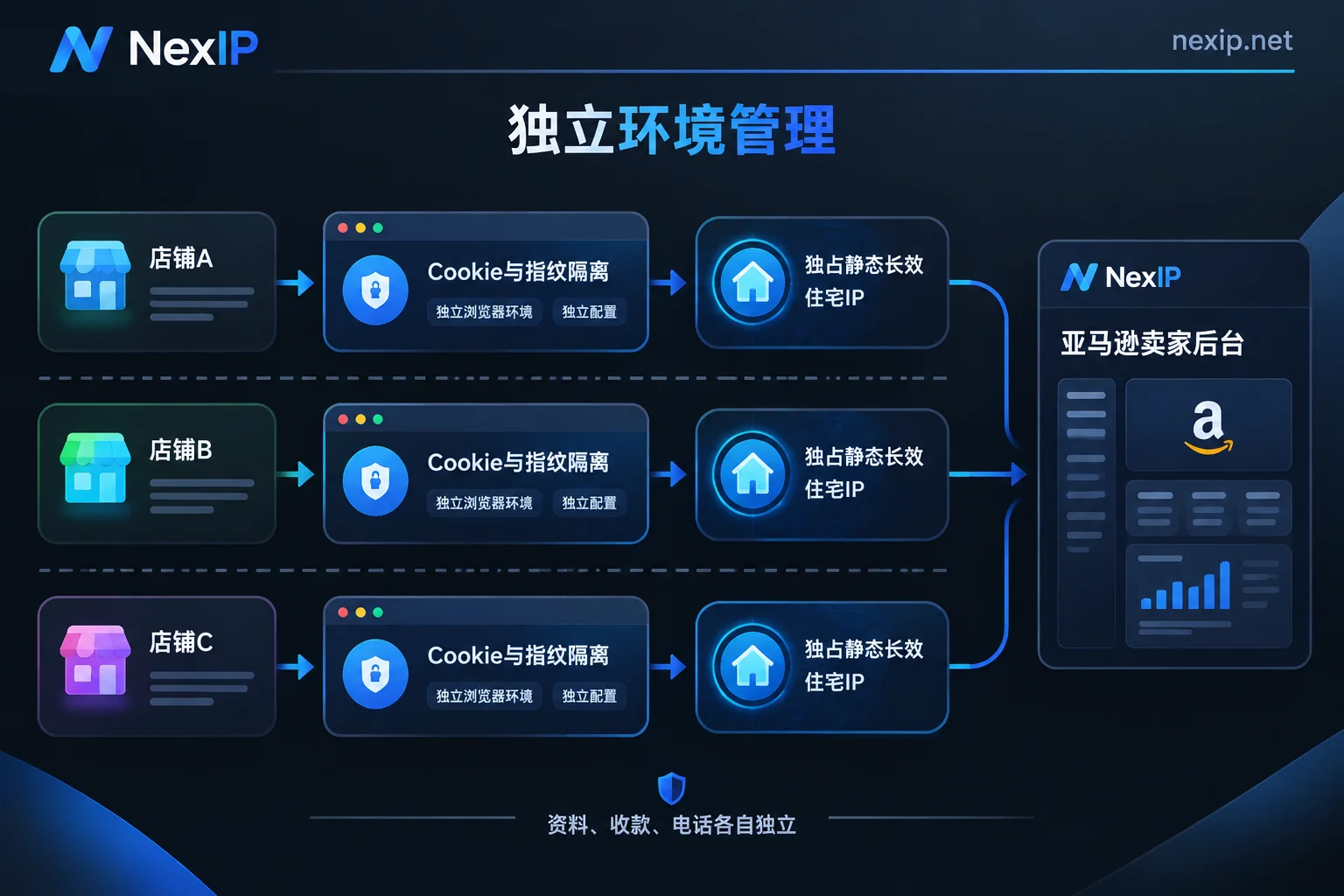
- First, make a list specifying the entity, site, responsible person, and exit IP for each store. Record any changes in this table thereafter.
- Assign a dedicated static long-term IP to each store, no mixing, no temporary borrowing.
- Use an independent browser environment for each store, with cookies and device fingerprints isolated from each other, and configure the corresponding proxy in that environment. Do not switch between multiple store accounts in the same browser. Browser environment isolation can be achieved with fingerprint browsers like NexBrowser, or by using separate devices.
- Keep information independent, including company information, receiving accounts, phone numbers, etc. For different entities, these should already be independent.
- Complete the verification in the next section before logging in for the first time, and log in only after confirming everything is correct.
After obtaining the IP, verify before logging into the store
- Is it fixed? Check the exit IP at different times multiple times to confirm consistency.
- Is the attribution correct? Check the IP's country and city to confirm they match your order; then check the ASN to confirm it belongs to a carrier broadband, not a data center.
- Is it truly dedicated? First ask the provider for their definition of dedicated, then use inspection methods to gather evidence. See How to tell if the IP you bought is truly dedicated.
- Are there leaks? In the browser environment with the proxy configured, check whether WebRTC and DNS expose your real IP.
- How to handle expiration? When the IP expires and needs replacement, keep the store's browser environment unchanged, only replace the exit, and record the time and reason for the change on the list.
Which type to choose
If your stores fall under situation 2 or 3 above, you need to configure a long-term dedicated exit for each store, corresponding to NexIP's static residential long-term IP. It is billed monthly or yearly, with options for home broadband native, home broadband broadcast, or data center subtypes, and free replacement when the IP expires. It supports API, username/password, port forwarding, process proxy, and other access methods, and can be integrated with fingerprint browsers or other common tools. For available countries and prices, please refer to the product page.
Finally, it should be noted: IP isolation can only reduce network-level misassociation, not guarantee that a store won't be suspended. Whether a store can operate stably long-term ultimately depends on whether the account is compliant and whether performance meets standards.


Comments(0)