 NexIP官方博客
Many technical teams and cross-border studios start with a very simple motivation when searching for "unlimited traffic proxy IP": they no longer want to nervously watch the GB consumption meter in the backend every day and hope to turn monthly network egress costs into a fixed expense.
But after actually placing an order and getting connected, many people encounter a strange sense of mismatch:
- Engineers doing high-frequency API scraping buy a batch of proxies labeled "unlimited traffic," only to have them all blocked by the target site after half an hour;
- Teams running cross-border stores and social media operations connect to an "unlimited traffic residential proxy pool," only to have the backend pop up a risk verification for a different location the next day.
The problem is not with the words "unlimited traffic" themselves, but that the industry slaps the same label on completely different underlying product forms. Proxy IPs that are not billed by GB actually fall into three major categories in real delivery: dynamic pools billed by port bandwidth, static short-term IPs billed by hour/day, and static long-term IPs billed by month/year.
Before purchasing, if you don't first unpack and see clearly whether the egress is changing and what the billing anchor is, it's easy to waste money.
Why does the same "unlimited traffic" label mean completely different things when purchased?
In the cost structure of proxy IPs, if a provider does not charge you by traffic (GB), it will certainly calculate costs based on concurrent bandwidth limits or the number and duration of exclusive IPs.
This gives rise to two completely different technical logics:
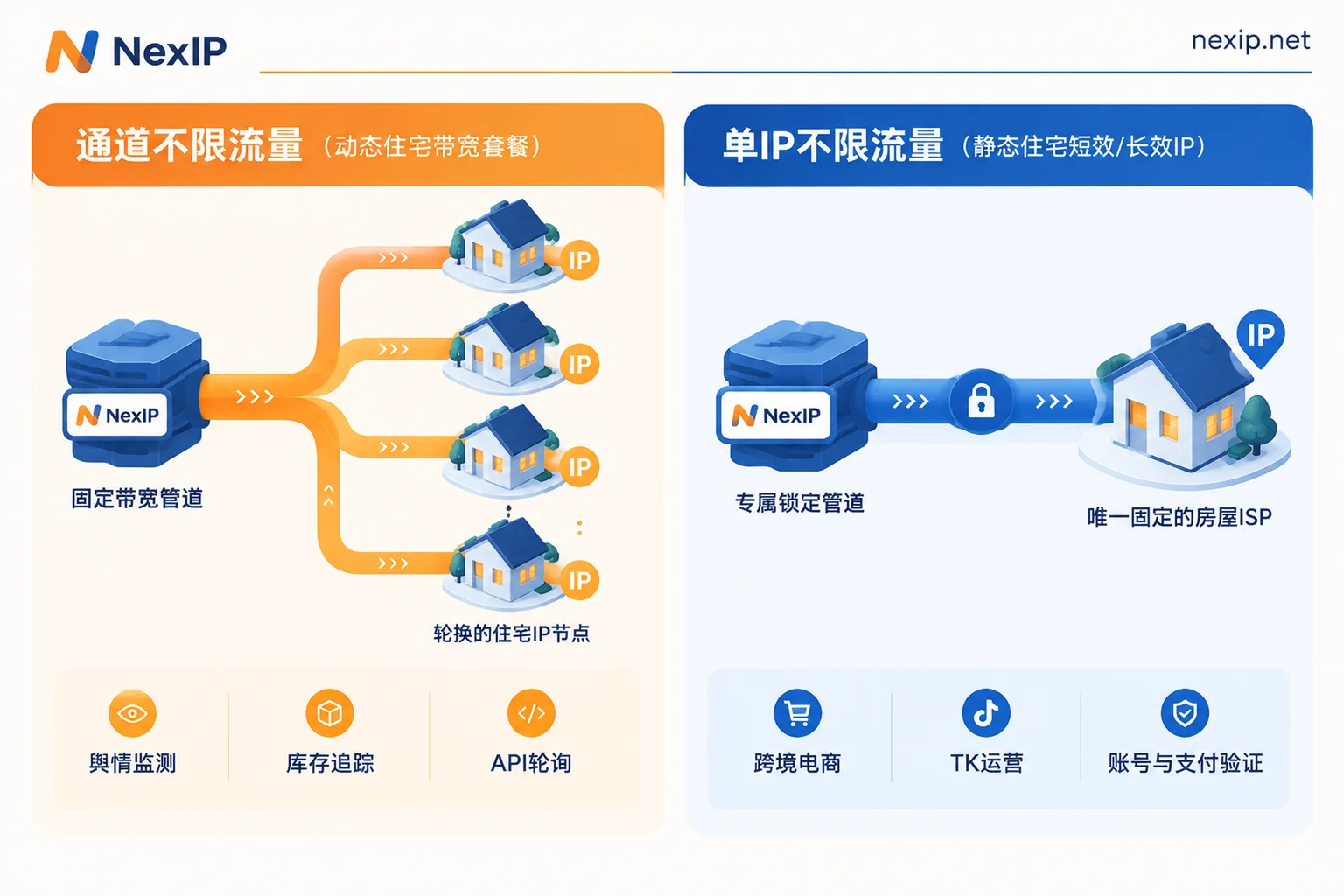
- The channel has unlimited traffic, but the IPs behind it are constantly rotating: You purchase a "pipe" with fixed bandwidth (e.g., billed by port bandwidth). As long as you don't exceed the bandwidth level, no matter how many GB of data flow through this pipe, there is no extra charge (subject to fair use policy), and the other end of the pipe connects to a dynamic residential IP pool, supporting automatic rotation or sticky sessions.
- A single IP has unlimited traffic, and the egress identity remains fixed: You purchase exclusive usage rights to one or several specific static residential IPs (billed by number of IPs and lease term). During the lease term, whether used for streaming videos, uploading product images, or running in the background all day, there is no GB-based deduction, but its core feature is that the egress IP is absolutely fixed.
Previously, in "How to Choose Between Traffic-Based and Bandwidth-Based Billing" and "Proxy IP Billing: Traffic or Bandwidth? Calculate Three Numbers First, Then Decide Which Saves More," we focused on helping you calculate the economics of GB versus bandwidth. Today let's change perspective: when you've already decided to choose an "unlimited traffic" plan, how do you pick the right specific form based on the task at hand?
Form 1: Dynamic Residential Bandwidth Plan — A Data Pipeline for 7×24 Continuous Throughput
If your GB-based bills are out of control because crawlers and monitoring scripts run around the clock, then the "unlimited traffic proxy IP" you're looking for actually corresponds to the Dynamic Residential Proxy · Bandwidth Plan.
How it works
In this mode, the billing anchor is port bandwidth, and traffic itself has no upper limit (subject to fair use policy). It still has the core capability of a dynamic residential proxy: you can configure automatic egress rotation based on the target site's anti-scraping strategy, or enable sticky sessions to maintain the same egress for a period of time.
Which tasks should use it?
Not all scraping tasks are suitable for a bandwidth plan. If your task is to scrape competitor prices once a day at a scheduled time and the machine is idle otherwise, pay-per-traffic is actually cheaper. Only when your business exhibits continuous operation and stable throughput does the advantage of a dynamic bandwidth plan become fully realized:
- 24/7 public opinion monitoring: Need to scan news sites, forums, and public content updates 24/7 without interruption, with uniform request density and no downtime.
- High-frequency inventory tracking: Continuous scanning of inventory status on e-commerce platforms or ticketing systems. Once you add up requests across all time slices, total traffic is very large, but instantaneous bandwidth demand is relatively stable.
- API polling: Business systems need high-frequency, continuous requests to external public APIs to sync data. Using a dynamic bandwidth plan locks network costs within a fixed budget while leveraging automatic rotation to avoid single-IP request frequency limits.
(Note: For bursty, high-concurrency AI corpus scraping or temporary price comparison, we recommend first evaluating the Dynamic Residential Proxy · Traffic Plan or checking the AI Application Solutions.)
Form 2: Static Residential Long-Term IP — Fixed Egress for Stores, TikTok, and Long-Term Accounts
Another group of users frequently searching for "unlimited traffic proxy IP" are cross-border e-commerce sellers, overseas social media matrix operators, and TikTok operations teams. What they worry about is: uploading video materials, loading high-resolution product images, or running clients for long periods will instantly drain their traffic package.
But note: these businesses must never buy the "dynamic unlimited traffic" pool mentioned above. As we emphasized in "Static IP or Dynamic IP for Account Nurturing: Use Static Long-Term IPs for Long-Term Accounts, Leave Dynamic IPs for Public Data Tasks," account systems are most averse to irregular egress jumps.
The product that truly corresponds to this need is Static Residential Proxy · Long-Term IP.
How it works
Rented by month or year, exclusive fixed egress, and unlimited traffic. During the lease term, this IP is used only by your business and will not be mixed with others' crawlers. Free replacement is supported if it becomes invalid. To adapt to platform risk controls of varying strictness, NexIP's static long-term IPs are further divided into three subcategories and support native dual ISP:
- Home Broadband Native IP: A real home broadband address assigned by a local ISP. If you are doing TikTok operations, the officially recommended solution is to use a home broadband native IP from the static long-term category, strictly following "one account, one fixed IP." You can post content and browse vertical content daily without worrying about traffic consumption.
- Home Broadband Broadcast IP: A network segment registered as residential property but hosted in a data center via BGP. For multi-store backend management in cross-border e-commerce and routine social media operations, broadcast IPs offer good cost-effectiveness while ensuring residential attributes (teams still unsure how to distinguish them can first read this comparison: How to Choose Between Home Broadband Native and Broadcast).
- Data Center IP: Suitable for routine backend businesses that do not require residential attributes but need fixed egress and high-speed stable connections.
In addition, teams that need to maintain AI account login states long-term should also directly choose static long-term IPs rather than using dynamic pools.
Form 3: Static Residential Short-Term IP — The Overlooked "Daily/Hourly" Unlimited Traffic Solution
Besides pipelines running year-round and stores nurtured long-term, there is a very common intermediate need:
"I need a real, fixed, exclusive residential IP for a few hours or two or three days of high-intensity testing, during which traffic is heavy, but I won't need it after these few days."
If you buy a traffic package, high-throughput testing is too expensive, and sticky sessions risk disconnection and IP changes (for the essential difference between sticky sessions and static IPs, see "Are Session Stickiness and Static IP the Same Thing? One Is Temporary Retention, the Other Is Fixed Allocation"). If you buy a monthly long-term IP, it's too wasteful to leave it idle after two days.
The most suitable solution in this case is Static Residential Proxy · Short-Term IP.
- Billing and attributes: Hourly or daily rental, billed by IP, also unlimited traffic, and during the lease term it is an exclusive fixed static residential (ISP) IP.
- Typical scenarios: One-time or periodic account verification, payment verification that requires a fixed environment to complete the loop, and overseas localization testing and integration before a development team goes live. During the short-term lease, you can confidently run full test data, ensuring the IP absolutely does not change during the period while not paying for a full month's lease.
Self-Check Table: Three Steps to Lock in Your Unlimited Traffic Solution
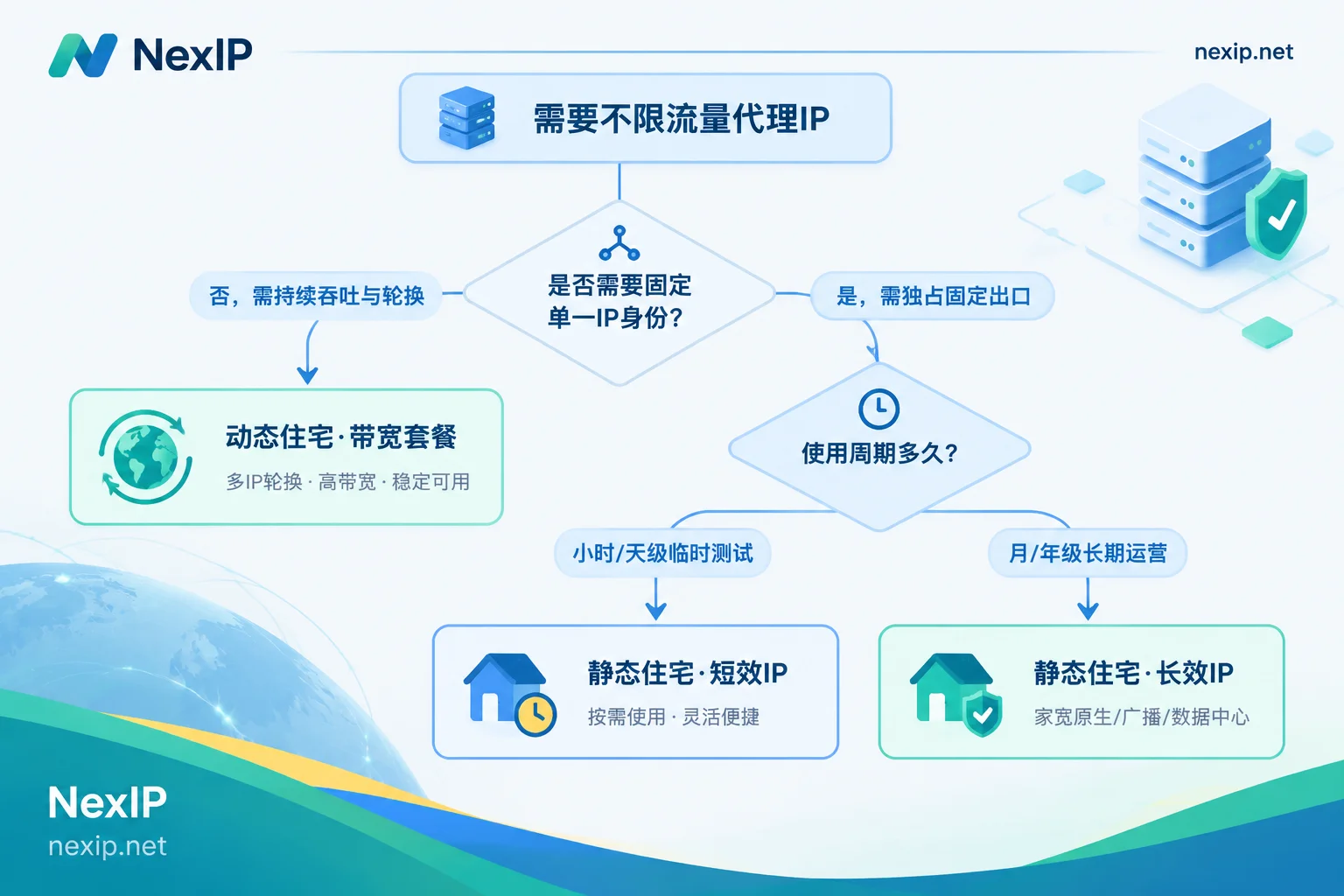
To avoid being misled by the vague term "unlimited traffic" when purchasing, it's recommended to run through the following three questions before placing an order:
| Check Dimension | Choose "Dynamic Residential · Bandwidth Plan" | Choose "Static Residential · Short-Term IP" | Choose "Static Residential · Long-Term IP" |
|---|---|---|---|
| Does the task need IP rotation? | Requires automatic rotation or short-term sticky sessions | Requires fixed IP during lease term | Requires absolutely fixed long-term (one store/account per IP) |
| How long does the task last? | 7×24 continuous stable throughput | A few hours or days (temporary/phase-based) | Long-term operation by month/year |
| Core billing anchor | Billed by port bandwidth (fair use) | Billed by number of IPs + hour/day | Billed by number of IPs + month/year |
| Typical business match | Public opinion monitoring, inventory tracking, API polling | Account verification, payment verification, testing and integration | Store management, cross-border e-commerce, TikTok operations, AI account keep-alive |
Conclusion: Align Billing Models with Business Rhythm
Ultimately, "unlimited traffic proxy IP" is not some magical single product, but a collective term for non-GB billing solutions that proxy providers offer for two types of scenarios: high-throughput continuous scraping and high-frequency use of fixed identities.
During implementation, regardless of which form you ultimately choose, NexIP supports HTTP/HTTPS/SOCKS5 protocols and provides targeting at the country, city, ASN, and ISP levels (subject to inventory). For authentication and access, it supports username-password or IP whitelist authentication, covering four access methods: API extraction, username-password, port forwarding, and process proxy, making it convenient for technical teams to manage and allocate sub-account permissions via API or for operations teams to manage directly through the client and official website panel.
If you are sorting out your business links, you can first go to View Coverage and Local ISPs by Country to confirm resource availability in target regions, or combine with Industry and Platform Solutions to match your business scenarios. You can also go directly to the NexIP User Dashboard to view specific specifications and configure the unlimited traffic egress that suits you.



Comments(0)