 NexIP官方博客
How to determine: First, find out which ASN (Autonomous System Number) announces this IP to the internet, then check which company the IP block actually belongs to, and finally examine the types at both layers. Only when both layers belong to a broadband or mobile operator can it be considered a reliable ISP attribute. If the ASN belongs to an operator but the IP block is used by a data center or a small service provider, the IP is likely a hosted block that borrows the operator's network for announcement, and is not a true residential connection. Finally, cross-check with two or three different IP databases, because each database updates with delays and their classification standards are not completely identical.
Looking only at 'Location: Some State, Some City, USA' cannot determine this. Geographic location and network type are two independent attributes; the geolocation of a data center IP can also fall within a city.
First, distinguish three concepts
- ASN: Autonomous System Number, allocated by the five regional internet registries (ARIN, RIPE NCC, APNIC, LACNIC, AFRINIC) to announce in BGP that 'these IP prefixes are routed by me'. Every public IP is announced by some Origin ASN.
- IP block ownership: To whom this address range is registered at the registry. The ASN that announces it and the organization that actually holds or uses it are not necessarily the same.
- Connection type / Usage type: Classifications given by various IP databases according to their own methods, such as ISP, mobile, hosting, business, education, etc. Risk control systems usually refer to these classifications.
Asking 'Is the ASN an ISP?' actually requires answering two questions: Is the announcing party an operator? Is the user an operator?
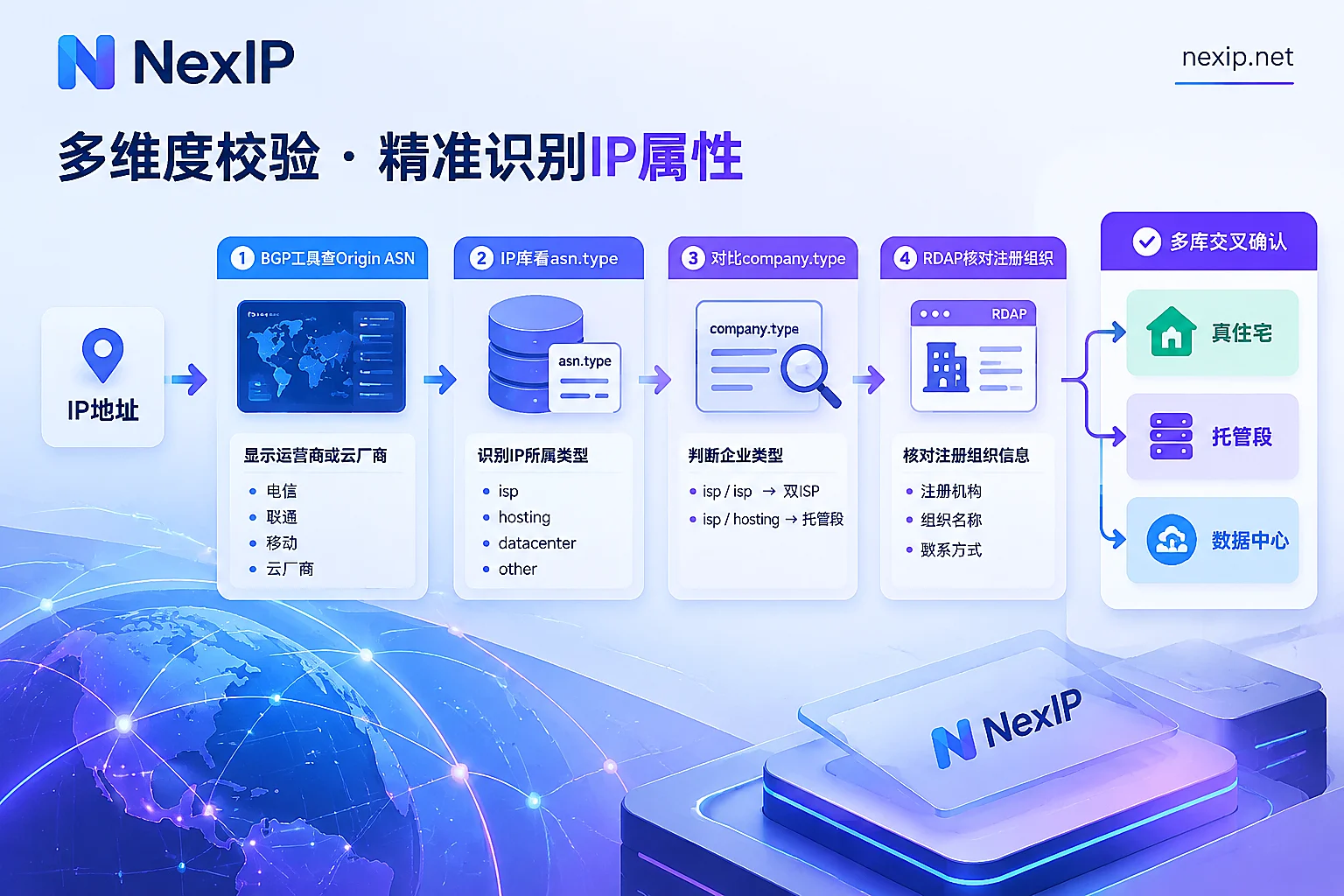
Step 1: Find the Origin ASN announcing this IP
Use a BGP routing lookup tool such as bgp.he.net (Hurricane Electric BGP Toolkit) or RIPEstat. After entering the IP, you can see:
- The prefix this IP belongs to (e.g., a /24 or larger block)
- The Origin ASN announcing that prefix
- ASN name and owning organization
A preliminary judgment based on the owner:
- If the owner is a broadband operator like AT&T, Comcast, Verizon, China Telecom, it usually has ISP attributes.
- If the owner is a cloud provider or hosting company, such as Amazon (AS16509), DigitalOcean (AS14061), OVH (AS16276), it can basically be judged as a data center.
This step can only rule out obvious data center IPs, not confirm residential broadband. Large operators' ASNs may also include enterprise dedicated lines, hosting services, and address blocks delegated to downstream users. So even if you see an operator's name, you need to continue checking.
Step 2: Check the ASN type given by IP attribute databases
Take IPinfo as an example. It classifies ASNs into isp, hosting, business, education, government categories. After querying an IP, the asn.type in the returned result indicates what business the autonomous system announcing this IP mainly does.
If asn.type is hosting, you don't need to look further; this is a data center network. If it is isp, proceed to the next step.
Step 3: Compare asn.type and company.type
This step determines whether it counts as 'true residential'. In IPinfo's data, besides the ASN-level type, there is also a company.type, indicating the type of company this IP block actually belongs to. The structure is roughly as follows (for illustration; which fields you can actually see depends on IPinfo's documentation and your API permissions):
{
  "asn":     { "asn": "AS…", "name": "某运营商", "type": "isp" },
  "company": { "name": "某运营商", "type": "isp" }
}
Meaning of common combinations:
| asn.type | company.type | General interpretation |
|---|---|---|
| isp | isp | Both announcer and user are operators, often called 'dual ISP', closest to real residential broadband |
| isp | hosting or small data center company | Data center or service provider rents addresses from an operator and announces via the operator's network; looks residential on the outside but is actually a hosted block |
| hosting | hosting | Typical data center IP |
| business / education etc. | Corresponding type | Enterprise or institutional network, not residential broadband |
For proxy IPs, the second case requires the most attention. Looking only at the ASN would misjudge it as residential, and risk control may identify it as a data center.
Step 4: Verify registration records with RDAP/WHOIS
Attribute databases are third-party inferences based on their own methods. The authoritative source of registration information is the Regional Internet Registry (RIR). You can use RDAP queries (the standardized successor to WHOIS, provided by all RIRs; there are also RDAP lookup tools that automatically find the corresponding registry), or the traditional whois command.
Focus on:
- Network range: Which address block this IP belongs to
- Organization: Whether the registered holder is an operator, a hosting company, or a company you've never heard of
- Usage description and allocation relationship: Whether this block is directly held by the operator, or further allocated or transferred to a third party from the operator's larger block
If a small segment of an operator's large block is registered to a hosting company, this matches what you saw in Step 3 ('ASN is isp, company is hosting'), and the judgment is fairly confident.
Step 5: Cross-check with two other databases
Different IP databases have different classification methods and update rhythms; it's common for the same IP to yield different results in different databases. Besides IPinfo, those often referenced by risk control systems include:
- IP2Location's Usage Type: ISP and MOB represent residential broadband and mobile networks respectively, DCH represents data center
- MaxMind GeoIP2's Connection Type: Cable/DSL, Corporate, Hosting, etc.
When results are inconsistent, you can handle it like this:
- If most databases show ISP or residential broadband type, and only one shows data center, it may be that database's data hasn't updated yet, but record it and later observe whether this IP is blocked in actual use.
- If most databases show data center or enterprise, even if the ASN is an operator, do not treat it as a residential IP.
- Mobile networks (MOB, mobile operator ASN) also belong to ISP, but the exit is usually shared by many users, which differs from fixed residential broadband. Consider this when you need a fixed identity.
Even if it's identified as ISP, it doesn't guarantee passing detection
One limitation to note: Platforms like TikTok, Amazon, and Meta do not disclose which IP databases they use or the weight of each judgment. So 'a database shows ISP' cannot guarantee that it will be treated as residential on all platforms. Besides IP type, platforms also look at the IP's history, behavior on the same exit, and whether login locations change frequently. For this part, you can refer to Will a static IP be flagged by platforms.
ASN checks are suitable for ruling out obviously unsuitable IPs and for confirming whether an issue is caused by the IP itself. When account login shows abnormal prompts, first confirm whether the exit has changed, then verify the IP type using the method in this article. The complete procedure is described in Network troubleshooting for Amazon login abnormal activity prompts.
After getting a proxy IP, how to verify using this method
Check the actual exit IP, not the proxy server address. Make requests go through the proxy to access the query interface, for example:
curl -x http://用户名:密码@代理地址:端口 https://ipinfo.io/jsonFor SOCKS5 proxy, replace with the
--socks5parameter. The returned IP is what the target website sees as the exit.- Check static IPs one by one and save the results. Record the IP, Origin ASN, asn.type, company.type, RDAP registered organization, and the classifications from two other databases. You can compare with these results when troubleshooting later.
- Sample dynamic IPs. The exits in a rotating pool are constantly changing; you can only sample multiple times to see the distribution of ASNs and types. A single result cannot represent the entire pool.
- Compare results with the type you purchased. If you bought a residential type, check whether it achieves 'dual ISP'; if you bought a data center type, showing hosting is normal and not a problem.
Choose exit based on task
Different tasks have different requirements for 'whether it's an ISP':
- For long-term operations like store backends and social media accounts, you need a fixed, exclusive exit, and the IP type should ideally withstand the above checks. This situation suits the residential native type in static long-lasting IPs. NexIP's official website also recommends static residential native IP for TK operations. Static long-lasting IPs also have residential broadcast and data center subcategories; before choosing, confirm which layer your business needs to be ISP, and self-check using the steps above after obtaining it. Long-lasting IPs can be replaced for free if they fail; specific conditions are subject to the official website. Entry: Static long-lasting IP.
- For tasks like collecting public data and monitoring SERP, the scale and rotation capability of the IP pool are more important; whether a single IP is dual ISP is less critical. Dynamic residential traffic packages with rotation or sticky sessions will suffice. Just sample to confirm the pool's ASN distribution is normal. Entry: Dynamic residential traffic packages. For how to distinguish these two types of tasks, refer to Which is suitable for scraping: static residential IP or dynamic residential IP.
IP type only solves the network exit issue. Browser fingerprints, accounts, and phone numbers belong to other aspects. After the exit check passes, these aspects also need separate checks.


Comments(0)