 NexIP官方博客
The most error-prone step when buying GB-billed dynamic residential proxies isn't choosing a country or protocol—it's estimating usage. Most people do this: open the target page, check "page size 1.2 MB", multiply by the number of pages they plan to scrape, get a number, and buy a plan based on it. Three days after launch, the quota hits bottom.
The gap isn't in arithmetic, but in what's missed: upstream request headers and cookies, failed retries, redirects, images/fonts/tracking pixels loaded by headless browsers, and TLS handshakes for every IP rotation. Fill these in, and your estimate will match the bill.
First, Set Up the Formula
A model you can directly apply is this:
Total Traffic = Number of Target Tasks × Requests per Task × (Average Upstream + Average Downstream per Request) × (1 + Retry and Redirect Rate) × (1 + Redundancy Factor)
Key points:
- Proxy billing counts total bidirectional bytes through the proxy channel, including request lines, headers, cookies sent by the client, and response headers and bodies from the server. Counting only "page size" accounts for only part of one side.
- Requests per task are often underestimated. Crawling a product detail page looks like 1 request; in reality it might be the main document + several XHR calls + one redirect + one login state check. With headless browsers, this number can be dozens or hundreds.
- The redundancy factor isn't insurance; it's a necessity. Payloads fluctuate with target site changes, and protocol handshake overhead varies with session strategy. The industry norm is to add 20%–30%.
The formula itself isn't hard; the challenge is getting the "average upstream/downstream per request" numbers.
Single Request Size: Order of Magnitude Varies by Tens of Times
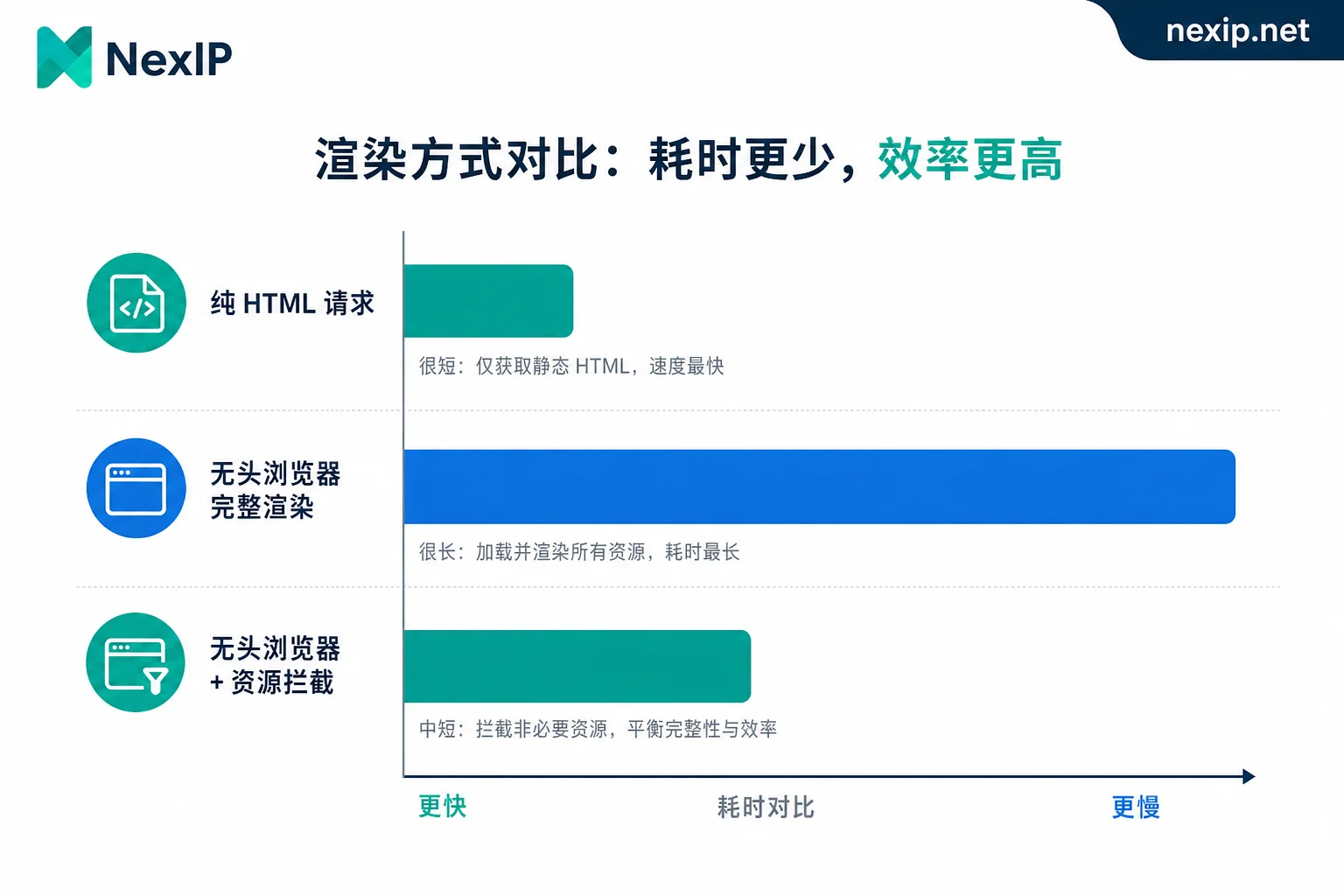
Even for the same page, different request methods can differ by two orders of magnitude in traffic.
Pure API / HTML scraping (Requests, cURL, Go's http client): Downloads only the main document or JSON response, no JavaScript execution or subresource loading. For tasks like price monitoring, SERP ranking scraping, stock checks, typical downstream per request is 20 KB to 100 KB. Heavier HTML pages like search result pages can reach 200–300 KB.
Full rendering with headless browsers (Playwright, Puppeteer without resource blocking): The main document is just the start; then come JS bundles, CSS, web fonts, product images, video previews, third-party tracking SDKs. Single-page traffic is commonly 1 MB to 3 MB, even higher for image-heavy e-commerce detail pages.
Headless browser with resource blocking: Blocking image, media, font, stylesheet, and third-party tracking domains at the route level can reduce ineffective downstream by 70%–90%, bringing single pages back to the 100 KB to 300 KB range.
This is the most cost-effective step in traffic control. The premise is to ensure key data on the target site isn't coming from blocked resources—some sites render prices in canvas or background images; if you block images, you lose data. In such cases, you must allowlist specific image domains.
Upstream matters too. Single upstream is usually only 1–5 KB (request line, User-Agent, Accept headers, cookies), which seems negligible, but requests with full login-state cookies can exceed 10 KB upstream. If tasks involve POST form submissions or uploads, upstream may exceed downstream. For API scraping with many requests but light responses, upstream ratio is higher than expected.
Keep compression enabled. Sending Accept-Encoding: gzip, br asks the server for compressed content, so the proxy channel carries compressed bytes; HTML and JSON compress well. Some custom clients don't include this header by default, or they disable it because they can't handle compressed responses—that's like wasting extra traffic. Before going live, use packet capture to confirm you're actually transferring compressed streams.
Get Real Numbers from Baseline Sampling, Not Estimates
Guessing values to plug into the formula is pointless. The correct process is to run a baseline sampling round first:
- Use the exact same tech stack as production. If production uses Playwright, sample with Playwright; don't sample with cURL and switch browsers later—they differ by tens of times. Also align session strategy (rotation vs sticky), protocol (HTTP/HTTPS/SOCKS5), and concurrency.
- Sample by page type separately. Listing pages, detail pages, search pages, and APIs have very different size distributions. Mixing them for an average will overestimate light tasks and underestimate heavy pages.
- Sample 50–100 real requests per type, not just three or five. Page sizes vary greatly across categories and products on target sites.
- Use median and P90; plug P90 into the formula. Averages are skewed by a few oversized pages; P90 is closer to your real bill.
- Read data from the proxy side, not just the client. Use the proxy's bidirectional byte counts. Client-calculated
len(response.content)doesn't include response headers, TLS handshakes, or data downloaded before blocking. The granularity of statistics (per-session, per-domain) varies by provider; confirm what dimensions you can view before sampling.
After sampling, you'll have the "combined upstream/downstream per request" for each page type—the only input that can't be guessed.
Two Budget Killers to Watch Out For
Retries and Redirects
Clients retry when they hit CAPTCHA pages, rate-limit responses, or 403 blocks. Each retransmission is a full request's worth of traffic, and failure pages often carry a challenge response body of tens of KB. More troublesome is aggressive retry logic: no exponential backoff, immediate retries, and retry limits set to 5. A persistently failing target can burn a significant quota in minutes.
In practice, counting a 20% failure rate—i.e., multiplying the formula by 1.2 to 1.3—is a safe starting point. If the target site has strong protections, run a week of tests to measure real failure rates before deciding. Recommendations:
- Use exponential backoff with a hard cap.
- Don't retry on certain 4xx errors (e.g., 404, 410).
- On CAPTCHA or block, prefer rotating IP or session over resending the same request.
Handshake Overhead from Session Strategy
Each new proxy connection involves a TCP + TLS handshake, plus the target may reissue cookies or return a verification page first. In high-frequency rotation scenarios with single requests, handshake and verification overhead is higher than you'd think; with sticky sessions running multiple requests consecutively, connection reuse spreads that cost.
This doesn't mean sticky is always cheaper—sticky sessions suit tasks needing login persistence or multi-step flows; pure concurrent scraping is better with rotation. But be aware: when the session strategy changes, the average per-request traffic also changes, so sampling must use the exact strategy you'll deploy.
For more on how access methods affect session behavior, see “API-Obtained Proxies vs. Account-Bound IP Proxies: 4 Key Differences”.
Two Worked Examples
Example 1: SERP Monitoring
5000 keywords daily, one results page per keyword, pure HTML requests. Sampling shows downstream P90 ~250 KB, upstream ~3 KB. The target site uses CAPTCHA; measured retry rate 25%; redundancy 20%.
5000 × 1 × (250 + 3) KB × 1.25 × 1.2 ≈ 1.9 GB / 天
月用量 ≈ 57 GB
Example 2: E-commerce Detail Page Scraping
10000 detail pages daily, headless browser.
Without resource blocking, P90 ~2 MB per page:
10000 × 2 MB × 1.2 × 1.2 ≈ 28.8 GB / 天 ≈ 864 GB / 月With images, fonts, media, and tracking scripts blocked, per-page drops to 300 KB:
10000 × 0.3 MB × 1.2 × 1.2 ≈ 4.3 GB / 天 ≈ 130 GB / 月The same business, but one line of blocking rules means a 6x+ difference in bills. So before estimating, optimize first; then buy a plan based on the optimized number, not the other way around.
When Per-GB Plans Stop Making Sense
After estimation, you'll get a monthly usage number. That number is also a signal for choosing the plan type.
Continue using per-GB dynamic plans if your tasks match these characteristics:
- Small payloads per request—JSON APIs, light HTML, SERP pages.
- Requests are sporadic, start-and-stop, not at full load all day.
- Need many different exit IPs with frequent rotation; request volume per IP is low.
- Have a clear daily quota cap; want controlled, predictable costs.
In such cases, per-GB pricing is cost-effective—pay for what you use.
Switch to bandwidth-billed unlimited plans if any of the following occurs:
- Running 24/7 high concurrency; exits are never idle.
- Scraping rich media—batch image downloads, video scraping, pages that require full rendering and can't block resources.
- Estimated monthly usage is too large to be cost-effective on per-GB, or usage fluctuates so much you can't budget.
- Throughput per unit time is the bottleneck; you care more about concurrency than total transfer.
The decision method is straightforward: convert estimated monthly usage into costs under both billing models and see which is cheaper; also assess whether your task is "volume-type" (GB) or "throughput-type" (bandwidth).
NexIP offers both: Dynamic Residential Traffic Plans are billed per GB, support rotation and sticky sessions, and suit tasks with distributed requests and light payloads; Dynamic Residential Bandwidth Plans are billed per bandwidth with unlimited traffic, suitable for long-term high concurrency or rich media. Both support API, username/password, port forwarding, and process proxy access, with HTTP/HTTPS/SOCKS5 and user/pass or IP whitelist authentication. Whichever access method you use during sampling, keep it the same in production to avoid estimation errors from session behavior changes.
Note: Both are dynamic plans with shared exits. If your task requires dedicated fixed IPs (e.g., for store dashboards or social media account binding), that falls under static short-term or long-term IPs, with a completely different billing logic; the traffic estimation model here doesn't apply. For a cost comparison of dedicated vs. shared IPs, see “Dedicated or Shared IPs for Scraping: Which Is More Cost-Effective? A Task-Type Breakdown”.
Three Things After Going Live
Estimation is the starting point, not the finish line.
Reconcile in the first week. Divide actual consumption by completed tasks to backtrack true per-task traffic and compare with sampling. If deviation exceeds 30%, investigate: is failure rate higher than expected, are blocking rules not working, or did the target site change?
Add a soft circuit breaker. Track cumulative consumption in your scheduler and set a daily threshold; when exceeded, slow down or alert first—don't wait until quota runs out and all tasks fail. Billing policies for failed requests and blocked responses may differ among providers; always refer to your plan's documentation and dashboard—don't apply one provider's rules to another.
Re-estimate quarterly. Target page sizes, protection strength, and your scraping depth will change. After a quarter, run another sampling round and update the formula inputs.
Estimating usage is essentially this: first decide on the request method and optimize it, then sample real numbers, apply retry and redundancy, and finally use the result to choose between per-GB and per-bandwidth. Skipping sampling and guessing directly will always underestimate.




Comments(0)