 NexIP官方博客
Many people, when looking for an IP lookup website, first think of "checking where this IP belongs." But when they actually open different tools, they find it's not that simple. Some sites focus on basic information like country, city, ISP, and ASN; others show proxy detection, connection type, residential or datacenter judgment; others lean more towards checking the current network environment. Because these websites all appear to "look up IPs," many users naturally see them as the same type of tool, leading to confusion about which results to focus on.
This is why sites like IPQS, Whoer, IPinfo, IPjiance, and ipip0.net are often discussed together. They all belong to IP detection websites and can provide some level of IP query results, but their actual focus differs. Some users open these sites to see the geolocation and network information of their current IP; some want to confirm their current connection type, proxy status, or environment exposure; some just want to quickly judge if an IP looks normal, residential, or suitable for use; still others look for more comprehensive results like IP type, path, latency, and leak detection. While they all seem to check IPs, the problems they actually solve are not the same.
Core Overview
- **IPQS, Whoer, IPinfo, IPjiance, and ipip0.net are all IP detection websites.** They can all check IPs, but their display focus varies.
- **Different IP lookup websites look at different layers of results.** Some lean more towards basic geolocation and network info, others towards proxy identification, connection type, or environment checks.
- **The same IP showing different results on different sites doesn't necessarily mean one is wrong.** Often it's due to differences in underlying data, update times, and detection focus.
- **When choosing an IP detection website, don't just look at the site name or a single result.** What matters more is whether you want to check geolocation, connection type, proxy status, or a quick quality assessment.
- **This article's focus is not to rank "which is best."** Rather, it helps you understand what each tool is suitable for checking.
Table of Contents
- [I. Conclusion First: IPQS, Whoer, IPinfo, IPjiance, ipip0.net Are All IP Detection Websites, But Focus on Different Aspects](https://ipweb.cc/ip-query-websites-comparison/#section-1)
- [II. What Do IP Detection Websites Generally Check, and Why Results Vary](https://ipweb.cc/ip-query-websites-comparison/#section-2)
- [III. What Are IPQS, Whoer, IPinfo, IPjiance, and ipip0.net Best Suited For](https://ipweb.cc/ip-query-websites-comparison/#section-3)
- [IV. Why the Same IP Shows Different Results on Different Sites](https://ipweb.cc/ip-query-websites-comparison/#section-4)
- [V. Which Results Should You Prioritize When Doing IP Detection](https://ipweb.cc/ip-query-websites-comparison/#section-5)
- [VI. How to Choose an IP Detection Website for Different Scenarios](https://ipweb.cc/ip-query-websites-comparison/#section-6)
- [VII. FAQ: Common Questions About IP Detection Websites](https://ipweb.cc/ip-query-websites-comparison/#section-7)
- [VIII. Summary](https://ipweb.cc/ip-query-websites-comparison/#section-8)
## I. Conclusion First: IPQS, Whoer, IPinfo, IPjiance, and ipip0.net Are All IP Detection Websites, But Focus on Different Aspects
Let's make the key point clear first: IPQS, Whoer, IPinfo, IPjiance, and ipip0.net can all be understood under the broad category of "IP detection websites." They all provide some level of query results for a given IP and help users make basic judgments. So from a search perspective, it's not out of place to compare these terms in one article. The user's real need is usually not to study the name of a particular site, but to find a detection entry point that helps them understand the current IP status. However, different sites occupy different positions: some lean more towards quick judgment, some towards environmental performance, some towards structured IP data, and sites like ipip0.net are more likely to be used when users want to check multiple network detection results.
But being in the same article doesn't mean they are exactly the same tool. This is precisely what causes confusion. Many people, seeing these sites display IP, country, city, ISP, or connection type, naturally assume they are similar, just with different page designs. But once you actually use them, you find that some are clearly more focused on basic information display, some emphasize proxy identification and connection type, and others are more like a quick judgment entry point to check if the current IP overall status is normal. On the surface, they all check IPs, but the problems they solve don't fully overlap.
This is why the article cannot simply be a "horizontal comparison of several IP lookup websites." If you just pile them up as similar tools, readers will quickly get confused: why does this site focus on residential networks, another on ASN and organization info, and yet another on proxy, leak, and other environmental results? The issue isn't which site is more comprehensive; it's that they weren't designed with the same logic. The reasons different sites enter a user's judgment range are inherently different.
More accurately, although these sites all belong to IP detection websites, they stand at different positions. Some are better for quickly confirming the geolocation, ISP, and basic network identity of the current IP; some are better for checking if the current connection looks like a proxy, is residential, or has more evident environmental characteristics; others are more inclined to "do a quick health check for you," giving an intuitive impression of the current IP in a short time. Once you think through this layer, the logic of the entire article becomes much smoother.
So the most important conclusion of this chapter is simple: these terms are not talking about completely different topics, but about "different types of detection entry points under the same type of need." That is, they all revolve around IP detection but have different focuses. What you need to learn is not to memorize which site is called what, but to first distinguish which layer of results you need to see. Once this is clear, comparing tools later will not be confusing.
## II. What Do IP Detection Websites Generally Check, and Why Results Vary
Many people mistakenly believe that results from IP detection websites should be identical, but in reality, different platforms focus on different core detection dimensions: the first layer is basic information (country/city/ISP/ASN), answering "who owns the IP and where is it from"; the second layer is connection characteristics (residential/datacenter/proxy), answering "what does the IP look like"; the third layer is environmental judgment (leak/risk score), answering "is the IP's overall status normal."
Different sites' core positioning determines their display focus—some lean towards basic data, others towards connection characteristics, others towards environmental detection. This is also the core reason why the same IP shows different results across platforms. Subsequent chapters will clarify the judgment order of "what to look at first, what next" to help you focus on key information.
## III. What Are IPQS, Whoer, IPinfo, IPjiance, and ipip0.net Best Suited For
After clarifying the judgment framework in the first two chapters, we can now enter the part that many people care about most: what are these common IP detection websites best suited for? Note that the distinctions below are closer to "usage positioning" and "common usage scenarios," not absolute definitions of these sites. Different platforms may simultaneously display basic geolocation, connection type, organization info, or other detection items, but their page focus and what users typically use them for differ.
In other words, although these sites can all provide information about the current IP, they are not simple substitutes for the same type of tool. Some are better for first checking the overall status, some for checking connection environment and detection items, some for basic network identity and structured information, and some for complementary comprehensive detection. As long as you first clarify which scenario each site is more likely to fit into, choosing a tool later will be much smoother.
| Tool Name | Core Positioning | Core Advantage (with Screenshot Evidence) | Detection Focus | Chinese Friendliness | Suitable Scenarios |
| --- | --- | --- | --- | --- | --- |
| **IPQS (IP Quality Score)** | Professional IP risk identification tool | Risk score (0-100), proxy/VPN/TOR detection, blacklist/abuse records, bot behavior recognition | Risk identification, fraud control, account security | Low (English only) | Enterprise risk identification, payment fraud control, account security audit |
| **Whoer** | Network environment/anonymity detection | DNS/WebRTC leak detection, anonymity score, timezone/browser fingerprint, proxy environment recognition | Environment exposure, connection anonymity | Low (partial Chinese) | Proxy/VPN self-check, privacy leak audit |
| **IPinfo** | Structured IP data query | ASN/organization info, precise geolocation (city-level), ISP/network identity, API batch query | Basic network identity, structured data | Low (English only) | Development integration, IP identity confirmation, batch data analysis |
| **IPjiance** | Chinese all-in-one IP detection | IP type (residential/datacenter) identification, proxy/blacklist detection, Chinese detailed report, aggregation of multiple indicators | Quick IP status check, Chinese result interpretation | Excellent (Full Chinese) | Chinese users quickly check IP status, domestic IP basic info check |
| **ipip0.net** | Comprehensive IP detection supplementary tool | Native/broadcast IP identification, risk score, Ping/Trace, IP reverse lookup, home broadband/datacenter IP judgment | IP type, network path, comprehensive detection | Excellent (Full Chinese) | Cross-border e-commerce, account matrix, proxy IP verification, supplementary network detection |
### 1. [IPQS (IP Quality Score)](https://www.ipqualityscore.com/) is a professional tool for IP risk identification and deep reputation analysis
From the page presentation and user experience, **IPQS (IP Quality Score)**'s core positioning is an **enterprise-level IP reputation and risk identification API**, not a quick impression tool for ordinary users. When users (especially developers or risk control personnel) open its website or call its API, their core focus is on **risk score (Fraud Score, 0-100)**, **proxy/VPN/Tor node detection**, **abuse history**, **bot activity likelihood**, and other deep risk control dimensions.
Because of this "professional risk control" and "deep analysis" orientation, it is generally more suitable for professional scenarios like development integration, risk identification, payment fraud control, and account security auditing. If your primary concern is whether an IP poses a risk, has a history of abuse, belongs to a high-risk proxy/VPN environment, or behaves like a bot, then IPQS is more valuable than a quick health-check site, and its data depth and reliability are higher.
However, note that a professional risk control entry like IPQS is **not suitable as a "first-glance quick judgment" tool for ordinary users**. Its results (especially low scores) may be overly sensitive and require background knowledge to interpret. If you just want to confirm the basic status of an IP (e.g., whether it's residential), it's recommended to first use tools like IPjiance or ipip0.net for quick screening. If the screening results are questionable or you need a final authoritative judgment, then use IPQS for in-depth verification.
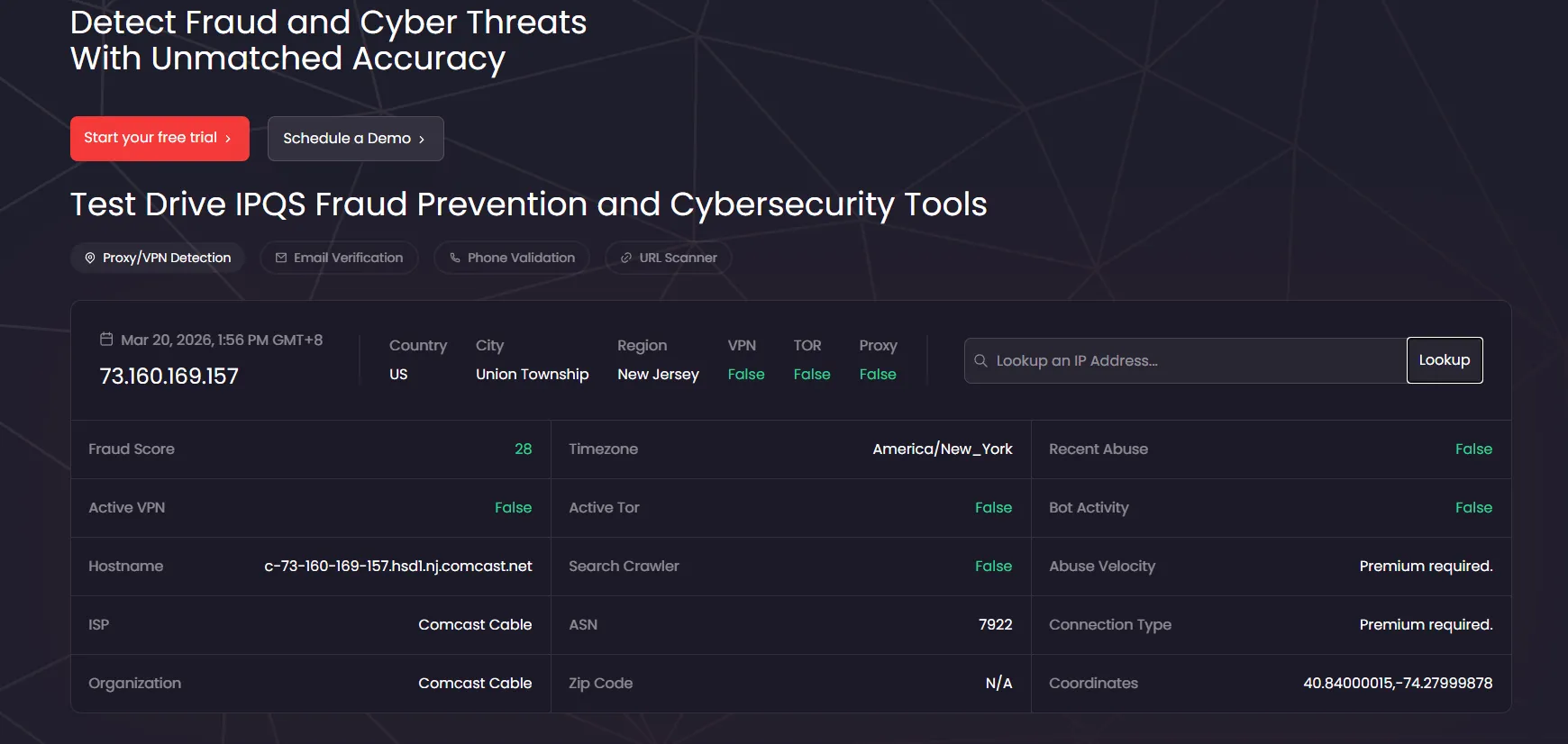
IPQS focuses on IP risk identification and deep reputation analysis, displaying risk score, proxy/VPN/TOR detection, and recent abuse history directly on the page.
### 2. [Whoer](https://whoer.net/) leans more towards current connection environment and detection item display
Whoer is different from the quick-result entry sites. Besides displaying basic IP information, it is more often used by many users to check for obvious exposure characteristics in the current connection environment and the results of various detection items listed on the page. In other words, users on Whoer often care not only about "where does this IP belong," but also about "what does my current connection look like" and "are the environmental features detected by the page obvious."
So in which scenarios is Whoer more suitable? Usually when you don't just want to check geolocation, but also want to take a look at the current connection environment, detection item results, and overall performance. For example, some users want to know if their current connection looks natural, if the environmental impression given by the page is consistent, or if there are any notable detection results. In such cases, Whoer is more likely to come into play than sites that only emphasize basic geolocation.
Because it focuses more on connection environment and detection item display, Whoer is not necessarily the best first choice for detailed network identity dissection. It serves more as a reminder: besides geolocation and ISP, the overall environmental information presented by the current connection is also important. If you want to check this part, Whoer is more natural; but if your focus is on organization, ASN, and more structured network identity information, then it is usually not the only key.
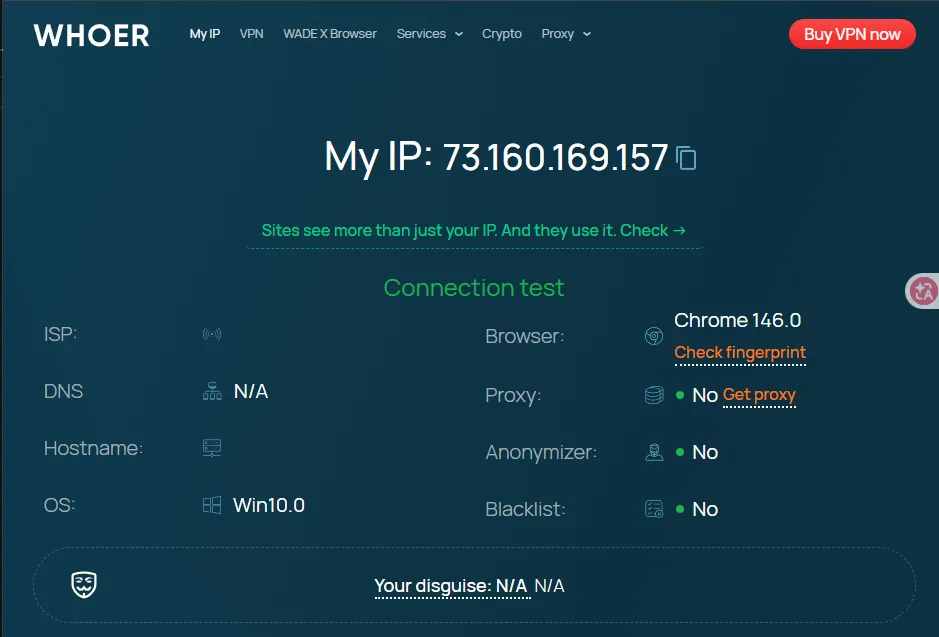
Whoer emphasizes current connection environment and detection item display, showing browser, proxy, anonymity, and environment-related results in addition to IP info.
### 3. [IPinfo](https://ipinfo.io/) leans more towards structured IP data and basic network identity information
If the first two sites are more about quick result viewing and connection environment/detection display respectively, then IPinfo's role is usually to explain the basic network identity of the current IP more clearly. Many users opening IPinfo first notice not an intuitive label, but a more structured presentation of geolocation, organization, ASN, network identity, etc. That is, it is more suitable for answering the question "who is this IP from the basic network info perspective."
This type of site is especially suitable for users who are not satisfied with just "looks residential" or "seems okay overall." Sometimes, what you really want to confirm is which organization this IP belongs to, which network provider it falls under, what its ASN is, and whether the basic geographic and network identity matches expectations. In such cases, IPinfo is more valuable than a site that only gives a quick impression, as it provides structured IP data rather than just an intuitive conclusion.
So where does IPinfo fit in the usage sequence? Usually after you have done the first round of quick checks and want to further confirm the basic network identity. If you need an entry point that provides more structured information and data-type results, it is more appropriate. It is not the most "health-check" feeling site, but it is more present in terms of "making clear who this IP is."
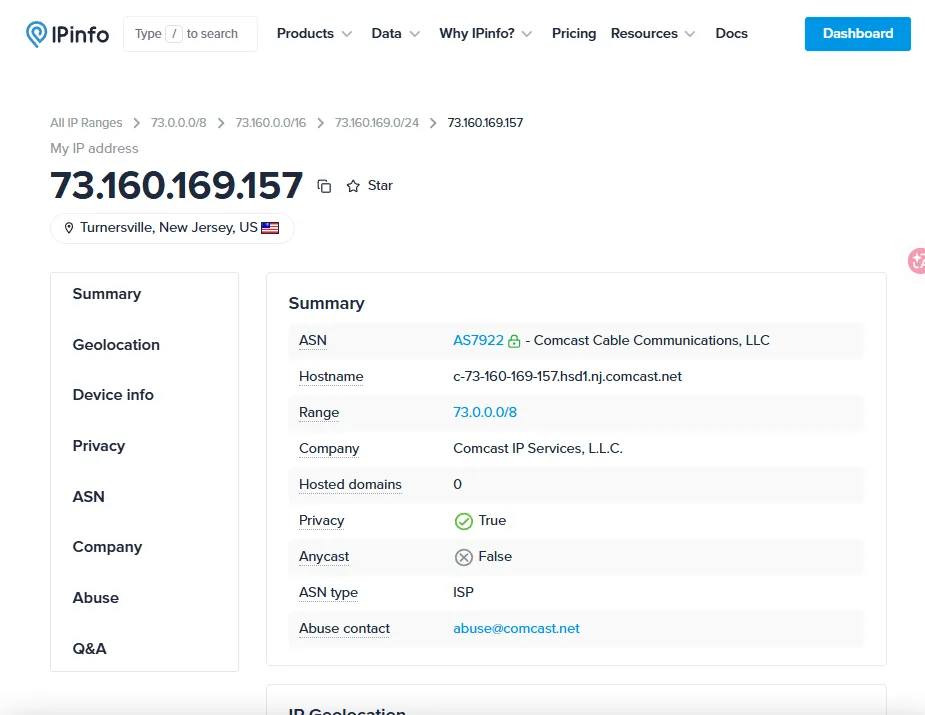
IPinfo focuses on structured IP data display, concentrating on ASN, Hostname, Company, Privacy, and other basic network identity info.
### 4. [IPjiance](https://ipjiance.com/) is a Chinese user-friendly comprehensive IP status viewer
IPjiance's advantage lies in providing **an aggregated, highly readable IP status viewing entry for Chinese users**. It clearly integrates multiple key IP information that Chinese users care about—such as **IP type (residential/datacenter), proxy detection, blacklist status, basic geolocation, and network latency**—on one page, using plain Chinese descriptions and intuitive presentation (like a status score), allowing users to quickly form an overall impression of the current IP's comprehensive status.
Its positioning is closer to **"information aggregation and quick troubleshooting tool"** rather than deep risk control analysis. If you need, in a Chinese environment, to understand the basic status of an IP at a glance (especially whether it looks residential or datacenter, and whether there are obvious proxy characteristics), then IPjiance is easier to use than professional but complex or pure-English tools. Its value lies in lowering the interpretation threshold for Chinese users.
Therefore, it is best suited as **the first stop for Chinese users to perform preliminary IP status screening**. If more professional risk scoring or deeper network identity data is needed, you can then use IPQS or IPinfo for in-depth verification.
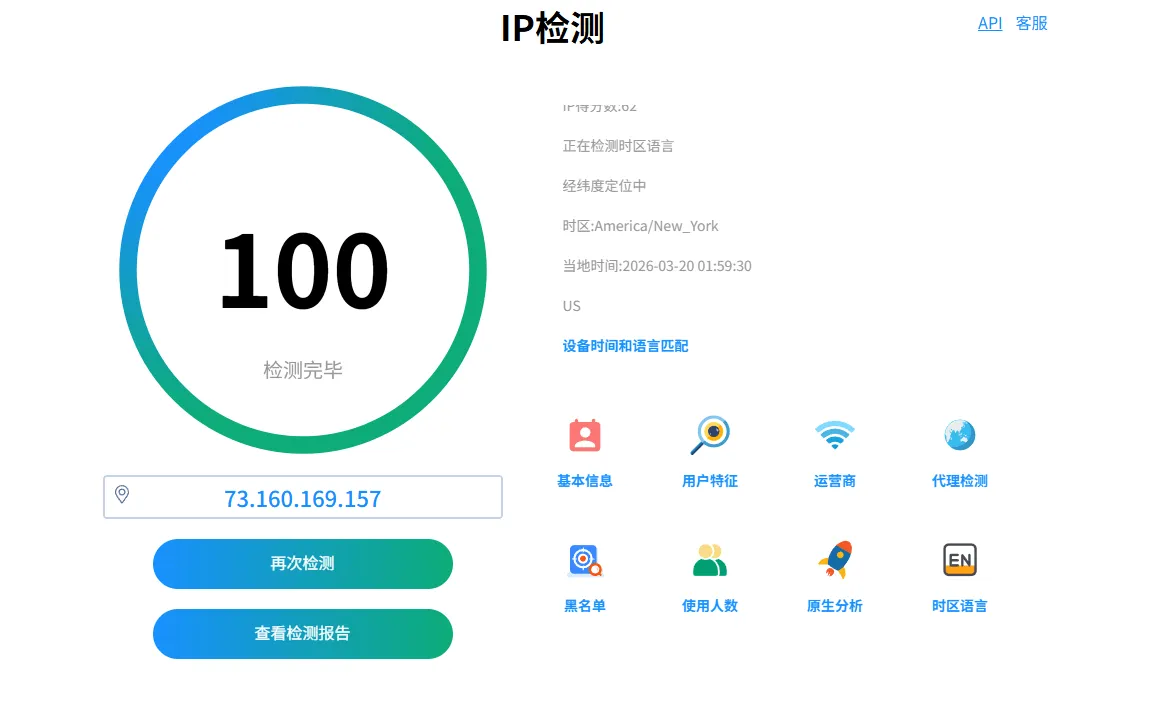
IPjiance's basic detection entry.
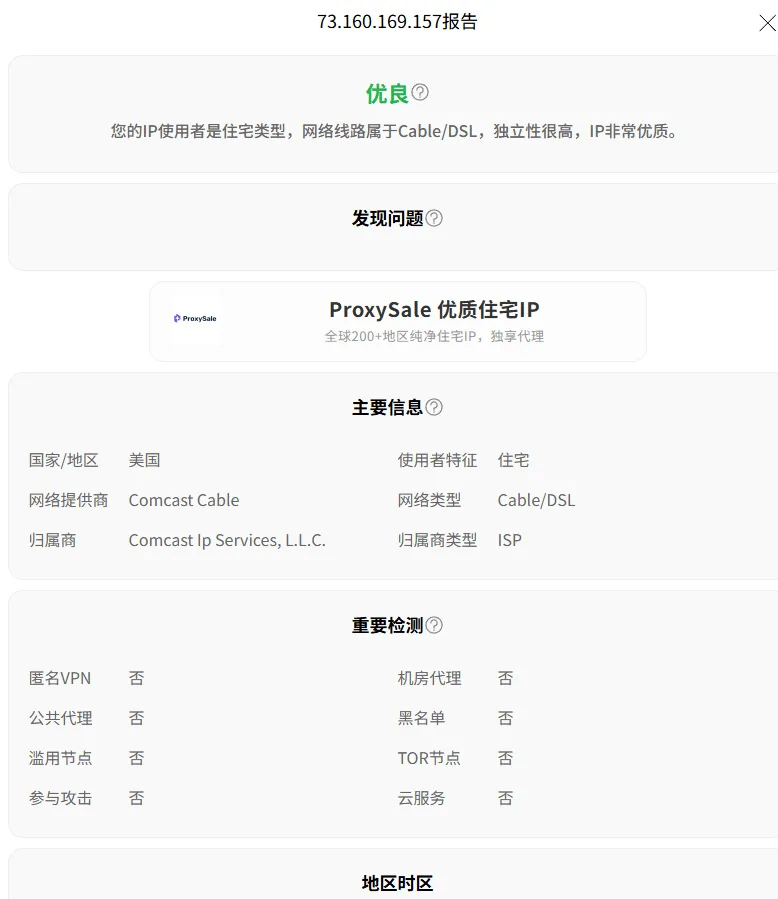
IPjiance's detailed report page further shows residential type, network type, proxy detection, and region/timezone results.
### 5. [ipip0.net](https://ipip0.net/) is more suitable for supplementary viewing of IP type, network path, and comprehensive detection results
If the previous sites are respectively more about quick result viewing, connection environment display, structured network information, and Chinese intuitive troubleshooting, then ipip0.net resembles a more comprehensive detection entry with broader coverage. On its public page, it not only provides basic IP query but also includes IP reverse lookup, rDNS, CNAME, Latency, Ping, Trace, and IPLeak detection. Thus, it fits better in scenarios where "I not only want to see geolocation but also want to check several network detection results."
From a usage positioning perspective, ipip0.net does not just answer "where does this IP belong" or give a quick impression; it is more suitable for supplementary viewing of IP type, network path, and some comprehensive detection items. Especially when you already know you don't just want to see country, city, or ISP, but also want to check risk score, IP type (native/broadcast/home broadband), Ping, Trace, or leak detection, ipip0.net is more likely to come into play than single-direction query tools. It acts more like a supplementary entry with "mixed information layers but broader coverage." The public FAQ also clearly mentions that it displays IP type, ASN number, region, risk score, and other results.
However, because it covers many functions, it is more suitable for the supplementary check stage rather than replacing all basic judgments. That is, if you just want to quickly establish a first impression, you don't necessarily need to go through all detection items at once; but if you have entered the further confirmation stage and want to complement IP type, path, and other network detection results, ipip0.net is usually more valuable.
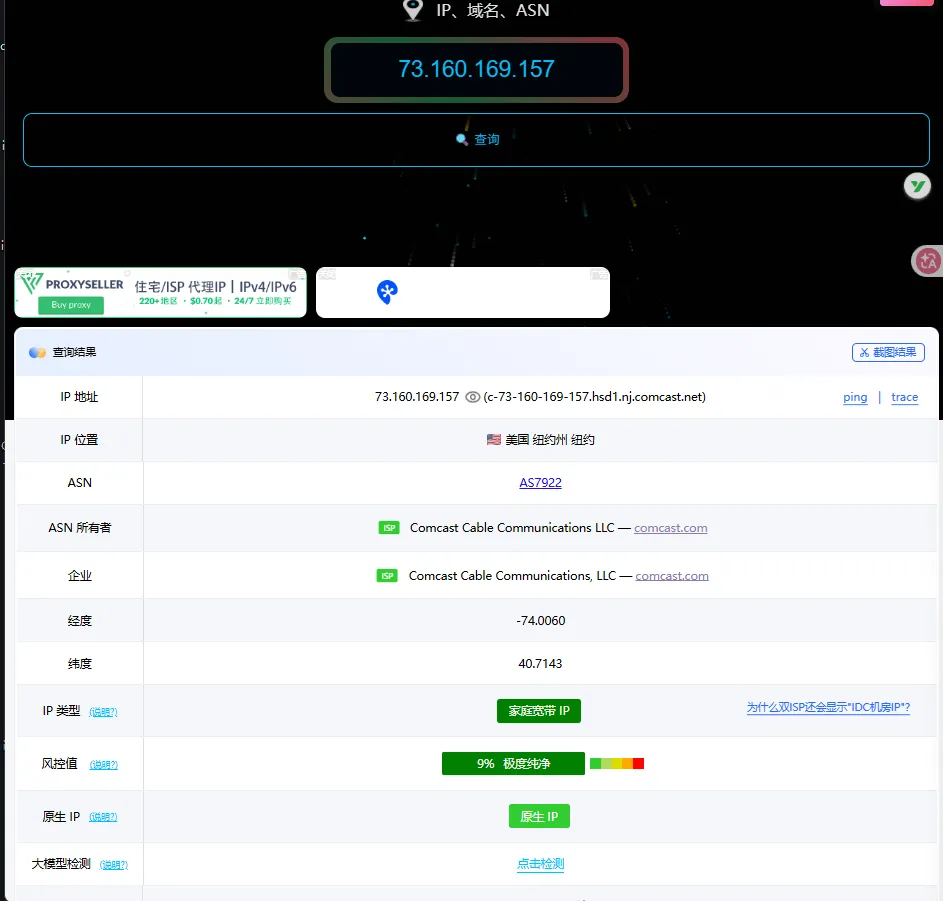
ipip0.net is more suitable for supplementary viewing of IP type, risk score, native IP judgment, and other comprehensive detection results.
### 6. Novice Minimalist Combination: IPjiance + Whoer + IPinfo
You don't need to use all tools. For novices, following the sequence "IPjiance for initial screening (quick overall check) → Whoer for environment check (leak detection) → IPinfo for identity verification (ASN/organization)" covers 90% of use cases, efficiently avoiding information overload.
## IV. Why the Same IP Shows Different Results on Different Sites
Once you actually use several IP detection websites, you quickly encounter a common issue: the same IP shows different results on different sites. Sometimes the differences are small, such as inconsistent city or region info; sometimes they are more pronounced, with one site suggesting a residential network while another gives a different overall impression. Many people's first reaction is to suspect that one of the sites is inaccurate or that a platform's data is wrong.
But the reality is usually not that simple. Different IP detection websites, while all checking the same IP, look at different layers, use different data sources, and present results in different ways. So "different results" is often not a matter of right or wrong, but of each platform interpreting the same IP from different angles. If you don't clarify this premise first, the more you compare, the more confused you become.
### 1. Different Sites Focus on Different Aspects (Core Reason)
Some sites focus on basic data (IPinfo), some on connection characteristics (IPjiance), some on environment detection (Whoer), some on risk scoring (IPQS) — even when checking the same IP, they answer questions from different dimensions like "identity/attributes/status," so results naturally differ. For example, IPinfo shows the ASN belongs to a certain ISP, while ipip0.net judges it as a datacenter IP; this is essentially a difference in detection dimensions, not a "mistake."
### 2. Underlying Data Sources and Update Times May Differ
Besides different focuses, another common reason is that the underlying data itself is not completely consistent. IP detection websites cannot all use the same database, nor can they synchronize all updates at the exact same time. Therefore, minor differences for the same IP across different sites are common. Especially for information like region, city, and connection type, variations are likely due to different data sources.
Many users naturally think: "Isn't an IP fixed? Why can different sites produce different results?" The problem is that the IP you are querying is fixed, but what is not fixed is how each platform interprets it, what data it uses to explain it, and when it last updated that explanation. For example, the same IP showing as New Jersey on IPQS/IPinfo but New York on ipip0.net is essentially due to differences in IP database accuracy and data source, not the site being "wrong." As long as the underlying databases and update times differ, results cannot be perfectly uniform.
### 3. Some Results Are Closer to Basic Data, Others Closer to Platform Judgment
Another easily overlooked point is that different fields have different natures. For instance, results like country, ASN, and organization are usually closer to basic data; while content like residential, proxy, environmental impression, and overall status are often based on a platform's own rules or models. The former is relatively more underlying data; the latter naturally carries the platform's own interpretation, so it is not strange for different sites to give slightly different statements.
Many people feel results are "contradictory" because they mix these two types of information. A site provides basic geolocation or network identity, while another provides connection type or overall impression, yet users try to compare them as if they should match exactly. This comparison approach is problematic. The former is more like "where does this IP belong based on basic data," while the latter is more like "what does this IP look like to me"; they are inherently different dimensions.
### 5. A More Stable Approach: Verify by Dimension, Not by Relying on One Site
Don't pursue a "single standard answer." Instead, choose a combination of tools based on needs. For example, a cross-border e-commerce seller can first use IPjiance for initial screening (Chinese intuitive), then Whoer for environment leak check, and IPinfo for ASN verification. This is both efficient and avoids the dimensional limitations of a single tool.
The benefit of this approach is not to read all sites, but to avoid forcing different layers of information into one answer. As long as you are willing to view results layer by layer and place each site in its more appropriate position, many seemingly conflicting points will eventually make sense. You no longer demand the same answer from every platform but let them answer different questions.
## V. Which Results Should You Prioritize When Doing IP Detection
The core of IP detection is "look by layer, check in order" to avoid distraction from redundant information. Below is the most practical judgment sequence for different users:
### 1. Step One: Check Basic Geolocation and Network Identity (Universal for All Users)
First confirm basic info like country, region, ISP, organization, and ASN. This is the core for judging the IP's "identity"—for example, cross-border e-commerce sellers first verify if the IP's geolocation matches the target market; developers first confirm if the ASN meets expectations. This ensures subsequent judgments are not built on incorrect foundations.
### 2. Step Two: Check Connection Type and Exit Characteristics (For Users Focused on IP Compliance)
After confirming basic identity, focus on features like "residential/datacenter/proxy/blacklist." For example, account matrix operators care whether it is a residential IP; privacy users care whether it is flagged as a proxy. This is key to judging the IP's "usage attribute," offering more reference value than simple city info.
### 3. Step Three: Check Environmental Performance and Overall Impression (For Novices/Quick Screening Users)
After confirming basic info and connection characteristics, then refer to comprehensive scores, environment leak detection (e.g., DNS/WebRTC) results, etc. For example, ordinary users can use IPjiance's 100-point scale for quick judgment without deep research into underlying fields, focusing on whether the overall status is normal.
### 4. Key Principle: A Single Result Cannot Replace Full Judgment
Never conclude based on a single label like "residential" or "high score." An IP with normal geolocation might be flagged as datacenter; a high-scoring IP might have DNS leaks—both require multi-layer judgment. Novices can follow the minimalist principle of "identity first, then type, then overall" to avoid misjudgment.
## VI. How to Choose an IP Detection Website for Different Scenarios
The previous chapters covered "what each site is suitable for" and "which info to prioritize." Now we address a more practical question: given a specific scenario, which site should you prioritize? Many users don't open these pages to research the tools themselves but have a concrete task and want to quickly find a more suitable detection entry point.
Therefore, when choosing an IP detection site, the key is never to memorize site names but to first clarify your current need. Do you want to quickly check the overall status? Confirm basic network identity? See the current connection type? Or just do a round of intuitive troubleshooting in a Chinese environment? Once the scenario is clear, the choice usually follows naturally. Conversely, if the scenario is not clear and you rush to ask "which is best," you'll likely end up with a vague answer.
### 1. If You Just Want to Quickly See the Overall Status of the Current IP (Cross-border E-commerce/General Users)
Prioritize IPjiance (100-point quick health check, Chinese intuitive) or ipip0.net (risk score + IP type). For example, a user who just obtained a proxy IP can determine within 30 seconds whether it is a residential IP and whether there is risk, without studying complex fields.
### 2. If You Want to Check Environmental Performance and Connection Feel (Privacy Protection/Proxy Users)
Prioritize Whoer, focusing on DNS/WebRTC leak detection, anonymity score, browser fingerprint, and other environmental features. For example, users of VPN tools can quickly check for privacy leaks to avoid exposing their real network environment.
### 3. If You Need to Confirm Basic Network Identity and Structured Information (Developers/Data Analysis Users)
Prioritize IPinfo for precise verification of ASN, organization, Hostname, and other structured data. For example, when integrating IP query functionality, developers need standardized basic data; IPinfo's structured output is more suitable for API integration.
### 4. If Your Primary Concern is Comprehensive Detection & Professional Risk Control + Starting from a Chinese Interface
If your scenario requires not only basic IP type and risk score but also a more comprehensive detection entry that includes network path, reverse lookup, and leakage detection, while preferring a Chinese interface, then start with ipip0.net. But note that ipip0.net is better suited as a supplementary check after initial screening rather than replacing first-round quick judgment in most cases.
### 5. If You Want to Quickly Identify IP Risk Level (Developers/Financial Risk Control Users)
If you are in a professional scenario requiring in-depth IP quality and risk assessment (such as payment fraud control, account security audits), prioritize IPQS for risk scores, abuse history, and proxy/bot detection—this is professional-grade depth tools cannot easily match.
## VII. FAQ: Common Questions About IP Detection Websites
### Q1: Which of these IP detection websites is the most accurate?
A: There is no single "most accurate" website. Different sites focus on different dimensions. For basic geolocation, IPinfo usually provides more structured data; for risk scoring, IPQS is more professional; for Chinese users quickly checking residential/datacenter status, IPjiance provides intuitive results. Accuracy is relative to the specific need.
### Q2: Why does the same IP show different geolocations on different sites?
A: Different sites may use different IP geolocation databases (e.g., MaxMind, IP2Location, custom databases) with different update frequencies and accuracy. This is normal; for critical use, cross-verify and pick the most trusted source.
### Q3: With so many websites to choose from, which one should I start with?
A: For average Chinese users, IPjiance is recommended as the first stop for quick IP status checks. Then use Whoer for environment leak checks and IPinfo for basic network identity if needed. This combination covers most needs without wasting time.
## VIII. Summary
This article explains the positioning and respective applicable scenarios of IPQS, Whoer, IPinfo, IPjiance, and ipip0.net. The core conclusions are:
- **They all belong to IP detection websites but have different focuses.** Understanding this premise is far more important than memorizing specific characteristics of each site.
- **The same IP showing different results on different sites does not necessarily mean one is wrong.** Differences in data sources, update times, and detection focus are common; the key is to recognize the layer of information each site provides.
- **Choose the right detection entry based on needs.** There is no universal "best" website; the correct approach is to select the most suitable tool for your current scenario.
- **Recommended combination for novices:** IPjiance for initial screening → Whoer for environment check → IPinfo for identity verification, covering 90% of use cases, efficient and easy to understand.
Hopefully, this article helps you quickly find the IP detection entry that suits your needs when choosing a tool.