 NexIP官方博客
Industry Shift: Data Center IP Block Rates Rise, Live Streaming Egress Migrates to ISP / Dual ISP Residential IPs
In 2026, cross-border live streaming teams are commonly feeling a shift: mainstream overseas platforms have been raising default block rates for data center (IDC) IPs. Practices that once relied on data center IPs for live streaming are increasingly difficult to sustain. Cross-border live streaming and social media multi-account operations are accelerating their shift toward ISP / dual ISP native residential IP selection.
This redefines the need for an “overseas live streaming dedicated line” in today’s context—it’s no longer just about purchasing a faster line, but a joint problem of link and egress identity. Many teams assume that adding another dedicated line will solve lag and throttling, but in practice, they often find the problem lies in the ASN attributes of the egress IP.
Difference Between Overseas Live Streaming Dedicated Lines and Regular Proxies: Distinguish “Link Quality Issues” from “Egress Identity Issues”
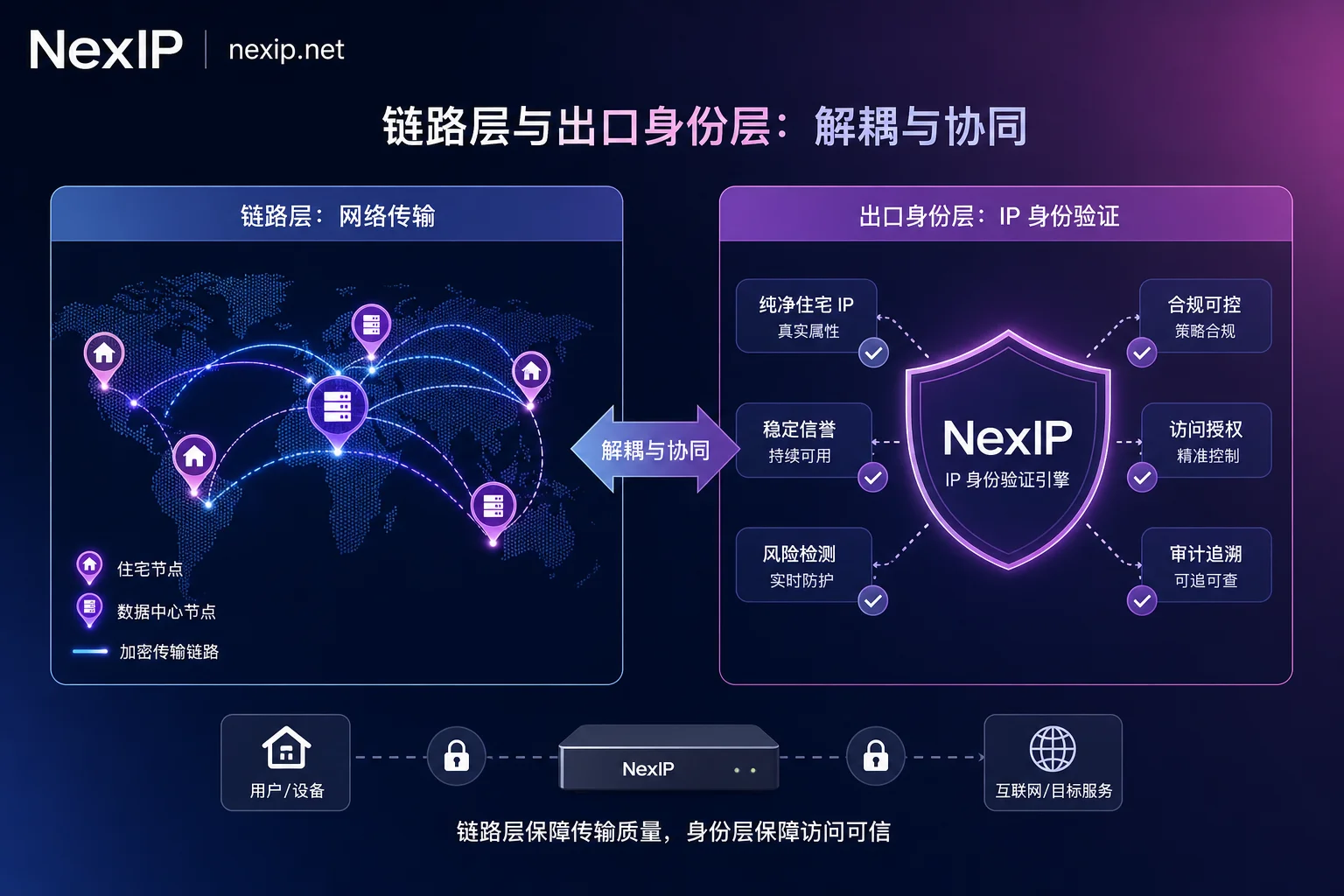
Many operators ask about the difference between overseas live streaming dedicated lines and regular proxies; in truth, they solve issues at different levels. Consider the symptoms: if the stream stutters, latency accumulates, the picture blurs, or frames drop, it’s more likely a link-layer issue—caused by insufficient uplink bandwidth, jitter, and packet loss leading to TCP retransmission and latency accumulation. If you’re blocked, prompted for verification, experience immediate anomalies upon going live, or multiple live rooms have issues simultaneously, it’s more likely an egress identity issue—where the ASN is flagged as data center.
“Overseas live streaming dedicated lines” typically solve transport-side issues, while residential IP egress solves identity-side issues; the two are not interchangeable. This is precisely why the industry decouples transport acceleration lines from egress IP identity in configuration. The following diagnostic framework comes from 2026 ASN reputation industry materials and competitor practical tutorials. Note that this is methodology, not platform penalty rules.
| Problem Type | Typical Symptoms | Common Causes | Priority Layer |
|---|---|---|---|
| Link Quality Issues | Stuttering, frame drops, latency accumulation | Insufficient uplink bandwidth, jitter/packet loss causing retransmissions | Link layer (dedicated line/bandwidth optimization) |
| Egress Identity Issues | Immediate anomaly upon going live, verification prompts, simultaneous issues across rooms | Egress ASN flagged as data center | Egress identity layer (residential IP) |
To address the question “Should TikTok live streaming use residential IP or dedicated line?”—it’s not an either/or: residential IP handles egress identity, acceleration line handles transmission quality, and they are combined based on the symptoms above. This article does not cover any platform’s official rules.
What to Look at in the Link Layer: The Relationship Between Uplink Bandwidth, Jitter, Packet Loss, and Concurrent Live Rooms
TCP-based RTMP streaming is prone to retransmission and latency accumulation under packet loss and jitter, manifesting as stuttering and stream drops. Therefore, how much uplink bandwidth does live streaming require? It’s not about having as much as possible; rather, it must match the bitrate with headroom, while also observing whether jitter and packet loss remain stable.
Suggested stress testing sequence: First, run a single live room to observe the baseline of uplink stability; then add a second live room to see if they interfere with each other; finally, conduct a long-duration test to observe whether jitter and packet loss remain stable. This helps distinguish single-point issues from concurrent resource contention. Note that I’m not providing specific bandwidth numbers or bitrate standards, as those depend on encoding settings and platform requirements and should be self-tested. Moreover, “changing IP” won’t solve link-layer contention; bandwidth budgeting and traffic distribution are key.
What to Look at in the Identity Layer: ASN Origins, Subnet Cleanliness, and Session Stability
The ASN attributes of egress IPs (difference between ISP/dual ISP and data center IDC) are more critical in 2026. The truth is that some resources labeled “residential IP” are actually data center single-ISP IPs adjusted via Whois annotations, which can be exposed under real-time ASN verification.
It should be noted that the exact proportion of true dual-ISP nodes and subnet cleanliness scores in residential IP pools of various providers lack publicly verifiable data. The judgments about ASN attributes and subnet selection in this section are methodological suggestions, not empirical conclusions; implementation should rely on your own testing. So how to select regional nodes for overseas live streaming dedicated lines? First, check if the target region has residential egress resources with ISP/dual-ISP attributes; second, check if the region’s egress remains stable under long sessions; finally, compare the link’s transmission performance itself.
Phased Configuration: Pre-Go-Live Testing, Long-Term Egress for Single Live Room, and Network Division for Multiple Concurrent Live Rooms
Break down the link-layer and identity-layer analysis into actionable steps:
- Pre-Go-Live Testing: Use a quickly replaceable egress for regional/link testing and rehearsals to validate link quality and IP attributes.
- Long-Term Egress for Single Live Room: For officially running live rooms, bind a long-term fixed egress to maintain session and regional consistency.
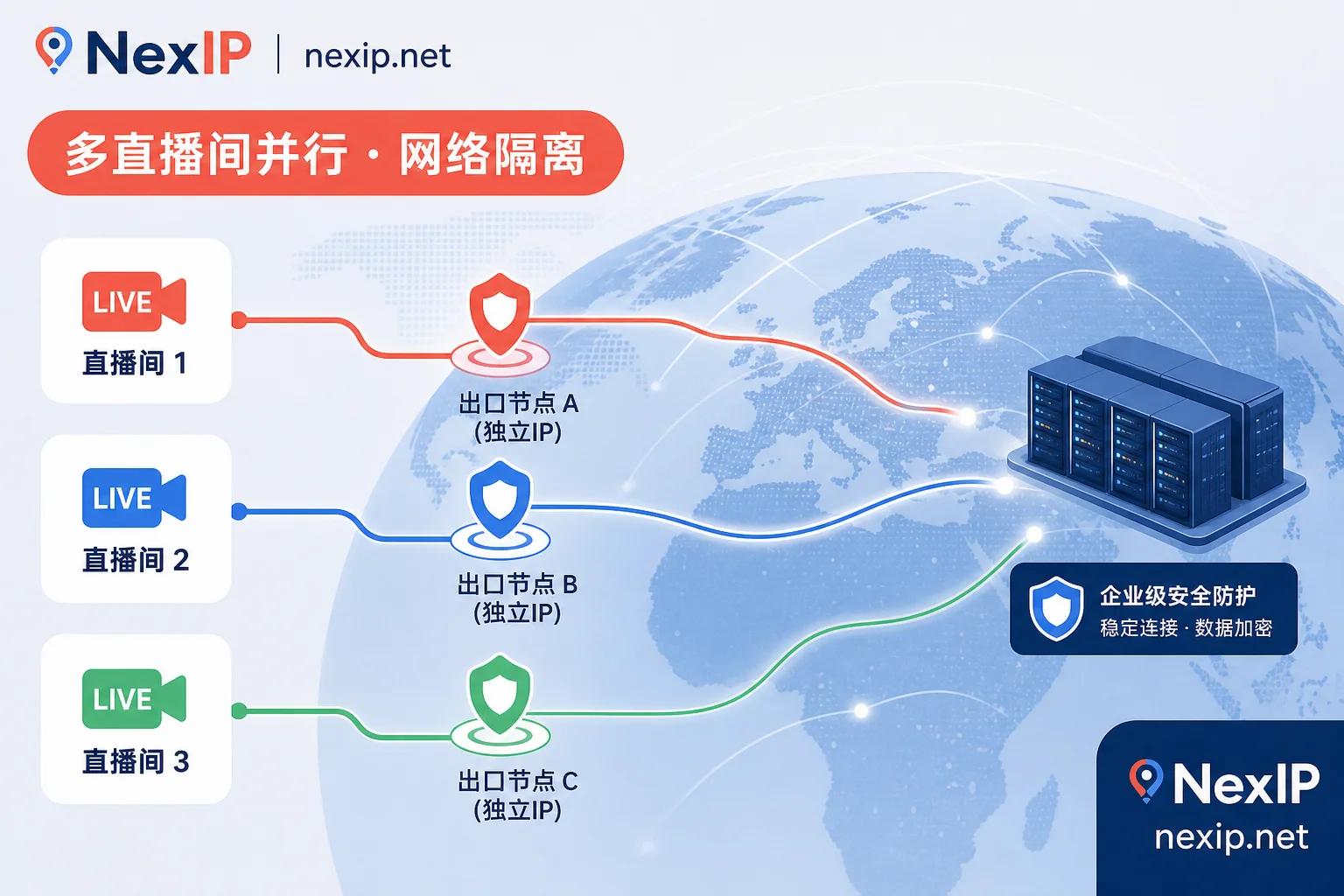
- Multiple Concurrent Live Rooms: Allocate separate egresses for different live rooms and accounts based on city/ASN for network isolation, while keeping transport acceleration lines and egress IPs decoupled for easy replacement and fault location.
Fault location recommendation: First fix the egress and only change the link—if the problem disappears, it’s link-side; then fix the link and only change the egress—if the problem disappears, it’s identity-side. This quickly identifies the bottleneck. For example, how to isolate networks for multiple concurrent live rooms? Use dedicated proxy nodes with city/ASN-based egress allocation, so each live room has an independent network identity without interference. Industry practice is to configure transport acceleration and egress IPs separately, so even if one egress IP fails, link quality is unaffected, and vice versa.
Combining with NexIP Capabilities: How Static Long-Term / Static Short-Term / Dynamic Residential Bandwidth Divide Responsibilities
In practice, you can reference NexIP’s publicly documented capabilities for combination. The logic is: official live rooms correspond to “long-term identity consistency” needs, test streams correspond to “pre-launch testing phase,” and multi-room simultaneous streaming corresponds to “concurrent uplink pressure and independent egress isolation.”
- Static Long-Term Residential IP: Suitable for official live room egress requiring long-term binding, regional and session consistency.
- Static Short-Term Residential IP: Suitable for temporary streams, regional testing, and configuration validation.
- Dynamic Residential Bandwidth Plans: Suitable for scenarios with high concurrent uplink pressure, billed by bandwidth rather than traffic, for multi-room simultaneous streaming.
At the configuration level, you can combine global region selection, city/ASN targeting, session stickiness, HTTP/SOCKS5, and API integration to automate egress allocation. For example, use city/ASN targeting + session stickiness to fix egress for each live room, and use API integration for batch allocation. Note that these are capability descriptions only and do not involve specific node counts or bandwidth values.
Pre-Go-Live Checklist: Link Metrics, IP Attributes, Session Duration, and Regional Consistency
Finally, here’s a self-check checklist for teams to execute directly:
- Observe uplink stability under single and concurrent conditions: are jitter and packet loss within acceptable ranges?
- Is the egress ASN of ISP/dual ISP attributes: test to confirm it’s not a data center single-ISP IP.
- Does the egress drift under long sessions: maintain session stickiness.
- Is the account’s common region consistent with the egress region/timezone?
- Does each live room have an independent egress without crossover?
If any step fails, adjust the link or egress configuration. Please note that this article does not provide any platform’s official throttling or banning standards, nor does it promise that using a certain type of IP or link will guarantee no throttling or stream drops.
It’s recommended to first test a small-scale live room’s uplink stability and egress ASN attributes, then decide whether to use static long-term or dynamic residential bandwidth for long-term egress; if you need to allocate independent egresses for multiple live rooms by region or city/ASN, you can refer to NexIP’s regional targeting and session stickiness configuration documentation before scaling up.


Comments(0)