 NexIP官方博客
In overseas short-video operations and TikTok Shop cross-border live streaming, "videos continuously getting 0 views" or "live rooms receiving no natural traffic" are the most common bottlenecks many teams face. Operators often tweak video editing and covers, but overlook the underlying network egress attributes. In TikTok's platform risk control and distribution mechanism, non-residential IPs often directly result in the system refusing to distribute traffic.
Why Do Non-Residential IPs Hinder TikTok Traffic Distribution?
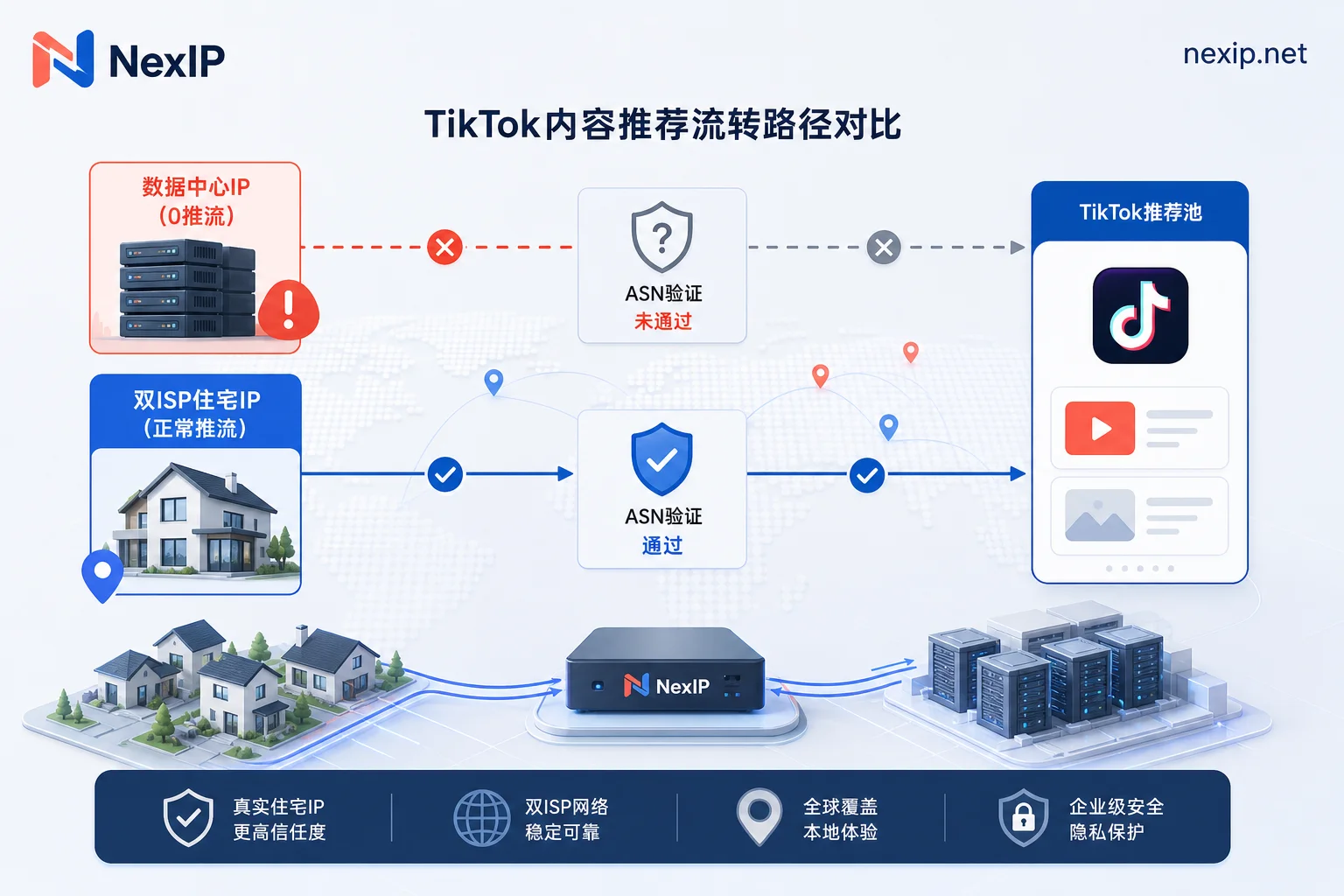
TikTok has established a multi-dimensional environment detection mechanism for account risk control, with the ASN (Autonomous System Number) attribute of the egress IP being the first filter.
When operators use regular VPS, cloud servers, or data center proxies (datacenter IP / DC IP) to access TikTok, the algorithm identifies them as cloud provider data center networks. Such IPs are historically associated with batch automation scripts, data scraping, or non-authentic personal behavior. Therefore, the system classifies the environment as "high-risk or bot traffic" and directly applies restrictions:
- Zero views / stuck at 200 views: Content fails the underlying network trust check during review and cannot enter the public Recommendation traffic pool.
- Live rooms fail to get local traffic: Live data cannot be precisely pushed to local users in the target region, and sometimes audiences are all abnormal cross-region accounts.
- Increased secondary risk control rates: Frequent triggers of email/phone verification, or even account downgrade or ban.
How Residential IPs Improve TikTok Traffic Distribution Trust
Unlike data center IPs, Residential IPs are network addresses assigned by local Internet Service Providers (ISPs) to real home users. In TikTok's distribution algorithm, residential IPs indicate "real users using mobile phones in a local home broadband environment."
In network architecture selection, static dual-ISP residential IPs and dynamic residential IPs play different roles:
- Static long-term residential IP / dual-ISP proxy: With a fixed egress IP and genuine home broadband ASN labels, these are ideal for long-term account nurturing, store management, and scheduled OBS live streaming, ensuring a highly consistent login environment.
- Dynamic residential IP: Suitable for initial batch registration of multiple accounts, short-video data collection, and phased trial runs, offering flexible city-level targeting and automatic session stickiness control.
Network Configuration Approach for TikTok Live Streaming Based on NexIP
To cope with TikTok's strict IP detection, building a network topology that combines purity and stability is crucial. As a professional enterprise-grade proxy network solution, NexIP provides cross-border teams with rich underlying proxy resources.
NexIP covers network nodes in major continents and regions worldwide, offering dynamic residential proxy traffic plans, dynamic residential proxy bandwidth plans, and static short-term/long-term residential IPs. For specific operational configuration, follow these practices:
- Precise region and city/ASN targeting:
When operating TikTok accounts in the US, UK, or Southeast Asia, use the product's city and ASN targeting features to ensure the IP location matches the account's target market, avoiding anomalies like "account location vs. network egress crossing borders." Choose the right session mode for the scenario:
- Short-video operations and live commerce: Recommend integrating NexIP static long-term residential IPs (especially dual-ISP nodes) with HTTP/SOCKS5 protocols bound to fingerprint browsers or soft routers, achieving ultra-low latency stable streaming and persistent session stickiness.
- Matrix testing and data scraping: Use NexIP dynamic residential proxies via API integration, setting single-session stickiness duration to maintain IP purity while improving multi-account testing efficiency.
- Check network purity before streaming:
Before broadcasting or posting on OBS or mobile clients, use detection tools to confirm that WebRTC is not leaked and that DNS resolution and IP address belong to the local broadband provider, ensuring a smooth streaming pipeline.
Brand Interaction: Have You Experienced Traffic Bottlenecks with Your TikTok Account?
In your overseas short-video or cross-border live streaming operations, have you ever encountered videos stuck at 0 views due to improper network node selection? When building a localized proxy environment, do you prioritize stability or IP purity? Feel free to share your practical experiences and questions in the comments.
If your team is looking for high-purity residential proxy networks that support SOCKS5/HTTP integration and global targeting, experience NexIP's dynamic and static residential IP services to build a stable and efficient underlying network streaming channel for your TikTok business.


Comments(0)