 NexIP官方博客
Bottom Line Up Front: Decide by Three Conditions, Not by "Which Is Faster"
When comparing SOCKS5 vs HTTP proxy performance in cross-border business, the answer isn't about which is faster but about three decidable conditions: whether UDP transmission is needed, whether request headers must be rewritten at the proxy layer, and whether DNS resolves locally or remotely. In 2026, the proliferation of cross-border live streaming, HTTP/3 (QUIC), and stricter risk control make it essential for tech teams to clarify these three conditions before making the right integration choice.
Fundamental Difference: SOCKS5 at Session Layer, HTTP Proxy at Application Layer
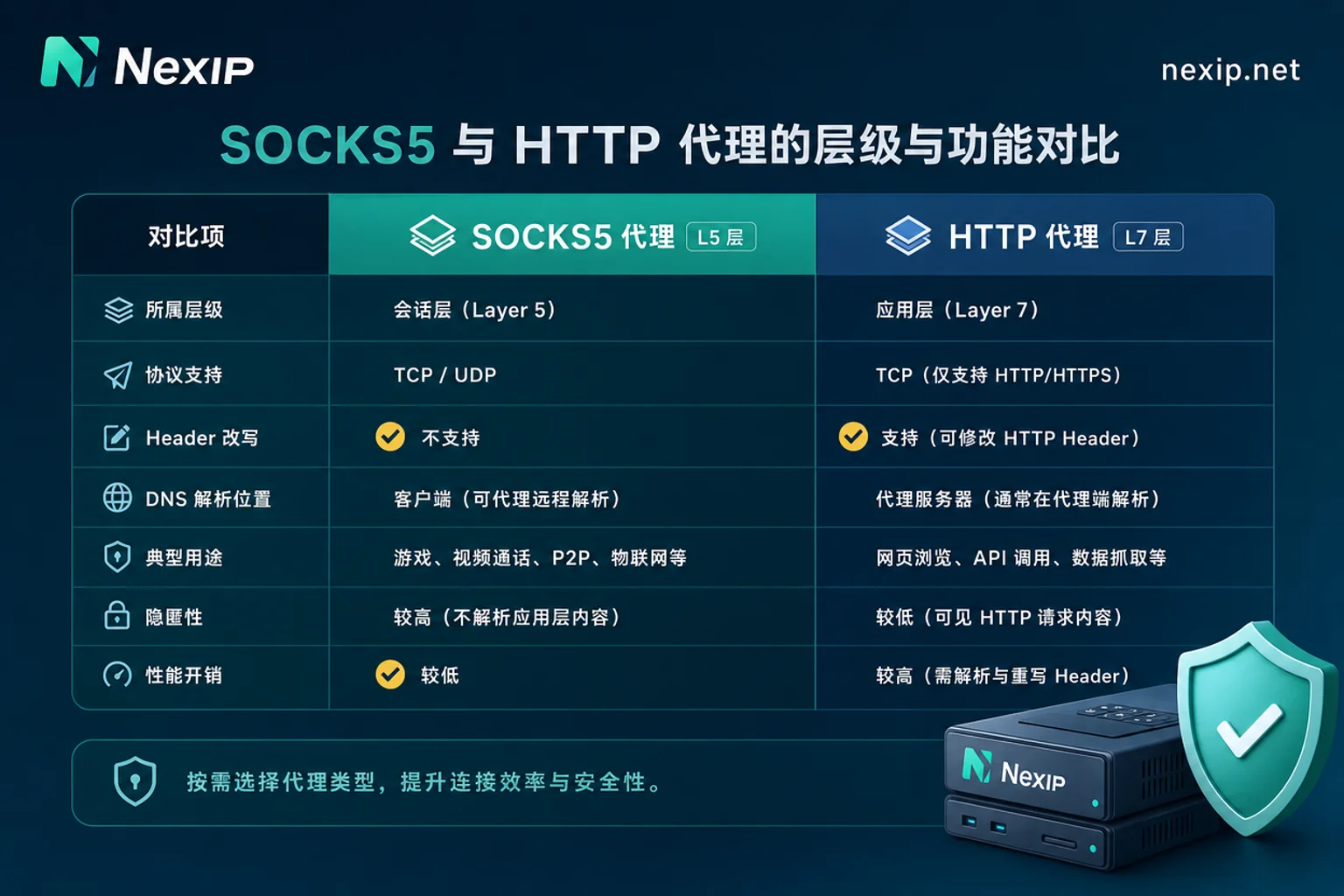
The core difference lies in the OSI layer: HTTP proxy operates at Layer 7 (application), while SOCKS5 operates at Layer 5 (session). This means HTTP proxy can understand and modify HTTP/HTTPS headers, status codes, and cookies, and can also perform content caching and filtering. In contrast, SOCKS5 is a generic blind forwarding channel that does no content sniffing or header modification on upper-layer application payloads.
This layer difference gives rise to two entirely distinct capability sets: HTTP proxy suits scenarios requiring fine-grained control over requests and responses, while SOCKS5 suits scenarios needing flexible carriage of multiple protocols. Understanding this makes subsequent selection logic straightforward. In performance comparisons between SOCKS5 and HTTP proxy for cross-border business, this layer premise is most often overlooked.
Difference 1: Can It Carry UDP? The Dividing Line for Live Streaming, QUIC, and Non-Web Traffic
SOCKS5 defines the UDP ASSOCIATE command in RFC 1928, supporting bidirectional TCP and UDP data forwarding, thus can carry WebRTC, VoIP, gaming traffic, and UDP-based HTTP/3 (QUIC). Standard HTTP CONNECT tunneling only supports TCP streams and does not provide a general UDP relay.
This directly answers the long-tail question "Can HTTP proxy transmit UDP?" — standard HTTP proxies cannot. But note: Whether commercial proxy providers' SOCKS5 ports support UDP depends on specific deployment and cannot be assumed by default. If you're doing live streaming or using WebRTC, ensure the provider has enabled UDP SOCKS5 access.
| Capability | SOCKS5 Proxy | HTTP Proxy |
|---|---|---|
| Layer | L5 Session | L7 Application |
| UDP Support | Yes (UDP ASSOCIATE) | Standard CONNECT only TCP |
| Header Rewriting | No | Yes |
| DNS Resolution Location | Client local (default) | Remote proxy (default) |
| Typical Scenarios | Live streaming, gaming, QUIC | Web scraping, API middleware |
Difference 2: Can It Rewrite Headers? Why Web Scraping Middleware and Account Operations Still Choose HTTP Proxy
HTTP proxy, at the application layer, natively reads and writes headers and cookies, and can perform content filtering and caching. For high-concurrency web scraping and account operations that require fine-grained request header control, this capability is critical. Scraping middleware often needs to inject specific User-Agent, Referer, or Cookie; HTTP proxy can do this directly at the proxy layer without additional tunnel encapsulation.
In contrast, SOCKS5 by design does not offer such capabilities; it only moves data streams from A to B, regardless of what's inside the packets. Therefore, if your business relies on middleware to rewrite headers, HTTP proxy is the more convenient tool.
Difference 3: Where Does DNS Resolve? The Difference Between socks5 and socks5h and Leakage Reproduction
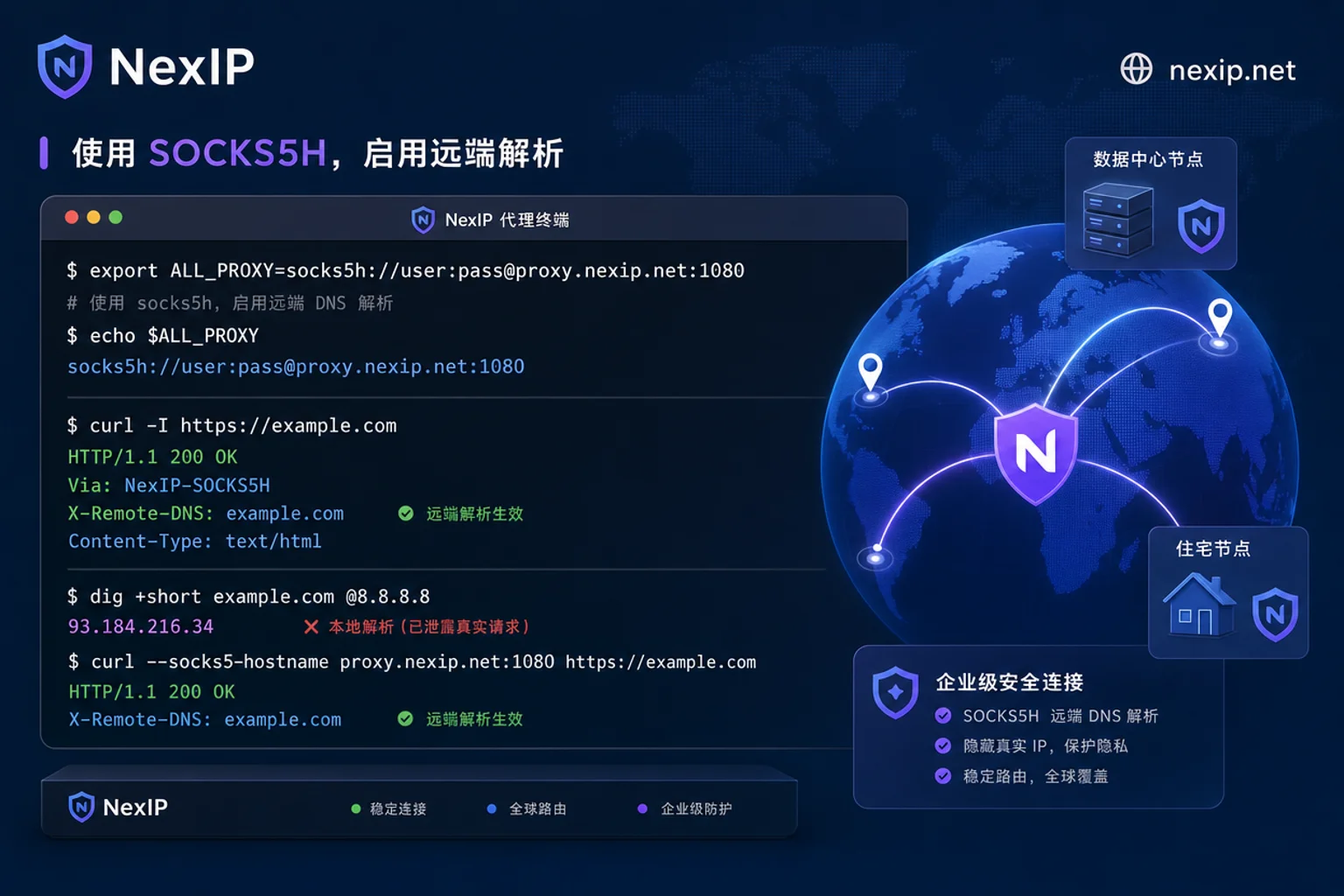
When using the socks5:// protocol header, the client locally resolves the target domain by default and then sends the target IP to the proxy, which can cause local DNS leakage and DNS pollution. The solution is to explicitly configure socks5h:// (or enable remote DNS / --socks5-hostname), sending the domain directly to the remote proxy server for resolution.
If you configured a SOCKS5 proxy and still have DNS leakage, it's likely you missed this detail. Self-check: compare local resolution results with remote exit-side resolution attribution; if local DNS requests appear, configuration needs adjustment. This is the essence of "the difference between socks5h and socks5" — the former is the secure practice.
Correction: Why "SOCKS5 Is Entirely Superior to HTTP" Is Wrong
In discussions of SOCKS5 vs HTTP proxy performance in cross-border business, a common misconception is that SOCKS5 is entirely superior to HTTP; in reality, the two differ in protocol layer and functional positioning, not absolute quality. SOCKS5 supports UDP but doesn't understand application layer; HTTP can rewrite headers but is limited to TCP. Similarly, configuring SOCKS5 does not automatically immunize against DNS leakage, nor does it guarantee bypassing platform risk control. Latency and throughput mainly depend on node links, bandwidth, and target server response, largely unrelated to the protocol itself.
Four Cross-Border Business Types to Match: Streaming, High-Concurrency Scraping, Account Operations, API Calls
| Business Type | Key Decisive Condition | Recommended Integration |
|---|---|---|
| Live streaming (WebRTC/QUIC) | Must transmit UDP | If SOCKS5 confirmed UDP support, use SOCKS5; otherwise, evaluate alternatives |
| High-concurrency web scraping | Need header injection and middleware adaptation | If middleware needs header injection/rewriting, use HTTP proxy; if only stable tunnel needed, use SOCKS5 and ensure domain resolution via socks5h:// |
| Account login operations | Need session persistence and remote DNS consistency | If need to control request headers at proxy layer, use HTTP proxy; if only stable tunnel needed, use SOCKS5 and explicitly use socks5h:// for remote resolution to ensure session exit and DNS attribution consistency |
| API calls | Protocol form supported by client SDK | Choose based on SDK capabilities |
This table serves as a reference for conditions, not absolute recommendations. If your business is live streaming, prioritize confirming SOCKS5's UDP capability; if high-concurrency scraping, HTTP proxy's header rewriting is more suitable; account operations require attention to session stickiness and remote DNS resolution; API calls depend on client protocol support.
After Choosing Protocol, How to Select IP Type and Integration Method
Protocol is just the integration method; exit identity is still determined by IP type. For high-concurrency scraping rotation needs, consider dynamic residential traffic plans; for scenarios like account operations or streaming that require stable exits, static residential IPs are more appropriate. NexIP's dynamic residential traffic/bandwidth plans support geo, city, and ASN targeting and session stickiness; static short-term and long-term residential IPs suit fixed-exit account operations and streaming scenarios. Both plan types can be accessed via HTTP or SOCKS5 and support API extraction. When configuring, note differences in credential forms, session stickiness, and geo/ASN targeting between HTTP and SOCKS5 access for different plans.
For the boundaries of dynamic vs. static exits, refer to Difference Between Static IP and Dynamic IP; for SOCKS5 credentials and socks5h usage, see SOCKS5 Proxy Configuration.
Three-Step Verification After Configuration: Exit IP, UDP Connectivity, DNS Resolution Attribution
Verify proxy configuration with the following checklist:
- Exit IP: Visit an IP lookup site to confirm the geographic region matches expectations.
- UDP Connectivity: Use UDP testing tools (such as
nc -uor specialized speed test software) to confirm UDP link availability, not just TCP. - DNS Resolution Attribution: Check whether domain resolution occurs locally or remotely; if local DNS requests appear, adjust configuration.
If verification fails, first check the protocol header (e.g., whether socks5h is written), then confirm whether the provider has enabled UDP port, and finally troubleshoot firewall blocking. After self-checking with the above three steps, match the exit type between NexIP's dynamic residential traffic/bandwidth plans and static short-term, long-term residential IPs based on business type.
FAQ
What's the difference between SOCKS5 and HTTP proxy?
The core difference lies in protocol layer: SOCKS5 operates at session layer, supports UDP, but doesn't understand application-layer content; HTTP proxy operates at application layer, can rewrite headers and cookies, but standard HTTP CONNECT doesn't support UDP. Choose based on whether your business needs UDP or header rewriting.
For live streaming, should I use SOCKS5 or HTTP proxy?
If streaming uses WebRTC or UDP-based protocols, prefer SOCKS5 and ensure the provider has enabled UDP support; if streaming is TCP-only (e.g., HLS), HTTP proxy is also usable but less flexible. The final choice also depends on node-to-target server link quality.
For scraping, is SOCKS5 or HTTP proxy faster?
"Faster" depends on node and target server links, not the protocol itself. However, HTTP proxy can directly inject headers during high-concurrency scraping, reducing client-side encapsulation overhead; SOCKS5 has an advantage in UDP scenarios. Choose based on your traffic type.
Can HTTP proxy transmit UDP?
Standard HTTP CONNECT tunnel doesn't support UDP. Some clients may use TCP tunnel to forward UDP traffic as a workaround; whether it works depends on your client and provider's actual support.
I configured SOCKS5 proxy but still have DNS leakage, what should I do?
Troubleshoot with these steps: ① Ensure the URL is written as socks5h:// or the client has remote DNS / --socks5-hostname enabled; ② Use curl --socks5-hostname vs curl --socks5 to request the same domain and compare exit-side resolution; ③ Check whether browser WebRTC and system-level DNS bypass the proxy.


Comments(0)