 NexIP官方博客
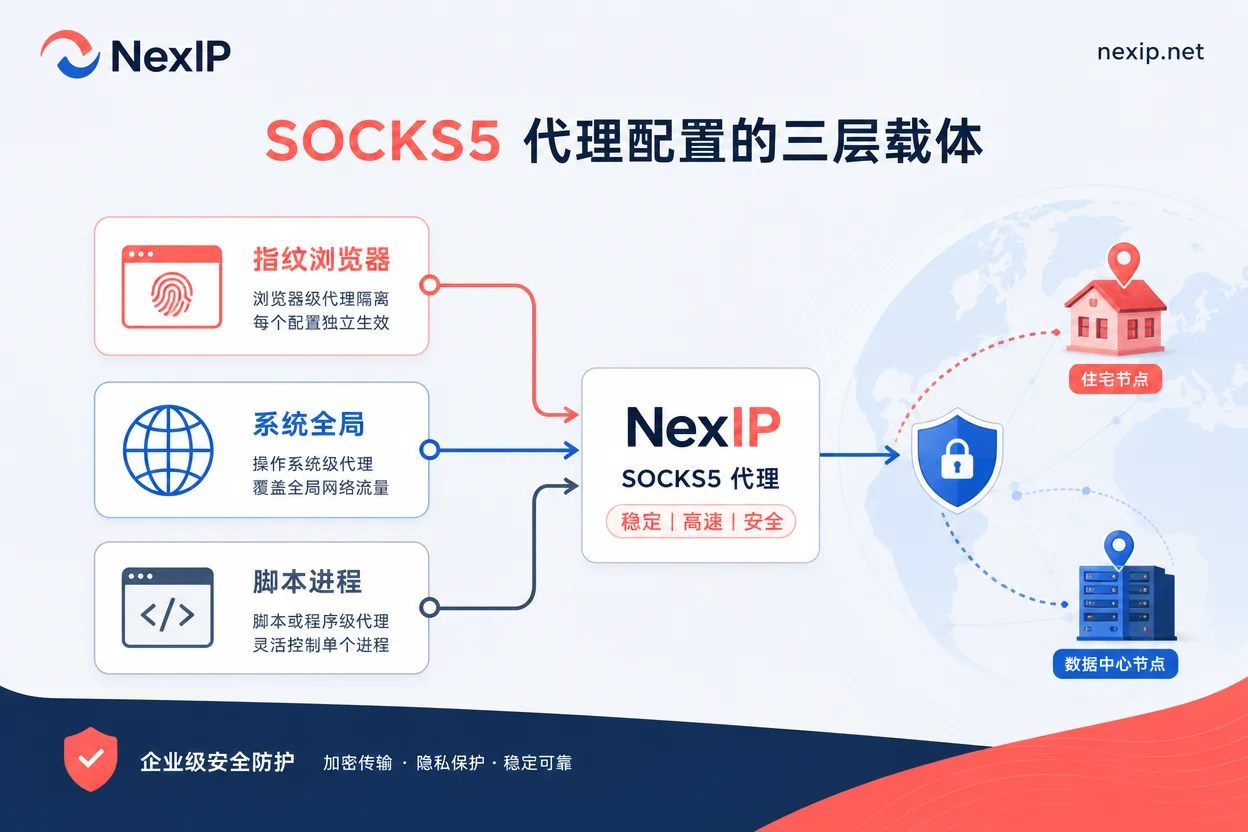
The core of SOCKS5 proxy configuration is "decide the layer first, then fill in the details." The so-called layer refers to whether you configure the proxy in the fingerprint browser environment, the operating system global settings, or within the script process. The three carriers do not replace each other and can easily override one another—configuring the same exit in both the fingerprint browser and the system simultaneously creates a double-layer proxy, causing IP verification to fail. So the first step is not to find the input field, but to confirm which layer you need to proxy this time: choose the browser layer for account management environments, the process layer for batch scraping and automation tasks, and only in rare tool-specific scenarios is the system global layer suitable.
How to Configure SOCKS5 Proxy: First Determine Which Layer to Configure
Let's start with the conclusion: SOCKS5 proxy configuration is not just about filling in an IP and port; it is divided into three layers based on the "configuration carrier." The judgment method is straightforward—identify which program or browser environment you want to route through the proxy and configure only that layer, keeping other layers disabled. Kookeey's official guide in July 2026 emphasized that for strictly risk-controlled platforms like Reddit and TikTok, a one-environment-one-exit isolation strategy is required (source: Kookeey official blog, 2026-07-28). This approach also applies to SOCKS5 configuration layering.
| Configuration Carrier | Applicable Tasks | Common Misconfiguration |
|---|---|---|
| Fingerprint browser environment | Multi-account login, social media management | Enabling the same proxy at the system layer, creating double-layer |
| System global (Windows/macOS) | Rare tools requiring all traffic through proxy | All browser, script, and update requests go through proxy, slowing down |
| Script process (requests/httpx) | Batch scraping, API calls | Relying on system proxy settings, leaving out-of-process requests uncovered |
Another common pitfall is "duplicate configuration": after filling in SOCKS5 in the fingerprint browser, you also enter the same parameters in the operating system's network settings. The result is that the exit IP appears normal, but verification may fail if the browser or system has cached data. The correct approach is to verify each layer individually; do not assume that "the browser can open web pages" is evidence that the global setting is in effect.
What is the Difference Between SOCKS5 and HTTP Proxy, Which One to Use?
The choice between SOCKS5 and HTTP proxy should not be based on "which is faster" or "which is safer," but on the task type. HTTP proxy can parse HTTP-layer content, suitable for web requests and scraping requiring POST/GET header information; SOCKS5 works at a lower level and can forward TCP and UDP traffic, suitable for tasks like maintaining login states, file uploads, streaming, and other tasks not limited to HTTP protocol. Kookeey's official guide in July 2026 analyzed the adaptation differences between SOCKS5 and HTTP in fingerprint browsers and Python automation (source: Kookeey official blog, 2026-07-28). Based on this, one thing is clear: the protocol determines traffic carrying capacity, not risk-control results. The exit IP type and environment isolation are the variables affecting risk-control decisions.
| Dimension | SOCKS5 | HTTP Proxy |
|---|---|---|
| Protocol layer | Transport layer, supports TCP/UDP | Application layer, focuses on HTTP/HTTPS |
| Typical tasks | Login states, file uploads, live streaming | Web scraping, API calls |
| DNS resolution | Configurable (socks5h resolves remotely) | Usually resolves remotely |
| Configuration complexity | Need to distinguish socks5 and socks5h | Simpler syntax |
Four Pieces of Information You Must Have Before Configuration: Host, Port, Authentication Method, Session Rules
Before diving into configuration, prepare these four pieces of information: host address (host), port, authentication method (username/password or IP whitelist), and session rules (whether sticky, validity duration). All four are essential; otherwise, you'll likely get stuck halfway.
Regarding authentication methods, username/password is suitable for fixed office exits or scenarios requiring remote use; IP whitelists are better for cloud servers or multi-person collaboration environments—as long as the exit IP is fixed, adding it to the whitelist eliminates password maintenance. However, it's important to note: do not fabricate credential formats that the provider hasn't disclosed. Before configuration, simply check with the provider whether the port distinguishes between HTTP/SOCKS5, the official format for session parameters in the username, and whether the whitelist requires a refresh to take effect. All examples use host, port, username, password placeholders.
Session rules directly affect configuration syntax: if the provider offers "session stickiness," it means maintaining the same exit IP for a specified period; when the session expires, the IP switches, and if the proxy parameters in the script are hardcoded, you may experience "configuration correct but suddenly failing." In August 2026, Kuai Proxy's evaluation used peak-hour availability and /24 subnet repeat rate as hard metrics (source: Kuai Proxy official blog, 2026-08-02), indicating that IP pool structure explains "correct configuration but unstable" better than total size alone.
How to Fill in SOCKS5 Proxy Username and Password in Fingerprint Browsers: Panel Configuration Steps and Common Mistakes
In mainstream fingerprint browsers, the configuration path is similar: create or edit environment → proxy settings → select proxy type SOCKS5 → fill in host, port, username, password in order → click test.
Each step has corresponding checkpoints:
- Select "SOCKS5" as the proxy type, not "HTTP" or "HTTPS".
- Strictly separate host and port; do not use HTTP port to connect to SOCKS5.
- Pay attention to special characters (like @, #) in username and password; some panels require URL encoding, otherwise authentication fails.
- Before saving, always click "test proxy" to confirm the exit IP and region meet expectations.
High-frequency errors include: filling socks5 as socks5h (the two have different DNS resolution locations, see below), wrong port, truncated session parameters in username, and multiple environments sharing the same exit IP. Kookeey's official guide in July 2026 pointed out that strictly risk-controlled platforms (such as Reddit, TikTok) require "one environment one exit," meaning each fingerprint environment should have an independent IP and credentials to avoid correlation due to shared IP. Use native static dual-ISP residential IPs with the fingerprint browser, rather than relying solely on the SOCKS5 protocol itself. The article Fingerprint browser proxy configuration details the practice of environment isolation.
How to Set SOCKS5 Proxy in Python requests: Authentication, Timeout, and DNS Resolution Ownership
To set SOCKS5 in Python requests, you need to install the dependency first:
pip install requests[socks]Then pass it via the proxies parameter:
import requests

proxies = {
    "http": "socks5://username:password@host:port",
    "https": "socks5://username:password@host:port",
}
response = requests.get("https://api.ipify.org", proxies=proxies, timeout=10)
The key here is the protocol prefix in the URL: when using socks5, DNS resolution happens locally; when using socks5h, DNS is resolved by the remote proxy server. In scenarios where DNS leak avoidance is needed, use socks5h.
For authentication, if the password contains special characters, URL-encode it first, for example, encode @ as %40. Also, be sure to set a timeout and retry strategy; otherwise, the script may hang indefinitely when the proxy server is unresponsive.
For more complex automation frameworks (like Playwright, Selenium), proxy parameters can be dynamically assigned at runtime rather than hardcoded. In August 2026, providers like Bright Data began pushing proxy integration into AI agent frameworks (such as Stagehand), dynamically allocating proxies via API based on task type (login, scraping, upload), switching protocols and IP types accordingly, rather than using one configuration for everything.
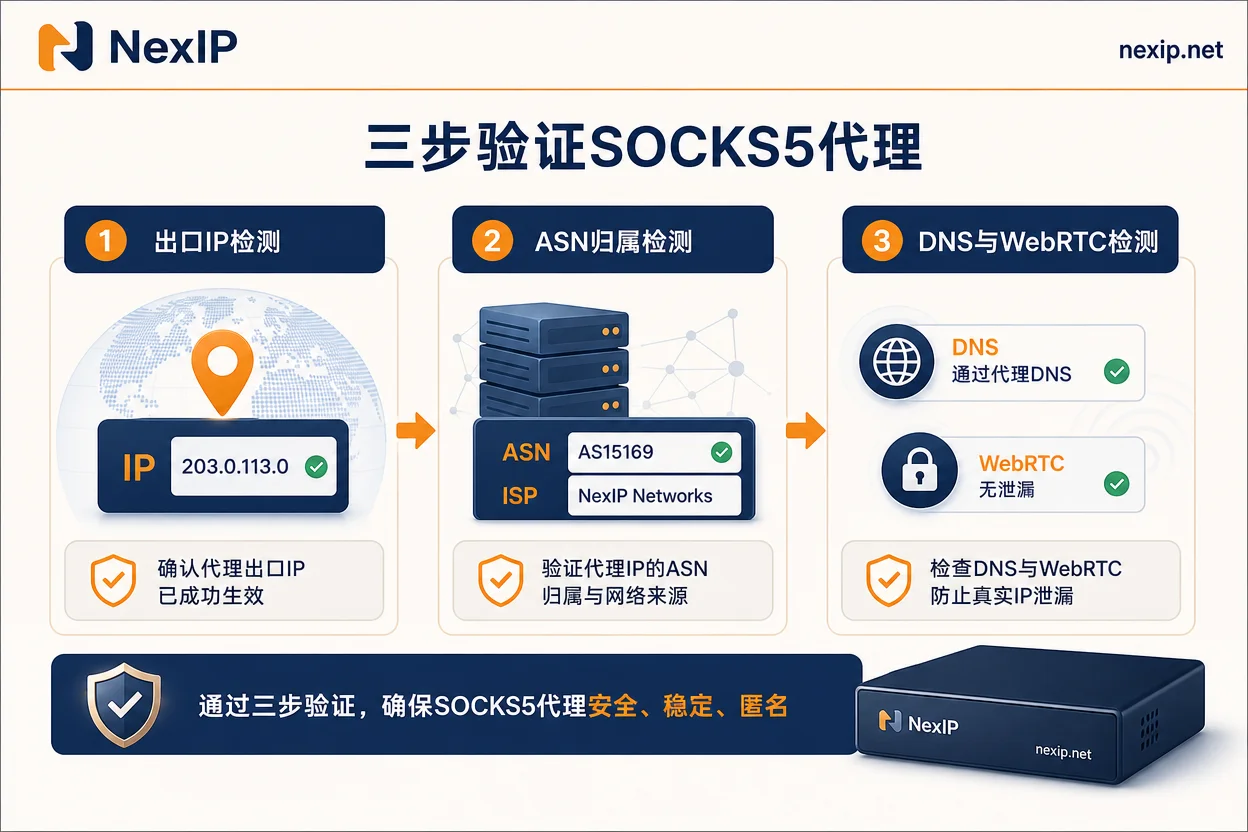
Three-Step Verification After Configuration: Exit IP, ASN Ownership, DNS and WebRTC Through Proxy?
After configuration, you must perform three verification steps in order, each corresponding to different risk points.
| Verification Step | Method | Pass Criteria |
|---|---|---|
| Exit IP | Visit https://api.ipify.org or https://ifconfig.me | The returned IP matches the proxy exit IP |
| ASN ownership | Use https://ipinfo.io to check ASN and IP type | ASN shows residential ISP, not data center |
| DNS and WebRTC | Visit https://browserleaks.com/webrtc or mainstream DNS leak detection sites | DNS resolution IP matches proxy region; WebRTC does not leak local IP |
The most critical point: verify the browser environment and script process separately. Passing verification in the browser does not mean the proxy works in the script, and vice versa. Especially WebRTC leaks, common when fingerprint browsers have WebRTC enabled, can expose the local IP even with SOCKS5 configured correctly. Kuai Proxy's official evaluation in August 2026 listed peak-hour availability as a core metric (source: Kuai Proxy official blog, 2026-08-02). Based on this metric, I recommend repeating the verification 2–3 times during peak hours; this is configuration experience advice, not a vendor-provided testing standard.
SOCKS5 Proxy Configured but IP Not Changing: Troubleshooting Step by Step
If the IP doesn't change after configuration, follow this order; don't panic and reinstall:
- Check credentials and whitelist: Confirm username/password are correct, or the current exit IP is added to the whitelist.
- Check upper-layer overrides: See if the operating system has a global proxy set, or if browser extensions (like SwitchyOmega) are taking over proxy settings.
- Check session stickiness: If the provider configured session expiration with automatic switching, you might be verifying at the exact moment it switches to a new IP, making it appear "unchanged."
- Check IP pool structure: Kuai Proxy's official evaluation in August 2026 disclosed a /24 subnet repeat rate below 0.3% (source: Kuai Proxy official blog, 2026-08-02); excessive subnet concentration may pose associated restriction risks, a structural judgment. For specific selection metrics on availability and subnet dispersion, refer to Residential IP provider comparison.
If all the above are fine, consider whether DNS is cached locally; restart the browser or clear cache and re-verify.
Align Configuration by IP Type: Dynamic Residential vs. Static Short/Long-term Credentials and Session Stickiness
When configuring SOCKS5, adjust parameters based on IP type.
| IP Type | Applicable Scenarios | Configuration Focus |
|---|---|---|
| Dynamic residential (traffic/bandwidth plans) | Data scraping, social listening | Session stickiness, automatic rotation |
| Static short-term (e.g., 24-hour) | Medium/short-term environment testing, event registration | Validity and renewal |
| Static long-term (monthly/yearly) | Long-term stable account login | Fixed exit, whitelist authentication |
For example, NexIP's dynamic residential supports region, city/ASN targeting, and provides API integration for real-time proxy parameter assignment in automation frameworks. Cross-border e-commerce proxy IP offers scenario-based configuration advice; for enterprise-level network deployment, refer to Enterprise proxy network for multi-node management.
Pre-Launch Checklist
Before going live, check against this list to avoid most rework:
- [ ] Whether protocol type matches task (SOCKS5 for login states/uploads, HTTP for pure scraping)
- [ ] Whether authentication method fits the runtime environment (fixed exit use IP whitelist, mobile office use username/password)
- [ ] Whether each account environment has an independent exit IP (avoid correlation from shared IP)
- [ ] All three verifications passed: exit IP, ASN ownership, DNS/WebRTC
- [ ] Script or environment has failure fallback and alerting (e.g., auto-switch on proxy failure)
- [ ] Credentials stored securely (not hardcoded in code or plaintext config)
It's recommended to plan protocol and IP type separately by task type (account environment / scraping script / automation framework), complete the three-step verification first, then evaluate dynamic residential or static residential options based on session stickiness and region targeting needs.
Common Questions
What is the difference between socks5 and http proxy, which one should I use?
SOCKS5 supports TCP/UDP, suitable for login state maintenance and file uploads; HTTP proxy only handles HTTP requests, suitable for web scraping. For tasks involving non-HTTP traffic, use SOCKS5; for pure web scraping, HTTP is simpler.
How to fill in socks5 proxy username and password in fingerprint browser?
In the proxy settings of the fingerprint browser, select SOCKS5 type, fill in host, port, username, password in order, and click test. Note the difference between socks5 and socks5h, and ensure special characters in username/password are URL-encoded.
How to set socks5 proxy in Python requests?
After installing requests[socks], set "socks5://user:pass@host:port" in the proxies parameter; use socks5h if remote DNS resolution is needed. Remember to set timeout and retry.
Socks5 proxy configured but IP not changing, what to do?
First check credentials and IP whitelist, then check if system proxy or browser extensions are overriding, next see if session stickiness expired and switched, and finally consider IP pool subnet repeat rate too high causing associated restrictions.
Does socks5 proxy need whitelist or username/password authentication?
IP whitelist is suitable for fixed office exits or cloud servers, eliminating password maintenance; username/password is more flexible for remote or multi-user use. Both can be combined, depending on provider support.
How to detect if DNS is going through socks5 proxy?
Use browserleaks.com/dns or mainstream DNS leak test sites. If the DNS resolution IP matches the proxy exit region, it's going through the proxy; if it shows local ISP DNS, then DNS is leaking, switch to socks5h prefix to solve.


Comments(0)