 NexIP官方博客
Many people rush to change cards when they encounter ChatGPT payment failures, but changing cards often doesn't help. The right approach is to first determine which layer the problem lies in: the card itself being blocked at the BIN level, the outbound IP and card region being inconsistent, or frequent failures triggering rate limits. The official troubleshooting guide updated on July 30, 2026 clarifies Stripe's logic; locate the issue first, then act, to truly resolve it.
Three Types of ChatGPT Payment Failure: Card Declined, Region Mismatch Declined, and Rate Limited
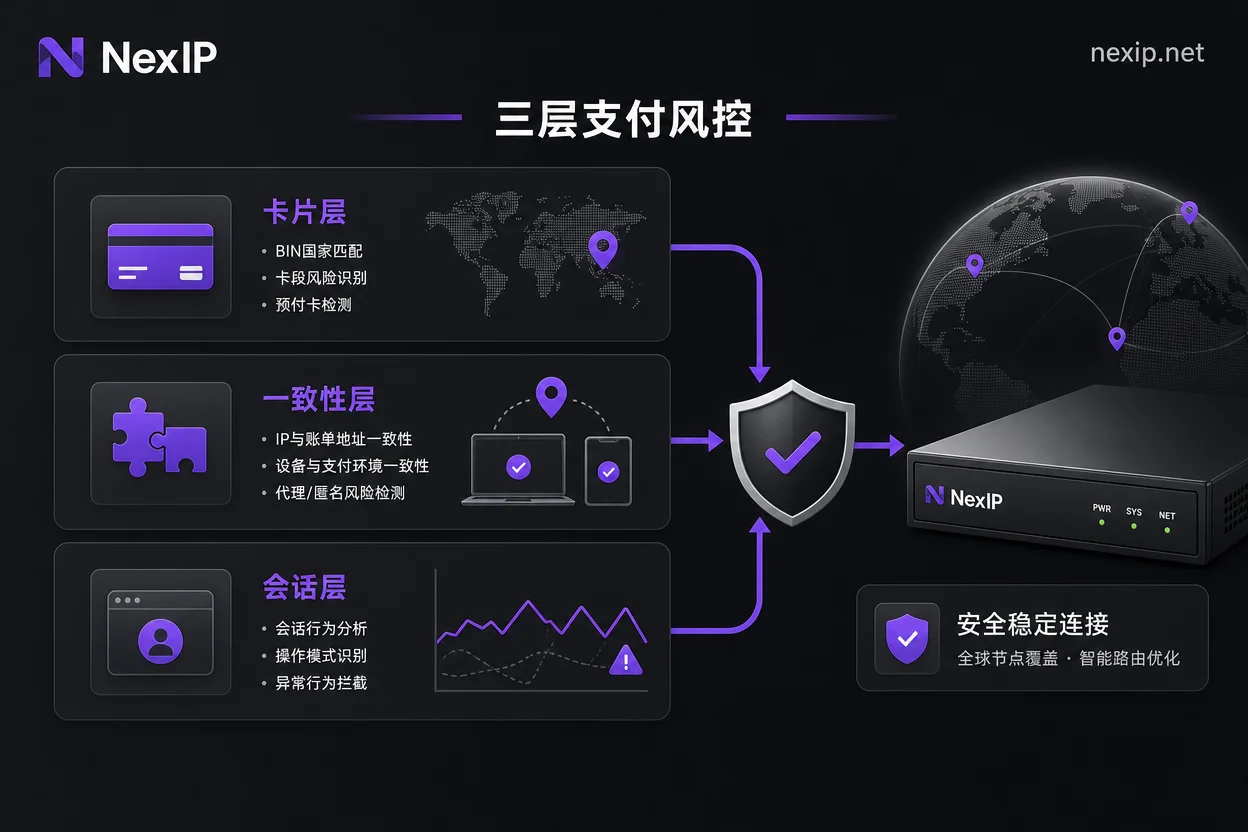
A 'card declined' message can stem from three entirely different causes, each requiring a different approach. First, check the symptoms below to identify which category you fall into, then decide your next step to avoid worsening the situation by blindly changing cards.
| Type | Typical Prompt | Core Reason | Action to Take |
|---|---|---|---|
| Card layer | Card declined (new card, valid balance) | Prepaid card filtered at the BIN (Bank Identification Number, first 6-8 digits of the card number, indicating issuer and country) level | Switch to a non-prepaid card with a BIN country matching your outbound IP region |
| Consistency layer | Card declined (US card, US billing address) | Outbound IP is a datacenter proxy or cross-region from the card issuer country | Change to a real residential IP in the same region as the BIN |
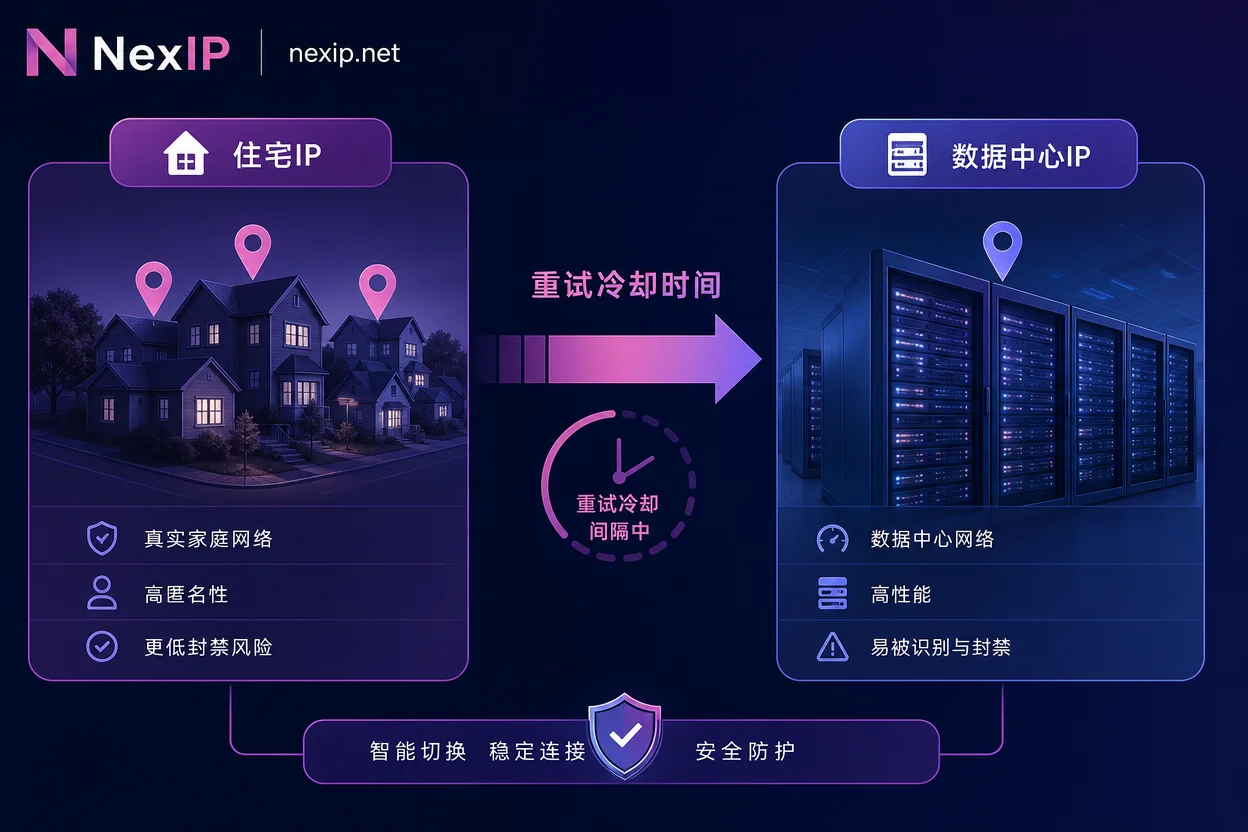
| Session layer | Card declined after repeated failures | Rate limit triggered, account and IP temporarily blocked | Stop retrying, cool down for 45+ minutes, switch to a dedicated outbound IP |
Official Stance: Prepaid Card BIN Filtering and Consistency Among IP, BIN, and Billing Address
The OpenAI Help Center, in a guide updated on July 30, 2026, explicitly states that Stripe first filters prepaid cards at the BIN level. It also requires that the outbound IP's country, the card issuer's BIN region, and the billing address you provide must be consistent across regions; otherwise, the system directly rejects the authorization request.
In plain terms: if you're using a virtual prepaid card, even if it has funds and the billing address is accurate, if the BIN falls on Stripe's blacklist, the request never reaches the bank and is rejected at the gateway. Moreover, the US billing address you fill must match the country of the IP you're using and the BIN region of the card. If any of these three is in a different region, the system will not initiate the charge.
The official list of banned BINs is not publicly disclosed, so don't trust any card vendor claiming 'guaranteed to work.' The three things you can verify on your own are: the country associated with the card's BIN, whether the billing address matches that country, and whether the ASN (Autonomous System Number, network operator identifier) and geographical location of your outbound IP are in the same country.
Why You Still Can't Pay with a US Card: Stripe Evaluates Outbound Identity Server-Side
Many assume that holding a valid US credit card guarantees payment success. However, Stripe's risk evaluation happens server-side, not client-side. When your request reaches Stripe, the system first scores your outbound IP: Is it a real residential ISP (Internet Service Provider, e.g., Comcast, AT&T) or a datacenter ASN (e.g., AWS, DigitalOcean)? Does its country match the card issuer's BIN region?
The widely circulated tip about 'modifying the User-Agent or request headers to bypass card declines' has been proven ineffective because Stripe's IP risk assessment is entirely server-side and real-time; front-end fingerprint spoofing cannot change the true identity of your network exit.
The Mechanism Behind 'More Attempts, More Failures': Rate Limits After 3+ Failures
If you fail payment attempts more than three times in a short period, Stripe and OpenAI will impose temporary rate (Velocity) limits on your account email and request IP. From that moment, even if you switch to a perfectly valid card, you'll continue to see 'Card Declined'. This is why many people experience 'more failures the more they try'.
What's worse, if you're using a shared outbound IP (like a shared datacenter proxy or public residential IP pool), other users' failures on that IP will also be flagged, poisoning the pool. Once contaminated, all users of that outbound IP get pulled into a high-risk determination—a significant risk of using shared proxies for payments.
The cooldown duration per third-party diagnostics is approximately 45 minutes, but actual times may vary. So after consecutive failures, the right move is to stop retrying immediately and let your account and IP cool down, rather than continuously swapping cards.
Cooldown and Environment Reset Before Retrying: Wait, Clear Session, Switch to a Non-Contaminated Outbound IP
After a rate limit, reset your environment in the following order, then make only one payment attempt for a significantly higher success rate:
- Stop all retries immediately and let your account cool down (at least 45 minutes; actual time may vary).
- Close the browser and clear the payment page's cache, cookies, and local session data.
- Switch to a dedicated, non-contaminated residential outbound IP (e.g., NexIP static short-duration residential IP), ensuring the ASN and country match your card's BIN.
- Log back into your account, and from filling card details to completing 3DS (bank-initiated secondary verification), ensure the outbound IP does not change throughout.
- Make only one payment attempt to avoid re-triggering rate limits.
If you're unsure whether your current outbound IP is clean, you can first run an IP risk check to confirm the IP's type and country meet requirements.
Four Hard Requirements for Outbound IP During Payment and Self-Check Sequence
During payment, the outbound IP must meet four hard conditions; missing any might lead to interception:
| Requirement | Description | Self-Check Item |
|---|---|---|
| Real residential ISP | Outbound IP belongs to a residential broadband ASN, not a datacenter | Check ASN is residential |
| Country matches card BIN | Country matches the card's BIN region | Verify BIN country and IP region |
| Dedicated, uncontaminated | Not polluted by other users' failure records | Confirm not in cooldown |
| No drift throughout | IP doesn't change from filling card to verification | Clear session thoroughly |
Recommended self-check order: Confirm outbound ASN and country → Confirm BIN country → Confirm billing address → Confirm not in cooldown → Make single payment attempt.
Note that it's not strictly required to be in the same city; as long as the country matches, it's usually acceptable. But if you frequently fail, you can try switching to an IP in the same city to test.
Alternative Payment Methods and Their Prerequisites
Besides direct credit card payment, using the iOS mobile app with Apple Gift Cards to subscribe to ChatGPT Plus is a viable non-credit-card path. However, before going this route, you must also meet several common prerequisites:
- Your network egress location must match the account's intended usage country (typically the US or other supported regions).
- The billing address (App Store address) must match your US-region account.
- Your account must not be in a cooldown period.
It's important to note that no alternative method has publicly verifiable success rates; community-shared success rates reflect specific environments and do not constitute expectations for your situation. Additionally, we do not recommend bypassing risk controls by sharing others' cards or using fake billing addresses, as this violates platform terms and may pose account security risks.
Outbound IP Configuration Combinations: Separating Long-Term Subscriptions, One-Time Top-Ups, and Daily Use
If you frequently need to top up ChatGPT or OpenAI API credits, consider separating outbound configurations by scenario to maintain a high-reputation environment and control costs.
- Long-term subscriptions and billing page logins: Use static long-duration residential IPs, fixed to a single egress, maintaining identity stability and avoiding being treated as a new device each login.
- One-time top-ups or temporary activation: Use static short-duration residential IPs, taking a clean, dedicated egress, and release after payment.
- Daily use and public information access: Use dynamic residential bandwidth packages, changing IP with each request to avoid tracking. For daily use, also refer to ChatGPT downgrade residential IP to maintain account environment consistency.
Region, city, and ASN targeting are useful when aligning with the card issuer's BIN country. For example, if your card BIN is US-based, target your outbound IP to a US city while ensuring the ASN belongs to a residential ISP. Session stickiness ensures the IP doesn't drift during the entire payment process, avoiding sudden switches to a different region during 3DS verification. NexIP's static long-duration/short-duration residential IPs support region and ASN targeting, allowing you to choose cities based on the card BIN country, and provide session stickiness to keep the IP stable throughout payment. Refer to How to choose overseas IP and Proxy IP purity to assess if they suit your needs, but no proxy can guarantee payment success; success ultimately depends on the overall consistency of card, account, and environment.
FAQ
I got a new card, but it still says card declined. Where's the problem?
It's likely not the card itself, but rather your outbound IP being in a different region from the card BIN, or your session has triggered rate limits. Check if your IP's country matches the BIN and whether it's been more than the cooldown period since your last failure (third-party diagnostics suggest about 45 minutes, but actual times may vary). Clear your session, then try a dedicated residential IP in the same region.
Do I need a US residential IP for ChatGPT Plus?
If you're using a US-issued credit card (BIN is US), the best practice is to use a US residential IP, because Stripe requires the request IP, BIN, and billing address to be regionally consistent. If you use a card from another country, your outbound IP should match that country. If your IP is a datacenter type, it's more likely to be flagged as high risk, significantly raising rejection rates.
Why is my virtual card rejected for ChatGPT payment?
Virtual cards are often prepaid, and Stripe applies BIN-level filtering to prepaid cards. Even if the card is valid, the BIN might be on the blacklist, causing direct interception. The solution is to use a non-prepaid physical or virtual credit card, ensuring the BIN region matches your outbound IP.
If I fill a US billing address but my IP is not in the US, will it be rejected?
Yes. Stripe verifies the outbound IP country, card issuer BIN region, and billing address; all three must be in the same region. If your IP is outside the US and you fill a US billing address, it's considered cross-region and the authorization request is denied. Therefore, you must ensure your IP and billing address are in the same country.
How can I get ChatGPT Plus without a credit card?
You can use the iOS in-app purchase method: top up your App Store balance with Apple Gift Cards and subscribe. You'll need a US-region Apple ID and ensure your network environment, billing address, and account region are consistent. This method doesn't require a credit card, but it still requires a residential outbound IP.
Can I use a datacenter IP to pay for ChatGPT Plus?
Basically no. Stripe assigns high-risk scores to datacenter ASNs, and datacenter IPs are rejected before reaching the bank. If you only have a datacenter proxy, you'll likely encounter 'card declined'. Switch to a real residential IP to improve approval odds.
After several failed ChatGPT payments, how long should I wait before trying again?
After more than three consecutive failures, Velocity Limits are triggered, requiring a cooldown of at least 45 minutes (actual time may vary). During cooldown, don't attempt any payments. Also, clear your browser session and switch to a clean outbound IP before making another attempt.


Comments(0)