 NexIP官方博客
How UDP protocol support affects cross-border live streaming quality hinges on whether the push stream can use QUIC—if the proxy doesn't forward UDP, QUIC connection fails or silently falls back to TCP, which under poor cross-border network conditions directly manifests as audio-video sync issues, reduced bitrate, and stream interruptions. Both Tencent Cloud and Volcano Engine's live streaming documentation provide UDP-based RTMP over QUIC push access solutions (UDP ports 1935/443), treating UDP support as the standard configuration for low-latency cross-border live streaming. This article works backwards from symptoms to help you identify whether the problem lies in the protocol layer, bandwidth, or exit stability.
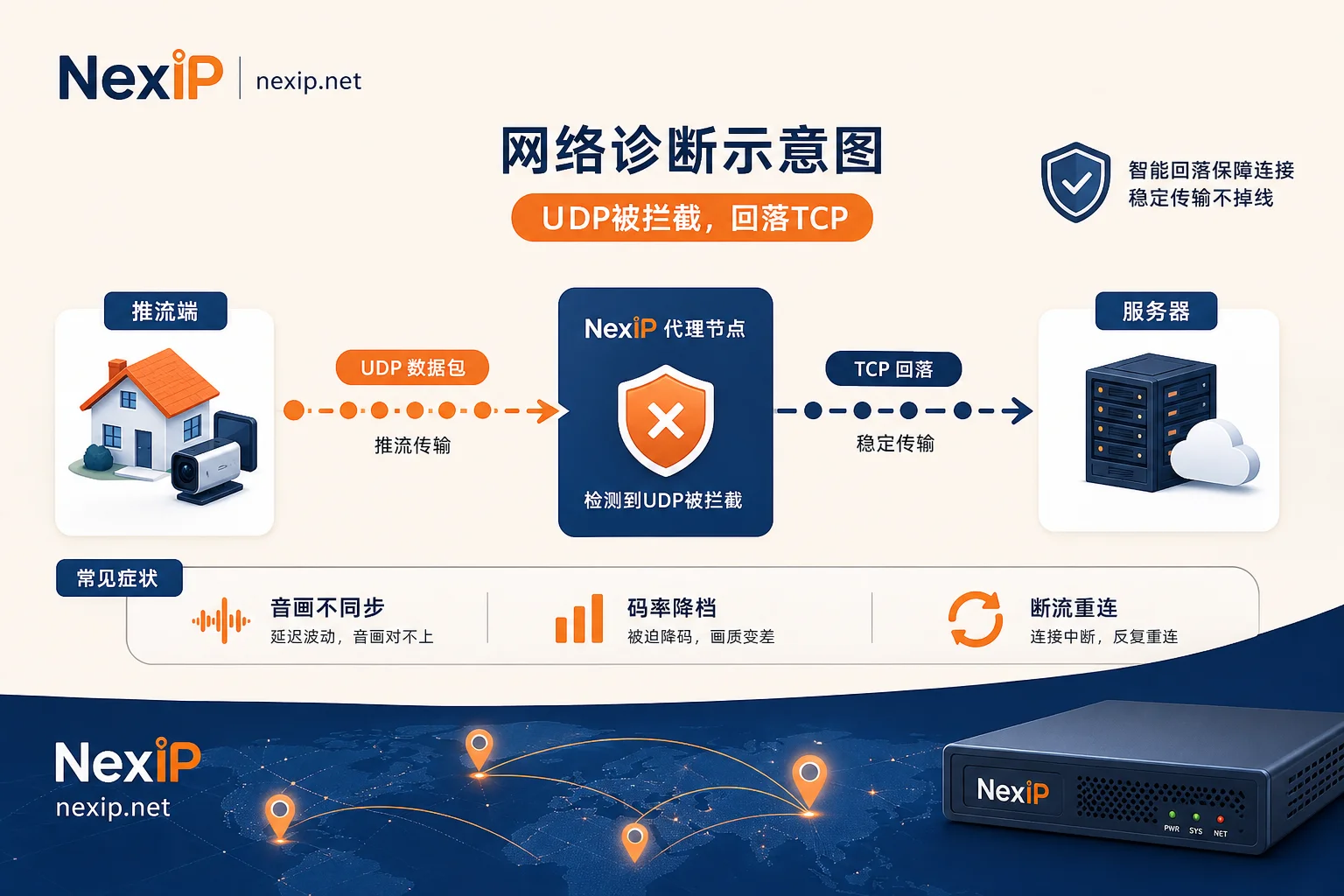
How UDP Protocol Support Affects Cross-Border Live Streaming Quality: First Distinguish Insufficient Bandwidth from No UDP Forwarding
When cross-border live streams appear blurry or stutter, most teams' first reaction is to increase bandwidth, but this often treats symptoms rather than causes. What you really need to distinguish is: Is physical uplink bandwidth insufficient, or is the proxy simply not forwarding UDP datagrams?
When the proxy tunnel doesn't open UDP, the push client either times out during handshake or silently falls back to TCP—even if local bandwidth is ample, TCP head-of-line blocking can still degrade quality. To understand how UDP protocol support affects cross-border live streaming quality, the diagnostic order must be protocol first, then bandwidth. The four symptom categories below all stem from this.
Symptom Attribution 1: Audio-Video Desync and Lip-Sync Drift, Which Layer Is the Problem?
Symptom: Viewers report that audio and lip movements don't match, with the picture visibly lagging behind sound, and the offset accumulates over the duration of the stream.
If the proxy doesn't support UDP, QUIC push gets forced back to TCP. On long cross-border links with jitter, TCP head-of-line blocking causes drift in the arrival delays of audio and video frames—video frames get blocked while audio frames arrive first, and the player renders each based on its own timestamps, naturally causing lip-sync issues. This is usually not due to insufficient local uplink bandwidth but rather protocol-layer packet loss and retransmission.
Is audio-video desync in live streaming a proxy problem? When local speed tests are normal but the streaming software shows high retransmission rates over time, it's likely due to the proxy's lack of UDP forwarding.
Symptom Attribution 2: Slow First Frame and Handshake Blocking, What Happens When QUIC Is Blocked
Symptom: Viewers see a black screen for several seconds after entering the live room, or even get a "stream has ended" prompt.
QUIC's 0-RTT/1-RTT fast connection setup should allow the first frame to appear instantly. If the proxy doesn't forward UDP, QUIC handshake packets can't be sent, forcing the client to wait for a TCP handshake—naturally increasing first-frame latency. Worse, some proxies may outright block UDP traffic, causing connection establishment to fail.
Additionally, QUIC's connection migration feature relies on UDP endpoint identifiers. During mobile network switching between Wi-Fi and 4G, the lack of a UDP relay can interrupt the session.
Symptom Attribution 3: Forced Bitrate Reduction, Why Does Weak-Network Anti-Jitter Capability Fail?
Symptom: Quality suddenly drops from 1080p to 720p or lower and doesn't recover for a long time.
The push client's bandwidth estimation (BWE) relies on real-time RTT and packet loss feedback. When the proxy falls back to TCP, retransmission delays are misjudged by BWE as congestion, forcing the encoder to reduce bitrate. This isn't actually a lack of bandwidth but rather being "misjudged as lacking bandwidth."
In contrast, under UDP, QUIC's application-layer congestion control can more accurately sense available bandwidth, providing stronger weak-network anti-jitter capability. If you see bitrate fluctuating repeatedly while physical bandwidth is ample, first check the proxy's UDP support.
Symptom Attribution 4: Complete Inability to Push, Differences Between Silent TCP Fallback and Direct Failure
Symptom: OBS shows "connection failed," or pushing appears normal but the platform never shows video.
Two types of failure must be distinguished:
| Manifestation | Possible Cause | Observation Point |
|---|---|---|
| Streaming software shows connected, but quality continues to degrade | QUIC silently falls back to TCP | Log shows protocol as TCP rather than UDP |
| Handshake timeout, direct error | UDP packets dropped by proxy | Multiple retries still fail to establish session |
How to tell if QUIC push failed and automatically fell back to TCP? Check the protocol field in the push log; if it's TCP and accompanied by high retransmission, you can confirm the fallback.
Can HTTP Proxies Carry UDP? Can Live Streaming Use Them? Protocol-Layer Hard Boundaries
HTTP proxies use the CONNECT method, which at the protocol layer only provides a TCP byte-stream tunnel and cannot carry UDP datagrams—this is stipulated by RFC 1928 and is not a configuration issue.
Can HTTP proxies carry UDP, and can they be used for live streaming? The answer is no. UDP must be forwarded via SOCKS5's UDP ASSOCIATE command, where the server allocates a relay port for forwarding. To set up a push exit, you need to choose a SOCKS5 proxy and confirm its UDP ASSOCIATE support. For related access configuration, refer to SOCKS5 proxy configuration guide on this site, or compare SOCKS5 vs. HTTP proxy protocol performance in cross-border business.
How to Test SOCKS5 Proxy UDP Forwarding: Three-Step Self-Test
- Send UDP ASSOCIATE test: Use Python or nc to send a UDP ASSOCIATE request to the proxy's TCP control port, confirming it returns the UDP relay IP and port.
- Test UDP port reachability: Initiate connectivity tests for UDP port 1935 or 443 through the proxy to confirm the target server can receive packets.
- Compare push streams: On the same network, push via TCP and QUIC to test addresses, then compare logs and quality.
How do you test SOCKS5 proxy UDP forwarding? Execute the above three steps in sequence: If step 2 fails, the proxy hasn't opened UDP push ports; if step 3 still falls back to TCP, the relay node's forwarding is abnormal.
If Stutter Persists After Verification: How to Separately Test Uplink Bandwidth, Jitter, and Exit Stability
UDP forwarding isn't a universal solution. If stutter continues after verification, break it down:
| Factor | Diagnostic Method |
|---|---|
| Local uplink bandwidth | Use speed test tools to measure upload rate and compare to push bitrate |
| Network jitter | Monitor RTT fluctuations; sustained high jitter can trigger BWE downshift |
| Exit stability | Observe packet loss rate across the stream; check if it worsens over time |
How do you judge whether cross-border live streaming stutter is a protocol or bandwidth issue? If UDP is verified but stutter persists, prioritize checking physical bandwidth and exit IP stability. Dynamic residential IPs may cause momentary stutter due to session re-establishment; in such cases, consider fixed exit. Refer to differences between static and dynamic IPs and how to diagnose and optimize residential proxy network latency.
Matching Exit to Scenario: Pre-Stream Testing, Single-Room Long-Term Pushing, Multi-Room Parallel
Technical conclusions ultimately need to translate into exit choices. Three scenarios have different requirements:
| Scenario | Requirement | Recommended Exit Type |
|---|---|---|
| Pre-stream testing | Quickly verify UDP forwarding and port connectivity | Static short-lived residential IP |
| Single-room long-term pushing | Stable sessions, fixed exit | Static long-lived residential IP |
| Multi-room parallel | Multiple concurrent sessions | Dynamic residential proxy bandwidth packages |
Taking NexIP as an example: During testing, use short-lived IPs to validate the protocol chain; switch to long-lived IPs for the actual broadcast to ensure stability; for multi-stream, use bandwidth packages that support session stickiness, global region selection, city/ASN targeting, HTTP/SOCKS5 access, and API integration. NexIP's SOCKS5 access method can cover all three exit scenarios above, and users can choose products based on their actual live streaming needs.
Pre-Launch Self-Checklist and FAQs
- [ ] Proxy supports UDP ASSOCIATE and returns a relay port
- [ ] UDP ports 1935/443 are reachable
- [ ] Push logs show QUIC or UDP, with no TCP fallback
- [ ] Exit IP stability meets session duration requirements
- [ ] Local uplink bandwidth is above push bitrate with a clear margin (recommend testing against actual push bitrate to determine the margin ratio)
FAQs
In live streaming audio-video desync, why doesn't adding bandwidth help?
When bandwidth is sufficient, audio-video desync is often due to TCP head-of-line blocking: if UDP isn't forwarded, QUIC falls back to TCP, causing audio frames to arrive first while video frames are blocked. The solution is to ensure the proxy forwards UDP, not just increase bandwidth.
With a SOCKS5 proxy, how do you specifically test UDP forwarding?
Send a UDP ASSOCIATE request to the proxy's control port, check the returned UDP relay address, then send UDP packets to the target port via that address to confirm reachability. You can also use a speed test tool that supports UDP to compare TCP and QUIC push.
If the streaming software shows connected but the picture is blurry, is it a proxy problem?
If the log shows TCP with retransmissions, it may indicate the proxy isn't forwarding UDP, causing a fallback. If you've confirmed UDP is working, then check encoder settings or whether the local CPU is overloaded.
For cross-border live streaming stutter, how do you determine if it's a protocol or bandwidth issue?
First run the three-step self-test to confirm UDP forwarding; if stutter persists after passing, then test uplink speed and RTT. Protocol issues typically manifest as handshake failures or TCP fallback in logs; bandwidth issues appear as bitrate drops but normal logs.
What type of proxy is needed for RTMP over QUIC push?
You need a proxy that supports SOCKS5 UDP ASSOCIATE; HTTP proxies cannot forward UDP. Additionally, ensure the node opens UDP push ports (e.g., 1935/443), and exit stability affects session stability.


Comments(0)