 NexIP官方博客
The stability of a cross-border live streaming network is determined by five layers of division of labor: local uplink, egress channel, transport protocol, region attribution, and concurrent isolation. Uplink headroom determines picture clarity, protocol anti-jitter decides stream interruption frequency, egress capacity determines handshake success rate, region attribution affects risk control judgment, and concurrent isolation dictates resource allocation. A team once doubled their uplink bandwidth and switched four egress nodes, but the live stream still stuttered frequently. The root cause turned out to be the protocol layer still stuck in TCP retransmission. This case reveals that stability is not a single-point breakthrough but a result of collaboration across five layers.
A Live Stream Frame Drop Review: Bandwidth Doubled, Four Nodes Swapped, Video Still Paused
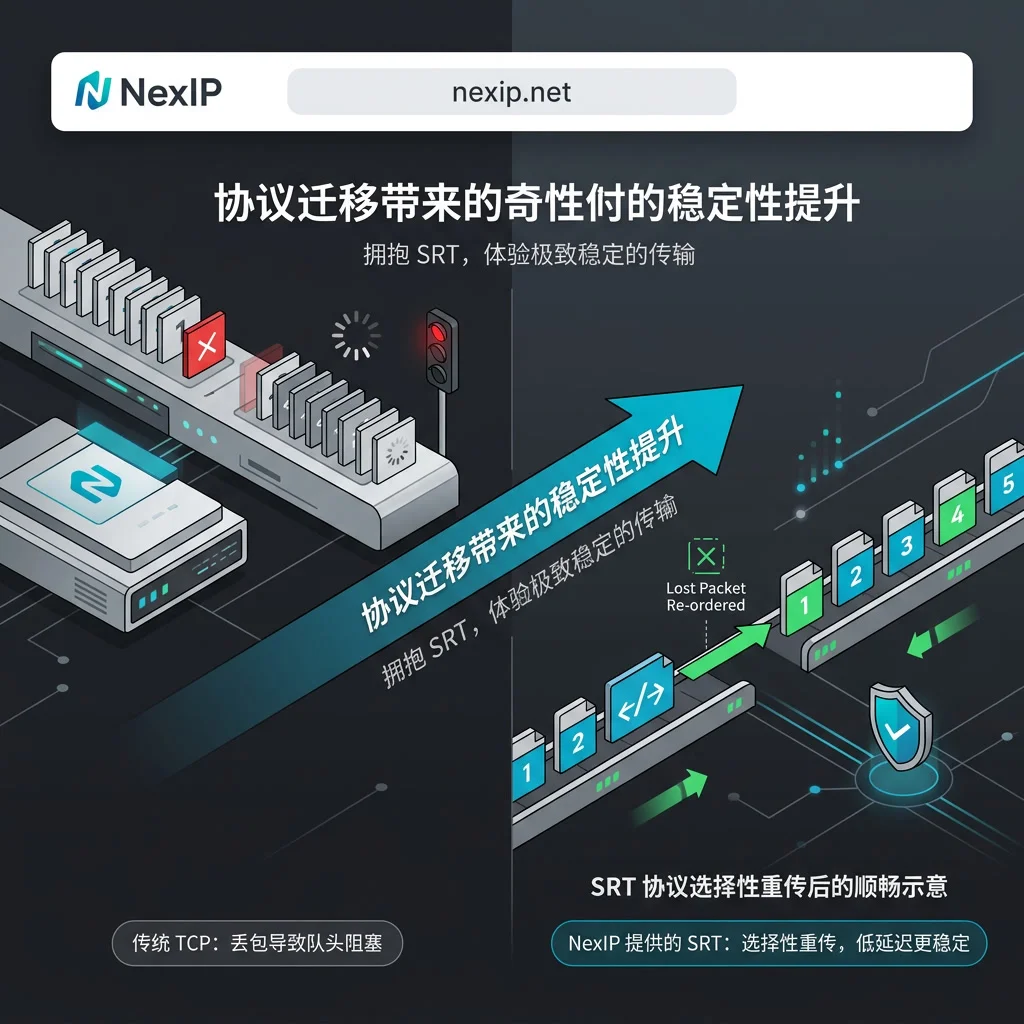
As cross-border stream acceleration increasingly migrates to UDP protocols in 2026, many teams still rely on TCP-era troubleshooting mindsets. When stuttering occurs, the immediate reaction is often to increase bandwidth or switch nodes. However, if the underlying link still uses RTMP over TCP and the proxy lacks UDP forwarding capability, no matter how much egress bandwidth or how close the node, packet loss-induced head-of-line blocking will force stream interruption. This "the more you adjust, the worse it gets" dilemma stems from failing to decompose the cross-border live streaming network into independently verifiable layers.
The Mismatch Exposed by This Review: Three Symptoms Treated as One Problem
The review revealed that the team treated three distinct symptoms as a single issue: insufficient source uplink, protocol waiting behavior during packet loss, and the egress channel's lack of UDP forwarding capability. In reality, insufficient uplink causes blurry video or reduced frame rate, protocol mechanism issues cause the picture to freeze and then jump suddenly, and proxy capability deficiency directly leads to handshake failures or stream interruptions. Issues at any layer cannot be compensated by strengthening another layer. For instance, using high bandwidth to compensate for TCP head-of-line blocking is ineffective because the bottleneck lies in the protocol's retransmission logic, not the pipe's thickness. You must first identify which layer the symptom belongs to, then modify the corresponding layer's configuration.
Layer 1: Local Uplink: How Much Headroom Should You Reserve Relative to the Streaming Bitrate?
Determining the required uplink bandwidth for an overseas live stream is fundamental. Engineering practice requires that the dedicated local uplink bandwidth must reserve 1.5 to 2 times the target streaming bitrate. For example, if the streaming bitrate is 6 Mbps, the uplink should be stable above 9 Mbps to handle public internet jitter and extra load from retransmissions. Note that fast download speeds don't guarantee sufficient uplink, and headroom should be monitored over the entire live session, not just based on one speed test. If uplink headroom is insufficient, even a perfect protocol and egress will result in stuttering due to data backlog.
Layer 2: Can the Egress Channel Forward UDP? The Boundary Between SOCKS5 and HTTP Proxies
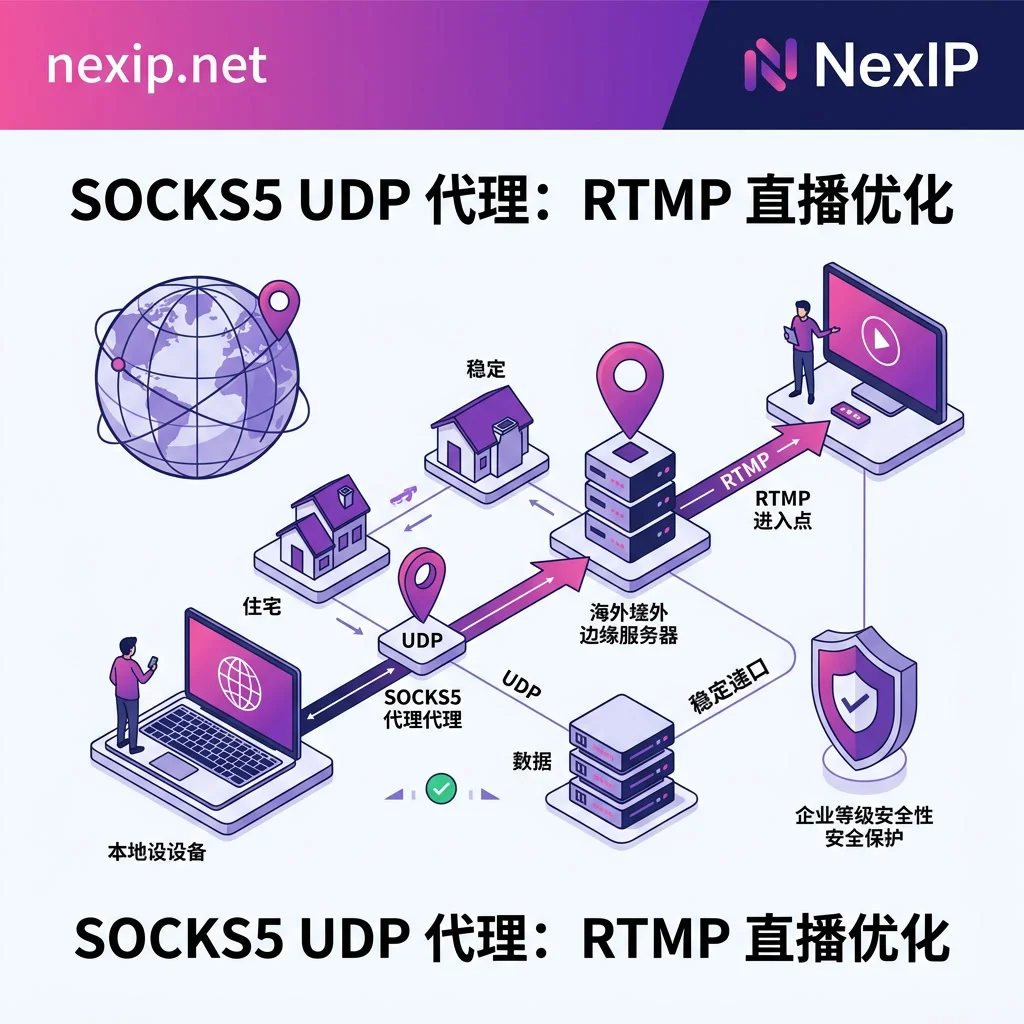
Must a live streaming proxy support UDP forwarding? The answer is yes, especially when using the SRT protocol. SRT is entirely based on UDP datagrams, so firewalls, gateways, and proxy egresses in the link must open corresponding ports and have native UDP datagram forwarding capability. HTTP/HTTPS proxies that only support TCP application-layer forwarding will directly cause SRT handshake failures.
| Proxy Type | Forwards UDP Datagrams? | SRT Handshake Completes? | Egress IP Remains Stable During Session? | Supported Protocols |
|---|---|---|---|---|
| HTTP/HTTPS Proxy | No | No | No | HTTP/HTTPS |
| SOCKS5 Proxy | Yes | Yes | Yes (e.g., NexIP static long-lived residential solutions) | HTTP/HTTPS/SOCKS5 |
In the proxy capability comparison, SOCKS5 proxies supporting location and city targeting with static long-lived residential egress (such as NexIP) can meet the requirement of keeping the egress IP stable within a session, but note that whether UDP packets can traverse is an egress-layer capability; protocol-layer anti-jitter behavior is not determined by it. Dedicated bandwidth requirements should be attributed to the local uplink layer and guaranteed by the local link. For more technical details on how UDP protocol support affects cross-border live streaming video quality, you can consult relevant troubleshooting guides.
Layer 3: How to Choose Cross-Border Streaming Protocols: SRT's Anti-Jitter and the Reality of RTMP Platform Access
SRT vs. RTMP: Which is better for cross-border live streaming?
| Protocol Type | Behavior on Packet Loss | End-to-End Latency | Encryption Capability | Current Platform Access Layer |
|---|---|---|---|---|
| RTMP (TCP) | Head-of-line blocking, forced stalls | Higher | No native transport-layer encryption | Universally accepted standard |
| SRT (UDP) | ARQ selective retransmission, maintains continuity | ~1 second | Native AES-128/256 | Requires re-encapsulation for access |
RTMP is based on TCP and is prone to head-of-line blocking under weak network conditions. SRT is based on UDP, uses ARQ selective retransmission, can control end-to-end latency to around 1 second, and supports transport-layer encryption. However, the access layers of mainstream overseas e-commerce platforms still commonly use RTMP/RTMPS. Therefore, a common deployment is the "dual-segment link": the first mile pushes via SRT from the local site to an edge server in the target region, which then re-encapsulates to RTMP for pushing to the platform. When configuring SRT, the latency parameter should be set to at least 2.5 times the round-trip time (RTT) to balance anti-jitter capability and latency. This parameter is in milliseconds and is a relative value that changes with the measured RTT; RTT should be measured during the live stream, not taken from a single ping. If you encounter complex jitter as mentioned in the network troubleshooting guide for overseas live streaming stuttering and lag, adjusting this parameter is often key.
Layer 4: Egress Region and ASN Registration Entity Should Align with the Audience Market
The egress region, city targeting, and ASN registration entity directly affect the platform's judgment of the live stream's geographic identity and the length of the return path. Choosing an egress in the audience market region and ensuring its attribution remains stable during the session is more important than simply pursuing the number of nodes. Frequent egress switching or selecting an ASN inconsistent with the target market may trigger risk control or cause the return path to take a longer route, increasing latency. For accounts requiring high stability, the choice between static and dynamic TikTok residential IPs should be based on the business scenario; static long-lived residential IPs hold an advantage in maintaining session continuity. Additionally, how to check if a residential IP is truly dual-ISP is also an important step to ensure egress quality.
Layer 5: When Multiple Live Streams Run Simultaneously, How to Separate Bandwidth and Egress One-to-One
How should network resources be allocated when multiple live streams start at the same time? The local uplink must be calculated by summing each stream individually, not estimated as a shared pool. For example, if 10 live streams each require 6 Mbps, you need at least 90-120 Mbps of absolute dedicated uplink. Additionally, the egress and browser environment for each stream must be isolated one-to-one to avoid bandwidth contention and to prevent account risk control due to a shared environment/egress. Claims of a single egress supporting multiple HD live streams often conflict with redundancy rules and risk control mechanisms; strict isolation at the physical or logical level is recommended.
How to Roll Back After Misconfiguration: The Rollback Order from Protocol, Egress, to Uplink
When a protocol switch fails to push the stream, or after changing egress the session interrupts or frame drops worsen, you should roll back in the order: "first return to a working RTMP baseline to start the stream, then verify egress UDP capability and uplink headroom layer by layer." Keeping a usable old configuration as a baseline is crucial. It must be clear that local hardware overload, platform-side sudden outages, or content compliance issues fall outside the network layer's scope; network configuration can only solve public internet packet loss recovery and network attribution determination.
Frequently Asked Questions
What network is most stable for cross-border live streaming?
There is no absolutely stable single network; stability comes from layered configuration. Uplink should reserve 1.5-2 times redundancy, egress must support UDP forwarding and be aligned with the target region, and the protocol must adapt to the platform access layer. If uplink is insufficient, changing the protocol won't help; if the proxy doesn't support UDP, using SRT will inevitably cause interruptions.
SRT vs. RTMP: Which is better for cross-border live streaming?
SRT has stronger anti-jitter capability over weak cross-border networks, with latency around 1 second. However, platform access layers mostly use RTMP. The best practice is to use SRT for the first mile to an edge server, then re-encapsulate to RTMP for platform access, balancing anti-jitter and compatibility.
If the stream suddenly disconnects mid-broadcast, what's the troubleshooting order?
Roll back in the order: "first return to a working RTMP baseline to start the stream, then verify egress UDP capability and uplink headroom layer by layer." Keeping a usable old configuration as a baseline is crucial. Local hardware overload, platform-side sudden outages, or content compliance issues are not solvable at the network layer; network configuration only addresses public internet packet loss recovery and network attribution determination.
How should network be allocated when multiple machines start live streaming on the same office network?
Uplink must be summed individually, not shared. For example, 10 streams at 6 Mbps each require at least 90-120 Mbps of absolute dedicated uplink. Additionally, each stream's egress and browser environment must be isolated one-to-one to avoid bandwidth contention and prevent risk control caused by a shared environment/egress.
What to do if the session interrupts after switching egress?
Egress region, city targeting, and ASN registration entity directly affect the platform's judgment of the stream's geographic identity and the length of the return path. Frequent egress switching or selecting an ASN inconsistent with the target market may trigger risk control or cause longer return paths, increasing latency. Static long-lived residential IPs are more advantageous in maintaining session continuity.


Comments(0)