 NexIP官方博客
When Google flags your IP as being in China, you only need to check three potential leak sources: client geolocation permission reporting, DNS resolution attribution, and neighboring pollution in the /24 subnet of your exit IP. First, identify which layer is responsible, then decide whether to fix the client, change DNS resolution, or switch your exit IP—rather than rushing to change your IP.
Google's official help page "Report IP problems" is the only authoritative statement: IP geolocation data updates may take more than a month, and individual progress reports are not provided. This means claims of "unblocking within 24 hours after appeal" lack official basis, and relying on appeals instead of isolating your environment is not a viable strategy.
Confirm the Category of Symptoms: Search Redirects, YouTube Premium Anomalies, and AI Service Restrictions Indicate Different Issues
Google Search forcibly redirecting to Chinese pages accompanied by security filters usually correlates directly with your exit IP's geolocation attribution; YouTube Premium indicating a region mismatch often points to a conflict between your account or IP attribution; Gemini indicating that your country or region is not supported means the region identified by the AI service is not in the available list. All three types point to the same issue: your network environment is judged as mainland China by Google.
Before taking action, record three things: the specific time the symptom appeared, on which device and browser, and whether the same device reproduces the issue on a different network. These samples will serve as a reference for the four-step localization process.
Why Third-Party Detection Shows the US but Google Judges It as China
Third-party detection services (such as IPinfo, MaxMind, Whois) may show your IP as located in the US or Europe, while Google services determine it as mainland China. The reason is that Google maintains its own IP geolocation database, uses proprietary algorithms, and dynamically overrides third-party GeoIP data based on signals like client GPS permission reporting, language and search preference telemetry, and DNS resolution chain. Google has not disclosed the full weight parameters and update trigger thresholds of its IP geolocation model. Understanding this, you'll know that third-party detection can only serve as a reference, not as a basis for determining Google service region.
Leak Source One: Client Geolocation Permission—How to Troubleshoot Location Reporting in Browsers and Apps
When GPS or location permissions are enabled on your device, accessing Chrome, YouTube App, or Google Maps can associate your real physical location with your exit IP, causing overseas IPs to be overridden as mainland China.
Troubleshooting actions: Check the site's location permission in the browser (via the icon on the left side of the Chrome address bar to access site settings); check OS-level location switches (privacy settings in Windows, macOS, iOS, Android); check mobile app permissions; for fingerprint browsers, verify whether the location API is disabled.
Will turning off Chrome's location permission fix Google's geolocation? Disabling the permission only stops future reporting; it does not immediately rewrite existing judgments. Google has not disclosed the update trigger conditions and cycles for location data. After disabling permissions, observe by "using a fresh incognito environment to re-access and record results" rather than setting expectations for a recovery timeframe.
Leak Source Two: DNS Resolution Attribution—Differences and Verification Methods Between Local and Remote Resolution
Local DNS leaks can expose mainland China attribution in the resolution chain, creating contradictory signals with the overseas nature of your exit IP, triggering Google's correction logic.
Verification method: Under a proxy link, compare whether the local DNS resolution exit location matches the proxy exit location; confirm whether SOCKS5 truly uses remote resolution (local resolution leaks your real location); check whether the system and browser bypass the proxy for direct resolution (e.g., system DNS settings or the browser's "use system DNS" option). Under the proxy link, access DNS leak detection sites (such as dnsleaktest.com, browserleaks.com/dns) to compare whether the resolution exit and proxy exit are in the same region.
If you find the resolution location is in mainland China, prioritize switching to remote DNS resolution (such as SOCKS5 remote resolution or having the router/system use proxy DNS uniformly). This step does not involve changing your IP but effectively eliminates a key leak source.
Leak Source Three: The Exit IP Itself—/24 Subnet Neighbor Pollution and the Inherent Disadvantage of Hosting ASN
Datacenter IPs (Hosting ASN) are often shared by multiple users, or many run on the same subnet of cheap VPS providers. When neighbor nodes frequently leak location (e.g., via GPS or local DNS), Google's algorithm may relabel the entire /24 subnet as a Chinese region, even if your client environment is clean.
How to determine if you're affected by "subnet pollution"? On the same client, switch to a different exit with a different ASN and /24 subnet for comparison; if the new IP is normal while the original IP is still judged as China, the issue lies in the original IP's subnet reputation.
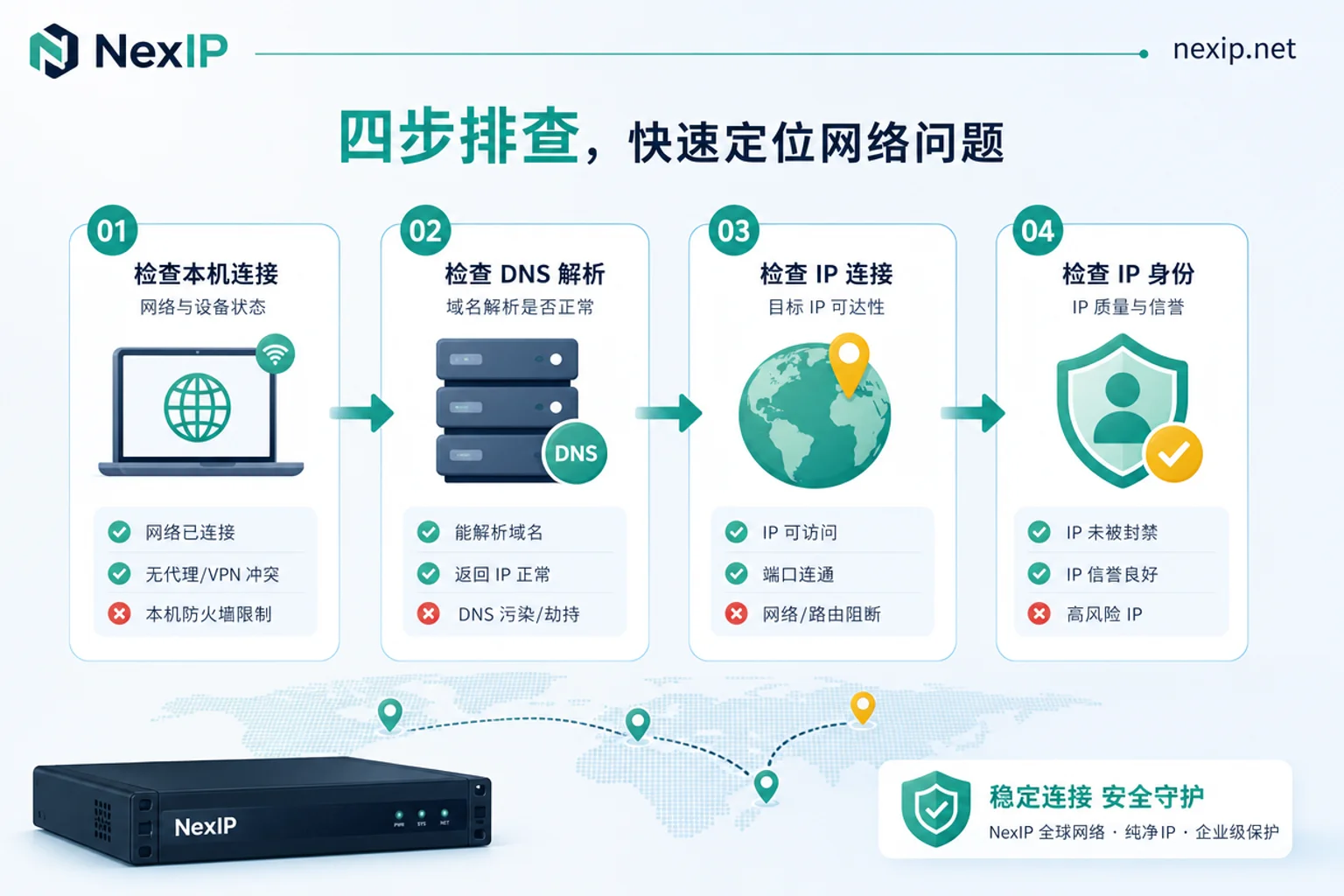
Four-Step Localization Process: Order of Determination from Symptoms to Leak Layer and Verification Actions for Each Step
When IP is flagged by Google as China, the operational steps are these four: first fix the symptom sample, then eliminate layers one by one.
| Step | Action | Criterion |
|---|---|---|
| Step 1 | Fix symptom sample: record occurrence time, device, browser, network environment | Confirm reproduction conditions to avoid misjudgment |
| Step 2 | On a clean device/incognito environment, disable location permission and re-access Google services | If symptom disappears, the leak source is client location reporting |
| Step 3 | Verify DNS resolution location: compare proxy exit location with resolution exit location | If inconsistent, DNS leak exists |
| Step 4 | On the same client, switch to a different exit with a different ASN and /24 subnet for comparison | If symptom improves, the issue is in exit IP subnet reputation |
Whichever step's change affects the symptom determines the layer. If all four steps are done and the symptom persists, the issue may involve multiple layers and require combined fixes.
What Official Appeals Can and Cannot Do: Submission Points and Realistic Timeline for Report IP problems
Google provides an official "Report IP problems" form (see Google Search Help) that allows users to submit issues about IP mislocation. However, Google explicitly states that location data updates may take more than a month and individual progress reports are not provided.
The claim of "unblocking within 24 hours after appeal" circulating online lacks official basis. Before submitting, you should first fix the leak source: if your environment is not isolated, appealing is like investing resources in a result that will be overridden again. The recommended order is "isolate the environment first, then appeal, then recheck."
Many people wonder how long it takes for Report IP problems to take effect. The official statement is that updates may take more than a month, and no specific timeframe is promised. When submitting, provide sufficient evidence, such as IP address, affected service, and reproduction steps, but do not expect immediate feedback.
Why Your IP Might Be Pulled Back to the Chinese Region After a Successful Appeal: The Triggers for Drift Back
After a successful appeal, if your network environment continues to leak location or local DNS, the corrected IP may be overridden again by algorithm based on telemetry signals. If your exit is in a polluted subnet, neighbor behavior may also trigger reclassification. Drift back is a mechanical risk that cannot be promised to be eliminated. Returning to the original question—what to do when Google flags your IP as China—the answer is to isolate the environment first, then appeal, then recheck; reversing the order leads to repeated rework.
When You Must Change Your Exit IP: Geolocation Reputation Differences Between Datacenter IPs, Shared Exits, and Static Residential IPs
When client location and DNS have been ruled out, changing to a similar type of datacenter exit still reproduces the issue, and multiple IPs in the same subnet behave similarly, the problem lies in the exit identity layer. At this point, changing the IP type is a selection issue, not a configuration issue.
The table below compares the geolocation stickiness differences among three exit types:
| Exit Type | ASN Attribute | Subnet Pollution Risk | Geolocation Stickiness |
|---|---|---|---|
| Datacenter IP | Hosting ASN | High (common with shared/cheap VPS) | Low, easily overridden |
| Shared Residential Exit | Real ISP ASN but shared by many | Medium (depends on sharer behavior) | Medium |
| Static Residential IP (Dual ISP) | Real local ISP ASN | Low (independent or limited binding) | High, strong regional consistency |
At a factual level, only one thing can be confirmed: static residential IPs with real local ISP ASN attributes have higher geolocation reputation weight than datacenter IPs with Hosting ASN; this only reduces the probability of reclassification and does not guarantee stable display of the target region. Additionally, the article Differences Between Residential IP and Datacenter IP explains in detail why datacenter IPs are more prone to risk control.
Corresponding to NexIP: Division of Labor Among Static Long-Term, Static Short-Term, and Dynamic Residential
When you confirm the need to change your exit IP, you can match IP types according to business needs:
- Static Long-Term Residential IP: Suitable for long-term logged-in states, high geolocation stickiness.
- Static Short-Term Residential IP: Suitable for temporary verification and testing.
- Dynamic Residential IP: Suitable for public information access, with weak session stickiness.
NexIP offers both HTTP and SOCKS5 access methods and API integration. Remote DNS resolution requires configuration on the client side following SOCKS5 remote resolution methods. Combined with fingerprint browsers (such as the Fingerprint Browser Proxy Configuration guide), you can build an isolated environment to reduce the probability of drift back. However, please note that no IP type can promise never to drift back; the article How to Choose an Overseas IP can serve as a reference.
Post-Fix Recheck: Three Verification Items and Self-Check Checklist
After completing the fix, recheck according to the following checklist:
| Check Item | Method | Normal Indicator |
|---|---|---|
| Exit attribution | Use a third-party detection site to view IP geolocation, ASN | Geolocation matches your target region, ASN is residential ISP rather than Hosting |
| DNS resolution location | Compare resolution exit location and actual exit | Both are consistent and not in mainland China |
| Google service side | Search for display language and region settings, YouTube Premium region, Gemini availability | All show target region |
If the issue recurs, return to the four-step localization process and re-troubleshoot.
Frequently Asked Questions
Will turning off Chrome location permission fix Google's geolocation?
Disabling the permission can stop future reporting, but it will not immediately rewrite existing judgments. Google has not disclosed the reassessment cycle, so you need to continuously observe after disabling; there is no officially promised recovery time. If other leak sources are not eliminated, erroneous location may persist.
What should I do when YouTube Premium suddenly prompts region mismatch?
First, confirm that the account region is consistent with the exit IP, then check for location permission or DNS leaks. If both are normal, it may be IP subnet pollution; try changing the IP type. Avoid frequently switching regions, as it may trigger risk control.
How long does Google Report IP problems take to take effect?
Official statements indicate updates may take more than a month, and individual progress reports are not provided. There is no reference timeline beyond the official statement. After submission, keep the environment clean and regularly self-test; do not judge success or failure based on a fixed number of days. If there is no improvement after more than a month, you can submit additional evidence again.
Can a VPS IP flagged by Google as China be saved?
If it's due to subnet neighbor pollution, simply cleaning the client is not feasible because neighbor behavior is beyond your control. It is recommended to change IP type and choose a low-pollution residential IP. If it's only due to your own client leak, you can retain the original IP after fixing it.
How to handle Gemini indicating that your country or region is not supported?
First, check whether the exit IP attribution is in the supported list, then confirm whether client location and DNS are leaking. If the IP is a datacenter IP, it may be judged as a high-risk region; it is recommended to switch to a residential IP and ensure the environment is leak-free.


Comments(0)