 NexIP官方博客
Bottom Line: Amazon Store IPs Are Configured as “One Store, One Egress,” Not “Rotate Multiple IPs”
When managing multiple store backends simultaneously, the correct IP configuration for Amazon store IPs is to bind each store to a dedicated, long-term static residential egress with an ASN belonging to a home broadband provider. Multiple stores should not share the same egress, and the egress must be paired one-to-one with the browser environment. Since 2026, the industry's anti-association logic has shifted from high-frequency rotation to strict binding between the environment and long-term static IPs. The difference between static and dynamic IPs has become foundational knowledge for seller selection.
Clarify Two Things: Does the Platform Care About IP Changes or Egress Identity Consistency?
Under a logged-in state, the platform checks whether the egress identity attributes (ASN registration entity, residential nature, exclusivity) remain consistent over time, not just whether the address string changes. Therefore, the egress must maintain stable identity attributes and a fixed address.
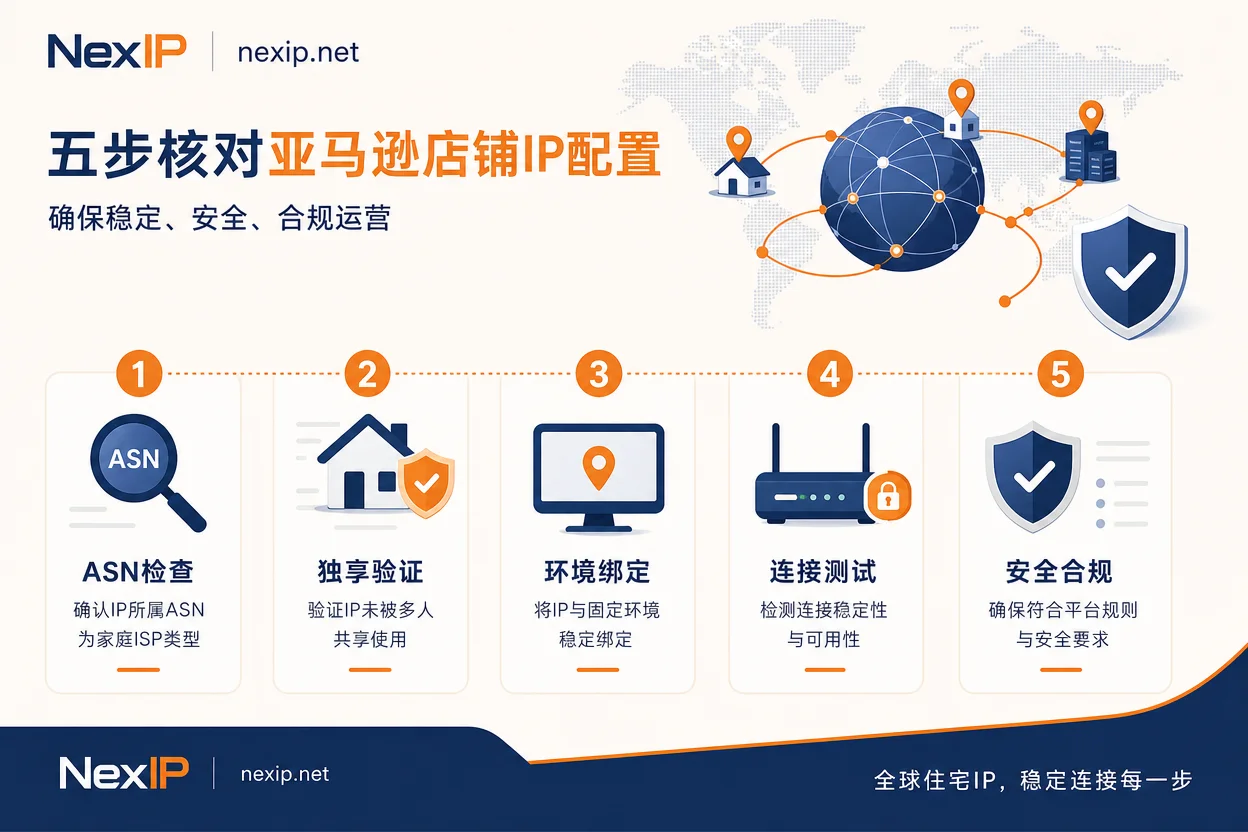
Step 1: Determine Egress Type—Check ASN Registration and Whois for ISP vs. Hosting
How to check: Use a Whois tool to view the ASN ownership and registration entity of the current egress IP, focusing on three points: (1) Whether the ASN's org/netname field shows a telecom/broadband operator entity or a cloud/IDC entity; (2) Whether the ASN type is marked as ISP/Telecom or Hosting/Data Center; (3) Compare the IP's city with the ASN operator's actual service area. If the ASN shows Hosting or Data Center, even if the IP appears to be in a city, it is not residential. As of 2026 security evaluations, mainstream platform risk controls have upgraded to real-time verification of both ASN attributes and Whois registration entities. Fake residential IPs hosted in data centers have an extremely high default block rate. Therefore, using data center IPs for backend login carries higher risk, which is why understanding the difference between residential and data center IPs is key.
Step 2: Verify Exclusivity—Sampling to Confirm It's Not a Temporary Shared Pool Address
How to verify: Sample the egress IP at different times and in different sessions to confirm that the address does not change and does not fall into obvious shared egress segments. Shared egress under a logged-in state introduces associated risks; for example, abnormal activity from other stores on the same segment could affect your account. Sellers often ask: can multiple Amazon stores use the same IP? From the isolation standpoint, it is not recommended—sharing the same egress for multiple store logins directly violates one store one egress, increasing association risk.
Typical features of shared egress: address reuse across segments, address changes between sessions, and multiple environments hitting the same egress. If these features are found, switch to an exclusive egress.
Step 3: One-to-One Binding of Environment and Egress—One Store, One Browser Environment, One Fixed Egress
According to 2026 proxy reviews, the standard solution for multi-account anti-association has shifted to “fingerprint browser independent environment + static exclusive residential IP” bound one-to-one. In other words, each store corresponds to an independent fingerprint browser environment, with one fixed egress hardcoded in that environment. Multiple environments must not share one egress, and one environment should not switch between multiple egresses. When configuring, check three points: whether the proxy settings are hardcoded in the environment, whether the global proxy coexists with the environment proxy, and whether the environment is reused after logout. Regarding “how many IPs does an Amazon store need,” for daily operations, one fixed egress per store is sufficient; no backup is required.
Step 4: Consistency Alignment—Check Timezone, Language, DNS Resolution, and WebRTC Against IP Location
Checklist: System and browser timezone, language/region settings, DNS resolution location, and whether WebRTC leaks the real local address. Specific operations: WebRTC should be disabled or rewritten to the egress address in the fingerprint browser; DNS egress should match the IP location of the proxy egress; timezone and language should be set to the specific granularity of the IP location. For example, if the IP is in the western U.S., set the timezone to Los Angeles time and language to en-US. Even with real dual-ISP residential IPs, if these parameters are inconsistent with the IP location, the environment may still be recognized as associated. For instance, if the IP is in the western U.S. but the system timezone is set to Beijing, there is an inconsistency risk. Check and correct each item.
Step 5: Drift Sampling—Check If the Egress Changes Mid-Session
How to test: Sample the egress IP and ASN multiple times during a complete backend operation session. It is recommended to sample at the start, in the middle, and at the end to record whether there is a mid-session segment change or cross-region jump. If a change is detected, stop operations immediately, check whether the proxy configuration has been overwritten, rebind the fixed egress, and then check whether verification has been triggered. Mid-session egress drift under a logged-in state creates risk of cross-location login triggers. Will the Amazon backend login IP always changing lead to a ban? Frequent changes are more likely to trigger cross-location risk controls, but the final ban depends on comprehensive platform judgment.
Correction: Why Preparing a Rotating IP Pool for Multiple Stores Is More Prone to Problems
Many sellers believe that the larger the IP pool and the more frequent the rotation, the safer. In reality, for long-term logged-in accounts, high-frequency egress drift directly triggers cross-location login risk controls. According to Bright Data's 2026 proxy guide on the use cases for static vs. dynamic proxies, rotating proxies are positioned for large-scale public data scraping, not backend logins. Separating the use cases of the two proxy types avoids misconfiguration. For a more systematic judgment approach, refer to proxy IP anti-association.
Allocating Egress by Store Stage: Registration Verification, Daily Login, Public Data Access
Different stages have different egress needs: the registration verification stage emphasizes egress purity and regional consistency; the daily backend login stage emphasizes long-term stability and exclusivity; public data access (such as price comparison and product page scraping) is when rotating egress is used. The table below summarizes the characteristics for each stage:
| Store Stage | Egress Characteristics | Recommended Egress Type |
|---|---|---|
| Registration Verification | Purity, regional consistency | Static short-term residential IP |
| Daily Login | Long-term stability, exclusivity | Static long-term residential IP |
| Public Data Access | Rotatable, high bandwidth | Dynamic residential IP |
The registration verification stage is temporary; egress purity and regional consistency take priority over long-term holding.
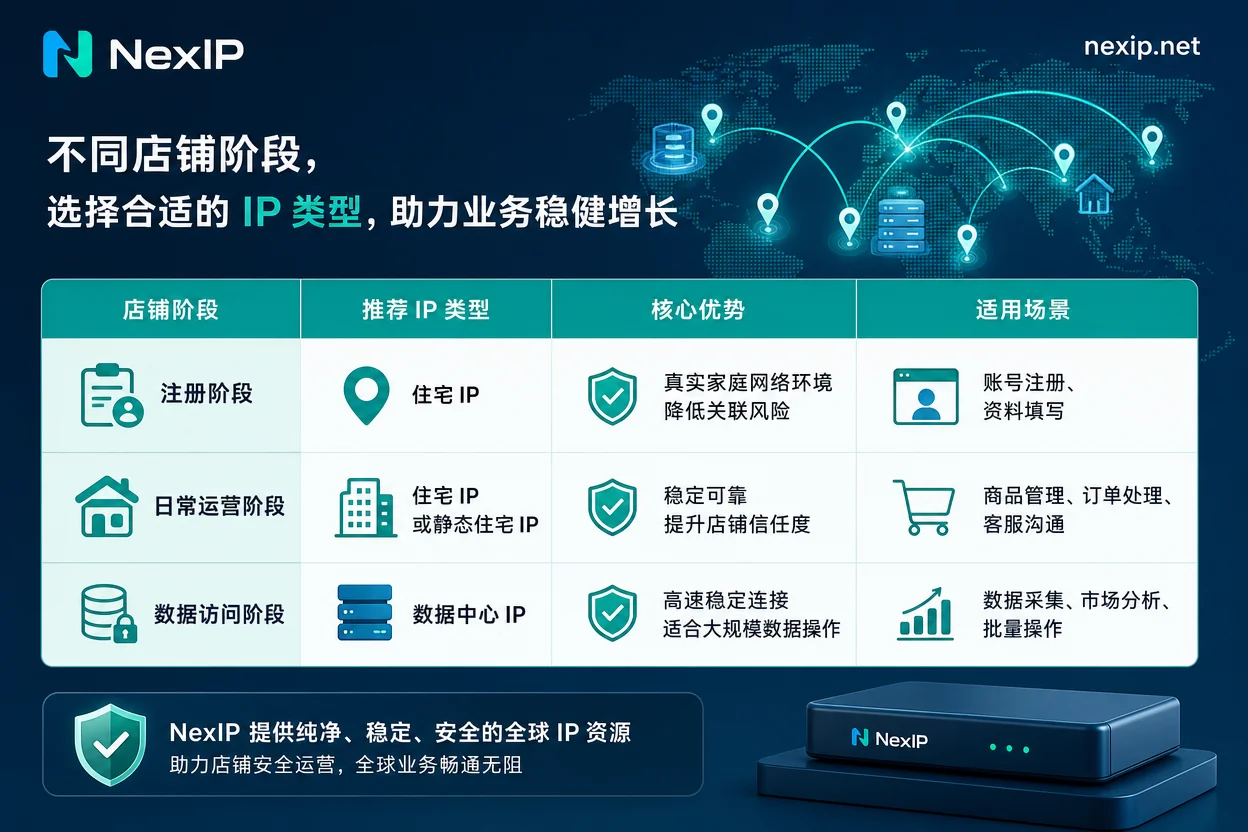
Mapping to NexIP: Roles of Static Long-Term, Static Short-Term, and Dynamic Residential Bandwidth
Based on the above stage requirements, NexIP's public capabilities align as follows: static long-term residential IPs are used for one store one egress binding in daily backend login; static short-term residential IPs are for temporary environments and verification needs; dynamic residential proxy bandwidth plans are for public data access tasks. In terms of binding stability, NexIP supports global region selection, city/ASN targeting, and session stickiness, and can be integrated into fingerprint browser environments via HTTP/SOCKS5 and API. For specific configuration, see fingerprint browser proxy configuration.
Pre-Launch Self-Check List
Before opening a store or changing environments, check the following items:
| Check Item | Status | Action on Failure |
|---|---|---|
| Egress ASN and Whois attribute as ISP | Yes/No | Replace with a true ISP static residential IP |
| Exclusivity sampling (3 consecutive same addresses) | Pass/Fail | Contact provider to replace with an exclusive egress |
| Environment-egress binding table (one egress per environment) | Complete/Incomplete | Reconfigure environment proxies to ensure one-to-one |
| Timezone, language, DNS, WebRTC alignment | Consistent/Inconsistent | Adjust system and browser settings according to IP location |
| Session drift sampling record (no mid-session changes) | Pass/Fail | Check if proxy configuration was overwritten, rebind fixed egress |
Frequently Asked Questions
Can multiple Amazon stores use the same IP?
Not recommended. Sharing the same egress IP across stores breaks isolation and increases association risk. Even with different fingerprint browser environments, if the egress IP is the same, the platform may identify shared egress characteristics, leading to association.
Should Amazon stores use static residential IP or dynamic IP?
For daily backend login, use static exclusive residential IPs because they require a long-term stable egress. Dynamic rotating IPs are more suitable for public data scraping; using them for login may trigger cross-location risk controls.
Will the Amazon backend login IP always changing cause a ban?
Frequent changes are more likely to trigger cross-location risk controls, but the final ban depends on the platform's comprehensive judgment. It is recommended to keep the egress IP stable and avoid mid-session changes.
How to diagnose why Amazon store IPs are associated?
First check whether the environment and egress IP are one-to-one, then verify whether timezone, language, WebRTC, and other parameters are consistent. If multiple stores share the same egress or environment, prioritize isolation and rebinding.
Can Amazon sellers log into the backend using a data center IP?
Risk is high. Data center IPs usually show ASN as Hosting, which is easily identified as low trust. It is recommended to use a static residential IP whose ASN and Whois indicate home broadband for backend login.


Comments(0)