 NexIP官方博客
In cross-border social media and independent site advertising in 2026, many teams find that even with seemingly clean accounts and compliant ad creatives, once they enter batch operations or cross-region collaboration, they still frequently receive Meta's Account Restricted or Location Verification notices, and even face cascading bans across the entire Business Manager (BM).
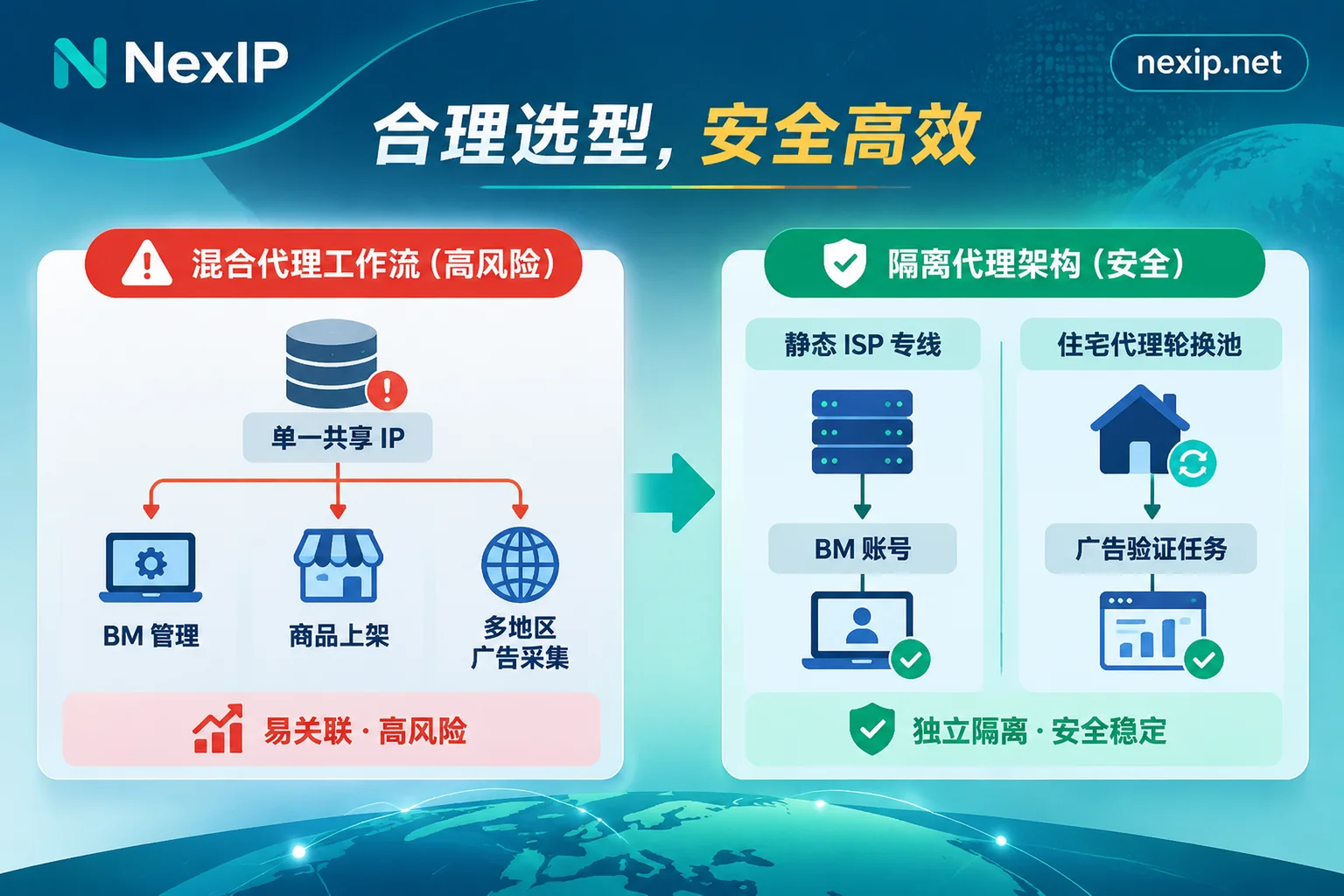
The problem often lies in the "one-size-fits-all" network egress. Many teams buy a batch of Facebook proxy IPs and use them both to log into the BM backend to adjust budgets, and casually hang them to browse competitor landing pages, test ad displays in different countries, or even let different media buyers share the same line.
In 2026, with Meta's widespread adoption of the "Entity Connection Graph" and AI abnormal session monitoring, failing to isolate egress by workflow is the core reason for account asset loss. This article combines Meta's latest risk control logic to break down a Facebook proxy IP configuration plan graded by business role.
I. Three Core Changes in Meta's 2026 Risk Control: Why "Mixed Egress" Is a Must-Fail
In the past, discussions about Facebook ban prevention focused mostly on registration and login of a single account. But in recent actual operations, Meta's security reviews have clearly shifted toward depth and correlation dimensions:
- Entity Connection Graph Anti-Association Review
Meta no longer views a personal profile in isolation; it weaves profiles, Pages, ad accounts, credit cards, domains, and login IP addresses into an association graph. If a previously flagged proxy IP or a high-density shared proxy line touches multiple ad assets simultaneously, once one link violates policies, other BMs in the graph will trigger "Association With Previously Flagged Entities." - Normalization of Advertiser Location Verification
In 2026, a large number of ad accounts received Meta's "Location Verification" requirement, where the system needs to confirm whether the actual operating location of the advertising business matches its network characteristics. If your team manages localized Pages or runs regional ads while the network egress jumps between data center ranges, different states, or even different countries, the system will immediately deem it high-risk or trigger mandatory stop-and-verify. - Session Hijacking and High-Frequency Inspection Conflicts
Many media buyers habitually switch proxy nodes frequently while logged into personal profiles to check ad landing page effects in target countries. This short-term location jumping and massive public page requests will be identified by Meta's anti-fraud classifiers as "session hijacking" or automated script behavior.
Therefore, the first iron rule for configuring Facebook proxy IPs is: completely separate "asset management tasks requiring fixed identity" from "verification and collection tasks requiring multi-point perspectives" at the network egress level.
II. Workflow Breakdown: Proxy IP Selection Guide for Four Types of Facebook Business
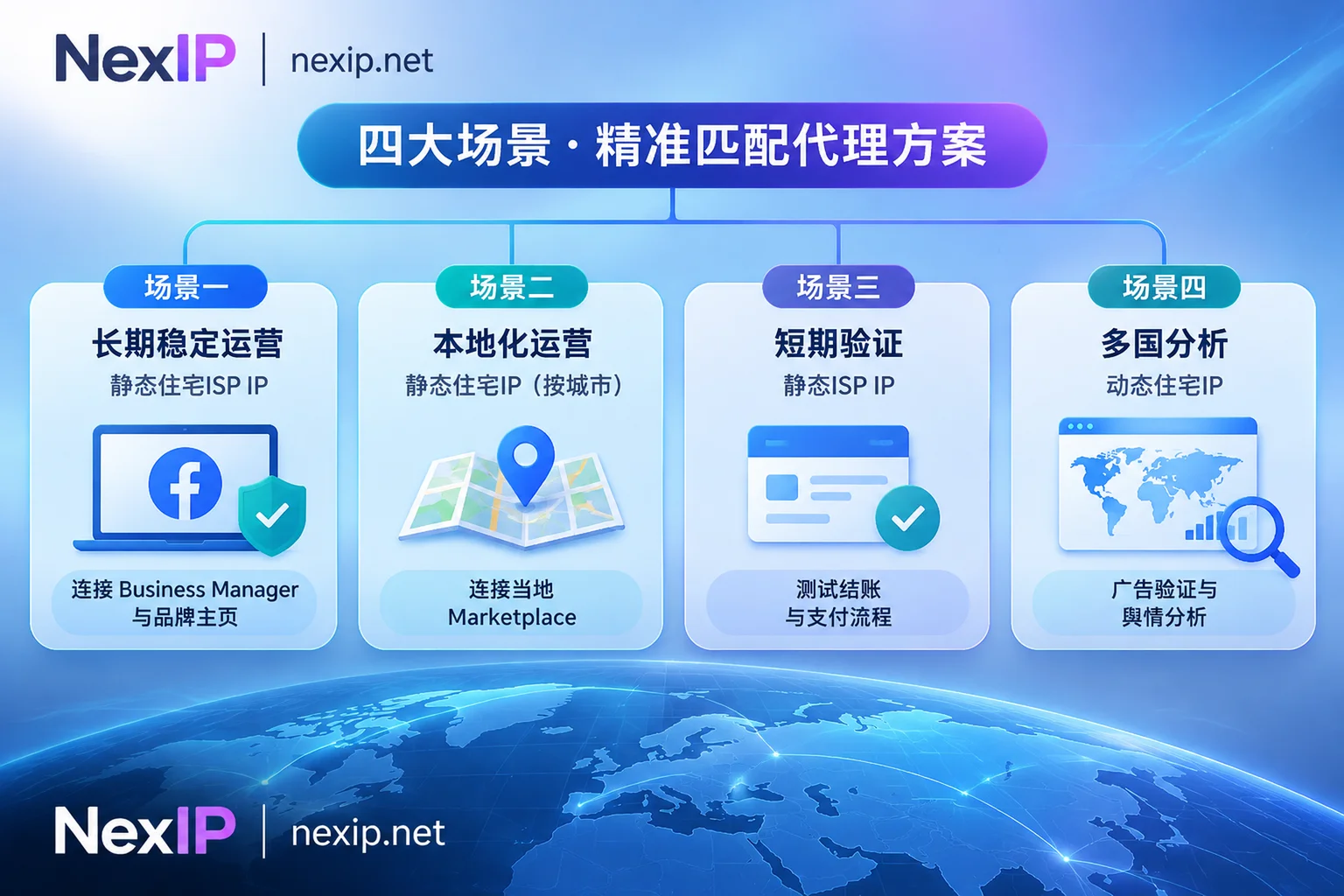
Different Facebook business actions have completely different requirements for IP ownership attributes, fixed cycles, and billing models. We can divide common cross-border team workflows into the following four categories:
1. BM Administrators, Media Buyer Personal Profiles, and Brand Page Daily Operations
- Risk Control Pain Point: The administrator's personal profile is the cornerstone of all BM assets. As analyzed in our article "Does It Matter If the BM Account Login IP Changes Frequently: How It Changes and How to Stabilize the Administrator Egress", core management accounts are most忌讳 (taboo) frequent egress changes or using data center (Hosting) IP ranges.
- Selection Plan: Must configure exclusive fixed Static Residential Proxy - Long-Acting IP (billed monthly or yearly, unlimited traffic).
Configuration Details:
- Prioritize Home Broadband Native Attributes: For high-weight old accounts, core BM administrators, and brand Pages that need long-term fan accumulation, it is recommended to directly choose home broadband native IPs or egress supporting native dual ISP from static long-acting IPs, ensuring that the ASN ownership and registration information are all real local home broadband operators in the target country (such as Comcast, AT&T in the US, etc.). If you are still unclear about the difference between native and broadcast network segments in underlying reviews, you can first read "Why Are You Still Rate-Limited Even When Checked as Residential? Starting from the Risk Control Differences Between Native Residential IPs and Broadcast Network Segments" and the official website's Home Broadband Native vs. Home Broadband Broadcast Comparison.
- One Fixed Asset, One Egress: Strictly enforce fixed binding. If a long-acting IP is found invalid before use, it can be replaced for free through the NexIP backend, avoiding temporary substitution with public lines.
2. Facebook Marketplace Local Listings and Regional Traffic Generation
- Risk Control Pain Point: In 2026, many sellers doing overseas warehouse clearance, large furniture, or local services are deeply cultivating Facebook Marketplace. Marketplace's recommendation algorithm and risk control rely heavily on geographic accuracy—if your listed product is located in Houston, but the proxy IP resolves to New York, or you use ordinary nodes that jump across the country, the product can easily be shadowbanned or even directly removed.
- Selection Plan: Use Static Residential Proxy - Long-Acting IP that supports city-level/carrier targeting.
- Configuration Details: Before purchasing, you can check the Global Node Coverage Page on NexIP to view available cities and local carrier inventory under the target country, ensuring that the account's network egress is precisely anchored to the city where the product is listed, maintaining long-term stable "local resident" network characteristics.
3. Short-Term Payment Integration, Landing Page Testing, and Temporary Verification
- Risk Control Pain Point: When building a new independent site payment link, testing Facebook Pixel回传 (callback), or handling short-term concentrated product testing tasks, the team needs a completely independent residential IP that remains fixed for a few hours or days, but does not require a monthly subscription.
- Selection Plan: Choose Static Residential Proxy - Short-Acting IP.
- Configuration Details: Short-acting IPs are also exclusive fixed static residential (ISP) IPs, billed per IP with unlimited traffic, with rental periods in hours or days. It ensures that your egress is absolutely fixed throughout the complete integration loop of "ad click—add to cart—card binding/payment verification," and can be released after the task ends, balancing security and cost control.
4. Cross-Regional Ad Verification and Public Data Monitoring
- Risk Control Pain Point: After ads are launched, do real target country users see the correct creative layout? Are landing pages hijacked or slow to load in different states and carrier networks? What promotions are competitors running in specific cities? Such tasks require simulating the perspectives of thousands of real local users in different regions, and must never use the static IPs that manage BMs.
Selection Plan:
- Multi-Region Ad Inspection and Landing Page Spot Checks: Use Dynamic Residential Proxy - Traffic Package. Billed by traffic (GB), supporting targeting by country, city, ASN, and carrier. You can set it to Sticky Session to ensure that the same local residential IP is maintained throughout the entire process from clicking the ad to completing multiple redirect jumps and loading the landing page; after checking one region, rotate to the next city's IP.
- 7×24 Public Opinion Monitoring and API Polling: If the data team needs to continuously track comment interactions, brand word heat, or inventory status on public social media pages around the clock, with stable concurrent throughput, they can choose Dynamic Residential Proxy - Bandwidth Package (billed by port bandwidth, unlimited traffic under fair use). For cost calculations of these two modes, please refer to "How to Choose Between Traffic-Based and Bandwidth-Based Billing".
| Facebook Business Scenario | Core Network Requirements | Recommended NexIP Product Type | Key Configuration Strategy |
|---|---|---|---|
| BM Administrator / Media Buyer Core Account / Brand Page | Long-term fixed identity, extremely high carrier reputation | Static Residential Proxy - Long-Acting IP (Home Broadband Native / Native Dual ISP) | Monthly/yearly exclusive fixed, strictly match billing/operating country |
| Marketplace Local Listings | City-level positioning accuracy, local resident characteristics | Static Residential Proxy - Long-Acting IP | Target by listing target city and local ISP binding |
| Payment Verification / Short-Term Campaign Integration | Exclusive fixed for a few days or hours, high cost-effectiveness | Static Residential Proxy - Short-Acting IP | Billed per IP, unlimited traffic, release after task closure |
| Cross-Regional Ad Verification / Landing Page Inspection | Wide coverage, precise to city/ISP, controllable session | Dynamic Residential Proxy - Traffic Package | Enable sticky session to complete redirect chain, switch cities as needed |
| Continuous Public Opinion Monitoring / Data Collection | Stable throughput, long-running without interruption | Dynamic Residential Proxy - Bandwidth Package | Billed by port bandwidth, configure automatic rotation or sticky session |
III. Team Collaboration and Technical Integration: How to Prevent "Line Crossing" Caused by Human Operations?
Even with the right proxy IP type, chaotic management in daily team collaboration can still lead to accidents such as "Media Buyer A mistakenly used Media Buyer B's IP" or "improper proxy protocol configuration causing real IP leakage." When building a team-level Facebook network architecture, it is recommended to implement the following three points:
1. Use "Sub-Accounts" to Isolate Permissions of Delivery Teams and Collection Teams
In multi-person cross-border enterprises, never let all employees share the same proxy backend main account to extract IPs. Through the panel or API management functions of the NexIP User Backend, administrators can create independent sub-accounts by business department (e.g., Europe/US delivery team, Southeast Asia Marketplace team, ad verification and data team). Each group only calls the static IP pool or dynamic traffic quota within its own permissions, fundamentally eliminating the risk of BM cascading bans caused by IP mixing.
2. Choose Matching Protocols and Access Methods
NexIP fully supports HTTP / HTTPS / SOCKS5 protocols, and provides username-password authentication or IP whitelist authentication, supporting four access methods: API extraction, username-password, port forwarding, and process proxy. It can be managed directly on the official website panel or used with clients:
- Multi-Account Daily Management: It is recommended to use SOCKS5 or HTTPS protocol with username-password authentication, directly filled into the independent browser environment used by the team (for performance and security differences of underlying protocols, see "SOCKS5 Proxy Configuration: From Protocol Basics to High-Performance Cross-Border Business Architecture").
- Automated Ad Verification and Collection Scripts: The development team can use API extraction or username-password gateway mode, combined with fixed server IP whitelist authentication, to seamlessly integrate dynamic residential proxies into automated inspection pipelines.
3. Three Must-Check Lists Before Going Live
Since NexIP focuses on providing pure and stable underlying network egress (browser environment isolation, etc., need to be completed by the operations team in their own terminal tools), before officially putting any Facebook proxy IP into business use, please be sure to complete the following verifications:
- Check ASN and Dual ISP Attributes: Confirm that the carrier ownership of the static long-acting IP meets expectations (for troubleshooting methods, refer to "How to Check If an IP's ASN Ownership Is ISP: Look at the Announced ASN, Verify IP Segment Ownership, Compare Multiple IP Databases").
- Check for WebRTC and DNS Leaks: Ensure that after the proxy connection, the terminal does not expose the local LAN or domestic real public IP through WebRTC, and that the DNS resolution path is completely consistent with the proxy egress country (if verification has already been triggered, you can troubleshoot and fix according to the steps in "What to Do If Facebook Still Requires Verification After Configuring Proxy IP: Pass Verification First, Then Check Egress Changes, Leaks, and Location").
- Align Time Zone and Language: Ensure that the system time zone and geolocation parameters of the terminal environment strictly match the country and city of the selected proxy IP (for example, if a residential IP in Los Angeles, US West is configured, the time zone should not remain in New York, US East).
Conclusion
Under Meta's increasingly stringent AI risk control system in 2026, to achieve long-term stability in Facebook ad delivery and social media matrices, you cannot rely solely on the mindset of "buying a good IP." Instead, you need to establish a clear workflow egress grading system: use high-weight static residential long-acting IPs to stabilize BMs, Pages, and Marketplace local assets; use flexible static short-acting IPs for payment testing and integration; and use dynamic residential proxies with city-level targeting to execute large-scale ad verification and public market research.
You can immediately visit NexIP Industry and Platform Solutions to learn more about detailed architecture recommendations for Facebook, Instagram, and ad verification, or directly log into the NexIP User Backend to configure exclusive residential network egress for your team as needed.