 NexIP官方博客
Conclusion first: A residential IP is not a VPN, and the vast majority of overseas residential proxy IPs cannot be used by directly connecting from domestic networks with one click after purchase. The two solve fundamentally different problems: VPNs solve the "encrypted transmission channel between device and server," while residential IP proxies only handle "the network exit identity that the target website ultimately sees." If you think buying a residential IP is like installing a VPN client and using it right away, you'll often find after payment that you can't connect, or still can't solve account verification and scraping blocks.
When first encountering this concept, it's very normal to confuse "line connectivity" with "exit identity." Below, we clarify the four most confusing questions before you place an order.
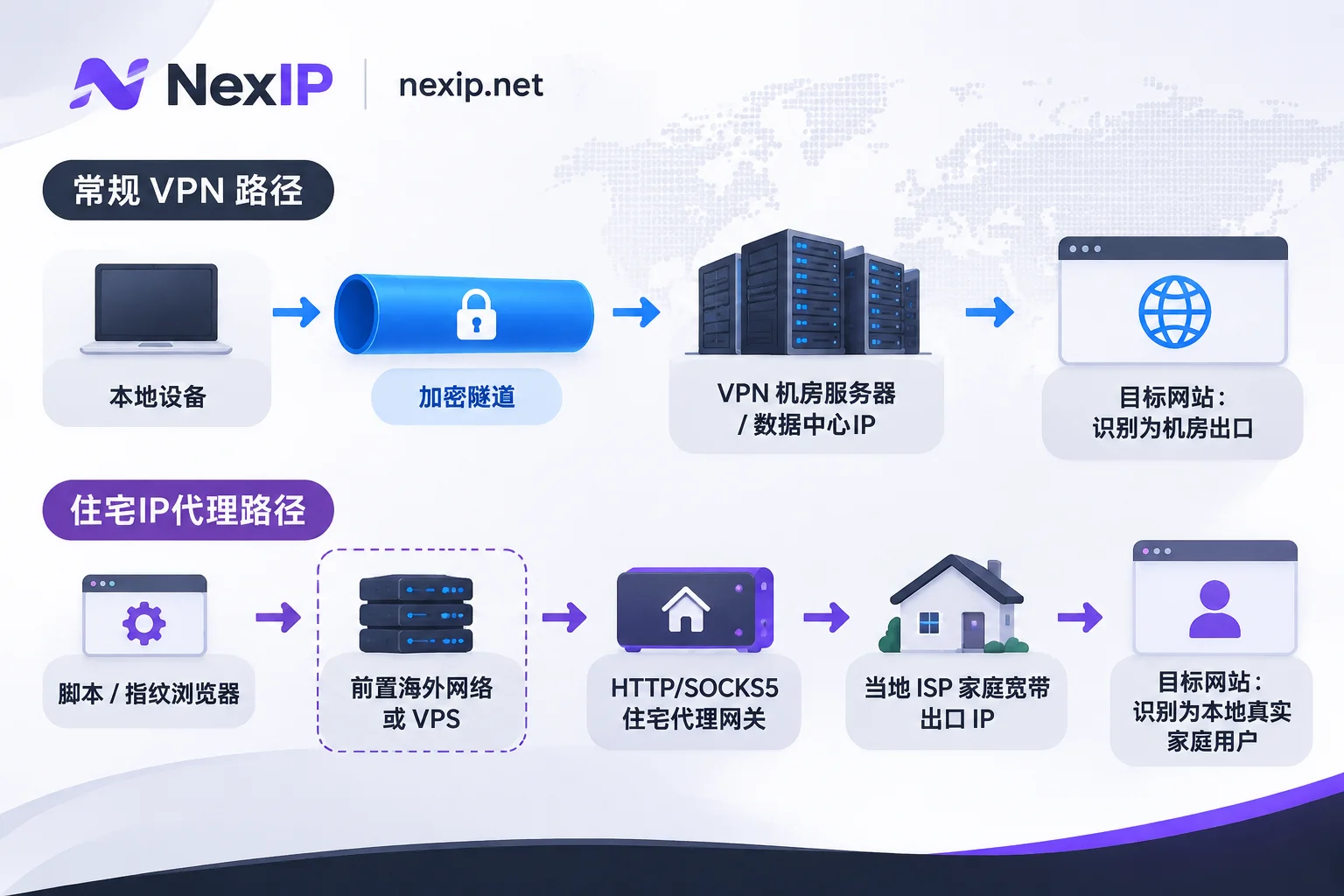
1. What Exactly Is the Difference Between Residential IP and VPN? One Diagram to Distinguish Two Layers of Logic
Many people search for "residential IP" because when using VPNs or common nodes to access overseas websites, they frequently encounter CAPTCHAs, payment failures, account risk controls, or scraping returning 403, so they hear that "switching to residential IPs works better."
But from a network architecture perspective, VPNs and residential proxies operate at completely different layers:
- Different functional roles: The core of a VPN is to build an encrypted tunnel between your device and a server, focusing on privacy protection on public networks, remote work, or cross-network connectivity; but most ordinary VPNs use data center (server room) IPs, shared by many users with obvious server characteristics. Residential proxies, on the other hand, forward your requests through local broadband ISP-assigned home networks or residential IP ranges via HTTP/HTTPS or SOCKS5 protocols, making the target platform identify the visit as a "normal local home user."
- Different encryption mechanisms: VPNs encrypt all traffic from the entire device; conventional proxy protocols only forward traffic from specified applications or browsers. When accessing HTTPS websites, the content itself is TLS-encrypted, but the proxy provider can still see the domains and times you connect to, so the provider's compliance and logging policies are equally critical.
- Can it be used as a direct connection tool? No. Overseas residential proxy services generally do not provide cross-border channels for direct connection from within China to overseas. Without an overseas server or compliant overseas network prerequisites, directly entering the port and credentials of an overseas residential IP on a local computer will most likely result in timeout and disconnection.
If you want to further understand why platforms can immediately recognize data center IPs and why "being able to open a webpage" does not equal "being trusted by the platform," you can read What Is the Difference Between Residential IP and Data Center IP and Why Residential IP Is Needed.
| Comparison Dimension | Conventional VPN | Residential IP Proxy |
|---|---|---|
| Core function | Establish encrypted communication tunnel | Provide real local broadband exit identity |
| Common IP sources | Data center / server room (multi-user shared) | Local ISP home broadband or residential registered IP ranges |
| Can it be directly connected from within China? | Usually comes with client and link | Generally not supported; requires overseas network or overseas VPS |
| Multi-account isolation / automatic rotation | Weak; same client hard to achieve one environment one IP | Extremely strong; can rotate per request or bind one fixed IP per environment |
| Typical use cases | Public Wi-Fi security encryption, team remote work | Cross-border store and social media backends, SERP/ad verification, data scraping |
2. Do Home Broadband and Mobile Hotspots Count as Residential IPs? Why Can't They Directly Replace Them?
Since residential IPs come from real broadband, many people then ask: if I install my own broadband or use a mobile 4G/5G hotspot, isn't that a ready-made residential network?
From a network attribute perspective, local home broadband does belong to residential IPs, and mobile base stations assign mobile IPs (usually through carrier-grade NAT, with multiple users sharing the same exit). But in practical business, they often cannot replace professional proxy solutions for three reasons:
- Region is physically locked: You or your office are in China, so local broadband and SIM cards can only get local exits, cannot become local broadband users in New York, London, or Tokyo, and cannot support multi-country ad verification or overseas localization operations.
- Cannot scale isolation: If dozens of scrapers run concurrently or a dozen operational environments all crowd under the same hotspot exit, it not only easily triggers rate limits but also easily forms same-exit associations on the platform side.
- Free "residential VPN/shared pools" hide risks: Many resources advertised online as "free residential IP" or "free residential proxy" come from bundled plugins, P2P sharing, or even maliciously controlled home devices. Logging into accounts using such unknown nodes easily exposes account credentials and cookies to man-in-the-middle eavesdropping and associated ban risks.
3. Three Things You Must Prepare Before Buying Residential IP
To avoid "buying an IP but being unable to use it," please check the following three prerequisites before placing an order:
1. Compliant pre-network environment or overseas host
- If you run scripts, API polling, or AI data scraping: The most reliable approach is to prepare an overseas cloud server (VPS), deploy Python scrapers, Playwright, or AI Agents on the overseas server, and then call the residential proxy's API or port forwarding.
- If you do e-commerce backends, social media, or daily operations of overseas AI accounts: Your local computer needs to already have stable overseas network access conditions, then pair with an anti-detect browser (if browser environment isolation is needed) or a local proxy client for exit traffic splitting, rather than treating the proxy port as a direct connection channel.
2. Clarify the "access carrier" and protocol you need
Residential IPs are just network exits and need to be filled into specific tools to take effect. Common integration methods include:
- Code and automation frameworks: Configure HTTP/HTTPS or SOCKS5 proxy address, port, and credentials in Requests, HTTPX, Playwright.
- Multi-account and operational environments: Fill static proxy parameters into anti-detect browsers to achieve "one browser environment fixed to one exit IP." For differences between browser built-in proxies and self-purchased independent IPs, refer to For Cross-border E-commerce, Is It Better to Use Fingerprint Browser Built-in IP or Buy Your Own Proxy IP.
- Single application directed through proxy: Use port forwarding or process proxy tools to make specified software go through residential exit. If you encounter connection failures or location drift even with correct parameters, you can self-check against SOCKS5 Proxy Configuration and DNS Leak Troubleshooting.
3. First distinguish whether you want to "rotate IPs for scraping data" or "keep one IP for maintaining accounts"
This is the most critical step determining whether you waste budget after purchase:
- Dynamic residential IP: Switches different exits per request or every few minutes to hours, suitable for public data scraping, price comparison, SEO ranking monitoring, ad landing page verification, AI real-time web retrieval.
- Static residential IP: A residential/ISP exit fixed for your use during the rental period, suitable for store backends, TikTok/social media operations, long-term AI account maintenance and whitelist binding.
4. How to Choose Solutions for Different Needs?
In actual service selection, professional residential proxy providers like NexIP (nexip.net) have a very clear positioning: they only handle the network exit itself—not bundling browser multi-opening, SMS verification, or ready-made accounts, but thoroughly implementing HTTP/HTTPS/SOCKS5 protocols, country/city/ASN/carrier targeting, and access capabilities such as API extraction, credentials, port forwarding, and process proxy.
You can directly match NexIP's four core solutions based on task cycles and traffic characteristics:
- Data scraping, SEO/SERP monitoring, ad verification, and AI retrieval: If request volume fluctuates and you need to frequently rotate real user exits in different regions, choose Dynamic Residential Proxy · Traffic Plan, billed by GB, supporting per-request rotation or sticky sessions, suitable for price comparison, travel aggregation, and AI Agent/RAG web scraping (for more AI pipeline scenarios, see NexIP AI Solutions).
- Continuous monitoring tasks with stable throughput: For public opinion monitoring, inventory tracking, or high-frequency API polling, traffic-based billing tends to be higher, so it's better to use Dynamic Residential Proxy · Bandwidth Plan billed by port bandwidth.
- Temporary account verification, payment testing, and integration testing: If you only need a fixed residential exit for a few hours or days, no need for monthly subscription; you can use Static Residential Proxy · Short-lived IP billed per IP with unlimited traffic.
- Cross-border store management, TikTok operations, and long-term account maintenance: For businesses needing the same local broadband exit fixed for months or even long-term, we recommend exclusive Residential IP (static long-term plan) billed monthly or annually, offering home broadband native, home broadband broadcast, and data center sub-types, supporting native dual ISP with free replacement upon failure. As for which tier to choose between "home broadband native" and "home broadband broadcast" in static, you can see the structural differences on the Native vs. Broadcast Comparison Page; for TikTok matrix, you can also refer to TikTok Scenario Recommendations, configuring one fixed native exit per account.
If you're still unsure about local carriers or city inventory in target countries before selection, you can first check on the NexIP Country Coverage Page or Industry Scenario Solutions Page, then go to the User Dashboard to view real-time pricing, bandwidth rules, and integration documentation. After small-scale testing works, then scale up officially.
Quick Answers to Common Questions
Q: I bought only one static residential IP, why can't I open webpages after configuring it in my local computer browser?
A: First confirm two things: First, whether your network can directly connect to the overseas proxy gateway (overseas residential IPs usually require an overseas server or compliant overseas network as the pre-link); second, check whether the authentication method (credential authentication or IP whitelist) and port, protocol (don't mix up HTTP and SOCKS5) match the backend.
Q: Since dynamic residential IPs can also set sticky sessions, can they be used to maintain long-term accounts?
A: Not recommended. Sticky sessions only temporarily keep the same exit for a period; when time expires or the node goes offline, it will still change. For long-term login to stores, payment backends, or main social media accounts, you need a static long-term residential IP that remains fixed during the rental period.
Q: Do overseas businesses need residential IPs at every step?
A: No. Residential IPs are more expensive than data center IPs due to scarce real broadband resources, so they should only be spent on steps where "the platform cares about exit identity." For daily office encrypted transmission, use conventional VPNs or dedicated lines; for public static resource fetching without risk control, use direct server connections; reserve residential IPs for risk-sensitive account ends and critical data scraping ends—this way the overall cost is most reasonable.