 NexIP官方博客
A static residential IP is not "permanently fixed after purchase," but rather a fixed exit reserved for you during the agreed lease term. As long as you renew on time before expiration and the upstream carrier's subnet is not decommissioned or reorganized, the original address can usually continue to be used; however, when the plan expires and is released, the upstream ISP adjusts routing, node maintenance occurs, or the IP is flagged by the target platform's risk control, the exit address may still change or even need to be replaced.
When many users search for "static residential IP," what they're most concerned about isn't the concept itself, but how long it will stay stable after paying, whether renewal will change the number, and if it drops, how to migrate without getting banned. Below is a clear breakdown in the order of troubleshooting and practical steps.
1. Don't Panic: The "IP Changed" You See May Be One of These 3 False Changes
In actual use, many people find that the region or IP queried has changed and rush to change configurations, only to create unnecessary login fluctuations. Before switching lines, check these three common misjudgments:
- Mistaking the "proxy entry address" for the "external exit IP": Some proxy services use domain names or relay gateways for access, and the resolved address of the entry server may switch due to load balancing, but the external exit IP seen by the target website has not actually changed. Verification should be based on the result returned by accessing a public IP detection interface via browser or script.
- City name drift caused by GeoIP database updates: The same IPv4 numeric address, after being re-mapped by databases such as MaxMind and IP2Location at different times, may show a city attribution that slightly shifts between neighboring cities. As long as the numeric IP remains the same, the platform still records the same exit.
- Local routing rules or client leaks: System proxy conflicts, browser plugins not taking over, or UDP/DNS leaking through the local network can all cause the query page to show a different exit. If you encounter connection failures or abnormal address displays, you can troubleshoot local rules item by item with reference to Why SOCKS5 proxy configuration still fails to connect after filling in parameters.
2. Why Do Static Residential IPs Really Change or Become Invalid?
If you confirm that the externally displayed numeric IP has indeed changed, or the original port completely times out and is unavailable, it usually comes down to these four reasons:
- Expiration without renewal or failed auto-renewal: Static resources are allocated by period. Once the lease term is exceeded and the buffer window has passed, the IP will be released back to the resource pool and reallocated to other users. After expiration, recovering the original address is often very difficult.
- Upstream ISP subnet restructuring or routing adjustments: When local telecom carriers perform backbone network migration, address block recycling, or BGP routing optimization, service providers must cooperate to switch the corresponding subnets. Such changes usually come with advance notice.
- Differences in underlying resource hosting models: If the node relies on real home terminals staying online, it will go offline once the terminal device is powered off or disconnected; while static ISP nodes hosted by carrier partner subnets or managed data centers do not depend on a single home device being powered on, but may still trigger node switching due to hardware maintenance in the data center.
- Physically unchanged but reputation damaged: The IP itself is still normally connected, but due to high-frequency concurrency during use, it has triggered the target site's risk control mechanism or been flagged by third-party risk control libraries. Continuing to use it will frequently trigger captchas or even rate limiting, so you must actively switch to a new one.
3. How to Keep the Original IP When Renewing? Watch 3 Things Before Purchase and Before Renewal
1. Choose the Plan According to Business Cycle, Don't Use the Wrong Plan Type
Not all businesses need to hold onto the same fixed address long-term. For tasks like account registration verification, payment risk control verification, or API integration testing that only take a few hours to a few days, buying long-term resources billed monthly is wasteful, and there's no need to renew after expiration; directly using short-lived static residential IPs billed hourly or daily, with exclusive fixed exits and unlimited traffic, is more cost-effective when stopped after use.
Only scenarios that require long-term maintenance of the same identity environment, such as store backend management, long-term cross-border e-commerce operations, overseas social media, or TK account farming, require monthly or yearly locked exclusive static residential IPs.
2. Leave a Renewal Buffer Period, Don't Wait Until the Expiration Day
Confirm the service provider's renewal rules (whether early renewal directly extends the expiration date, whether the original exit is retained), and it is recommended to complete renewal or confirm sufficient account balance 3 to 7 days before expiration. Stagger renewal, line verification, and business peaks (such as major promotions or advertising periods) to avoid accidental recycling caused by payment delays.
3. Check Network Attributes and "Free Replacement on Failure" Fallback Policy Before Purchase
When choosing a long-term fixed exit, it is advisable to first distinguish the risk control differences between native home broadband and broadcast subnets (see Explanation of differences between native home broadband and broadcast home broadband). Taking NexIP's long-acting static residential proxy as an example, it provides exclusive fixed exits (billed monthly or yearly, unlimited traffic), subdivided into native home broadband, broadcast home broadband, and data center subcategories, supports native dual ISP and targeting by country, city, ASN, or carrier (subject to real-time inventory), and explicitly provides a free replacement on failure mechanism—when upstream line anomalies or node unavailability occur, the same-spec exit can be directly replaced, reducing the passive risk brought by sudden disconnections.
4. When You Must Change Static Residential IPs, How to Migrate Without Triggering Risk Control?
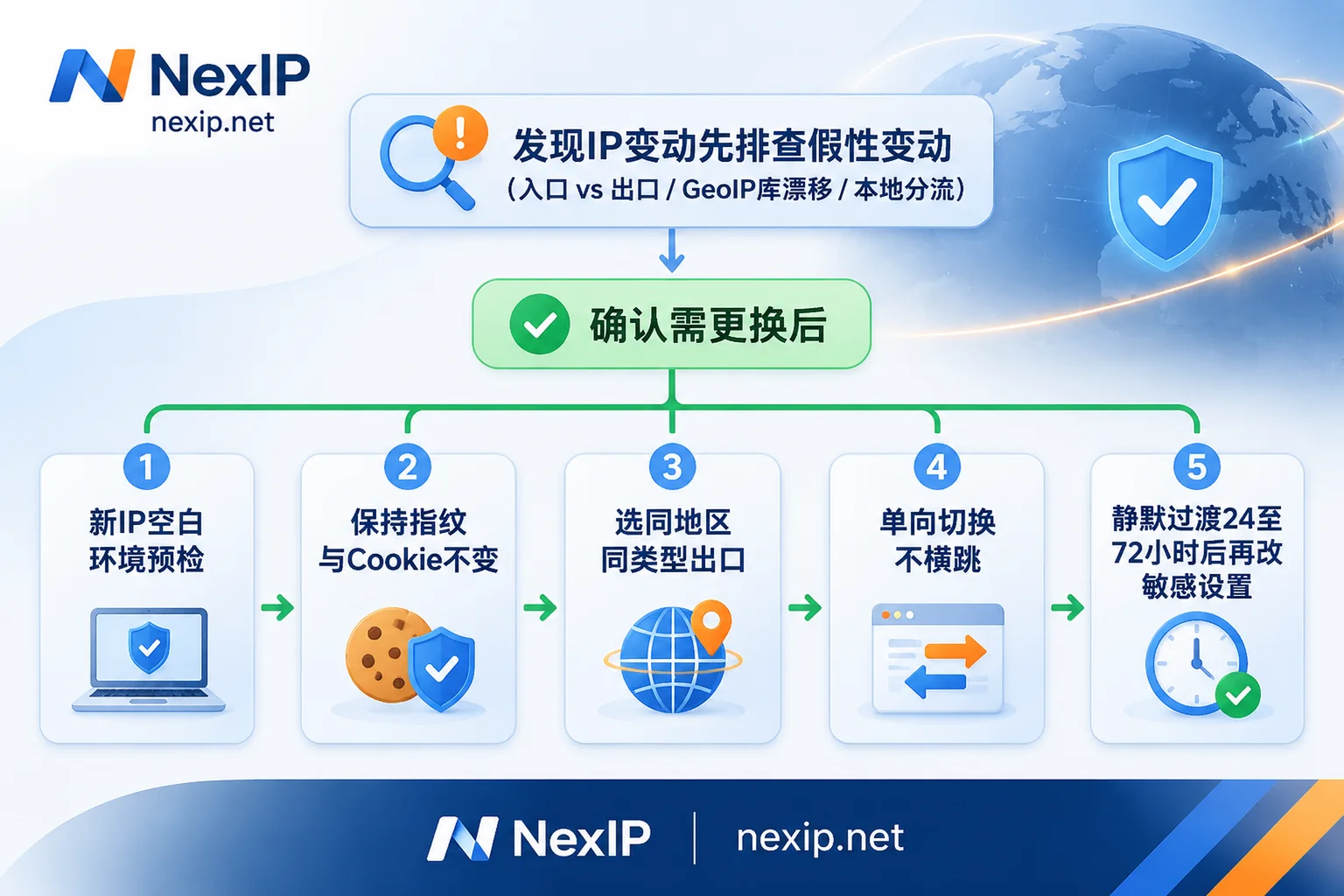
If you encounter a lease expiration without renewal, upstream subnet decommissioning, or the old IP has been restricted by the target site, and you have to change to a new IP, never "log in and change the password right after the old one disconnects." Following the five steps below for a smooth migration can minimize the probability of secondary verification or account suspension:
| Migration Step | Core Action | Missteps to Absolutely Avoid |
|---|---|---|
| 1. Independent Pre-check of New IP | After obtaining the new IP, first check the attribution, ASN type, DNS/WebRTC leaks, and connectivity to the target site's homepage in a local blank environment | Logging in with the main account to test before verifying the goods |
| 2. Lock Device and Fingerprint | Completely retain the original browser profile, cookies, local cache, system language, and time zone parameters, and only replace the proxy exit | Upgrading the browser, clearing cookies, or logging in from a different computer while changing the IP |
| 3. Match Similar Exit | Prioritize alternative nodes in the same country, same city, and same residential ISP type (e.g., native dual ISP to native dual ISP) | Dragging until the old IP completely fails in pursuit of an identical ASN, or randomly switching across states/countries |
| 4. One-way Complete Switch | First completely close the old proxy session, then bind the new IP and reconnect, and keep only single-line access after confirming the exit is stable | Logging in on mobile with the old IP while logging in on computer with the new IP, causing short-term location jumps |
| 5. Allow a Silent Transition Period | Within 24–72 hours after switching, only perform routine low-risk actions such as daily browsing and viewing data | Immediately changing the login password, unbinding the phone, changing the payment card, or making large-scale ad placements right after changing the IP |
For e-commerce seller backends or high-authority accounts, before binding a new exit, it is recommended to complete the goods verification with reference to Which items to verify before binding a static residential IP to the store backend; when platform switch review logic is involved, you can also refer to the risk boundary assessment in Will changing IP to log in to an Amazon store trigger a review.
5. Use Products According to Their Roles to Reduce the Operational Cost of "Forced IP Changes"
To minimize hassle in your business, the key is to completely separate fixed identities from high-frequency requests:
- Long-term core accounts (store backends, TK main accounts, long-term AI account keep-alive): Use NexIP static residential proxy · long-acting IP to achieve one account per fixed exit; for how to draw the line between short and long-acting, see How to choose between static short-lived and static long-acting residential IPs.
- Temporary verification and debugging tasks (registration verification, payment testing, short-term integration): Use NexIP static residential proxy · short-lived IP to obtain fixed residential exits on an hourly or daily basis.
- Public web scraping and high-frequency polling: Leave it to dynamic residential proxies to avoid using expensive fixed exits for high-concurrency scraping, which may cause the IP to be blacklisted by the target site in advance.
At the access and team collaboration level, NexIP is only responsible for the network exit layer, supports HTTP/HTTPS/SOCKS5 protocols across the board, provides both username/password authentication and IP whitelist authentication, and four connection methods: API extraction, username/password, port forwarding, and process proxy. It also supports sub-account management in the official website panel and API (registration and purchase can be viewed in the NexIP user backend). As for specific regional real-time inventory, plan specifications, prices, and availability metrics, the latest display on the official product page shall prevail; for supporting aspects such as multi-browser environment isolation and mobile SMS reception, you need to combine them with the corresponding tools yourself.