 NexIP官方博客
In mid-July, an analysis report on underground forums caught attention: researchers reviewed approximately 2,889 posts and 545 discussion threads over the past two years and found that fraud practitioners are no longer satisfied with ordinary residential proxies but are desperately seeking "clean" residential IPs. They classify proxy pools into clean and dirty categories, focusing on IP history, whether they have been flagged by banks or payment platforms, and whether the geographic location can precisely match to the city or even ZIP code level. Around the same time, an updated article on LWN pointed out that a large amount of website scraping traffic comes from residential and mobile networks, including both devices controlled by malware and services claiming ethical sources. The Proxyway 2026 Market Study confirmed that residential proxies remain the top choice for the vast majority of users, with prices stabilizing after a significant decline.
What do these new developments mean for legitimate data collection, account management, or localization testing? If a shared pool is abused and its cleanliness declines, even legitimate businesses may be caught in risk control. Below is a step-by-step method directly addressing the real search query "how to self-test residential IP cleanliness," helping you vet IPs before use.
Why Residential IP Cleanliness Suddenly Became a Core Threshold
In the past, people mainly considered pool size and success rate when choosing residential IPs. Now it's different. Underground discussions show that even if an IP belongs to a real home broadband, if it has been used by many people for card testing, credential stuffing, or high-frequency scraping, its reputation score will quickly deteriorate. Fraudsters cross-compare multiple reputation services, complaining about score discrepancies for the same address, and acknowledge that clean IPs are scarce resources.
Legitimate users face the same problem: detection on payment, social, and e-commerce platforms has escalated from simply identifying IP type to analyzing historical behavior, geographic consistency, and device fingerprint matching. The Proxyway report mentioned that residential proxies remain popular due to their high trust level, but precisely because they are widely used, pool quality varies significantly. When using services that emphasize sources, like Nexip, self-testing first can help avoid contaminated nodes and reduce retry costs.
5 Specific Steps for Self-Testing Residential IP Cleanliness
First, obtain the exit IP to be tested (access an IP lookup page after connecting to the proxy), then proceed in order. The entire process uses free public tools and does not require complex scripts.
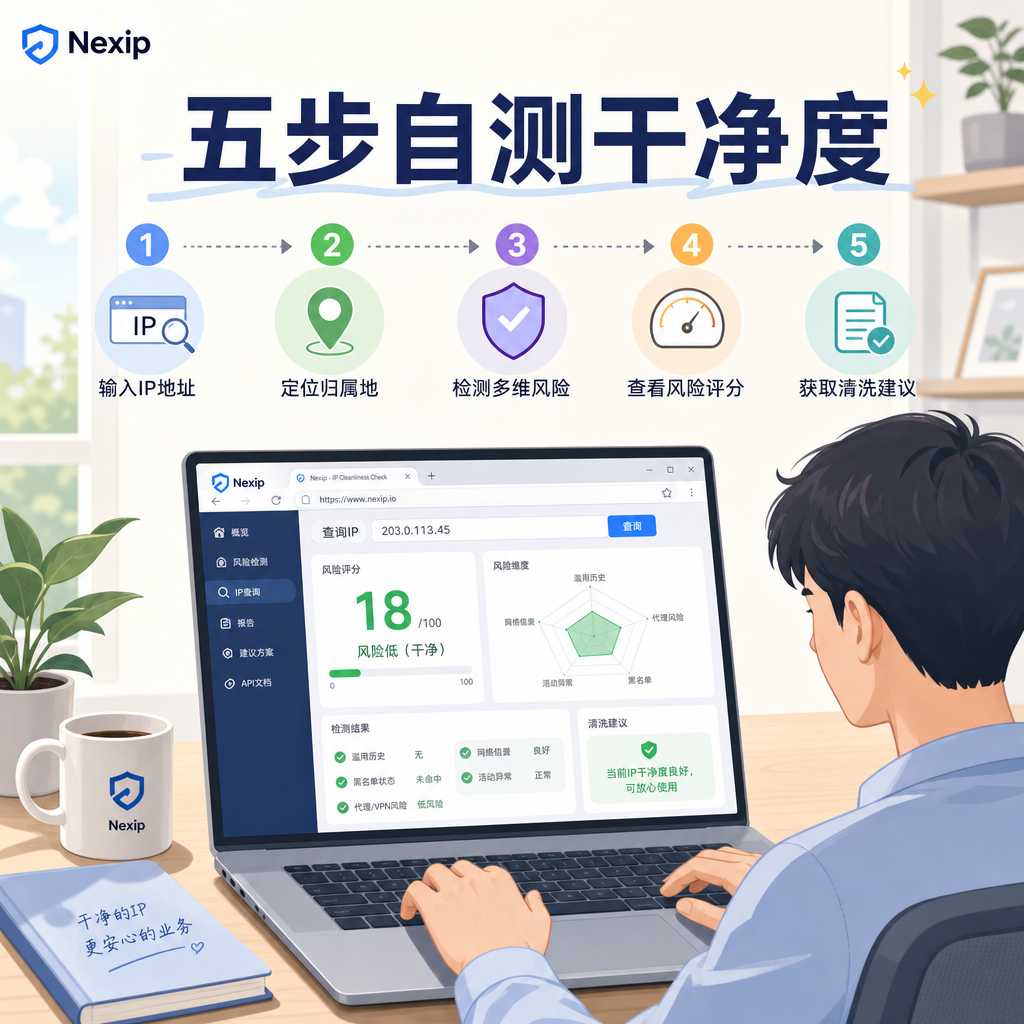
- Step 1: Basic Type and Location Verification. After connecting to the proxy, open multiple IP lookup sites to check whether it shows as residential type, ISP name, and whether the country/city matches your intended target. If the location deviation is large, or if it is identified as a data center/VPN, replace it directly.
- Step 2: Blacklist and Abuse Database Query. Submit the IP to AbuseIPDB, Spamhaus-related queries, or similar aggregation tools to see if there are recent abuse reports, spam, or malicious activity records. Eliminate any IP with records.
- Step 3: Fraud and Risk Scoring. Use services like IPQualityScore or Scamalytics to check risk scores, proxy detection results, and historical behavior labels. Avoid IPs with high scores or those explicitly marked as proxy/high risk. Underground forum carders also often compare these scores.
- Step 4: Fine-Grained Geographic Matching Test. If your business requires city or ZIP code level, additionally check ASN and precise geo information to ensure alignment with the time zone and language settings of the target account or content. Mismatches can trigger consistency risk controls.
- Step 5: Actual Connectivity and Behavioral Mini-Test. Use a clean browser configuration (disable WebRTC, unify fingerprints) to visit a few pages of the target site, and observe whether you encounter immediate CAPTCHAs, login failures, or abnormal rate limiting. Also test response time and stability. Expand usage only after passing.
After completing these five steps, you can basically filter out obviously dirty nodes. In practice, Nexip residential IPs can be batch-exported for a few exit points to perform the same checks, making it easy to quickly screen.
How to Use Fingerprints and Sessions After Self-Testing
Clean IP is just the foundation. Reports repeatedly emphasize that proxies must be consistent with other signals to be effective: browser fingerprints, cookie history, time zone, language, device characteristics. Relying solely on IP rotation is easily detected by behavioral analysis.
In practice, fix a residential IP session (sticky duration based on business needs, from a few minutes to several hours), and pair it with an anti-detection browser or script to control Canvas, WebGL, and font lists. Simulate human-like access frequency, avoiding a large number of requests in a short time. If managing multiple accounts, bind each account to an independent clean IP and independent fingerprint configuration; do not share.
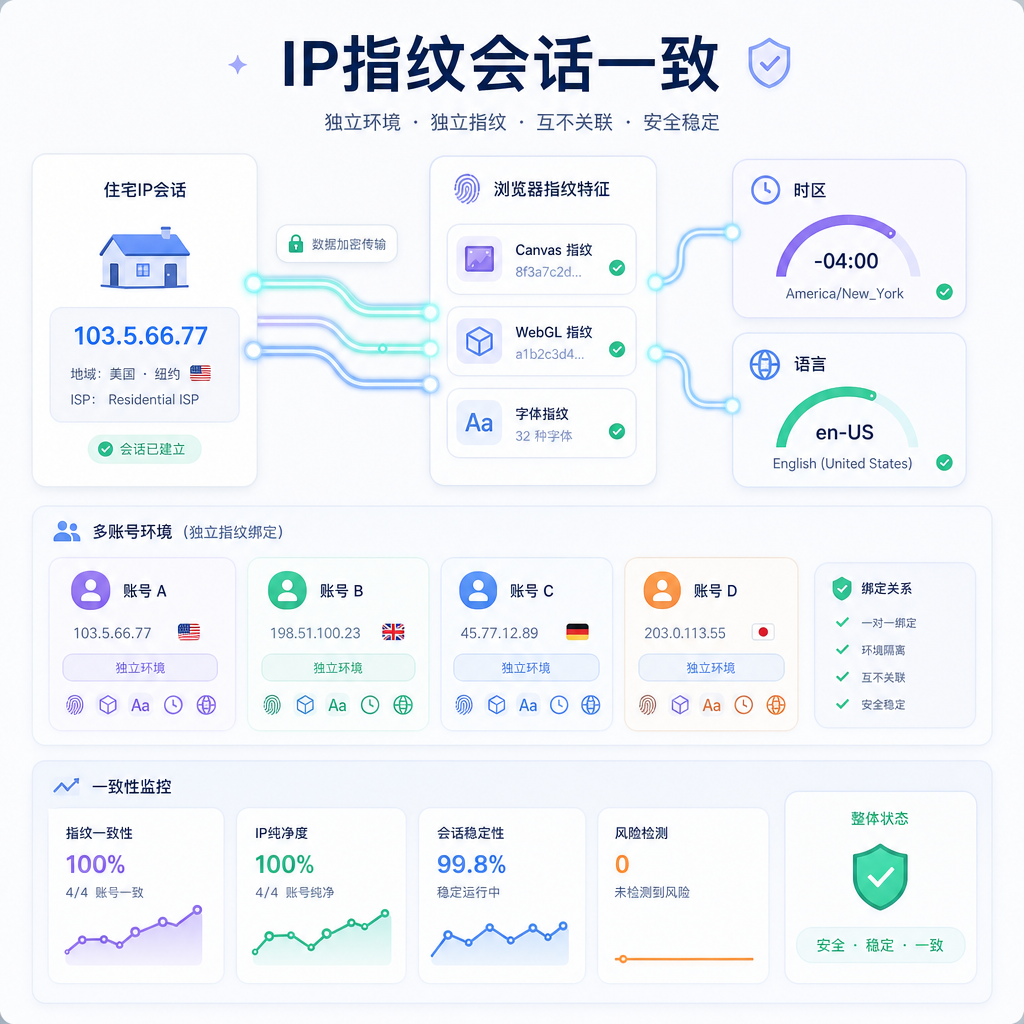
Periodically check the reputation of exit IPs, especially for rotating pools. Once a score rises, switch immediately. This protects your business and also prevents good IPs from being dirtied.
Practical Habits for Long-Term Residential IP Quality
Pools are dynamic; clean today does not guarantee clean tomorrow. Cultivate a few habits: prioritize services that clearly state ethical sourcing, support precise geolocation and session control; do not reuse the same IP for high-abuse scenarios after use; monitor changes in your business's block rate as an indirect quality indicator.
Proxyway data shows that residential proxy prices have stabilized, indicating that quality resources have cost support. Don't blindly chase the lowest price; a dirty pool will eventually cost you more CAPTCHAs and retry time. Combining these July discussions and practical tests, self-test first and then scale up—this is more reliable than blindly scaling.
By following the steps above, you can quickly determine whether your current residential IP can withstand current risk controls. For new target sites, just retest geographic location and scores as needed.


Comments(0)