 NexIP官方博客
When using residential proxies, many people first check if the IP has changed. The proxy connects, whatismyip shows a new address, and they think it's safe. But WebRTC in the browser is often still working silently, leaking the real public IP or local LAN address. As a result, the main traffic goes through the clean residential exit, while WebRTC exposes your real network info. In multi-account scenarios, if several profiles share the same real IP leak, the correlation risk is high; in automation scripts, the login flow may look normal, but the backend signals mismatch.
WebRTC was originally designed for real-time audio/video and P2P data transfer. Browsers use ICE, STUN, and TURN to find available network paths, collecting many candidate addresses during the process. These candidates often include your real public IP, IPv6, and even local IPs starting with 192.168. Proxies or VPNs only handle the HTTP/HTTPS path; WebRTC uses a different channel and by default does not respect proxy settings. A site only needs to run a small script to obtain this information. Public IP leaks directly expose real geographic location and ISP; local IP leaks add a network topology feature to fingerprints. For privacy users, this is a problem; for multi-account and account farming, it invalidates isolation.
Testing is not complicated, but it must be done step by step. First, disconnect all proxies and VPNs, and note your real IPv4 and IPv6. Then connect to the target residential proxy and confirm the main IP has switched. Open a WebRTC leak detection page and check whether the results show only the proxy IP or also include real addresses. Public IP leaks are the most dangerous, but local IP leaks should not be ignored, especially in multi-machine or shared network environments. Each anti-detection browser profile must be tested individually; a system-level proxy does not save a single Chromium instance. After browser updates, extension changes, or proxy swaps, it's best to retest. IPv6 is especially prone to leakage, as many tools only check IPv4 by default.
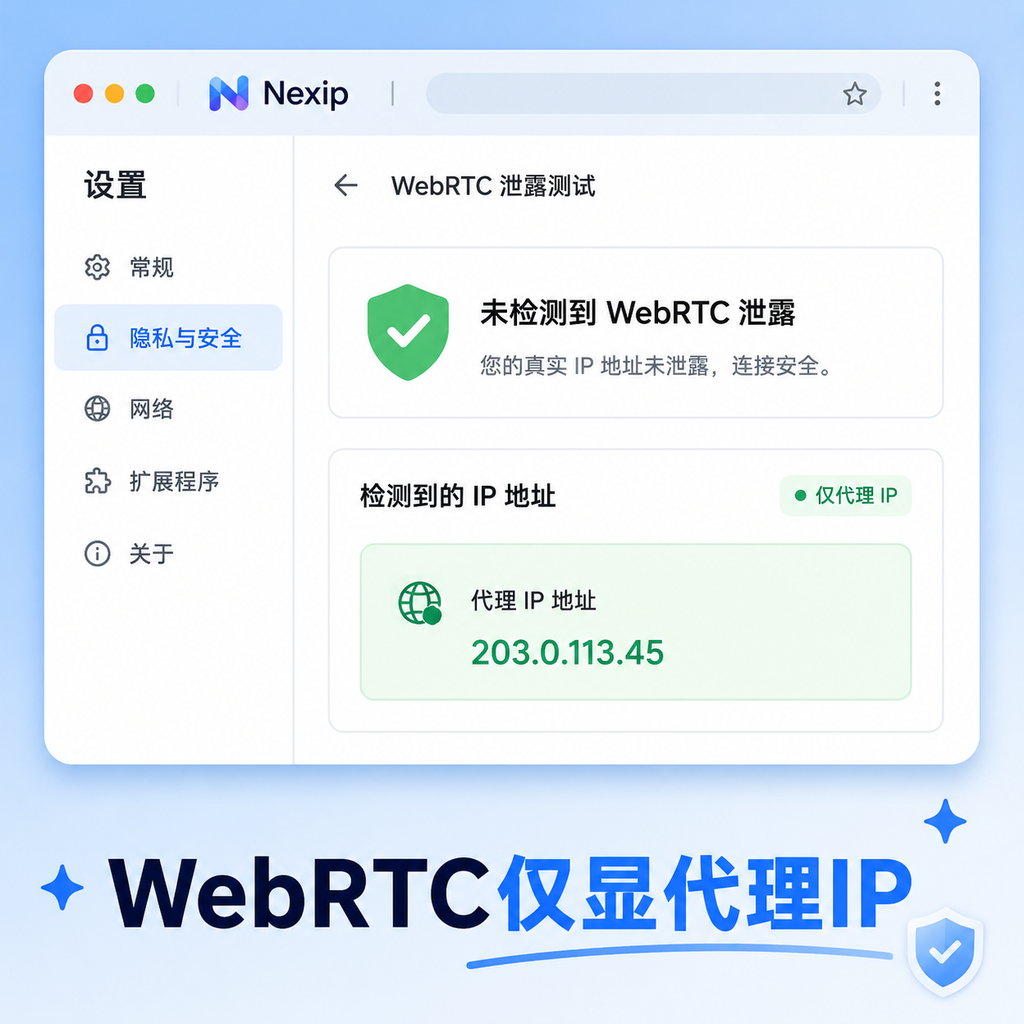
There are several remediation paths, depending on the scenario. Firefox is the most straightforward: in about:config, set media.peerconnection.enabled to false to disable it completely. Chrome/Edge have no native toggle, so extensions like WebRTC Control are needed to block it. Anti-detection browsers usually have built-in WebRTC control options to replace, block, or spoof the IP to match the proxy. In "replace" or "match proxy" mode, ensure it follows the current exit IP, not a fixed value. In automation, it's more important: when launching Puppeteer or Playwright, add relevant flags to disable WebRTC, or inject scripts before page load to clear ICE candidates. Some tools already support "active WebRTC spoofing" so when the proxy rotates, the WebRTC IP changes synchronously, avoiding inconsistency during rotation.
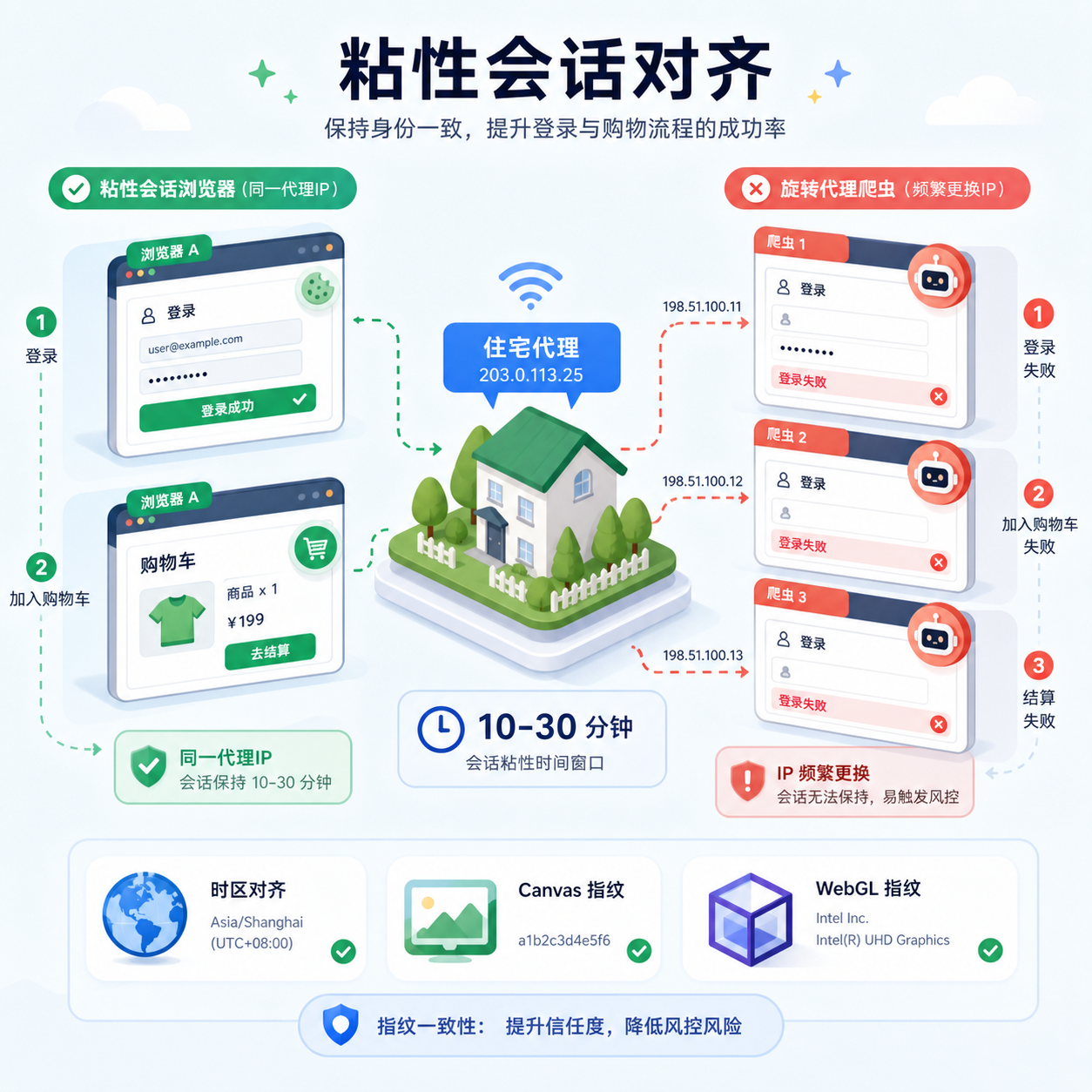
Fixing WebRTC alone is not enough; it must be combined with the session strategy of residential proxies. High-value flows (login, cart addition, multi-step forms) use sticky sessions to keep the same IP for a period, say 10 to 30 minutes, with consistent browser fingerprint and timezone. This makes the site see a coherent identity. For pure scraping or high-frequency rotation, use dynamic rotation, but verify WebRTC sync each time. Fingerprint alignment is key: if the proxy is a US residential, the timezone, language, Canvas, and WebGL must match; otherwise, even a clean IP looks fake. Nexip's dynamic residential IPs support flexible switching between sticky and rotating sessions, with high realness of exit, making it easier to match anti-detection configurations and reduce signal conflicts. Start with a small traffic test before going production.
Common pitfalls are many. Testing only on the system browser while the profile leaks; trusting VPN icons or proxy connection success prompts without running a dedicated WebRTC check; forgetting to retest after browser updates, which often reset default settings; treating local IP leaks as trivial, but they become correlation clues in multi-account setups; proxies change countries, but WebRTC still reports the old address. Some people only fix the HTTP layer, ignoring the default behavior of headless browsers in automation. In practice, establish a checklist: every new profile must pass WebRTC test before going online, production tasks need monitoring, and on failure, check IP consistency first instead of blind retries.
When selecting a residential proxy service, besides pool size and speed, consider whether session control is stable, geographic coverage is city-level, and integration with automation tools is convenient. Services like Nexip offer clean exits and adjustable sticky durations in dynamic residential scenarios, which, combined with browser hardening, greatly improve overall consistency. Don't expect a proxy to solve everything alone; WebRTC is a browser-layer issue, while proxies solve the routing layer. Only by doing both can multi-account isolation and automation success rates truly improve. Form the habit: always retest after proxy changes, configuration changes, and updates. Only then will the trust advantage of residential IPs not be undermined by a small browser feature.



Comments(0)