 NexIP官方博客
In daily use of ChatGPT for complex coding, deep analysis, or multimodal image generation, many users encounter a sudden drop in response quality—not only does the logic become shallow and replies become perfunctory, but even advanced tools like web search, Canvas, and the code interpreter may fail inexplicably. This phenomenon is commonly referred to in the community as "ChatGPT IQ drop."
Core conclusion: The "IQ drop" is usually not due to a lack of permissions on your account, but rather a defensive strategy adopted by OpenAI against high-risk network environments. When the exit IP of a request is identified as a data center node, shared proxy, or a low-reputation blacklisted network segment, the system, to save computational resources or prevent automated abuse, will "silently degrade" the response model, automatically routing the request to a less capable, trimmed model.
1. Why Does Your ChatGPT Get "IQ Dropped"?
OpenAI has established a real-time network risk control and security filtering system for global user access requests. Understanding its risk control logic is key to solving connectivity quality issues:
- IP Reputation and Data Center Marking (Datacenter ASN): Most public proxies or regular VPS use data center (IDC) IPs. These IPs are concentrated in cloud computing vendor network segments, naturally lacking the behavioral characteristics of real human users, making them highly prone to being flagged as high-risk networks by security engines.
- Shared Exit and Concurrent Usage: When dozens or hundreds of users share the same proxy node to access AI interfaces, sudden high-frequency concurrent traffic can easily trigger the system's abuse alerts, causing the entire IP block to be restricted.
- Browser Fingerprint and Geolocation Mismatch: If the country/city of the IP conflicts with the browser's timezone, language, and DNS resolution results, it further reduces the session's environmental trust score.
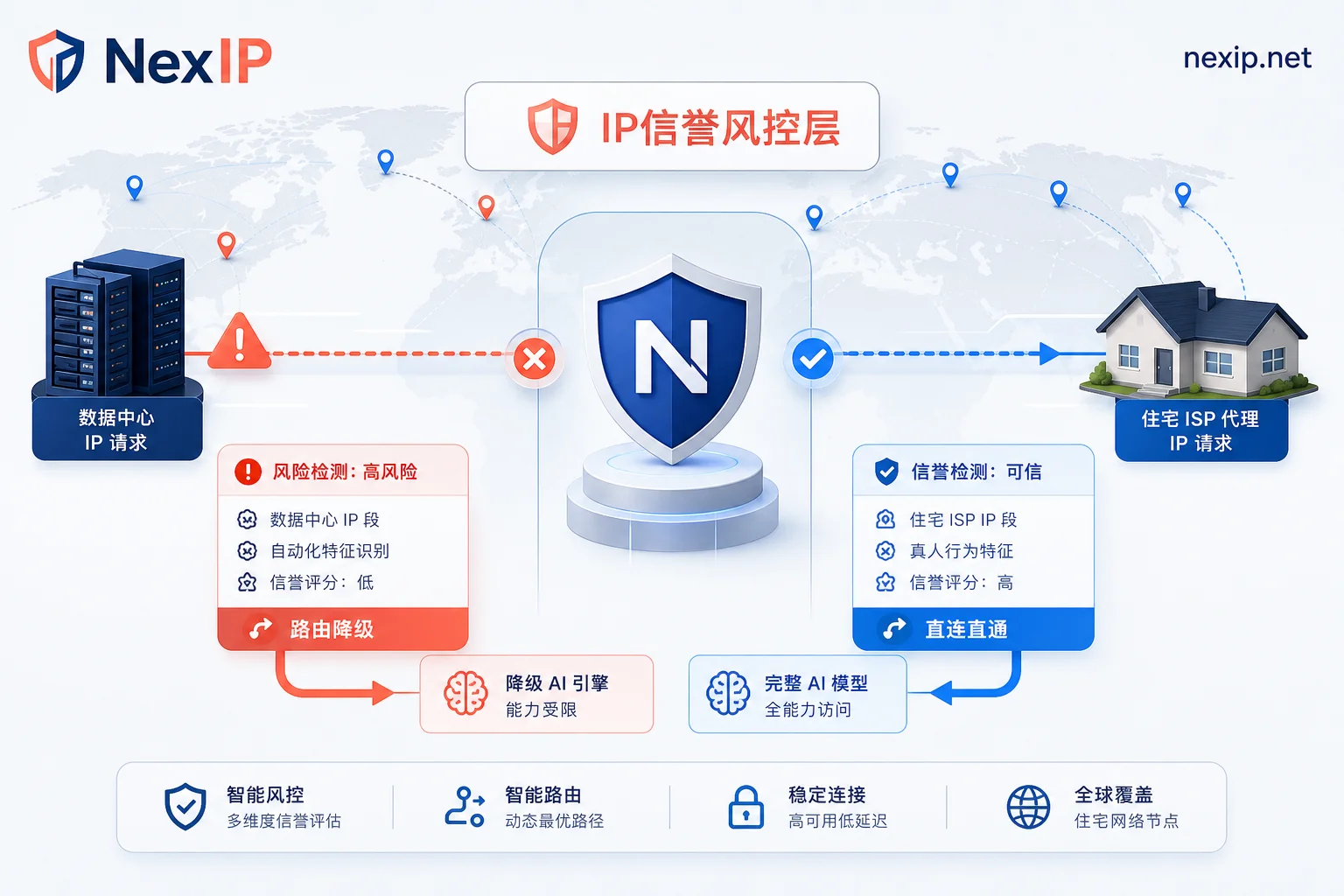
2. Comparison Between Data Center IP and Residential IP
For OpenAI's risk control interception, choosing the right network exit infrastructure is crucial. The table below clearly shows the core capability differences between traditional data center IPs and residential IPs when handling AI tasks:
| Comparison Dimension | Data Center IP (IDC) | Dynamic Residential IP (Residential) | Static Residential IP (Static ISP) |
|---|---|---|---|
| Network Source | Server room / hosting data center | Real home broadband (dynamic allocation) | Real ISP broadband (long-term fixed) |
| Risk Control Risk | High (easily triggers CAPTCHA or model degradation) | Very low (has real residential network trust) | Very low (highest stealth and trust) |
| Session Stability | High | Depends on refresh cycle (suitable for short-term rotation) | Very high (suitable for long-term login and persistent sessions) |
| Use Case | Basic data scraping | Batch concurrent requests, automated interactions | High-value account maintenance, deep AI interactions |
In such high-frequency interaction scenarios, using static long-term residential IPs or dynamic residential proxies like those provided by NexIP can effectively improve network trust through real ISP protocol nodes, reducing model degradation or CAPTCHA pop-ups caused by proxy exit issues.
3. Removing the IQ Drop: Four Steps for Troubleshooting and Configuration
If you are currently facing a decline in ChatGPT response quality, you can follow the steps below to rebuild a high-purity access environment:
Step 1: Check the Purity of Your Current Network Exit
Use IP fraud detection tools (such as IPQS or MaxMind) to check the Risk Score of your current exit IP. If the IP type is shown as Data Center / Web Hosting and the fraud score is higher than 30, it means the node has been flagged by risk control.
Step 2: Choose a Suitable Residential Proxy Plan
Configure your IP strategy based on your specific use case:
- Personal or team deep interaction: Prioritize static residential IPs, bind a fixed IP node, and avoid frequent cross-region logins that could cause account anomalies.
- Large-scale AI API integration or automation scripts: Use dynamic residential proxies with sticky sessions to prevent bans while ensuring continuity for single tasks.
Step 3: Unify Fingerprint Environment and Network Protocol
When accessing NexIP proxy services, users can flexibly choose between HTTP or SOCKS5 protocols based on business needs, and configure session stickiness and city/ASN targeting via API integration or the console. At the same time, use anti-fingerprinting browsers to adjust system timezone, language, and WebRTC settings to ensure full consistency with the proxy's region.
Step 4: Clean Local Cache and Restart the Session
After switching to a clean node, clear browser cookies and LocalStorage, or log back into ChatGPT in incognito mode, and input complex derivation code to test whether the model's response depth has returned to normal.
4. NexIP Official Blog Suggestion: Build a Stable and Controllable AI Interaction Network
To cope with escalating platform risk controls and IP reputation checks, relying solely on frequently changing free nodes is unlikely to solve the root problem. Establishing an independent, compliant, and isolated network access infrastructure is the long-term solution to ensure stable business operations.
When planning network access solutions for AI teams or enterprises, it is always recommended to follow the isolation principle and ISP-level protection:
- High-value main accounts: Configure dedicated static long-term residential IPs to maintain a fixed home broadband environment;
- Multi-task concurrent business: Use dynamic residential proxy traffic packages combined with city/ASN targeting to precisely allocate traffic to low-risk regions.
In response to increasingly strict risk control standards for large models, using high-quality proxy networks that comply with security regulations and possess native ISP attributes can help enterprises and developers effectively reduce efficiency losses caused by network fluctuations while remaining compliant.


Comments(0)